
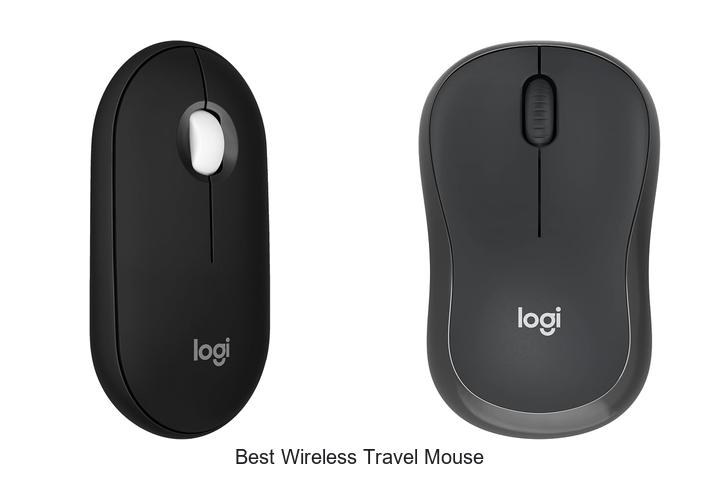
In an era where portability and efficiency define modern computing, the significance of precision sensors, ergonomic designs, and long-lasting battery life in peripheral devices cannot be overstated. Among these, a wireless travel mouse emerges as a crucial accessory, seamlessly blending advanced connectivity protocols with compact form factors tailored for on-the-go productivity.
Identifying the best wireless travel mouse involves analyzing factors such as DPI settings, Bluetooth versus RF preferences, and power management systems that support extended use without frequent recharging. Delving deeper into these technical considerations reveals how selecting the ideal travel mouse can transform your mobile workspace.
Continue exploring to discover the nuances that distinguish the best wireless travel mouse for your specific needs.
Travel Light and Click Right: Top Picks for Seamless Mobility on the Go
| Image | Product | Price |
|---|---|---|
Our Picks 1 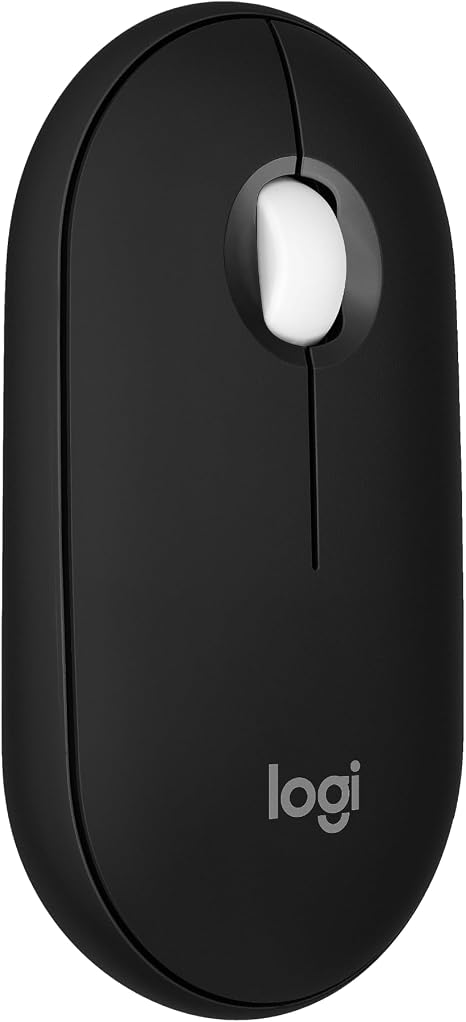 | Logitech M350s Pebble Bluetooth Wireless Mouse Black | Check Price On Amazon |
Our Picks 2  | Logitech M240 Compact Silent Bluetooth Mouse | Check Price On Amazon |
Our Picks 3  | Logitech Mobi Fold Wireless Mouse Graphite | Check Price On Amazon |
1. Logitech M350s Pebble Bluetooth Wireless Mouse Black
Discover effortless navigation with the Logitech M350s Pebble Bluetooth Wireless Mouse, designed for travelers and on-the-go users seeking a sleek, reliable companion. Its minimalist style combined with advanced Bluetooth connectivity makes it an exceptional choice for productivity across multiple devices and platforms.
Boasting a slim, lightweight frame made from recycled plastic, the Pebble M350s offers silent clicks and seamless switching between up to three devices via Bluetooth. Customizable buttons and a long-lasting 18-month battery enhance usability, making it an eco-friendly, versatile option for professionals and casual users alike.
Pros
- Connects effortlessly to up to three devices across various operating systems with the Easy-Switch button
- Silent Touch Technology reduces click noise by 90%, ideal for quiet environments
- Eco-conscious design utilizing a minimum of 58% certified post-consumer recycled plastic
- Long battery life of up to 18 months with included AA battery and power-saving auto-sleep mode
- Lightweight and portable design, perfect for travel and frequent use
Cons
- Logitech Bolt receiver is not included, which may limit wireless connectivity options for some users
The Logitech M350s Pebble Mouse blends sustainability, quiet operation, and multi-device flexibility into a compact, stylish package. For those comparing it to similar travel mice, its recycled materials and versatile compatibility offer a unique edge, ensuring a smart investment for everyday use and travel convenience.
2. Logitech M240 Compact Silent Bluetooth Mouse
Experience seamless connectivity and quiet operation with the Logitech M240 Compact Silent Bluetooth Mouse. Designed for on-the-go professionals and travelers, this sleek, ambidextrous mouse combines long battery life with noise-free clicks, making it an ideal companion for focused work anywhere without disturbing your surroundings.
Utilizing fast Bluetooth wireless technology, the M240 pairs quickly with no dongle needed, supporting multiple platforms including Windows, macOS, Linux, and more. Its compact shape fits comfortably in either hand, while an 18-month battery life and energy-saving sleep mode ensure reliability. Crafted partially from recycled plastic, it’s a sustainable choice as well.
Crafted partially from recycled plastic, it’s a sustainable choice as well.
Pros
- Silent clicks reduce noise by 90%, promoting concentration and minimizing distractions.
- Compatibility with diverse operating systems such as Windows, macOS, Linux, ChromeOS, and iPadOS for versatile use.
- Up to 18 months of battery life with an energy-efficient auto sleep feature.
Cons
- Requires 1 AAA battery, which may not appeal to users preferring rechargeable options.
Offering an excellent balance of quiet performance, portability, and broad compatibility, the Logitech M240 stands out among wireless travel mice. Its durable construction and extended battery life make it a reliable choice for users seeking a hassle-free and distraction-free experience on the move.
3. Logitech Mobi Fold Wireless Mouse Graphite
Discover the perfect companion for your mobile workspace with the Logitech Mobi Fold Wireless Mouse in Graphite. Designed for seamless portability and effortless precision, this ultra-compact mouse folds neatly for travel and unfolds instantly for productive use, making it an essential tool for professionals and travelers alike.
The foldable design enhances portability by slipping easily into your pocket or bag, while Bluetooth connectivity supports multiple operating systems including Windows, macOS, Chrome OS, Android, and iPadOS. Enjoy precise 4K DPI tracking and adaptive touch scrolling, combined with quiet clicks to maintain focus in shared environments.
Pros
- Ultra-portable foldable design powers on/off automatically for convenience and space-saving.
- Multi-device Bluetooth connectivity with Easy-Switch lets you toggle between three devices seamlessly.
- Extended battery life of up to one month per charge with rapid 1-minute charging for 22 hours of use.
Cons
- USB-C charging cable not included, requiring an additional purchase if not already owned.
Combining innovative foldability, multi-platform compatibility, and eco-friendly materials, the Logitech Mobi Fold Wireless Mouse offers exceptional value for frequent travelers and professionals seeking a reliable, ergonomic input device. It stands out among wireless travel mice for its thoughtful design and efficient performance.
4. VssoPlor Wireless Slim Mouse Black and Gold

Experience seamless navigation with the VssoPlor Wireless Slim Mouse in Black and Gold, designed for travelers and professionals seeking reliability and style. Its slim profile and quiet operation make it an essential accessory for productivity anywhere, combining elegance with practical functionality.
Equipped with 4 GHz wireless technology, this mouse ensures a stable connection up to 10 meters, while the intelligent sleep mode dramatically extends battery life. Compatible with both Windows and Mac systems, its ergonomic, ambidextrous design fits comfortably in any hand, supporting long hours of use without fatigue.
Pros
- Low power consumption with auto sleep mode to maximize battery efficiency
- Strong 2.4 GHz wireless connection offering up to 10 meters of reliable range
- Wide compatibility across Windows and Mac operating systems with plug-and-play ease
Cons
- Requires a single AA battery, which may require replacement more often than rechargeable alternatives
Overall, the VssoPlor Wireless Slim Mouse combines portability, efficient power use, and broad compatibility, making it a strong contender among wireless travel mice. Its quiet clicks and compact design outperform many bulkier models, providing exceptional value for users on the move.
5. Logitech M185 Wireless Mouse Swift Grey

Experience seamless navigation with the Logitech M185 Wireless Mouse Swift Grey, designed for effortless control and ergonomic comfort. Its ambidextrous shape and reliable wireless connection make it an excellent choice for users seeking both precision and portability in a travel-friendly device.
The compact Logitech M185 features an optical sensor for smooth cursor movement, a line-by-line scroll wheel, and up to 12 months of battery life thanks to smart sleep mode. Compatible with Windows, Mac, and ChromeOS, it offers plug-and-play simplicity via a tiny nano USB receiver with a strong 33-foot connection range.
Pros
- Ambidextrous design suitable for both right- and left-handed users, providing ergonomic comfort
- Long-lasting battery life of up to one year, reducing frequent replacements
- Universal compatibility across multiple operating systems with quick plug-and-play setup
Cons
- Limited to a single button and scroll wheel, which may restrict advanced functionality for power users
Combining portability, reliability, and simplicity, the Logitech M185 Wireless Mouse Swift Grey is a solid investment for travelers and everyday users alike. Compared to touchpads and bulkier mice, it delivers enhanced productivity with minimal setup, making it a standout option for anyone seeking the best wireless travel mouse experience.
6. Logitech M196 Bluetooth Wireless Mouse Graphite

Discover the perfect blend of portability and performance with the Logitech M196 Bluetooth Wireless Mouse Graphite. Designed for users on the move, it offers seamless Bluetooth connectivity and a comfortable ambidextrous design, making it an essential travel companion for laptops, tablets, and more.
Engineered for versatility, this lightweight mouse supports multiple operating systems including Windows, macOS, and Linux. It features precise optical tracking for smooth cursor control on a variety of surfaces, a 12-month battery life, and an eco-conscious build using recycled plastic, ensuring durability and sustainability in one compact device.
Pros
- Quick and reliable Bluetooth pairing—no dongle required
- Ambidextrous, travel-ready design fits comfortably in any bag
- Long-lasting 12-month battery life with energy-saving auto sleep
Cons
- Limited maximum sensitivity (1000 DPI) may not suit high-precision gaming
For professionals and students seeking an affordable, durable, and easy-to-use wireless travel mouse, the Logitech M196 offers excellent value. Its broad device compatibility and eco-friendly materials make it stand out as a reliable companion compared to other wireless mice in the same price range.
7. Afaartcci Rechargeable Wireless Bluetooth Mouse

Discover the perfect blend of convenience and functionality with the Afaartcci Rechargeable Wireless Bluetooth Mouse. Designed to cater to multitasking professionals and travelers alike, this mouse offers seamless connectivity, long-lasting battery life, and an ergonomic, compact design—ideal for users seeking efficient and portable control on the go.
Featuring dual-mode connectivity via Bluetooth 2/0 and a 4G USB receiver, switching between two devices is effortless and driver-free. Its rechargeable 500mAh battery provides over a week of continuous use on a single 2-hour charge, complemented by silent click technology and a vibrant 7-color LED breathing light for an enhanced working environment.
Pros
- Dual-mode wireless connection supports Bluetooth and USB receiver for flexible device pairing.
- Fast charging delivers 7+ days of usage with power-saving sleep mode for extended battery life.
- Compact, lightweight, and ergonomically designed for comfortable travel and daily use.
Cons
- Unable to use Bluetooth and USB receiver modes simultaneously, requiring manual switching.
Offering a reliable and versatile wireless experience, the Afaartcci Rechargeable Wireless Bluetooth Mouse stands out as a top choice for travelers and multitasking users. Its balance of portability, connectivity options, and stylish design makes it a valuable addition to any tech arsenal, outperforming many single-mode mice in its class.
8. wegear Bluetooth Silent Wireless Mouse Gray

Discover seamless productivity with the wegear Bluetooth Silent Wireless Mouse Gray, designed for comfort and efficiency on the go. Its ergonomic shape and silent clicks make it an ideal companion for travel, providing a smooth and noise-free experience whether you’re working at a café or in a quiet office environment.
Equipped with Bluetooth 0 and Microsoft Swift Pair technology, this wireless mouse connects quickly to a variety of devices. It features six functional buttons—including forward and backward navigation on Windows—and three adjustable DPI levels (800, 1200, 1600) to tailor precision for browsing or detailed tasks. A long-lasting battery life of up to 24 months ensures uninterrupted use, while compatibility spans Windows, macOS, Chrome OS, and Android platforms.
A long-lasting battery life of up to 24 months ensures uninterrupted use, while compatibility spans Windows, macOS, Chrome OS, and Android platforms.
Pros
- Ergonomic design minimizes hand fatigue during extended use
- Silent click buttons and scroll wheel enable quiet operation suitable for shared spaces
- Impressive battery efficiency provides up to 24 months of usage on a single AA battery
Cons
- Forward and backward buttons are not supported on macOS, limiting full functionality for Mac users
Combining ergonomic comfort, versatile connectivity, and silent operation, the wegear Bluetooth Silent Wireless Mouse Gray offers exceptional value at an affordable price. Its extended battery life and multi-surface tracking make it a compelling choice compared to other wireless travel mice in its category.
9. Dell MS700 Bluetooth Travel Mouse

Experience unparalleled convenience and precision with the Dell MS700 Bluetooth Travel Mouse, engineered for those constantly on the move. Its sleek, lightweight design complemented by seamless multi-device connectivity makes it an essential accessory for efficient mobile productivity.
Weighing just 9 grams, this compact mouse features a unique twistable design for easy power management and portability. It supports connections to up to three devices via Bluetooth 0, allowing effortless switching with the click of a button.
Adjustable sensitivity up to 4000 DPI ensures responsive, accurate control, enhanced by quiet clicks and smooth touch scrolling.
Pros
- Ultra-lightweight and slim profile ideal for travel and daily portability
- Multi-device Bluetooth 5.0 connectivity with easy device switching and one-click pairing
- High precision adjustable DPI up to 4000 for smooth and accurate cursor control
Cons
- Compatible primarily with Windows 10, limiting usage across other operating systems
Perfect for professionals and travelers seeking a dependable wireless mouse, the Dell MS700 offers exceptional portability and performance. Compared to other travel mice, its twistable power design and advanced multi-device connectivity provide a distinctive edge for seamless workflow management on the go.
10. Logitech MX Anywhere 2S Wireless Mouse

Experience seamless productivity with the Logitech MX Anywhere 2S Wireless Mouse, a compact yet powerful companion designed for professionals on the move. Its advanced Darkfield tracking and versatile connectivity make it ideal for working from any surface, delivering precision and convenience wherever your travels take you.
Equipped with Bluetooth and radio frequency options, this lightweight wireless mouse offers up to 33 feet of range and a high sensitivity of 4000 dpi for smooth, accurate cursor control. Rechargeable with a battery life of up to two months, it supports multiple devices across Windows and macOS platforms, ensuring seamless workflow transitions.
Pros
- Dual connectivity via Bluetooth and USB receiver enhances compatibility and flexibility.
- Darkfield tracking technology enables precise usage on nearly any surface, including glass.
- Compact and portable design with a rechargeable battery offering up to two months of use on a single charge.
Cons
- Right-hand orientation limits comfort for left-handed users.
The Logitech MX Anywhere 2S sets a high standard among wireless travel mice, combining cutting-edge tracking and flexible connectivity in a sleek package. Its robust battery life and device compatibility make it a smart choice for users seeking efficient and reliable mobile computing accessories.
Navigate Anywhere with Ease: Your Ultimate Guide to the Best Wireless Travel Mouse
Portability and Design
Size and weight considerations. Ergonomic shape for extended use. Build materials and durability.Ensuring a seamless connection to your devices is crucial for a hassle-free experience, especially when on the move. Devices offering multiple ways to connect, such as Bluetooth and USB receivers, provide greater flexibility across different laptops and tablets. Additionally, having extra ports or compatibility with adapters allows for expanding functionality without the need to carry extra dongles or accessories, which is particularly valuable during travel.
Additionally, having extra ports or compatibility with adapters allows for expanding functionality without the need to carry extra dongles or accessories, which is particularly valuable during travel.
| Connection Type | Advantages | Potential Limitations |
|---|---|---|
| Bluetooth | Wireless, no USB ports required, easy pairing with modern devices | May have slight latency; battery consumption |
| USB Receiver (2.4 GHz) | Stable connection, plug-and-play, low latency | Occupies a USB port; risk of losing receiver |
| Multi-Device Switch | Ability to switch between multiple devices seamlessly | Higher cost; slight learning curve |
Devices that support extra features such as USB-C hubs or allow for additional ports ensure users can connect to older or varied tech environments without hassle. This adaptability is key for travelers who may encounter different setups in airports, cafes, or hotels.
Connectivity Options
Bluetooth vs. USB receiver. Multidevice pairing capabilities. Wireless range and stability.Many travel mice offer two main ways to connect to devices: Bluetooth and USB receivers. Bluetooth is valued for its convenience, allowing connection to laptops, tablets, and smartphones without needing to plug in a dongle, which is especially handy when ports are limited.
Multidevice pairing features enhance usability by letting you switch seamlessly between two or more gadgets, such as a laptop and a tablet, without needing to re-pair each time. This functionality is a significant time-saver for anyone managing multiple devices during travel or daily tasks.
Wireless range and signal stability are essential for ensuring uninterrupted performance. A strong, reliable connection minimizes lag or drops, which can be frustrating when working or browsing on the go. While USB receivers typically provide consistent performance within a short range, Bluetooth connections vary depending on device compatibility and interference but generally cover a decent distance suitable for most travel environments.
While USB receivers typically provide consistent performance within a short range, Bluetooth connections vary depending on device compatibility and interference but generally cover a decent distance suitable for most travel environments.
Battery Life and Charging
Battery type (rechargeable vs. replaceable). Estimated usage time per charge. Charging methods and speed.Effective power management plays a crucial role in ensuring uninterrupted use throughout demanding travel days. Devices with built-in rechargeable batteries often provide the convenience of cable-free operation after a quick charge, with estimated usage times ranging from several days to weeks depending on the model. On the other hand, options that use replaceable batteries offer the flexibility of swapping out power sources instantly, which can be especially handy in remote locations without access to charging facilities.
On the other hand, options that use replaceable batteries offer the flexibility of swapping out power sources instantly, which can be especially handy in remote locations without access to charging facilities.
Charging methods and speed also greatly impact user experience. Some models support fast charging via USB-C or wireless charging pads, allowing for rapid top-ups that minimize downtime.
Understanding these differences helps in planning for continuous productivity without unexpected interruptions during travel.
Performance and Sensitivity
DPI settings and adjustability. Tracking technology (optical vs. laser). Responsiveness and lag.Reliable connection options and the ability to connect to multiple devices can greatly enhance the user experience for those constantly on the move. A mouse that supports both Bluetooth and a USB receiver offers flexibility, allowing seamless switching between laptops, tablets, or even smartphones without the hassle of unplugging and re-pairing devices. Additionally, having extra USB ports or slots for other peripherals means you can expand your workspace efficiently, combining multiple tools without compromising convenience or productivity.
Before making a decision, it’s essential to assess how the device communicates with your system and whether it accommodates future needs for additional gadgets. This ensures uninterrupted workflow during travel and reduces the risk of compatibility issues, making it a smarter investment for frequent users.
Compatibility and Features
Operating system support. Additional buttons and customization. Silent click and noise levels.Ensuring the mouse supports multiple operating systems maximizes its use across various devices, whether it’s Windows, macOS, or Linux. This flexibility is crucial for travelers who often switch between laptops or tablets with different platforms.
Another important aspect is the noise level during use; a silent click feature helps maintain a quiet environment, which is especially beneficial in shared spaces like airplanes, libraries, or cafes.
| Feature | Benefit |
|---|---|
| Operating system support | Ensures seamless use across different devices |
| Additional buttons and customization | Enhances productivity and user convenience |
| Silent click | Minimizes noise for quiet environments |
Price and Warranty
Budget vs. premium options. Included warranty and customer support. Value for money considerations.Price and warranty play a crucial role in determining the overall value of a compact, portable mouse designed for travelers. Budget-friendly models often provide the essential functions needed for everyday tasks, but may lack advanced features or durability found in more premium options.
Alongside the price, the length and coverage of the included warranty are important factors. A reliable warranty paired with responsive customer support adds peace of mind, ensuring that any potential issues can be resolved without additional expenses.
| Aspect | Budget Options | Premium Options |
|---|---|---|
| Price Range | $15 – $40 | $50 – $100+ |
| Warranty Period | 6 months – 1 year | 1 year or more |
| Customer Support | Basic, limited channels | Comprehensive, multiple channels |
| Durability & Features | Basic build, fewer features | Enhanced materials, advanced functions |
Evaluating these factors carefully helps ensure the device delivers strong performance and reliability while fitting within your budget, making the investment worthwhile over time.
FAQ’s
What Features Should I Look For In The Best Wireless Travel Mouse?The best wireless travel mouse should have compact, lightweight design for easy portability and long battery life to avoid frequent charging. Additionally, look for reliable Bluetooth connectivity and adjustable DPI settings for smooth and precise control on various surfaces.
Which Wireless Travel Mouse Offers The Longest Battery Life?The Logitech MX Master 3 offers one of the longest battery lives among wireless travel mice, lasting up to 70 days on a single charge. Its efficient power management and fast USB-C charging make it ideal for extended use on the go.
How Does The Size Of A Wireless Travel Mouse Affect Portability?The smaller size of a wireless travel mouse enhances portability by making it easy to carry and fit into bags or pockets. However, a very small mouse may compromise comfort and precision during use.
Are There Any Wireless Travel Mice Compatible With Multiple Devices?Yes, there are wireless travel mice designed to connect with multiple devices, often featuring Bluetooth and multi-device pairing capabilities. Popular models like the Logitech MX Anywhere series can switch seamlessly between laptops, tablets, and smartphones.
What Is The Price Range For High-Quality Wireless Travel Mice?The price range for high-quality wireless travel mice typically falls between $30 and $100. Prices vary based on features like battery life, portability, and brand reputation.
Conclusion
In summary, the best wireless travel mouse combines portability, reliable connectivity, and comfortable design to enhance productivity on the go. Whether you prioritize battery life, compact size, or advanced features, choosing a quality travel mouse ensures smooth navigation during your trips. Invest in one that suits your workflow and travel style for a seamless computing experience anywhere.
Invest in one that suits your workflow and travel style for a seamless computing experience anywhere.

- Top Best Computer Speakers with Microphone for Clear Sound! - November 11, 2026
- Best Wired Computer Speakers That Blow Your Mind! - November 11, 2026
- Top Best External Speakers for Laptop Computers Revealed! - November 11, 2026
