
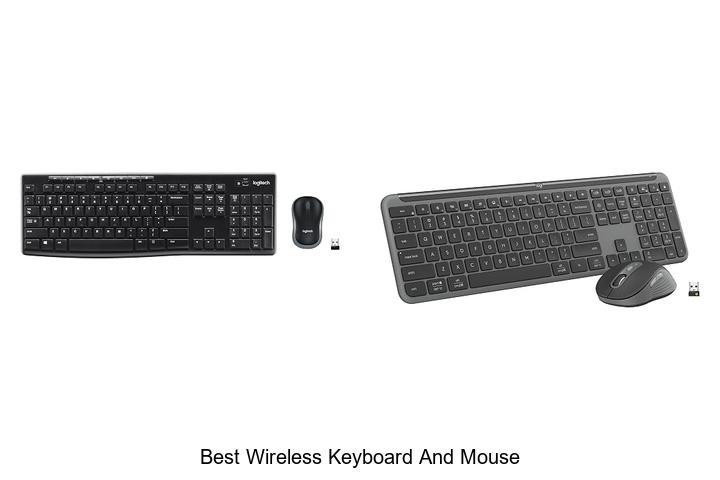
In the realm of peripheral connectivity, seamless signal transmission and ergonomic design are paramount for optimizing user experience. Wireless keyboards and mice rely on advanced Bluetooth protocols and RF technology to minimize latency while maximizing range and battery efficiency. As computing environments become increasingly mobile and clutter-free, the demand for the best wireless keyboard and mouse combinations has surged, emphasizing both performance precision and aesthetic compatibility.
Selecting the ideal setup involves a nuanced balance between responsiveness, build quality, and multifunctional capabilities tailored to diverse workflows. Understanding these intricate factors can significantly enhance productivity and comfort in both professional and casual settings.
Delve deeper to discover what distinguishes the best wireless keyboard and mouse in today’s competitive landscape.
Discover Top Contenders That Combine Style, Comfort, and Cutting-Edge Technology
| Image | Product | Price |
|---|---|---|
Our Picks 1  | Logitech MK270 Wireless Keyboard and Mouse Combo | Check Price On Amazon |
Our Picks 2  | Logitech MK955 Signature Wireless Keyboard and Mouse Combo | Check Price On Amazon |
Our Picks 3  | Logitech MK345 Wireless Keyboard and Mouse Combo | Check Price On Amazon |
1. Logitech MK270 Wireless Keyboard and Mouse Combo
Discover seamless productivity with the Logitech MK270 Wireless Keyboard and Mouse Combo, designed to deliver reliable performance and comfort. Ideal for both home and office use, this wireless set offers a robust connection and a comfortable typing and navigation experience, making it a top contender for the best wireless keyboard and mouse setup.
The combo includes a full-size keyboard featuring quiet, low-profile keys, a number pad, and convenient multimedia hotkeys for quick access to essential functions. Its spill-resistant design and durable construction ensure long-lasting reliability.
The compact ambidextrous mouse offers smooth cursor control and comfort for all users, completing this efficient wireless solution.
Pros
- Reliable wireless connection up to 33 feet via a single USB receiver, minimizing dropouts and delays.
- Long battery life with up to 36 months on the keyboard and 12 months on the mouse, plus on/off switches to conserve power.
- Ergonomic design with quiet keys, full-size layout, and comfortable ambidextrous mouse suitable for extended use.
Cons
- Lacks backlighting which might be inconvenient in low-light environments.
Combining reliability, comfort, and efficiency, the Logitech MK270 Wireless Keyboard and Mouse Combo stands out as a practical choice for everyday computing needs. While it lacks advanced features like backlighting found in higher-end models, its durable design and exceptional battery life make it a cost-effective and dependable option for most users.
2. Logitech MK955 Signature Wireless Keyboard and Mouse Combo
Experience seamless productivity with the Logitech MK955 Signature Wireless Keyboard and Mouse Combo, designed to enhance both your workspace and workflow. This sophisticated set offers quiet, efficient typing and clicking, adaptable multi-device connectivity, and eco-friendly construction, making it an ideal choice for modern users seeking comfort and versatility.
Featuring full-size Bluetooth keyboard with familiar laptop-style keys and an ergonomic contoured mouse, the MK955 lets you type and navigate quietly thanks to SilentTouch technology. Easily switch between devices with a single tap and customize functionality through the Logi Options+ app, compatible across Windows, macOS, and more.
Pros
- Multi-device connectivity allows effortless switching between computer, tablet, and phone.
- Quiet typing and clicking with SilentTouch technology reduce distractions in any environment.
- Customizable keys and shortcuts enhance productivity using the Logi Options+ app.
Cons
- Priced higher compared to some entry-level wireless keyboard and mouse sets.
For users seeking the best wireless keyboard and mouse combo that combines comfort, customization, and eco-conscious design, the Logitech MK955 stands out as a premium choice. While it commands a premium price, its feature-rich package and cross-platform compatibility make it a worthwhile investment over simpler alternatives.
3. Logitech MK345 Wireless Keyboard and Mouse Combo
Experience seamless productivity with the Logitech MK345 Wireless Keyboard and Mouse Combo, designed for comfort and efficiency. Its dependable wireless connection and full-size keyboard layout make it ideal for both home and office use, providing a reliable and comfortable input solution that adapts to your daily tasks.
Featuring a 4 GHz wireless connection with up to 10 meters range, this combo ensures uninterrupted performance. The keyboard offers quiet, comfortable typing with a palm rest and spill-resistant design, while the right-handed mouse provides smooth optical tracking. Compatible across Windows, macOS, and ChromeOS, it includes long-lasting batteries for worry-free use.
Pros
- Reliable 2.4 GHz wireless connection with extended 10-meter range for flexibility
- Ergonomic full-size keyboard with palm rest and spill-resistant design for comfortable, durable typing
- Long battery life—up to 3 years for the keyboard and 18 months for the mouse—reducing frequent replacements
Cons
- Lacks backlit keys, which might affect usability in low-light environments
Offering a balanced mix of comfort, reliability, and cross-platform compatibility, the Logitech MK345 combo stands out as a top choice for anyone seeking an efficient wireless keyboard and mouse set. Compared to similar options, it excels in battery longevity and ergonomic design, making it a valuable investment for everyday computing needs.
4. Logitech MK540 Wireless Keyboard and Mouse Combo

Experience the perfect blend of comfort, precision, and wireless convenience with the Logitech MK540 Wireless Keyboard and Mouse Combo. Designed for efficiency and endurance, this combo ensures seamless productivity whether you’re working from home or the office.
Featuring a full-size keyboard with quiet, comfortable keys, adjustable tilt legs, and a palm rest, the MK540 delivers a familiar and pleasant typing experience. Its wireless mouse boasts an ambidextrous shape with rubber side grips for comfortable, precise control. Both devices offer remarkable battery life—up to 36 months for the keyboard and 18 months for the mouse—while connecting effortlessly through a compact Logitech Unifying USB receiver with up to 33 feet of reliable range.
Both devices offer remarkable battery life—up to 36 months for the keyboard and 18 months for the mouse—while connecting effortlessly through a compact Logitech Unifying USB receiver with up to 33 feet of reliable range.
Pros
- Long-lasting batteries support extended use—keyboard up to 36 months, mouse up to 18 months.
- Ergonomic design featuring palm rest and ambidextrous mouse shape for comfortable daily use.
- Convenient hotkeys provide quick access to media, calculator, and battery status functions.
Cons
- Limited compatibility excludes macOS users, focusing primarily on Windows and Chrome OS systems.
For users seeking a dependable, well-crafted wireless keyboard and mouse set, the Logitech MK540 offers excellent value through its durable design, user-friendly features, and hassle-free connectivity. Compared to more advanced combos like the Logitech MK850, the MK540 is a straightforward, cost-effective choice for everyday productivity needs.
5. Logitech MK335 Wireless Keyboard and Mouse Combo

Discover seamless productivity and comfort with the Logitech MK335 Wireless Keyboard and Mouse Combo, designed for efficiency and style. Perfectly balancing quiet typing and wireless freedom, it’s an ideal pairing for those seeking a reliable, user-friendly setup to elevate everyday computing tasks.
The combo features low-profile, whisper-quiet keys for a smooth and comfortable typing experience, coupled with an ambidextrous optical mouse that includes a convenient plug-and-forget nano receiver. With advanced 4 GHz wireless connectivity delivering fast, lag-free performance and up to 24 months of keyboard battery life, this setup ensures reliable use across home or office environments.
Pros
- Long-lasting battery life: up to 24 months for the keyboard and 12 months for the mouse
- Reliable 2.4 GHz wireless connection with minimal latency and secure data transmission
- Ergonomic design with whisper-quiet, low-profile keys and ambidextrous mouse suitable for both hands
Cons
- Limited multimedia key customization compared to higher-end models
Combining style, reliability, and efficiency, the Logitech MK335 offers excellent value for users seeking the best wireless keyboard and mouse setup. Its blend of comfort, long battery life, and seamless connectivity makes it a strong contender against similar wireless combos in its price range.
6. Logitech MX Keys S Combo Wireless Keyboard and Mouse Graphite

Discover the perfect blend of speed, precision, and comfort with the Logitech MX Keys S Combo Wireless Keyboard and Mouse in Graphite. Designed for professionals and creatives alike, this duo offers an ultra-responsive typing experience paired with a smooth, high-precision mouse to elevate your productivity effortlessly.
The MX Keys S keyboard boasts spherically-dished keys molded for fingertip comfort, delivering quiet and fluid typing akin to a laptop. Complementing this, the MX Master 3S mouse features Logitech’s MagSpeed scroll wheel for rapid, precise navigation, even on glass surfaces. Both devices support multi-device connectivity and customizable smart shortcuts via the Logi Options+ app, enhancing workflow efficiency across Windows, macOS, and Linux systems.
Pros
- Ergonomic design with quiet, fluid typing experience for extended use
- MagSpeed scroll wheel with 1000 lines per second speed for precise navigation
- Customizable Smart Actions through Logi Options+ for automating repetitive tasks
Cons
- Higher price point compared to standard wireless keyboard and mouse combos
Ideal for those seeking a premium wireless keyboard and mouse combo, the Logitech MX Keys S and MX Master 3S offer unmatched comfort, advanced features, and reliable connectivity. While the investment is premium, the ergonomic design and productivity enhancements justify the cost, outperforming many competitors in the same category.
7. Logitech MK850 Performance Wireless Keyboard and Mouse Combo

Enhance your productivity with the Logitech MK850 Performance Wireless Keyboard and Mouse Combo, expertly designed for comfort and efficiency. Ideal for multitasking, this combo seamlessly connects across multiple devices, making it a standout choice for professionals seeking a versatile and ergonomic setup.
The full-size keyboard features cushioned palm rests and carefully sculpted keys to support hours of typing without strain. Complementing it, the contoured right-handed mouse boasts a hyper-fast scroll wheel for swift navigation through documents and web pages.
Additionally, Logitech DuoLink software enables customized functions by linking the keyboard and mouse, providing smarter and more intuitive control.
Pros
- Multi-device connectivity via Bluetooth and USB receiver supports up to three devices.
- Ergonomic design including a cushioned palm rest and contoured mouse for prolonged comfort.
- Customizable controls through Logitech DuoLink software enhance productivity.
Cons
- Right-handed mouse design may not suit left-handed users.
Offering a perfect balance between ergonomic comfort and versatile functionality, the Logitech MK850 is an excellent investment for those seeking the best wireless keyboard and mouse combo. Compared to similar models, its multi-device support and software customization provide added value for dynamic work environments.
8. Wireless Keyboard and Mouse Combo

Discover seamless productivity with the Wireless Keyboard and Mouse Combo, designed to deliver a lag-free and efficient workflow whether at home or in the office. Its stable wireless connection and ergonomic design make typing and navigation comfortable and quiet, elevating your computing experience.
This combo features a full-size keyboard with a numeric keypad and multimedia shortcut keys, enhancing functionality without occupying excess space. The shared nano USB receiver supports a reliable 10-meter range and plug-and-play convenience, while the quiet, adjustable keyboard and mouse provide comfort during extended use with smart power-saving technology.
Pros
- Stable wireless connection up to 33 feet with a single nano USB receiver for both keyboard and mouse
- Quiet, ergonomic design including adjustable tilt legs and silent keys to reduce wrist strain and noise
- Full-size keyboard with numeric keypad and 12 multimedia shortcut keys for enhanced productivity
Cons
- Requires two AA batteries which may need periodic replacement depending on usage
Offering reliability, comfort, and versatility at an affordable price, this wireless keyboard and mouse combo stands out as an excellent choice for users seeking efficiency and quiet operation. It compares favorably against similar sets by integrating power-saving features and broad OS compatibility, making it a valuable addition to any workspace.
9. Redragon S101M-KS Wireless Gaming Keyboard and Mouse

Discover seamless gaming with the Redragon S101M-KS Wireless Gaming Keyboard and Mouse, designed to elevate your experience by eliminating cable clutter. This versatile tri-mode combo offers remarkable freedom through wired, Bluetooth, and 4G receiver connectivity, catering perfectly to both casual and competitive gamers seeking reliability and comfort.
Equipped with true RGB backlighting featuring 8 dynamic patterns, the keyboard and mouse set enhances ambiance while delivering up to 300 hours of battery life with lighting off. The mouse boasts a precise 4800 DPI sensor adjustable across five levels, complemented by fully programmable keys and multimedia shortcuts for efficient gameplay and productivity. Its ergonomic design ensures long-lasting comfort during extended sessions.
Its ergonomic design ensures long-lasting comfort during extended sessions.
Pros
- Tri-mode connectivity (wired, Bluetooth, 2.4G receiver) for versatile use across devices.
- Customizable RGB lighting with 8 patterns and adjustable brightness to suit any gaming environment.
- 5-level adjustable DPI up to 4800 with software customization and remappable mouse buttons for precision control.
Cons
- Software required for advanced programming may require user familiarity with driver installations.
Offering excellent value at its price point, the Redragon S101M-KS combo stands out as a dependable and feature-rich choice for gamers seeking wireless freedom without compromising on performance or style. Compared to similar options, it delivers a balanced mix of customization and comfort backed by a robust warranty and dedicated support.
10. Logitech MK470 Slim Wireless Keyboard and Mouse Combo

Discover seamless productivity with the Logitech MK470 Slim Wireless Keyboard and Mouse Combo, designed for users seeking a sleek, compact setup. Combining modern aesthetics and advanced functionality, this combo is an ideal choice for anyone looking to enhance their workspace with noise-free operation and extended battery life.
The MK470 features a low-profile keyboard with scissor keys, a dedicated number pad, and a Windows-optimized layout. Its ambidextrous mouse offers high precision optical tracking at 1000 DPI and a mechanical scroll wheel, ensuring smooth and accurate navigation.
With a reliable 4 GHz wireless connection and up to 33 feet range, productivity stays uninterrupted.
Pros
- Whisper-quiet keyboard and noise-reduced mouse provide a distraction-free environment
- Long-lasting battery life: up to 36 months for the keyboard and 18 months for the mouse
- Customizable FN keys via Logi Options software for personalized shortcuts
Cons
- Battery door finish may vary between glossy and matte depending on production batch
Offering a blend of minimalist design, durable performance, and user-oriented features, the Logitech MK470 stands out as an excellent choice within the best wireless keyboard and mouse combos. Its premium typing experience and extended wireless range make it competitive against similar options like the Logitech MK540 or Microsoft Wireless Desktop.
Ultimate Guide to Choosing the Best Wireless Keyboard and Mouse for Effortless Productivity
Connectivity Options
Bluetooth vs. USB Receiver. Wireless Range and Stability. Multidevice Pairing Capability.Devices equipped with Bluetooth offer the advantage of seamless pairing with multiple gadgets without occupying a USB port, making them ideal for users who value portability and ease of switching between devices. In contrast, those with a USB receiver often provide a more stable and extended wireless range, which is particularly beneficial in environments with potential signal interference. The ability to connect to several devices simultaneously enhances productivity, allowing effortless transitions from a laptop to a tablet or smartphone without the need to reconnect each time.
The ability to connect to several devices simultaneously enhances productivity, allowing effortless transitions from a laptop to a tablet or smartphone without the need to reconnect each time.
| Feature | Bluetooth | USB Receiver |
|---|---|---|
| Port Usage | Does not occupy a USB port | Requires a USB port |
| Wireless Range | Typically shorter range (around 10 meters) | Generally longer and more stable range (up to 30 meters) |
| Signal Stability | Can be affected by interference in crowded signal areas | Usually less prone to interference |
| Multidevice Pairing | Often supports multiple device connections | Some models support multidevice, others limited to one |
Ergonomics and Design
Keyboard Layout and Key Travel. Mouse Shape and Grip Types. Build Quality and Material.Devices that connect seamlessly to multiple platforms or offer options for additional peripherals enhance overall workflow and reduce frustration caused by compatibility issues. Having the ability to link through various wireless protocols or include extra USB ports can future-proof your setup, allowing easy integration with smartphones, tablets, or other accessories. This flexibility ensures you won’t be limited by the number of devices you can operate simultaneously.
Expanding functionality is just as important. Some models provide slots or hubs that support additional devices, making it simple to add a charging station, storage device, or external screen without cluttering your workspace. Choosing a unit that supports such features means adapting to evolving needs becomes straightforward, rather than requiring new equipment.
Choosing a unit that supports such features means adapting to evolving needs becomes straightforward, rather than requiring new equipment.
Battery Life and Power Management
Rechargeable vs. Replaceable Batteries. Battery Life Duration. Powersaving Features.Understanding how devices connect and support additional peripherals can greatly affect user experience and efficiency. Wireless peripherals often rely on specific types of receivers or Bluetooth protocols, influencing compatibility with various systems. Some models come with a single unified receiver that can handle multiple devices, reducing USB port usage, while others may require separate receivers for each device, which can be less convenient.
A setup supporting a range of expansion options offers greater flexibility, allowing integration with other gadgets such as external drives or additional input devices without mobility restrictions or frequent reconnections.
Compatibility and Software Support
Operating System Compatibility. Customization Software Availability. Driver Installation Requirements.Devices that support a wide range of operating systems ensure seamless integration across different platforms, whether it’s Windows, macOS, or Linux. This flexibility prevents compatibility issues and allows users to switch between devices without hassle.
Additionally, the availability of customization software enhances the user experience by enabling personalized key mapping, macros, and adjustable sensitivity settings for the mouse. Such software often requires installation of specific drivers, making it important to verify whether the device needs additional setup or works through plug-and-play functionality. Ensuring these factors align with your system can save time and avoid frustration during setup.
Additional Features
Backlit Keys and Adjustable Lighting. Programmable Buttons and Macros. Silent Typing and Click Noise Levels.A seamless connection between your devices ensures reliable performance without frustrating delays or dropouts, which is crucial for both productivity and entertainment. Ample options to link multiple gadgets or easily switch between them add convenience and versatility to your setup.
- Backlit keys and adjustable lighting allow for comfortable use in low-light environments and offer customizable aesthetics that match your style or mood.
- Programmable buttons and macros provide shortcuts for frequent tasks, boosting efficiency whether you’re working, gaming, or multitasking.
- Silent typing and click noise levels minimize distractions, making these devices ideal for quiet offices, meetings, or shared spaces.
Price and Warranty
Budget vs. Premium Options. Warranty Terms and Support. Value for Money Considerations.Understanding the trade-offs between budget and premium models is essential for getting the most out of your investment. More affordable options may cover basic functions well but often lack advanced features or longer-lasting durability that come with higher-end sets. On the other hand, premium products typically include extended wireless range, additional programmable buttons, or enhanced ergonomic designs that justify their higher price tags.
Warranty terms and customer support services are key factors in ensuring peace of mind. Checking the length and scope of coverage can save you from unexpected repair or replacement costs down the line. Some brands offer comprehensive support that includes hassle-free returns and responsive troubleshooting, while others provide limited guarantees that might leave you exposed to issues.
Balancing cost against features and post-sale assistance guarantees better value for money. Investing slightly more upfront for a reliable, feature-rich setup backed by strong warranty terms often proves economical in the long run. Carefully evaluating these aspects can help ensure the device you choose meets your needs without unnecessary expenses.
FAQ’s
What Are The Top Features To Look For In The Best Wireless Keyboard And Mouse Combo?The best wireless keyboard and mouse combo should offer reliable connectivity with minimal latency, long battery life, and ergonomic design for comfortable use. Additional features like customizable keys, compactness, and compatibility with multiple devices also enhance usability and convenience.
Which Wireless Keyboard And Mouse Offer The Best Battery Life?The Logitech MX Keys and MX Master 3 combo offers some of the best battery life, with the keyboard lasting up to 10 days on a full charge and the mouse up to 70 days. Both devices feature efficient power management and rechargeable batteries for extended use.
What Are The Most Ergonomic Wireless Keyboard And Mouse Options Available?Some of the most ergonomic wireless keyboard and mouse options include the Logitech MX Keys keyboard paired with the Logitech MX Master 3 mouse, known for their comfortable design and customizable features. Another popular choice is the Microsoft Sculpt Ergonomic Keyboard and Mouse set, which offers a natural hand position and wrist support.
How Do The Best Wireless Keyboard And Mouse Sets Compare In Terms Of Connectivity And Range?The best wireless keyboard and mouse sets typically offer strong, reliable connectivity through Bluetooth or dedicated USB receivers, ensuring minimal latency. They also provide impressive range, often up to 30 feet or more, allowing for flexible use across various environments.
Are There Budget-Friendly Yet High-Quality Wireless Keyboard And Mouse Combos?Yes, there are budget-friendly yet high-quality wireless keyboard and mouse combos available from brands like Logitech, Microsoft, and Anker that offer reliable performance and good battery life. These combos provide excellent value without compromising on comfort or durability.
Conclusion
In summary, choosing the best wireless keyboard and mouse depends on your needs, whether for gaming, office work, or portability. Look for features like battery life, comfort, connectivity, and design.
Investing in quality wireless peripherals enhances productivity and user experience.

- Top Best Computer Speakers with Microphone for Clear Sound! - November 11, 2026
- Best Wired Computer Speakers That Blow Your Mind! - November 11, 2026
- Top Best External Speakers for Laptop Computers Revealed! - November 11, 2026
