
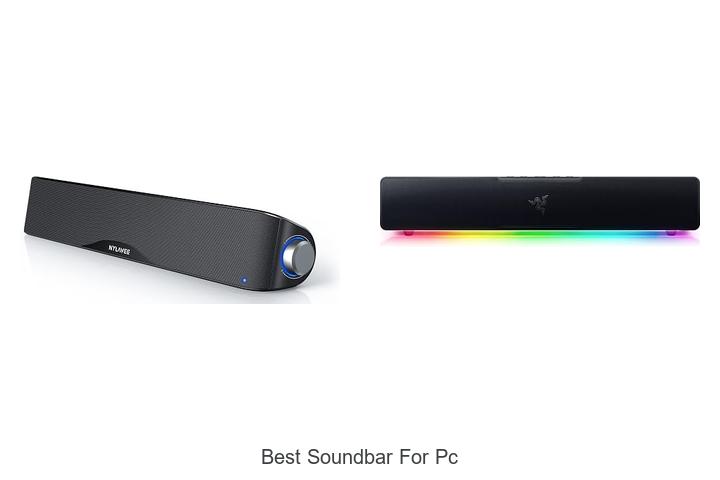
When it comes to enhancing audio fidelity for desktop setups, factors such as frequency response, signal-to-noise ratio, and connectivity options become paramount. A well-designed soundbar can deliver a balanced sonic experience, bridging the gap between basic PC speakers and complex surround sound systems.
Additionally, seamless compatibility with various audio codecs and ease of integration through USB, Bluetooth, or AUX interfaces can significantly elevate the overall listening experience. Exploring the nuances behind these features reveals why selecting the optimal soundbar is crucial for a superior auditory environment.
Continue reading to uncover the key specifications and top contenders that define the best soundbar for PC setups.
Elevate Your Gaming and Streaming Experience with Top Audio Solutions
| Image | Product | Price |
|---|---|---|
Our Picks 1  | Nylavee Bluetooth and AUX Computer Sound Bar | Check Price On Amazon |
Our Picks 2  | Razer Leviathan V2 X Soundbar | Check Price On Amazon |
Our Picks 3  | Bluedee Bluetooth Computer Sound Bar | Check Price On Amazon |
1. Nylavee Bluetooth and AUX Computer Sound Bar
The Nylavee Bluetooth and AUX Computer Sound Bar delivers an exceptional audio experience tailored for PC users seeking immersive sound quality. Combining powerful bass with crisp highs, it transforms any desktop or gaming setup into a rich auditory environment, making it a standout choice for the best soundbar for PC enthusiasts.
Equipped with four speaker units and dual independent bass diaphragms, the soundbar offers deep, resonant bass alongside clear treble. Featuring Bluetooth 0 for wireless convenience and a 5mm AUX connection for versatile compatibility, it supports laptops, desktops, smartphones, and consoles. Crafted from durable, non-toxic materials, the system powers via USB and provides simple one-knob control for effortless operation.
Pros
- Rich stereo sound with powerful bass thanks to four speaker units and two bass diaphragms
- Dual connectivity options: Bluetooth 5.0 and 3.5mm AUX for flexible device integration
- USB-powered design with easy one-knob control for instant setup and use
Cons
- Lacks built-in battery, requiring constant USB power source connection
Offering excellent sound clarity and a sleek tabletop design, the Nylavee soundbar is ideal for users seeking an affordable, high-performing PC speaker solution. Its advanced bass system and versatile connectivity set it apart from standard computer speakers in the same price range, ensuring significant value for multimedia and gaming applications.
2. Razer Leviathan V2 X Soundbar
Experience crystal-clear sound and immersive gaming audio with the Razer Leviathan V2 X Soundbar. Designed specifically for PC setups, this compact yet powerful soundbar transforms your desktop with rich stereo output and dynamic RGB lighting, offering an exceptional upgrade for gamers and multimedia enthusiasts alike.
Equipped with two full-range drivers and passive radiators, the Leviathan V2 X delivers vibrant, distortion-free sound. Its space-saving design fits seamlessly below monitors, while connectivity via USB Type-C and Bluetooth 0 ensures effortless setup and versatility. Customize lighting through Razer Chroma RGB and control audio preferences using the intuitive Razer Audio App and Synapse software.
Pros
- Compact desktop form factor ideal for clutter-free PC setups
- High-quality stereo sound with full-range drivers and passive radiators for immersive audio
- Seamless connectivity via USB Type-C and low-latency Bluetooth 5.0 with smooth switching
- Customizable Razer Chroma RGB lighting with 14 zones and game-synced effects
- User-friendly control through the Razer Audio App and Synapse for personalized sound and lighting
Cons
- Lacks waterproof design, limiting outdoor or wet environment use
The Razer Leviathan V2 X Soundbar offers an unbeatable combination of powerful audio, sleek design, and customizable lighting, making it one of the best soundbars for PC users seeking both style and performance. Compared to other PC audio solutions, it balances size, sound quality, and smart features effortlessly, delivering outstanding value at an accessible price point.
3. Bluedee Bluetooth Computer Sound Bar
Experience exceptional audio clarity with the Bluedee Bluetooth Computer Sound Bar, designed to elevate your desktop listening. Compact yet powerful, it enhances your PC’s sound with rich bass and crisp highs, offering an immersive experience whether for gaming, work, or entertainment.
Equipped with dual drivers and anti-magnetic technology, this soundbar ensures dynamic sound without static interference. Its versatile connection options include Bluetooth 0 and a 5mm audio jack, while a sleek USB power design eliminates the need for extra software.
Pros
- High-fidelity stereo sound with deep bass and clear treble for an enriched audio experience.
- Flexible dual connectivity via Bluetooth 5.0 and 3.5mm jack supports most devices seamlessly.
- Space-saving, stylish design with ambient lighting adds elegant visual appeal to any desk.
Cons
- Not waterproof, limiting outdoor or high-moisture usage scenarios.
Ideal for users seeking the best soundbar for PC setups, the Bluedee strikes a balance between quality, convenience, and eco-conscious design. It stands out against many competitors by integrating multiple connection methods and ambient aesthetics in a compact form factor.
4. Computer Speakers Wired USB Soundbar with USB-C Adapter

Enhance your PC audio experience with the Computer Speakers Wired USB Soundbar featuring a versatile USB-C adapter. Designed for seamless compatibility and powerful performance, this compact soundbar delivers rich, immersive sound while saving desk space with its innovative clip-on design.
Equipped with dual ultra-magnetic drivers and passive radiators, it offers crystal-clear stereo audio and deep bass. The built-in G-sensor ensures adaptive channel switching, maintaining correct left-right orientation regardless of placement. Easy touch controls and broad OS compatibility make it an ideal soundbar for any USB or USB-C-enabled device.
Easy touch controls and broad OS compatibility make it an ideal soundbar for any USB or USB-C-enabled device.
Pros
- Wide compatibility with Windows, macOS, ChromeOS, Linux, and USB-C devices including recent MacBooks and Android tablets
- Adaptive-channel switching with G-sensor for optimal stereo orientation whether mounted on top, side, or bottom of your monitor
- Space-saving clip-on mount that easily attaches to monitors and desks for a clutter-free workspace
Cons
- Not compatible with monitors, TVs, or projectors without USB audio support
Overall, this soundbar offers excellent value for anyone seeking powerful PC audio in a compact, adaptive design. Compared to traditional desktop speakers, its clip-on mounting and USB-C compatibility provide superior convenience and versatility.
5. Redragon GS560 RGB Desktop Soundbar

Elevate your PC audio experience with the Redragon GS560 RGB Desktop Soundbar, designed to deliver rich, crystal-clear sound paired with vibrant LED lighting effects. Compact yet powerful, it fits perfectly beneath your monitor, blending style and performance to enhance gaming, work, and entertainment sessions.
Equipped with an upgraded driver, the GS560 produces clear, immersive audio with deep bass, while its dynamic RGB backlighting offers four customizable modes, synchronizing to your music for an engaging visual experience. Easy volume control and broad compatibility make it a versatile addition to any setup.
Pros
- Upgraded audio drivers provide crisp sound quality with balanced bass for immersive playback.
- Four distinct RGB lighting modes including dynamic music-sync for an appealing visual ambiance.
- Compact 16-inch design fits neatly on desktop, compatible via USB and 3.5mm jack with PCs, laptops, TVs, and smartphones.
Cons
- Lacks Bluetooth connectivity, limiting wireless playback options compared to some competitors.
The Redragon GS560 balances high-quality sound and eye-catching RGB lighting at an affordable price, making it one of the best soundbars for PC users seeking both audio performance and aesthetic enhancement without breaking the bank.
6. LENRUE G11 Computer Desktop Speakers

Elevate your desktop audio experience with the LENRUE G11 Computer Desktop Speakers, designed to deliver crystal-clear stereo sound and immersive gaming lighting. Combining compact design with powerful performance, these speakers offer an ideal solution for those seeking the best soundbar for PC setups without sacrificing desk space or convenience.
Equipped with four large amplifier IC horns, the LENRUE G11 produces distortion-free audio that enhances movies, games, and music with stunning clarity. Its unique touch-sensitive angular game lights create dynamic ambient effects, easily toggled on or off.
Pros
- Powerful distortion-free stereo sound with four amplifier horns for clear, immersive audio
- Innovative touch control for dynamic gaming lights enhances desktop atmosphere
- Space-saving compact design with glued cables minimizes clutter on desks
Cons
- Lacks Bluetooth connectivity and headphone or microphone ports, limiting versatility
For users prioritizing clear audio and stylish lighting in a compact format, the LENRUE G11 stands out as a practical and affordable choice. While it doesn’t support wireless features like Bluetooth, its plug-and-play USB and AUX connectivity make it an excellent option for a clutter-free desktop audio upgrade.
7. Clip-On Monitor Computer Speakers

Upgrade your desktop audio experience with the Clip-On Monitor Computer Speakers, a space-saving and powerful sound solution designed specifically for PC users. Combining sleek design with rich audio performance, these speakers transform daily gaming, music, and movie sessions into immersive sound experiences without cluttering your workspace.
Featuring a secure, non-slip spring clamp, these speakers attach effortlessly to monitor edges or stand independently. Dual ultra-magnetic drivers and passive radiators deliver vibrant highs and booming bass, while six customizable RGB lighting modes add a personalized touch. Setup is simple via USB plug-and-play, compatible with various operating systems, and controlled with handy multifunction buttons right on the speaker.
Pros
- Space-efficient clip-on design that avoids monitor scratches and supports freestanding placement.
- Powerful stereo sound with rich bass, enhancing gaming, movies, and music despite compact size.
- Six dynamic RGB lighting modes with easy controls to customize ambiance or disable lights for focus.
Cons
- Lacks a built-in microphone, limiting functionality for calls or voice chats.
With its flexible mounting options, rich audio quality, and hassle-free USB setup, the Clip-On Monitor Computer Speakers are an excellent choice for anyone seeking the best soundbar for PC setups. Compared to bulkier desktop speakers, they offer a unique blend of convenience and performance tailored for modern workstations and gaming rigs.
8. Redragon GS560 RGB Desktop 2.0 Channel Soundbar

Elevate your PC audio experience with the Redragon GS560 RGB Desktop 0 Channel Soundbar, designed to deliver crystal-clear sound and immersive bass. Perfectly blending performance with aesthetic appeal, its vibrant RGB lighting enhances any gaming or work setup, making it an excellent choice for those seeking both sound quality and style.
Equipped with upgraded drivers, this 16-inch soundbar produces rich stereo sound complemented by customizable LED backlit modes that sync with your music. Its compact tabletop design fits seamlessly under monitors or laptops, while the easy-to-use volume knob and broad compatibility through USB and 5mm inputs make setup effortless across PCs, TVs, and smartphones.
Pros
- Enhanced sound quality with clear highs and rich bass for immersive audio
- Dynamic RGB lighting modes that respond to your music for a captivating visual experience
- Compact and versatile design ideal for desktop setups with plug-and-play compatibility
Cons
- Lacks waterproof feature, limiting outdoor use
For users seeking the best soundbar for PC without compromising on aesthetics or audio clarity, the Redragon GS560 offers exceptional value at an affordable price. Its blend of performance, visual flair, and ease of use makes it competitive against other budget-friendly soundbars in the market.
9. Sound Bar with Bluetooth and ARC Connectivity

Transform your PC audio experience with the Sound Bar featuring Bluetooth and ARC connectivity. Designed to deliver rich, immersive sound, this sleek and versatile soundbar enhances music, movies, and gaming with powerful clarity and deep bass, making it an exceptional choice for any setup.
Equipped with four high-performance drivers and an 80W output, the soundbar elevates every audio detail from subtle whispers to thunderous effects. Its unique design supports multiple placements—horizontal, vertical, tabletop, or wall-mounted—for tailored sound distribution. With three customizable equalizer modes and seamless Bluetooth 0, ARC, OPT, and AUX connections, setup and control are effortless.
Pros
- Versatile placement options enable 360° cinematic sound tailored to any room layout.
- Dynamic equalizer modes optimize audio for movies, music, and news.
- Easy connectivity via Bluetooth 5.0, ARC, optical, and auxiliary inputs with remote control support.
Cons
- Not waterproof, limiting outdoor usage possibilities.
Offering robust performance at an affordable price, this soundbar stands out as a top contender for the best soundbar for PC use. Its flexible features and quality sound make it ideal for gamers and home theater enthusiasts alike, providing excellent value over similar models in the market.
10. Bluedee Bluetooth USB Desktop Computer Speakers

Elevate your desktop audio experience with the Bluedee Bluetooth USB Desktop Computer Speakers, designed to deliver clear, powerful sound in a compact soundbar form. Ideal for work, gaming, or entertainment, it combines high-quality audio with modern connectivity, ensuring seamless integration with your PC or other devices.
Featuring 10W full-range drivers, this soundbar produces balanced vocals and immersive sound. Its one-cable USB-A/C plug-and-play setup eliminates the need for additional cables or drivers, while Bluetooth 3 enables wireless streaming from phones and tablets.
Enhanced with six customizable RGB lighting effects, it adds style to any workspace.
Pros
- Clear and balanced 10W audio perfect for various multimedia uses
- Simple USB plug-and-play with no complex driver installations required
- Bluetooth 5.3 support for versatile wireless connectivity
- Six RGB lighting effects with seven colors to customize your setup
- Wide compatibility with PCs, tablets, smartphones, and gaming consoles
Cons
- Wired mode requires a USB port that supports digital audio output, which some devices may lack
Offering a blend of easy setup, excellent sound quality, and eye-catching RGB lighting, the Bluedee Bluetooth USB Desktop Computer Speakers stand out as a versatile choice for users seeking the best soundbar for PC setups at an affordable price. Compared to standard PC speakers, its Bluetooth feature and lighting options provide added value and flexibility.
Top Soundbars to Elevate Your PC Audio Experience
Audio Quality and Sound Performance
Sound clarity and bass response. Surround sound capabilities. Frequency range and distortion levels.Ensuring a sound system easily connects with your computer and other devices is crucial for seamless audio playback and user convenience. Having multiple input options like USB, Bluetooth, and optical ports allows you to integrate the speaker effortlessly with various setups, whether it’s a gaming rig, desktop, or external media player.
Additionally, the ability to expand by adding subwoofers or satellite speakers can dramatically enhance audio depth and create a more immersive listening experience, especially in complex soundscapes or multi-room configurations.
- Plug-and-play compatibility reduces setup hassle.
- Supports a wide range of audio sources and formats.
- Facilitates quick switching between devices without continually unplugging cables.
- Enhanced bass and richer sound layers through additional speakers.
- Greater control over audio distribution for surround sound.
- Future-proofing audio setup by allowing upgrades without full replacement.
Connectivity Options
Wired connections (USB, AUX, Optical). Wireless connections (Bluetooth, WiFi). Compatibility with PC ports and devices.Modern soundbars offer a variety of options to link with your PC, making it essential to ensure compatibility with the ports and devices you use daily. Wired connections such as USB, AUX, and optical cables provide stable, high-quality audio with minimal delay, which is particularly beneficial for gaming or watching movies. USB connections often allow for easy plug-and-play functionality, while optical cables are known for supporting surround sound formats, enhancing the overall audio experience.
On the other hand, wireless connectivity options like Bluetooth and WiFi deliver greater flexibility and reduce cable clutter. Bluetooth is widely supported across PCs and offers convenience for casual listening, though it may have slight latency issues. WiFi connections can support multi-room setups and higher bandwidth audio streaming, perfect for audiophiles who want crisp, uninterrupted sound.
Understanding the types of connections available and matching them with your system’s ports helps avoid compatibility problems and ensures seamless integration. This also allows room for future upgrades, whether you’re adding extra speakers or connecting multiple devices, creating a more versatile and enjoyable audio setup.
Size and Design
Dimensions suitable for desk setup. Mounting options and placement flexibility. Aesthetic design and build quality.Ensuring that the soundbar offers the right types and number of input options is crucial for seamless integration with your PC and other devices. Having multiple ports such as USB, HDMI, and optical inputs allows you to connect various gadgets simultaneously without constantly swapping cables.
It’s also important to check for the possibility to expand your audio system in the future. Some soundbars come with additional speaker outputs or subwoofer compatibility, allowing you to upgrade your setup gradually.
| Feature | Benefit |
|---|---|
| Multiple Input Ports | Connect several devices simultaneously |
| Wireless Options | Stream audio effortlessly with fewer cables |
| Expandable Outputs | Allows system upgrades with extra speakers or subwoofers |
Power and Volume Levels
Wattage and sound output capacity. Volume control features. Power efficiency and standby mode.The ability to connect easily with various devices and expand audio options plays a crucial role in maximizing the functionality of a sound system designed for desktop use. Multiple input options such as USB, Bluetooth, optical, and auxiliary ports ensure compatibility with different computers, gaming consoles, and media players without the need for extra adapters.
Additionally, having the option to link additional speakers or subwoofers helps enhance the overall audio experience, allowing for richer sound and greater immersion during gaming or media consumption. Failing to account for these aspects might limit versatility and prevent users from fully utilizing the system’s capabilities.
Strong integration features also future-proof the setup, ensuring smooth transitions when upgrading or changing devices. Easy-to-use connection interfaces save time and reduce frustration, while the option to expand audio setups can elevate sound quality beyond the limitations of built-in speakers.
Additional Features
Remote control and app integration. Builtin microphones for voice control. Equalizer settings and sound customization.Having multiple options for connecting a soundbar offers flexibility, ensuring it easily pairs with various devices without compatibility issues. Features like remote control and app integration provide convenient access to adjustments, allowing users to tweak settings or switch inputs without interrupting their workflow.
Built-in microphones enable hands-free voice commands, adding a layer of smart control that enhances usability, especially during multitasking sessions.
Sound customization plays a crucial role, too. Equalizer settings allow for personalized audio experiences, tailoring bass, treble, and midrange frequencies to match individual preferences or different types of content such as gaming, music, or movies. These customizable sound profiles ensure optimal clarity and richness, making the listening experience more immersive and enjoyable.
These customizable sound profiles ensure optimal clarity and richness, making the listening experience more immersive and enjoyable.
| Feature | Benefit |
|---|---|
| Remote Control & App Integration | Easy adjustments and seamless switching between inputs without getting up |
| Built-in Microphones | Hands-free operation with voice commands, improving accessibility and convenience |
| Equalizer & Sound Customization | Tailors audio output for different content and personal preferences, enhancing sound quality |
Price and Warranty
Budget considerations and value for money. Warranty terms and customer support. Brand reputation and reviews.Having a variety of input options and the ability to connect with multiple devices ensures seamless integration with your existing setup, whether it’s a gaming console, monitor, or smartphone. This flexibility allows for a more versatile audio experience, enabling easy switching between sources without hassle. Additionally, the option to expand with additional speakers or subwoofers can significantly enhance sound quality, offering richer bass and more immersive surround sound as your needs evolve.
Additionally, the option to expand with additional speakers or subwoofers can significantly enhance sound quality, offering richer bass and more immersive surround sound as your needs evolve.
FAQ’s
What Are The Key Features To Look For In The Best Soundbar For Pc?The best soundbar for PC should offer clear, balanced audio with good bass performance and multiple connectivity options like Bluetooth, USB, or AUX for versatility. Additionally, compact design and easy compatibility with your PC setup are important features to consider.
Which Soundbars Offer The Best Audio Quality For Gaming On Pc?Soundbars like the Sonos Arc and the Bose Smart Soundbar 900 offer excellent audio quality for gaming on PC, providing immersive surround sound and clear dialogue. Additionally, the Razer Leviathan is specifically designed for gaming, delivering rich, detailed audio with powerful bass.
How Do Budget Soundbars Compare To Premium Models For Pc Use?Budget soundbars for PC use typically offer decent audio quality and basic features at an affordable price, but they may lack the rich bass, clarity, and advanced connectivity options found in premium models. Premium soundbars generally provide superior sound performance, enhanced build quality, and additional features like surround sound and customizable settings, making them better suited for immersive PC audio experiences.
What Connectivity Options Are Important In A Soundbar For Pc Compatibility?Important connectivity options for a soundbar to be compatible with a PC include HDMI ARC/eARC, optical audio, and a 3.5mm AUX input. Additionally, USB and Bluetooth support can enhance versatility for various PC setups.
Can A Soundbar Improve The Overall Experience Of Watching Movies And Listening To Music On A Pc?Yes, a soundbar can significantly enhance the overall experience of watching movies and listening to music on a PC by providing clearer, richer, and more immersive audio compared to built-in speakers. It often delivers better bass, volume, and sound clarity, making media consumption more enjoyable.
Conclusion
In summary, choosing the best soundbar for your PC depends on your budget, space, and audio preferences. Look for features like clear dialogue, immersive surround sound, and easy connectivity.
Top models offer excellent bass and compatibility with gaming and multimedia setups, enhancing your overall experience. Investing in a quality soundbar transforms your PC audio to next-level enjoyment.

- Best Small Sound Bar That Transforms Your TV Audio! - November 8, 2026
- Top 7 Best Samsung Sound Bars for Epic Home Audio! - November 8, 2026
- Best Sound Bars for TV That Will Blow Your Mind! - November 8, 2026
