
High-resolution displays with precise color accuracy, adjustable refresh rates, and ergonomic design play a crucial role in optimizing a developer’s workflow. For programmers, the ideal workstation setup includes a monitor that supports extended screen real estate, sharp text rendering, and reduced eye strain during long coding sessions.
Factors such as pixel density, response time, and connectivity options significantly impact productivity, making the choice of the best PC monitor for programming an essential consideration. Beyond just size and resolution, the balance between screen real estate and visual comfort can elevate coding efficiency and reduce fatigue. Exploring these technical aspects reveals why selecting the right monitor is more than just a matter of preference—it’s a key component in enhancing programming performance and focus.
Dive deeper to uncover what truly defines the best PC monitor for programming needs.
Discover the Top Displays That Enhance Focus and Efficiency for Coders
| Image | Product | Price |
|---|---|---|
Our Picks 1  | Philips 241V8LB 24 Inch Computer Monitor | Check Price On Amazon |
Our Picks 2  | Sceptre E225W-FW144 22-Inch Gaming Monitor | Check Price On Amazon |
Our Picks 3  | Philips 221V8LB 22 Inch Computer Monitor | Check Price On Amazon |
1. Philips 241V8LB 24 Inch Computer Monitor
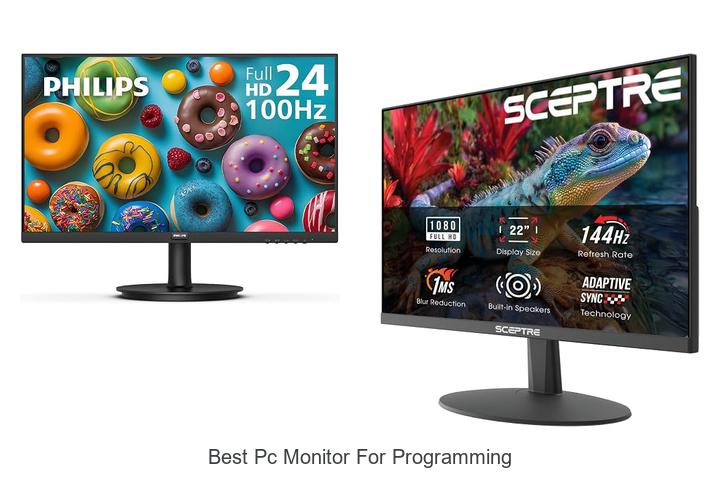
Discover the Philips 241V8LB 24 Inch Computer Monitor, designed to elevate your programming and everyday computing experience with crisp Full HD visuals and impressive color accuracy. Its sleek design and advanced VA panel technology make it an excellent choice for multitasking professionals seeking clarity and consistency on screen.
Featuring a 8-inch LED display with a 1920×1080 resolution, this monitor delivers bright whites and deep blacks thanks to its 3000:1 contrast ratio. The 178-degree wide viewing angle ensures color stability from almost any viewpoint, while Adaptive-Sync technology minimizes screen tearing for smooth performance during complex tasks.
Pros
- Exceptional color accuracy with 16.7 million colors and VA panel technology
- Minimal bezel design ideal for multi-monitor setups and enhanced workflow
- EasyRead mode reduces eye strain during prolonged document reading sessions
Cons
- Glossy screen finish may cause glare in brightly lit environments
With solid performance and thoughtful features tailored towards productivity, the Philips 241V8LB is a strong contender among budget-friendly monitors for programming and general use. Its combination of image quality and ergonomic design makes it a practical choice compared to other models in its price range.
2. Sceptre E225W-FW144 22-Inch Gaming Monitor
Discover the perfect balance of performance and affordability with the Sceptre E225W-FW144 22-Inch Gaming Monitor. Designed to enhance productivity and entertainment, this monitor offers crisp visuals and immersive sound, making it an excellent choice for programmers, gamers, and everyday users alike.
Featuring a nearly bezel-free design and integrated speakers, the Sceptre E225W-FW144 delivers a seamless viewing experience with rich audio output. Its Blue-Light Shift technology reduces eye strain for long coding sessions, while the 144Hz refresh rate ensures smooth and fluid visuals whether you’re working or gaming.
Pros
- Integrated speakers provide quality sound without cluttering the desk.
- Blue-Light Shift technology minimizes eye fatigue during extended use.
- High 144Hz refresh rate enhances smoothness in visual performance.
Cons
- Screen size at 22 inches may be limiting for users who prefer larger displays.
Combining eye-friendly features and responsive display technology, the Sceptre E225W-FW144 stands out as a value-packed monitor for programmers and gamers. Its competitive price point and thoughtful design make it a strong contender against similarly priced models featuring lower refresh rates or lacking integrated audio.
3. Philips 221V8LB 22 Inch Computer Monitor
Discover exceptional display performance with the Philips 221V8LB 22 Inch Computer Monitor, designed to enhance programming tasks and multimedia experiences alike. Featuring Full HD clarity and a sleek design, it offers vibrant visuals ideal for long coding sessions and detailed work.
Equipped with a 1920×1080 resolution and a 100Hz refresh rate, the Philips 221V8LB delivers crisp images and smooth motion. Its VA panel ensures deep blacks and bright whites, while Adaptive-Sync technology minimizes screen tearing for fluid visuals, making it perfect for both productivity and entertainment.
Pros
- Full HD 1920×1080 resolution offers sharp and detailed visuals for programming and multimedia tasks.
- 100Hz refresh rate combined with Adaptive-Sync technology provides smooth motion and reduces screen stutter.
- VA panel display with a 3000:1 contrast ratio produces vibrant colors and deep blacks for true-to-life images.
Cons
- Glossy screen finish may cause reflections in brightly lit environments.
Combining smooth visuals, excellent color accuracy, and ergonomic viewing angles, the Philips 221V8LB stands out as a reliable and budget-friendly option for developers and casual users seeking a dependable monitor without unnecessary extras.
4. Acer KB220Q H2bi 21.5in Office Monitor

Discover exceptional clarity and smooth performance with the Acer KB220Q H2bi 5-inch Office Monitor, designed to meet the demands of programming and everyday office tasks.
Equipped with a 1920×1080 resolution on a 16:9 matte VA panel, the monitor delivers sharp and true-to-life visuals while minimizing glare. Featuring a 100Hz refresh rate, 1ms response time, and Adaptive-Sync support, it offers seamless motion rendering and reduced screen tearing—ideal for both work and casual multimedia use.
Pros
- Crystal-clear Full HD 1080p resolution for detailed, crisp images and text
- Adaptive-Sync (FreeSync Compatible) prevents screen tearing for smooth visuals
- ZeroFrame bezel design enables multi-monitor setups with an immersive, near-edge-to-edge viewing experience
Cons
- Brightness capped at 250 nits, which may be less suitable for very bright environments
The Acer KB220Q H2bi strikes a strong balance between affordability, performance, and ergonomics, making it a highly attractive option for programmers and office users. Compared to other monitors in its price range, it stands out with its high refresh rate and sleek bezel-less design, enhancing productivity and comfort.
5. Sceptre E275W-FW100T 27-inch Gaming Monitor

Experience vibrant visuals and smooth performance with the Sceptre E275W-FW100T 27-inch Gaming Monitor, ideal for both programming and immersive gaming. Its 100% sRGB color gamut and 100Hz refresh rate deliver crisp, true-to-life images and fluid motion, enhancing productivity and entertainment alike.
Equipped with dual HDMI and a DisplayPort, this LED monitor supports a 16:9 aspect ratio and 170-degree viewing angle, ensuring excellent clarity from all positions. Features like Blue Light Shift reduce eye strain during extended use, while built-in speakers and customizable game modes add versatility and convenience to your workspace.
Pros
- 100% sRGB Color Gamut for accurate and vibrant color reproduction
- 100Hz refresh rate with DP and HDMI connectivity for smooth visuals
- Blue Light Shift technology to minimize eye fatigue during long sessions
- Built-in speakers provide quality audio without extra peripherals
- VESA wall-mountable design saves desk space and allows flexible setup
Cons
- May lack higher resolution options compared to some premium monitors
Affordable and feature-rich, the Sceptre E275W-FW100T stands out as a reliable choice for developers seeking sharp visuals and ergonomic benefits. When compared to other monitors in its price range, it offers a well-balanced mix of performance and comfort, making it a strong contender for the best PC monitor for programming and gaming needs.
6. Acer Nitro EDA323QU S3 Curved Gaming Monitor

Discover exceptional clarity and immersive visuals with the Acer Nitro EDA323QU S3 Curved Gaming Monitor. Its expansive
5 WQHD curved display is crafted to deliver crisp images and smooth performance, making it a top contender for professionals and gamers who demand precision and speed.
Equipped with a rapid 180Hz refresh rate and 1ms response time, this monitor eradicates screen tearing and motion blur through AMD FreeSync technology. The zero-frame design and ergonomic tilt enhance multi-monitor setups and viewing comfort, while its matte finish reduces glare for prolonged focus during intense coding or gaming sessions.
Pros
- Stunning 2560 x 1440 WQHD resolution on a large 31.5″ curved screen offers immersive and detailed visuals ideal for multitasking and programming.
- AMD FreeSync syncs frames with the GPU, eliminating screen tearing and fostering smooth motion critical for gaming and visual work.
- High 180Hz refresh rate paired with a 1ms VRB response time ensures ultra-responsive performance, minimizing input lag and blurriness.
- Near bezel-less zero-frame design enables seamless multi-monitor setups, expanding workspace efficiently.
- Multiple connectivity options including DisplayPort 1.4 and dual HDMI 2.0 ports support versatile device compatibility.
Cons
- Brightness at 250 nits may be less ideal under very bright ambient lighting conditions compared to higher-end monitors.
Balancing performance and value, the Acer Nitro EDA323QU S3 serves as an excellent choice for those seeking a high-refresh, high-resolution curved monitor with crisp visuals and low input lag. Ideal for programming, gaming, and multitasking, it stands out against competitors with similar specs but often higher price tags.
7. HP Series 3 Pro 23.8 Inch FHD Monitor 324Ph

Enhance your programming workspace with the HP Series 3 Pro 8 Inch FHD Monitor 324Ph, designed to deliver crisp visuals and smooth performance. Its Full HD resolution and wide viewing angle make coding and multitasking more efficient, providing a comfortable and productive environment for developers and tech enthusiasts alike.
Its Full HD resolution and wide viewing angle make coding and multitasking more efficient, providing a comfortable and productive environment for developers and tech enthusiasts alike.
Featuring a matte screen finish and a 16:9 aspect ratio, this monitor reduces glare and ensures clear visibility from virtually any angle. The 100 Hz refresh rate and 1000:1 contrast ratio contribute to vibrant and smooth image quality, while 250 cd/m² brightness supports well-lit workspaces.
Backed by a three-year warranty, the HP Series 3 Pro combines reliability with essential technical features.
Pros
- Full HD 23.8-inch display offering sharp and detailed visuals ideal for programming tasks
- Matte screen finish minimizes reflections and eye strain during extended use
- 178-degree viewing angle ensures consistent clarity from multiple perspectives
Cons
- Brightness level of 250 candela per square meter may be insufficient in very brightly lit rooms
Overall, the HP Series 3 Pro 8 Inch FHD Monitor combines essential features and dependable performance at an attractive price point. It stands out among similar monitors by offering a balanced blend of usability and quality, making it an excellent choice for programming professionals seeking an efficient display without overspending.
It stands out among similar monitors by offering a balanced blend of usability and quality, making it an excellent choice for programming professionals seeking an efficient display without overspending.
8. LG 24U411A-B 24-inch Full HD IPS Monitor
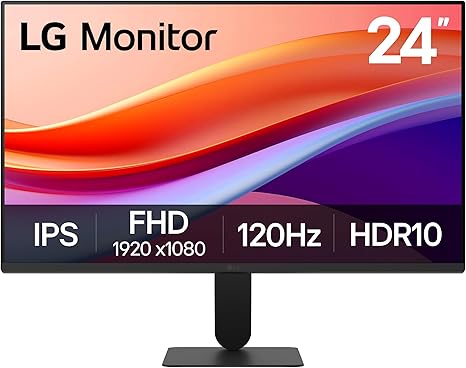
Discover a display designed to elevate your work and entertainment experience with the LG 24U411A-B 24-inch Full HD IPS Monitor. Combining vibrant visuals and a sleek, virtually borderless design, it’s perfect for programming, creative projects, and immersive gaming sessions alike.
This monitor boasts Full HD resolution with a wide 178-degree viewing angle, enhanced by IPS technology for consistent color accuracy. A 120Hz refresh rate and 1ms Motion Blur Reduction ensure smooth, crisp visuals, while HDR10 and 99% sRGB coverage deliver rich colors. The adjustable tilt and user-friendly Switch app further optimize comfort and multitasking efficiency.
The adjustable tilt and user-friendly Switch app further optimize comfort and multitasking efficiency.
Pros
- Vivid Full HD IPS display with wide viewing angles for accurate color representation
- Smooth motion handling through 120Hz refresh rate and 1ms Motion Blur Reduction
- Ultra-slim bezels and elegant design for a clean, multi-monitor setup
- HDR10 support and 99% sRGB gamut enhance color richness and detail
- Customizable screen layout via the Switch app for enhanced productivity
- Adjustable tilt between -5° and 20° ensures ergonomic comfort
Cons
- Brightness level of 250 cd/m² may be limited in very bright environments
With its blend of sharp visuals, fluid performance, and ergonomic design, the LG 24U411A-B stands out as an excellent choice for programmers and multitaskers seeking quality and comfort at an affordable price point compared to similar monitors in its class.
9. Sceptre Curved 24-inch Gaming Monitor C248W-1920RN

Experience immersive visuals tailored for programming and gaming with the Sceptre Curved 24-inch Gaming Monitor C248W-1920RN. Its 1800R curvature wraps the screen around your field of vision, providing a comfortable and engaging workspace that reduces eye strain during long hours of coding or entertainment.
Boasting a 75Hz refresh rate and a crisp 1920×1080 Full HD resolution on a 16:9 VA LED panel, this monitor delivers sharp images with rich contrast and vibrant colors. Multiple input options including HDMI, VGA, and PC audio ports ensure versatile connectivity for various devices, while Adaptive Sync technology minimizes screen tearing for smooth visuals.
Pros
- Immersive 1800R curved screen enhances viewing comfort and depth perception
- High contrast ratio of 3000:1 and 220 cd/m² brightness offer clear, vivid image quality
- Wide 178° viewing angle and matte finish reduce glare and maintain color accuracy
Cons
- Limited brightness compared to higher-end monitors may affect visibility in brightly lit rooms
Offering great value at an affordable price point, the Sceptre C248W-1920RN stands out as a reliable and stylish option for programmers seeking an ergonomic and visually appealing monitor. Compared to similar models, its curvature and Adaptive Sync support enhance both productivity and entertainment experiences.
10. ASUS ProArt PA278QV 27 QHD Monitor

Discover unparalleled clarity and color precision with the ASUS ProArt PA278QV 27 QHD Monitor, designed specifically for professionals who demand exceptional visual performance. Its expansive 27-inch display and industry-leading color accuracy make it a top contender for creatives and programmers seeking reliable and vibrant visuals.
Equipped with a 2560 x 1440 WQHD IPS panel, this monitor ensures crisp details and consistent color from wide viewing angles. Calman Verified with Delta E <2 accuracy, it covers 100% sRGB and Rec. 709 gamuts, while its ergonomic stand and ASUS Eye Care technology promote comfort during long work sessions.
Versatile connectivity options and an integrated USB hub streamline your workspace.
Pros
- Exceptional color accuracy with Calman Verified certification and Delta E <2 for true-to-life visuals
- Ergonomically designed stand offering tilt, swivel, pivot, and height adjustments to reduce strain
- Comprehensive connectivity including DisplayPort, HDMI, DVI-D, Mini DP, and USB hub for seamless device integration
Cons
- Refresh rate capped at 75Hz, which may be limiting for high-frame-rate gaming or fast-paced visuals
For professionals seeking the best PC monitor for programming and creative work, the ASUS ProArt PA278QV delivers exceptional performance and reliability at a competitive price point. Its precise color calibration, ergonomic flexibility, and extensive connectivity make it an excellent choice over standard monitors lacking in color fidelity and adjustability.
Unlock Productivity: How to Choose the Best PC Monitor for Programming
Screen Size and Resolution
Ideal screen size for coding comfort. Recommended resolutions for crisp text. Aspect ratio considerations for multitasking.Having multiple ways to connect your devices and add peripherals is crucial for a seamless programming setup. A monitor with a variety of ports such as USB-C, HDMI, and DisplayPort allows easy integration with laptops, desktops, and other gadgets without needing extra adapters. Additionally, built-in USB hubs or the option to attach docking stations boost productivity by enabling quick access to keyboards, mice, external drives, and other essential accessories.
This flexibility reduces cable clutter and streamlines workspace organization, making it easier to switch between different tasks or machines.
Moreover, the ability to expand your setup with additional displays or specialized equipment can significantly enhance workflow efficiency. Monitors that support daisy-chaining multiple screens or offer extra slots for upgrades accommodate growing demands as projects become more complex.
Ensuring your display supports these features future-proofs your investment and supports dynamic multitasking environments common in programming work.
Display Panel Type
IPS vs. VA vs. TN panels for color accuracy. Viewing angles and eye strain implications. Color reproduction needs for UI/UX work.Ensuring your new monitor offers a variety of ports and the ability to connect multiple devices simultaneously can significantly enhance your workspace efficiency. Having versatile input options like USB-C, HDMI, DisplayPort, and legacy connections means seamless compatibility with laptops, desktops, or additional peripherals such as tablets and external drives. This flexibility allows for easy multitasking and reduces the hassle of frequently unplugging and reconnecting cables.
Additionally, the capability to upgrade or expand your setup by adding extra monitors or docking stations can future-proof your investment. Monitors that support daisy-chaining or come with built-in USB hubs streamline the process of creating a multi-screen environment or connecting accessories, which is especially beneficial for developers who rely on multiple applications and windows.
| Port Type | Common Use | Benefit |
|---|---|---|
| USB-C | Modern laptops and smartphones | Single-cable connection for video, data, and power |
| HDMI | Video and audio transmission | Wide compatibility with various devices |
| DisplayPort | High-resolution displays | Supports higher refresh rates and multi-monitor setups |
| USB Hubs | Peripheral connectivity | Convenient access for keyboards, mice, and external drives |
Ultimately, a monitor’s ability to interface smoothly with your existing equipment and expand as your needs grow plays a crucial role in creating a productive, clutter-free programming environment.
Ergonomics and Adjustability
Height, tilt, and swivel adjustments. VESA mount compatibility. Blue light filters and flickerfree technology.Having a variety of ports and the ability to connect multiple devices simultaneously significantly enhances productivity, especially when working with multiple systems or peripherals. Monitors equipped with HDMI, DisplayPort, USB-C, and USB hubs allow seamless integration with laptops, desktops, and external gadgets such as keyboards, mice, or storage devices.
- Supports multitasking with ease by connecting several devices at once.
- Reduces cable clutter by using hubs integrated into the monitor.
- Enables quick switching between different workstations or sources.
- Offers compatibility with a diverse range of hardware, enhancing versatility.
- Allows easy upgrades without needing to replace the entire monitor.
Connectivity Options
Essential ports for programming setups. USB hubs and peripheral connectivity. Compatibility with multiple devices.Having a variety of essential ports can greatly enhance your programming setup by allowing seamless connection to different devices and accessories. Monitors equipped with multiple USB ports serve as convenient hubs, enabling you to connect peripherals such as keyboards, mice, and external storage without needing additional adapters. Ensuring compatibility with a range of devices, including laptops, desktops, and even tablets, provides flexibility and reduces the hassle of constantly swapping cables.
This versatility supports efficient multitasking and streamlines your workflow, making it easier to manage multiple screens and devices simultaneously.
| Port Type | Function | Benefits for Programmers |
|---|---|---|
| HDMI | Video & Audio | Easy connection with most laptops and desktops |
| DisplayPort | High-Quality Video | Supports higher resolutions and refresh rates |
| USB-A/USB-C | Peripheral & Data Transfer | Connects keyboards, mice, storage devices; supports fast data transfer |
| Ethernet (optional) | Network Access | Reliable wired internet for stable programming tasks |
Refresh Rate and Response Time
Importance for general programming use. When faster refresh rates matter. Balancing speed and display quality.Having ample options to connect various devices and the ability to add peripherals can significantly enhance the efficiency and flexibility of a workspace. Different ports like HDMI, DisplayPort, and USB-C ensure compatibility with laptops, desktops, and other gadgets without needing constant adapter swaps. Additionally, support for multiple monitors or easy upgrades through additional slots means developers can scale their setups as projects grow or multitasking demands increase.
This seamless integration reduces clutter and improves workflow, making complex coding sessions more manageable and productive.
Additional Features and Price Considerations
Builtin speakers and ambient lighting. Software support for screen splitting. Budget vs. premium features tradeoffs.Modern monitors often come equipped with built-in speakers and ambient lighting, which can enhance the overall workspace by reducing the need for extra peripherals and creating a more comfortable viewing environment. Software support for screen splitting is another valuable feature, allowing users to organize multiple windows efficiently – a crucial aspect for programming tasks that require simultaneous access to code, documentation, and testing environments.
| Feature | Budget Models | Premium Models |
|---|---|---|
| Built-in Speakers | Basic quality, sufficient for casual use | High-fidelity sound, suitable for multimedia and video conferencing |
| Ambient Lighting | Rare or minimal lighting options | Customizable RGB or bias lighting to reduce eye strain |
| Screen Splitting Software | May include limited or third-party options | Advanced, seamless software solutions with multiple layout presets |
Understanding the tradeoffs between affordable and high-end models helps balance the features you truly need with your budget. While premium monitors offer enhanced comfort and productivity tools, budget-friendly options can still deliver solid performance without breaking the bank.
Prioritizing these additional features ensures a setup tailored to both work efficiency and personal comfort.
FAQ’s
What Are The Key Features To Look For In A Pc Monitor For Programming?Key features to look for in a PC monitor for programming include a high-resolution display for clear text, an adjustable stand for ergonomic comfort, and a screen size and aspect ratio that supports multitasking. Additionally, eye-care technologies like blue light filters and flicker-free screens help reduce eye strain during long coding sessions.
Which Screen Size Is Ideal For A Programming Monitor?An ideal screen size for a programming monitor is typically between 24 to 32 inches, as it provides ample space for multiple windows and code editors without causing eye strain. Ultimately, the choice depends on personal preference and workspace constraints.
How Important Is Resolution And Screen Clarity For Coding Tasks?Resolution and screen clarity are very important for coding tasks, as they reduce eye strain and make text easier to read for extended periods. High resolution and sharp display help developers spot syntax errors and navigate code more efficiently.
Are Curved Or Flat Monitors Better For Long Programming Sessions?Flat monitors are generally better for long programming sessions because they reduce distortion and provide a consistent viewing angle, which helps minimize eye strain. Curved monitors can enhance immersion but may cause discomfort over extended periods due to the unnatural viewing angles they create.
What Budget-Friendly Monitors Offer The Best Performance For Programmers?Budget-friendly monitors like the Dell UltraSharp U2419H and ASUS ProArt PA248QV offer excellent performance for programmers with crisp 1080p displays, accurate colors, and adjustable ergonomics. Both provide good screen real estate and comfortable viewing angles, enhancing productivity without breaking the bank.
Conclusion
In summary, the best PC monitor for programming offers a combination of high resolution, ample screen size, adjustable ergonomics, and eye-friendly features like anti-glare and blue light filters. Prioritizing these factors ensures comfortable coding sessions and improved productivity, making it easier to manage multiple windows and read text clearly for extended periods.

- Best PC Monitor for Programming That Boosts Productivity! - October 9, 2026
- Best PC Monitor for Gaming Budget: Unbeatable Deals! - October 8, 2026
- Best Monitors for Working at Home You’ll Love to Use! - October 8, 2026
