
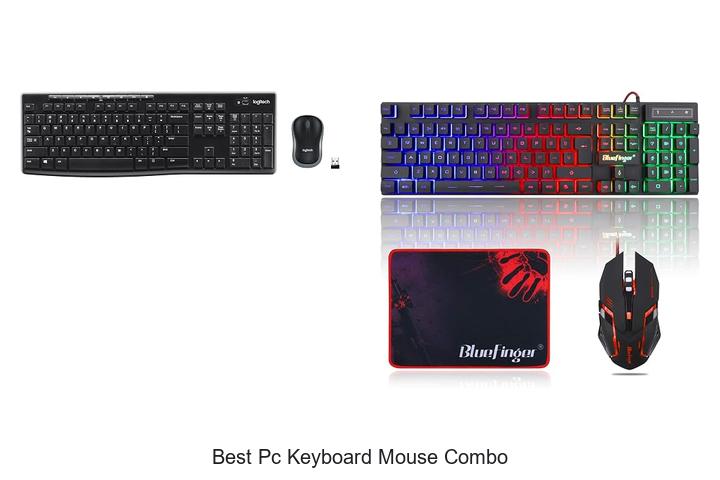
Ergonomic key switches, high-precision optical sensors, and seamless wireless connectivity are critical factors in evaluating input devices for an optimized computing experience. When selecting peripherals, the integration of responsive keyboards and accurate mice into a cohesive package can significantly enhance productivity and comfort.
The best PC keyboard mouse combo not only ensures compatibility across various operating systems but also prioritizes durability, customization options, and latency reduction. As computing demands evolve—whether for gaming, professional work, or casual use—the importance of choosing the right combo becomes increasingly evident. Understanding the technical specifications and design principles behind these devices is essential to making an informed decision.
Explore the features and innovations that set the best PC keyboard mouse combo apart in the competitive landscape of input peripherals.
Discover Top Picks for Seamless Typing and Precision Control in One Package
| Image | Product | Price |
|---|---|---|
Our Picks 1  | Logitech MK270 Wireless Keyboard and Mouse Combo | Check Price On Amazon |
Our Picks 2  | BlueFinger RGB Gaming Keyboard and Mouse Combo | Check Price On Amazon |
Our Picks 3  | Redragon S101-3 PRO Gaming Keyboard and Mouse Combo | Check Price On Amazon |
1. Logitech MK270 Wireless Keyboard and Mouse Combo
Discover seamless wireless productivity with the Logitech MK270 Wireless Keyboard and Mouse Combo, designed to deliver comfort, reliability, and long-lasting performance for everyday computing. Its robust connection and ergonomic design make typing and navigation effortless whether you’re working or browsing.
Equipped with a reliable USB receiver, this combo offers a strong wireless range up to 33 ft without drop-outs. The full-size keyboard features quiet, low-profile keys, a number pad, and durable spill-resistant construction, while the ambidextrous compact mouse provides smooth cursor control and comfort for both hands.
Pros
- Reliable plug-and-play wireless connection with up to 33 ft range for flexibility.
- Comfortable typing experience featuring quiet, low-profile keys and adjustable keyboard height.
- Long battery life of up to 36 months for keyboard and 12 months for mouse, minimizing maintenance.
Cons
- Lacks backlit keys, which may affect usability in low-light environments.
The Logitech MK270 combo stands out as an affordable, durable, and efficient option for users seeking dependable wireless input devices. For those needing enhanced ergonomics and additional customizability, the MK540 combo offers an upgrade with features like scooped keys and a palm rest.
2. BlueFinger RGB Gaming Keyboard and Mouse Combo
Elevate your gaming and productivity experience with the BlueFinger RGB Gaming Keyboard and Mouse Combo. Designed to blend vibrant aesthetics with robust performance, this combo offers precise control and vivid backlighting that enhances usability in low-light environments.
Perfect for gamers and everyday users alike.
The keyboard features 104 keys with rainbow RGB backlighting easily toggled via the Scroll Lock key, ensuring visibility and style. Equipped with a durable built-in steel plate and 19 anti-ghosting keys, it supports multiple simultaneous key presses.
The ergonomic mouse includes adjustable DPI settings, customizable LED breathing lights, and a comfortable grip, while the included large gaming mouse pad offers a smooth surface for accurate movement and stability.
Pros
- RGB backlit keyboard with easy on/off functionality for enhanced typing visibility in dark settings.
- Durable build featuring a steel plate keyboard frame and braided USB cables for long-lasting use.
- Ergonomic mouse with adjustable DPI (800/1200/1600/2000) and customizable LED lighting for precision and aesthetic appeal.
Cons
- Absence of dedicated macro keys may limit customization possibilities for advanced gamers.
Combining affordability with essential gaming features, the BlueFinger combo strikes a balance between style and durability. It serves as a strong contender among budget-friendly keyboard and mouse sets, delivering reliable performance and vivid lighting without extra complexity.
3. Redragon S101-3 PRO Gaming Keyboard and Mouse Combo
Elevate your gaming and productivity setup with the Redragon S101-3 PRO Gaming Keyboard and Mouse Combo, a budget-friendly peripheral duo designed for performance and style. Combining vibrant RGB lighting with ergonomic comfort, this combo suits gamers, students, and professionals seeking reliable, customizable tools without breaking the bank.
The combo offers a full-size RGB backlit keyboard with six lighting modes and five programmable macro keys, paired with a high-precision gaming mouse featuring ten lighting effects and adjustable DPI up to Equipped with anti-ghosting keys and a detachable wrist rest, it ensures comfort and responsiveness for extended use, supported by plug-and-play compatibility across major operating systems.
Pros
- Customizable RGB lighting on keyboard and mouse enhances the gaming atmosphere.
- Programmable macro keys and adjustable DPI for precise control and efficient gameplay.
- Ergonomic design with soft-touch keys and wrist rest for comfortable long sessions.
Cons
- Membrane keys may not satisfy users preferring mechanical switches for tactile feedback.
Offering durable performance and versatile compatibility, the Redragon S101-3 PRO Combo stands out as a compelling choice for those seeking an affordable, feature-rich keyboard and mouse set. Its balance of ergonomic comfort, lighting customization, and responsive controls make it an excellent alternative to more expensive gaming combos.
4. RedThunder K10 Wired Gaming Keyboard and Mouse Combo

Elevate your gaming and productivity with the RedThunder K10 Wired Gaming Keyboard and Mouse Combo, designed for precision and comfort. Combining a durable mechanical keyboard with a high-performance optical mouse, this combo is tailored for gamers and professionals seeking seamless control and vibrant aesthetics at an affordable price.
The full-size 104-key keyboard features 26 anti-ghosting keys and a sturdy steel plate for durability, complemented by a mouse equipped with a 7200DPI optical sensor ensuring swift and accurate tracking. Vibrant RGB lighting spans both peripherals, enhancing your gaming ambiance, while ergonomic design elements minimize fatigue during extended sessions.
Pros
- 26 anti-ghosting keys enable multiple simultaneous key presses without input errors.
- High-precision mouse sensor with adjustable 7200DPI and 1000Hz polling rate ensures accurate and responsive navigation.
- Customizable RGB lighting on keyboard keys, light bar, and mouse sides delivers an immersive gaming experience.
Cons
- Corded design may limit mobility compared to wireless alternatives.
The RedThunder K10 combo strikes an excellent balance between quality and affordability, offering robust features typically found in higher-end setups. Its combination of durability, precision, and customizable lighting makes it a standout choice for gamers and everyday users compared to other keyboard-mouse bundles in its price range.
5. Logitech MK345 Wireless Keyboard and Mouse Combo

Experience seamless productivity with the Logitech MK345 Wireless Keyboard and Mouse Combo, designed for reliable performance and maximum comfort. Its wireless convenience and full-size layout make it ideal for both home and office use, providing a clutter-free workspace and effortless navigation.
This combo features a dependable 4 GHz wireless connection offering up to 10 meters of range, ensuring uninterrupted use across multiple operating systems including Windows, macOS, and ChromeOS. The full-size keyboard includes a palm rest, spill-resistant build, and media keys for enhanced functionality, while the ergonomic right-handed mouse offers smooth tracking and comfortable use throughout the day. Long-lasting batteries guarantee extended usage without frequent replacements.
Pros
- Reliable 2.4 GHz wireless connectivity with a range of up to 10 meters
- Ergonomic full-size keyboard with palm rest and spill-resistant design
- Long battery life: up to 3 years for keyboard and 18 months for mouse
Cons
- Right-handed mouse design may not be suitable for left-handed users
Offering excellent value with dependable wireless performance and comfort, the Logitech MK345 Wireless Keyboard and Mouse Combo is a smart choice for those seeking a versatile and efficient input solution. When compared to similar combos, its extended battery life and spill-resistant keyboard provide a significant edge for daily use.
6. GEODMAER 65% Gaming Keyboard and Mouse Combo

Upgrade your gaming and productivity setup with the GEODMAER 65% Gaming Keyboard and Mouse Combo. Designed for space-saving efficiency without sacrificing functionality, this combo delivers a premium experience with vibrant RGB lighting and high-precision mouse control, perfect for both gamers and professionals.
Featuring a compact 65% keyboard layout with 68 keys, this combo offers separate arrow keys and a sleek black & silver-gray keycap design. The keyboard boasts
Pros
- Space-saving 65% compact keyboard design ideal for minimal desktop setups
- Customizable 16.8 million color RGB backlighting enhances aesthetics and usability in low-light environments
- High-performance wired mouse featuring adjustable DPI settings up to 7200 for precise control
Cons
- Lacks a dedicated numeric keypad, which may be inconvenient for users requiring extensive number input
The GEODMAER 65% Gaming Keyboard and Mouse Combo stands out as a budget-friendly, high-value option featuring mechanical-like key feedback and ergonomic design, making it a strong contender against other entry-level combos. This set is ideal for users seeking a compact, stylish, and reliable peripheral duo for both gaming and daily use.
7. AULA Wired Gaming Keyboard and Mouse Combo

Upgrade your gaming and productivity setup with the AULA Wired Gaming Keyboard and Mouse Combo. Combining durability, ergonomic design, and vibrant RGB lighting, this combo delivers precision and comfort tailored for intense gaming sessions and extended work hours.
Featuring a sturdy aluminum alloy panel and an ergonomic 7° tilt, the keyboard and mouse ensure reduced hand fatigue. The adjustable RGB backlighting offers customizable illumination modes, while 12 multimedia keys and anti-ghosting technology allow seamless performance.
A built-in phone holder adds convenience, making it a comprehensive solution for PC users.
Pros
- Durable metal panel with ergonomic design for comfortable use
- Customizable RGB backlighting with multiple modes and brightness levels
- Anti-ghosting and multimedia keys support smooth, responsive input
Cons
- Wired connection limits mobility compared to wireless alternatives
Balancing design, functionality, and cost, the AULA Wired Gaming Keyboard and Mouse Combo stands out as a compelling choice for gamers and professionals seeking reliable performance with customizable features at an affordable price point.
8. Logitech MK120 Wired Keyboard and Mouse Combo Black

Discover exceptional typing comfort and precise control with the Logitech MK120 Wired Keyboard and Mouse Combo Black, designed for durability and ease of use. This reliable combo is perfect for everyday computing needs, offering a spill-resistant keyboard and an ambidextrous optical mouse to enhance your productivity seamlessly.
Featuring a sturdy USB connection, the keyboard boasts deep-profile keys, a curved space bar, and adjustable tilt legs to create a familiar, ergonomic typing experience. The full-size optical mouse complements it with smooth tracking and an ambidextrous design, suitable for long hours of use. Both devices are compatible with Windows 7, 8, 10, or later.
Both devices are compatible with Windows 7, 8, 10, or later.
Pros
- Durable keyboard with spill-resistant design and keys rated for 10 million keystrokes
- Comfortable full-size layout including F-keys and numeric keypad for efficient workflow
- Ambidextrous, high-definition optical mouse offering precise and smooth tracking
Cons
- Wired design limits mobility compared to wireless alternatives
The Logitech MK120 combo delivers dependable performance and comfort at an affordable price point, making it an excellent choice for users seeking a robust wired keyboard and mouse set. For those wanting wireless convenience, the Logitech MK270 provides enhanced mobility and extra features, but the MK120 remains a solid, budget-friendly option.
9. Wireless Keyboard and Mouse Combo

Experience seamless productivity and comfort with the Wireless Keyboard and Mouse Combo, designed to elevate your typing and navigation experience. Offering a full-size keyboard and a contoured mouse, this combo ensures ergonomic support and reliable wireless connectivity for both home and office use.
Equipped with adjustable tilt legs and quiet membrane keys, the wireless keyboard minimizes wrist strain and typing noise. The mouse complements it with precise 1600 DPI tracking and silent clicks. Both devices connect via a single 4 GHz USB receiver, providing lag-free performance up to 33 feet without software installation.
Both devices connect via a single 4 GHz USB receiver, providing lag-free performance up to 33 feet without software installation.
Pros
- Ergonomic keyboard with adjustable height to reduce wrist fatigue during extended use
- Long-lasting battery life of up to 365 days, minimizing maintenance and replacements
- Wide compatibility with multiple operating systems including Windows, Mac OS, Chrome OS, and Linux
Cons
- Requires separate batteries (one AAA for keyboard, one AA for mouse), which may necessitate occasional replacements
Combining ergonomic design with reliable wireless technology and broad system compatibility, this keyboard and mouse duo stands out as an excellent choice for users seeking comfort, efficiency, and convenience. Its value compares favorably to other combos in the market, especially given the extended battery life and quiet operation.
10. Wireless Keyboard and Mouse Combo

Experience the perfect blend of style and functionality with the Wireless Keyboard and Mouse Combo, designed to elevate your desk setup. Ideal for work, gaming, or study, this combo offers vibrant RGB lighting and seamless wireless connectivity, ensuring productivity and comfort wherever you are.
Featuring a rainbow backlit keyboard with adjustable brightness and a mouse with 15 customizable lighting effects, both devices recharge via USB-C with usage supported during charging. They connect effortlessly through a single 4GHz USB receiver, providing up to 33 feet of reliable wireless range and compatibility with Mac and Windows layouts.
Pros
- Bright RGB lighting with multiple effects enhances visibility and aesthetics
- Long-lasting rechargeable battery with smart power-saving features
- Universal compatibility across Windows, Mac, Linux, and Chrome systems
Cons
- Some multimedia keys may have limited functionality on Mac OS
Combining ergonomic design, efficient power management, and versatile compatibility, this keyboard and mouse combo stands out as a reliable choice for users seeking both performance and style. Compared to similar combos under $30, it offers superior lighting customization and multi-device support, making it a smart investment for your workspace.
Ultimate Guide to Choosing the Best PC Keyboard Mouse Combo for Effortless Computing
Compatibility and Connectivity
Wired vs Wireless options. USB and Bluetooth compatibility. Device and operating system support.Understanding the difference between wired and wireless options is crucial, as it directly impacts convenience and performance. Wired setups tend to offer a more stable connection with minimal latency, making them ideal for gaming or tasks requiring precision. Wireless options, on the other hand, provide greater mobility and reduce cable clutter but may sometimes experience slight delays or require battery management.
Compatibility with USB ports and Bluetooth is another key factor. Devices that support both USB and Bluetooth connections offer greater flexibility, allowing seamless switching between desktops, laptops, and even tablets. Ensuring the hardware matches the available ports on your computer prevents frustration and the need for additional adapters.
Operating system support plays an important role in seamless functionality. Not all keyboards and mice are fully compatible across Windows, macOS, or Linux platforms.
Choosing peripherals that explicitly support your device’s OS ensures access to special features, driver updates, and reliable performance.
Keyboard Features
Key switch types (mechanical, membrane, etc.). Layout and key spacing. Backlighting and customization options.Devices with versatile connection options and the ability to accommodate additional peripherals provide greater flexibility and convenience for users. Ensuring that the setup supports both wired and wireless interfaces can improve compatibility with various systems and reduce latency or interference issues.
Key switch types play a crucial role in the overall typing experience. Mechanical switches offer tactile feedback and durability, appealing to gamers and typists who value precision and responsiveness. Membrane switches, on the other hand, tend to be quieter and more affordable but may lack the same level of responsiveness.
The ideal switch depends on personal preference and intended use.
Layout and key spacing impact comfort and efficiency. A standard full-size layout with well-spaced keys can reduce typing errors and hand fatigue during extended sessions.
Compact designs save desk space but might require getting used to smaller or closer keys. Evaluating the layout helps ensure smooth navigation and ease of use.
Backlighting and customization options add both aesthetic appeal and functionality. Adjustable lighting can enhance visibility in low-light environments, while RGB settings allow users to personalize their setup to match their mood or gaming themes.
Some models also offer programmable keys and macros, enabling tailored shortcuts that improve productivity and gaming performance.
Mouse Features
DPI and sensitivity settings. Ergonomics and grip style. Button configuration and programmable keys.Having multiple options for connecting devices ensures a seamless setup and compatibility with various systems, whether through USB ports, Bluetooth, or wireless dongles. It’s equally important to think about how easily you can add peripherals or upgrade components without hassle.
This flexibility can save time and money in the long run, especially if your workspace evolves or you require additional devices.
- Available ports and wireless technologies for reliable, lag-free performance.
- Expandable features such as extra USB hubs, audio jacks, or customizable slots.
- Ease of integration with your existing hardware and future upgrades.
Ensuring your setup supports both a range of connection types and room to grow helps maintain a clutter-free desk while enhancing user experience and productivity.
Build Quality and Durability
Materials and construction. Spill resistance and protective features. Brand reputation and warranty.Materials and construction play a crucial role in the overall durability and feel of the keyboard and mouse set. Devices made from high-quality plastics or metal not only offer a satisfying tactile experience but also withstand daily wear and tear better than those using cheaper materials.
Another key aspect is the manufacturer’s reputation and warranty policy. Trusted brands often invest more in research and development to ensure reliability and offer better customer support, including hassle-free repairs or replacements if issues arise. Paying attention to these details allows for a more confident investment in peripherals that combine comfort, functionality, and long-term value.
Paying attention to these details allows for a more confident investment in peripherals that combine comfort, functionality, and long-term value.
Additional Functionalities
Multimedia keys and shortcuts. Charging methods and battery life (for wireless). Compatibility with gaming or productivity software.Additional functionalities can greatly impact the overall user experience and efficiency of a keyboard and mouse set. Multimedia keys and shortcuts provide quick access to essential controls like volume adjustment, media playback, and launching applications, saving valuable time during work or entertainment sessions. For wireless setups, it’s important to evaluate charging methods and battery life; reliable, long-lasting power sources minimize interruptions and help maintain seamless performance.
For wireless setups, it’s important to evaluate charging methods and battery life; reliable, long-lasting power sources minimize interruptions and help maintain seamless performance. Moreover, compatibility with gaming or productivity software ensures that the devices can be customized and optimized to suit specific tasks, whether it’s assigning macros for intense gaming or streamlining workflows in professional applications. Factoring in these elements helps create a setup that is not only functional but also tailored to individual needs for greater convenience and productivity.
Price and Value for Money
Budget vs premium options. Included accessories and extras. Longterm reliability and user reviews.Devices that offer a variety of connection options and the ability to add peripherals can greatly enhance your overall workspace efficiency. Whether you need to plug in via USB, Bluetooth, or wireless receivers, having multiple interfaces ensures compatibility with different systems and eases device setup. Additionally, keyboards and mice that support additional ports or features allow for greater customization, such as attaching a headset or USB drive directly to the device, reducing cable clutter and streamlining your desk.
Additionally, keyboards and mice that support additional ports or features allow for greater customization, such as attaching a headset or USB drive directly to the device, reducing cable clutter and streamlining your desk.
Considering future needs is also essential; expandable features can accommodate upgrades without requiring a complete replacement. This adaptability often translates into better long-term value, as your setup can evolve alongside your workflow. Devices praised for reliability and positive feedback from users often highlight these convenient options as major selling points, proving that investing in these functional aspects can lead to sustained satisfaction over time.
FAQ’s
What Are The Top Features To Look For In The Best Pc Keyboard And Mouse Combo?The best PC keyboard and mouse combo should offer comfortable ergonomics, reliable build quality, and responsive performance with customizable keys or buttons. Additionally, features like wireless connectivity, long battery life, and compatibility with your system enhance convenience and usability.
Which Keyboard And Mouse Combos Offer The Best Value For Gaming?The Logitech G213 keyboard and Logitech G502 mouse combo offer excellent value for gaming, providing durable build quality and customizable features at a reasonable price. Alternatively, the Razer Cynosa V2 keyboard paired with the Razer DeathAdder V2 mouse delivers strong performance and RGB lighting without breaking the bank.
Are Wireless Keyboard And Mouse Combos Better Than Wired Ones For Pc Use?Wireless keyboard and mouse combos offer greater convenience and a clutter-free workspace, making them ideal for mobility and ease of use. However, wired combos typically provide more reliable connections and faster response times, which can be important for gaming or professional tasks.
What Are The Most Ergonomic Keyboard And Mouse Combos Available In The Market?Some of the most ergonomic keyboard and mouse combos available are the Logitech Ergo K860 keyboard paired with the Logitech MX Vertical mouse, both designed to reduce wrist strain and promote a natural hand position. Another popular option is the Microsoft Sculpt Ergonomic Desktop, which includes a split keyboard and a cushioned mouse for enhanced comfort.
How Do Budget-Friendly Keyboard And Mouse Combos Compare To High-End Models?Budget-friendly keyboard and mouse combos typically offer basic functionality and durability suitable for everyday use, while high-end models provide advanced features, better build quality, and enhanced ergonomics for improved performance and comfort. However, the choice depends on individual needs and budget constraints.
Conclusion
In summary, choosing the best PC keyboard mouse combo depends on your specific needs, whether for gaming, productivity, or general use. Look for comfort, durability, and compatibility with your system. Top combos offer seamless connectivity, responsive keys, and ergonomic designs, ensuring enhanced performance and a better user experience.
Investing in a quality combo can significantly boost your computing efficiency.

- Top Best Computer Speakers with Microphone for Clear Sound! - November 11, 2026
- Best Wired Computer Speakers That Blow Your Mind! - November 11, 2026
- Top Best External Speakers for Laptop Computers Revealed! - November 11, 2026
