
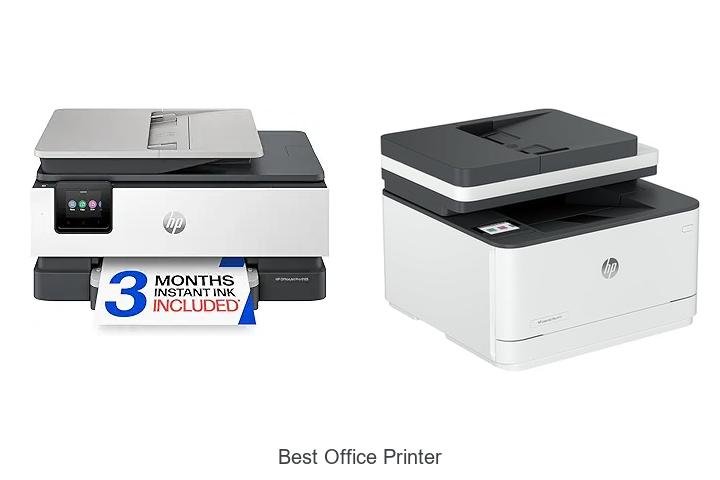
In today’s fast-paced work environments, efficiency hinges on the seamless integration of hardware like multifunction printers, laser printing technology, and advanced connectivity options such as Wi-Fi Direct and Ethernet. Selecting the best office printer involves balancing factors like print resolution, page-per-minute (PPM) speed, duplexing capabilities, and compatibility with various operating systems. Beyond just print quality, considerations around toner capacity, energy consumption, and paper handling capacity also significantly impact daily operations.
Beyond just print quality, considerations around toner capacity, energy consumption, and paper handling capacity also significantly impact daily operations. With a vast array of models boasting features ranging from mobile printing to cloud integration, making an informed choice can be overwhelming. Delving deeper into these technical specifications reveals which devices truly stand out in productivity and cost-effectiveness—unlocking the key to enhanced workflow efficiency.
Keep reading to discover what sets the best office printer apart from the rest.
Discover Top Picks That Will Transform Your Workplace Efficiency
| Image | Product | Price |
|---|---|---|
Our Picks 1  | HP OfficeJet Pro 8125 Wireless All-in-One Printer | Check Price On Amazon |
Our Picks 2  | HP LaserJet Pro MFP 3101sdw All-in-One Laser Printer | Check Price On Amazon |
Our Picks 3  | Brother MFC-L8930CDW Color Laser All-in-One Printer | Check Price On Amazon |
1. HP OfficeJet Pro 8125 Wireless All-in-One Printer
Discover the HP OfficeJet Pro 8125 Wireless All-in-One Printer, a reliable and efficient solution designed to meet the demands of home offices. It delivers professional-quality color prints with impressive speed, making it ideal for business documents, presentations, and flyers.
Equipped with a 7-inch color touchscreen and advanced wireless connectivity, this printer offers intuitive navigation and seamless printing from multiple devices. Features like auto two-sided printing, a 225-sheet input tray, and HP’s AI-enhanced formatting optimize productivity and reduce wasted pages.
Pros
- Fast print speeds up to 20 ppm (black) and 10 ppm (color) for efficient workflow
- Convenient wireless printing with dual-band Wi-Fi and HP smart app compatibility
- Security-enhanced with HP Wolf Essential Security to protect data and network
Cons
- Only compatible with original HP cartridges equipped with proprietary chips
Overall, the HP OfficeJet Pro 8125 offers a blend of speed, quality, and smart features that support productivity and security. Its sustainable design and included trial of Instant Ink add extra value, making it a smart choice for professionals seeking dependable print solutions.
2. HP LaserJet Pro MFP 3101sdw All-in-One Laser Printer
Experience efficient and professional-quality printing with the HP LaserJet Pro MFP 3101sdw All-in-One Laser Printer, designed specifically for small teams and busy office environments. Combining speed, reliability, and wireless connectivity, it elevates everyday business tasks seamlessly.
Offering print speeds up to 35 pages per minute and sharp monochrome outputs, this multifunction device features auto two-sided printing, a 250-sheet input tray, plus a 50-sheet automatic document feeder. Compatible with smartphones and laptops, it supports wireless printing and scanning to email, all managed through an intuitive app and LED display.
Pros
- High-speed printing at 35 ppm for efficient workflow
- Reliable wireless connectivity ensuring seamless device integration
- Comprehensive all-in-one functionality: print, scan, and copy with ADF and flatbed scanner
Cons
- Compatible exclusively with HP cartridges containing original chips, limiting third-party cartridge use
For offices seeking a dependable, fast monochrome printer with enhanced connectivity and versatile scanning features, the HP LaserJet Pro MFP 3101sdw delivers consistent performance at a competitive price. Compared to similar laser printers, it stands out with an integrated app-based control system and award-winning reliability, making it a smart investment for professional environments.
3. Brother MFC-L8930CDW Color Laser All-in-One Printer
Discover exceptional printing quality and efficiency with the Brother MFC-L8930CDW Color Laser All-in-One Printer, designed to meet the demands of busy offices. Its compact design and fast performance deliver professional results, making it a standout choice for businesses seeking reliability and productivity.
Equipped with sharp color and black printing capabilities, this laser printer offers speeds up to 33 pages per minute and advanced two-sided scanning at 104 images per minute. It includes a multipurpose tray for diverse print media and supports wireless and Ethernet connectivity, complemented by a user-friendly 7” touchscreen for seamless operation.
Pros
- High-yield toner cartridges provide long-lasting, cost-effective printing with up to 7,500 black and 6,500 color pages per cartridge.
- Advanced security features including triple layer protection and NFC card reader ensure document and network safety.
- Efficient scanning options with an 80-page auto document feeder and legal-size glass enable versatile digital workflow integration.
Cons
- Heavier and larger footprint compared to some compact models, requiring more office space.
The Brother MFC-L8930CDW stands out with robust features and sustainable design, making it an excellent investment for offices needing dependable, fast, and secure printing and scanning solutions. For businesses prioritizing productivity and cost efficiency, it competes strongly against other all-in-one color laser printers in its class.
4. HP LaserJet Pro MFP 4101fdw All-in-One Printer

Experience exceptional efficiency and professional-quality output with the HP LaserJet Pro MFP 4101fdw All-in-One Printer. Designed for small teams, it effortlessly handles printing, scanning, copying, and faxing tasks, making it an ideal choice for offices seeking fast, reliable monochrome document management.
Equipped with blazing fast print speeds of up to 42 pages per minute and streamlined auto 2-sided printing, this laser printer supports up to 10 users. Intelligent Wi-Fi connectivity ensures seamless wireless printing from multiple devices, while HP Wolf Pro Security safeguards your data with advanced customizable settings.
Pros
- High-speed printing up to 42 ppm for increased productivity
- Auto document feeder and duplex printing for simplified workflow
- Robust security features with HP Wolf Pro Security to protect sensitive data
- Versatile connectivity options including Wi-Fi, Ethernet, Bluetooth, and compatibility with various operating systems
- Color touchscreen interface for easy control and management
Cons
- Exclusively uses original HP cartridges with proprietary chips, limiting third-party cartridge options
Combining speed, security, and multi-functionality, the HP LaserJet Pro MFP 4101fdw stands out as an exceptional office printer for small teams. Its balance of performance and protection offers a compelling solution compared to other monochrome laser printers in its class, making it a worthy investment for efficient office environments.
5. Brother DCP-L2640DW Wireless Monochrome Multifunction Printer

Discover exceptional efficiency and reliability with the Brother DCP-L2640DW Wireless Monochrome Multifunction Printer, designed especially for small businesses seeking high-quality black & white printing. Its compact design integrates printing, scanning, and copying functions, making it a versatile cornerstone for productive office environments.
Delivering up to 36 pages per minute, this laser printer excels in speed and precision. With a 50-page auto document feeder and robust wireless connectivity options—including dual-band Wi-Fi and Ethernet—it supports seamless multitasking. The Brother Mobile Connect app adds convenience by enabling remote print and scan management, while genuine toner options and subscription services ensure consistent performance.
The Brother Mobile Connect app adds convenience by enabling remote print and scan management, while genuine toner options and subscription services ensure consistent performance.
Pros
- High-speed printing and scanning capabilities boost workflow efficiency.
- Flexible connection modes support wireless, Ethernet, and USB interfaces.
- Mobile app integration allows remote control and toner management for added convenience.
Cons
- Monochrome printing limits use for color document needs.
The Brother DCP-L2640DW stands out as a cost-effective, reliable solution for small business offices aiming to streamline daily document tasks. Compared to similar multifunction printers, it offers excellent speed and connectivity features that justify its competitive price point of $209, providing impressive value and productivity benefits.
6. HP OfficeJet Pro 9135 Wireless All-in-One Printer

Discover outstanding office productivity with the HP OfficeJet Pro 9135 Wireless All-in-One Printer, designed to deliver professional-quality color prints at impressive speeds. This versatile machine combines printing, scanning, copying, and faxing seamlessly, making it an ideal choice for busy workspaces demanding reliability and efficiency.
Equipped with fast color printing up to 25 ppm, dual 250-sheet trays, and a 3-inch intuitive touchscreen, the OfficeJet Pro 9135 enhances workflow with wireless connectivity and a convenient automatic document feeder featuring single-pass two-sided scanning. HP’s innovative AI optimizes print formatting, while security features protect your data.
Pros
- High-speed printing with up to 25 pages per minute for black and 20 ppm for color outputs
- Seamless wireless connectivity via dual-band Wi-Fi supporting smartphone printing through the HP app
- Advanced AI-driven print formatting minimizes waste and ensures professional-quality results
Cons
- Compatibility limited to original HP cartridges with embedded chips, which may restrict third-party ink use
Combining speed, advanced features, and sustainable design, the HP OfficeJet Pro 9135 is a dependable investment for office environments seeking quality and convenience. Compared to similar models, its AI integration and robust security set it apart, justifying its premium price for professional settings.
7. HP OfficeJet Pro 9125 Wireless All-in-One Printer

Discover the HP OfficeJet Pro 9125 Wireless All-in-One Printer, designed to deliver professional-quality color prints with remarkable speed and convenience. Ideal for busy offices, this versatile printer offers advanced features that streamline your workflow while ensuring crisp, vibrant results every time.
Equipped with fast print speeds up to 22 ppm in black and 18 ppm in color, the OfficeJet Pro 9125 supports wireless connectivity, a 7-inch touchscreen for intuitive control, and an automatic document feeder with two-sided scanning and printing. It also integrates HP AI technology for optimized print formatting and robust security features to safeguard your data.
Pros
- High-quality, professional color printing with speeds up to 22 ppm black and 18 ppm color
- Convenient wireless printing and user-friendly 2.7-inch color touchscreen interface
- Advanced HP AI optimizes print layouts and reduces wasted pages, enhancing productivity
Cons
- Exclusive compatibility with original HP cartridges may increase ongoing ink costs
Boasting a blend of speed, precision, and smart features, the HP OfficeJet Pro 9125 stands out as a reliable choice for office environments seeking all-in-one printing capabilities. Compared to similar models, it balances performance and sustainability with over 40% recycled plastic content, making it an efficient yet eco-conscious option.
8. HP Color LaserJet Pro MFP 3301sdw All-in-One Printer

Discover the HP Color LaserJet Pro MFP 3301sdw All-in-One Printer, designed to elevate small office workflows with exceptional color printing, scanning, and copying capabilities. Offering fast performance and professional-quality results, it is an ideal choice for teams demanding reliability and vibrant output.
Equipped with next-generation TerraJet toner, this printer delivers crisp prints at speeds up to 26 pages per minute in both color and black and white. Features like auto duplex printing, a 250-sheet input tray, and an auto document feeder streamline daily tasks, while Original HP 218A and 218X toner cartridges ensure consistent output.
Pros
- Professional-quality color printing with vivid, sharp results thanks to TerraJet toner technology.
- Enhanced productivity through fast print speeds of up to 26 ppm and automatic two-sided printing.
- Convenient all-in-one functionality including flatbed scanning and copying, plus smartphone compatibility for flexible device management.
Cons
- Relatively heavy at 37.7 pounds, which may require dedicated space for optimal placement.
Combining speed, reliability, and vibrant color output, the HP Color LaserJet Pro MFP 3301sdw stands out as one of the best office printers for small teams seeking efficient and professional all-in-one solutions. Its robust features and trusted brand support make it a valuable investment for business environments.
9. HP OfficeJet Pro 8135 Wireless All-in-One Printer

Discover professional-quality printing with the HP OfficeJet Pro 8135 Wireless All-in-One Printer, designed specifically for home office environments. It delivers fast, vibrant color prints and versatile functionality, ensuring every document looks polished and every task is handled efficiently.
Equipped with features like auto 2-sided printing, a 7-inch touchscreen, and a 225-sheet input tray, this reliable printer supports wireless connectivity through dual-band Wi-Fi and integrates seamlessly with the HP app. Enjoy convenient scanning, copying, and faxing, enhanced by HP AI for perfectly formatted prints and robust security to protect your data.
Pros
- Fast printing speeds up to 20 ppm in black and 10 ppm in color for efficient workflow.
- 3-month trial of Instant Ink subscription delivers ink automatically, saving up to 50% on supplies.
- Advanced wireless capabilities with dual-band Wi-Fi ensure stable, hassle-free connectivity.
Cons
- Functionality optimized only when using original HP cartridges, limiting third-party ink options.
The HP OfficeJet Pro 8135 strikes an excellent balance between professional-grade output and user-friendly features, making it a standout choice for home offices needing reliable, all-in-one printing solutions at a competitive price point.
10. Brother MFC-L2820DW Wireless Monochrome All-in-One Printer

Discover exceptional efficiency and premium monochrome print quality with the Brother MFC-L2820DW Wireless Monochrome All-in-One Printer—an ideal choice for small offices seeking space-saving design combined with versatile laser printing, copying, scanning, and faxing capabilities in one compact unit.
Delivering swift black-and-white output at speeds up to 36 pages per minute, this all-in-one device features a 50-page auto document feeder and flexible connectivity options including dual-band wireless, Ethernet, and USB. The intuitive 7 touchscreen simplifies navigation while integration with cloud apps and Brother Mobile Connect enhances mobile productivity.
Pros
- Fast monochrome printing and scanning with up to 36 ppm print speed and 23.6 ipm scan speed
- Convenient 50-page automatic document feeder for multi-page tasks
- Multiple connection options: dual-band Wi-Fi, Ethernet, and USB for versatile deployment
- Easy-to-use 2.7″ touchscreen supports printing and scanning directly to popular cloud services
- Companion Brother Mobile Connect app offers remote printer management and toner ordering
- Supports Brother Genuine toner with a subscription service to save costs and prevent supply shortages
Cons
- Print output limited to monochrome; no color printing capabilities available
Combining performance, connectivity, and cost-saving features, the Brother MFC-L2820DW stands out as a reliable, multifunctional solution perfect for small office environments. Its competitive pricing and compact footprint make it a strong contender against similar laser printers in its class.
The Ultimate Guide to Choosing the Best Office Printer for Your Workspace
Print Volume and Speed
Monthly duty cycle requirements. Pages per minute (PPM). Speed for color vs. blackandwhite printing.Understanding the monthly duty cycle is crucial to ensure that the device can handle the volume of printing your office demands without frequent breakdowns or maintenance issues. A higher duty cycle indicates a robust machine designed for heavy usage, which is ideal for busy work environments.
Print speed, often measured in pages per minute (PPM), directly impacts productivity, especially when handling large documents or tight deadlines. It’s important to note that color printing generally takes longer than black-and-white due to the additional processing and ink application, so factoring in the speed difference can help streamline workflow efficiency.
Print Quality and Technology
Resolution (DPI) considerations. Laser vs. inkjet printers. Color accuracy and photo printing capabilities.High resolution plays a crucial role in producing sharp and clear documents, with DPI (dots per inch) serving as a key indicator of print quality. Laser printers are typically preferred for crisp text and fast printing speeds, making them ideal for heavy office use, while inkjet models excel at rendering vibrant colors and detailed photo prints. Understanding the nuances of color accuracy and the ability to handle photographic images can greatly impact the quality of presentations and marketing materials.
Choosing a device that matches the specific demands of your workflow ensures not only professional results but also maximizes efficiency and cost-effectiveness over time.
Connectivity and Compatibility
Wireless and mobile printing options. Network and USB connectivity. Compatibility with operating systems and devices.Seamless integration with various devices and networks plays a crucial role in ensuring smooth workflow in any office environment. Printers equipped with wireless and mobile printing capabilities allow employees to send documents directly from smartphones, tablets, or laptops without the hassle of cables, enhancing convenience and productivity.
Having multiple connection options, such as Ethernet for network access and USB ports for direct attachment, provides flexibility in how the printer fits into your existing setup. Additionally, compatibility with different operating systems, including Windows, macOS, and various mobile platforms, is essential to avoid technical frustrations and ensure that every team member can use the device effortlessly.
Taking these factors into account guarantees a printer that adapts effortlessly to varied technologies and workstyles, minimizing downtime and maximizing efficiency throughout the office.
Cost Efficiency and Consumables
Cost per page and toner/ink cartridge prices. Cartridge yield and refill options. Energy consumption and ecofriendly features.A printer’s ability to connect effortlessly with multiple devices and adapt to growing business needs plays a crucial role in maintaining seamless workflow and reducing downtime. A machine that supports various connection options such as USB, Wi-Fi, and Ethernet ensures that everyone in the office can print without hassle, regardless of their device type. Additionally, having room for future upgrades or additional modules means the printer can evolve alongside your business demands, preventing the need for frequent replacements and saving costs in the long run.
Considering these factors helps create an efficient, collaborative environment where printing tasks are managed smoothly, boosting overall productivity and minimizing interruptions caused by incompatible interfaces or limited functionality.
Additional Features and Functionality
Multifunction capabilities (scan, copy, fax). Duplex (doublesided) printing. Paper handling capacity and sizes supported.Modern office printers often go beyond basic printing tasks, offering multifunction features like scanning, copying, and faxing that streamline workflows and reduce the need for multiple devices. Another key factor is the ability to print on both sides of the paper automatically, which not only saves paper costs but also promotes eco-friendly practices. Alongside these features, the paper handling capacity and compatibility with various paper sizes play a crucial role in meeting diverse business needs—whether it’s handling large print volumes without frequent refills or accommodating different document formats such as envelopes, labels, or letterhead.
Balancing these elements ensures the device fits seamlessly into daily operations and enhances overall productivity.
Size, Design, and User Interface
Printer footprint and workspace considerations. Ease of use and control panel features. Maintenance and troubleshooting accessibility.Modern printers often offer a variety of connection options such as wireless, Ethernet, and USB ports, ensuring seamless integration with different office devices and networks. This flexibility enables multiple users to print effortlessly from desktops, laptops, smartphones, or tablets, enhancing overall productivity.
Additionally, ability to add extra trays, memory, or finishing features like staplers and duplex units can future-proof your investment, accommodating growing printing demands without needing a complete replacement.
- Multiple interface options: Support for various protocols and devices allows smooth workflow across diverse office setups.
- Scalability: Upgrade capabilities let the device adapt to increasing volume or specialized tasks over time.
- Compatibility: Ensures smooth operation with existing software, drivers, and network infrastructure.
FAQ’s
What Features Should I Look For In The Best Office Printer?The best office printer should offer high printing speed, excellent print quality, and multifunction capabilities like scanning, copying, and faxing. Additionally, look for wireless connectivity, efficient toner usage, and robust security features to support a productive and secure work environment.
Which Printer Brands Offer The Most Reliable Office Printers?HP, Brother, and Canon are known for offering some of the most reliable office printers, combining durability with high-quality performance. These brands consistently receive positive reviews for their efficient functions and strong customer support.
How Do Inkjet And Laser Printers Compare For Office Use?Inkjet printers offer high-quality color prints ideal for detailed images, but they tend to be slower and have higher ink costs, making them less efficient for heavy office use. Laser printers are faster, more cost-effective for high-volume black-and-white printing, and generally more durable, making them better suited for most office environments.
What Is The Most Cost-Effective Office Printer For High-Volume Printing?The Brother HL-L6200DW is often considered the most cost-effective office printer for high-volume printing due to its low cost per page and high monthly duty cycle. It offers fast printing speeds and reliable performance, making it ideal for busy offices.
Are All-In-One Printers Suitable For Office Environments?Yes, all-in-one printers are suitable for office environments as they combine printing, scanning, copying, and sometimes faxing in one device, saving space and increasing efficiency. However, for high-volume printing needs, dedicated printers may be more reliable and cost-effective.
Conclusion
In summary, choosing the best office printer depends on your specific needs, including print volume, speed, and features like wireless connectivity and duplex printing. Prioritize reliability, cost-efficiency, and quality to ensure smooth office operations. Investing in a versatile and durable printer will enhance productivity and reduce downtime, making it an essential tool for any workspace.

- Best Monitor for Eyes: Top Picks That Reduce Strain Fast! - October 10, 2026
- Best Monitor for Editing Pictures: See Every Detail Now! - October 10, 2026
- Best Monitor for CAD: Ultimate Guide to Boost Your Design! - October 10, 2026
