
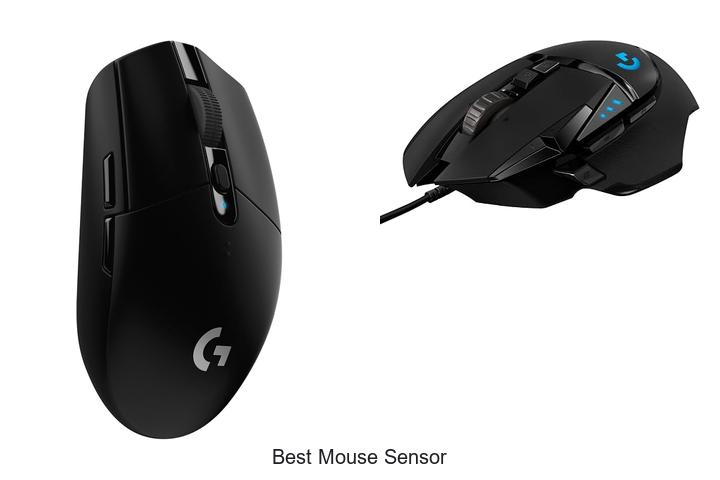
The precision of a gaming or productivity mouse hinges largely on its sensor technology, where factors such as DPI (dots per inch), tracking accuracy, and latency converge to define user experience. Among the various sensor types—optical, laser, and hybrid—the quest for the best mouse sensor involves dissecting nuanced performance metrics like lift-off distance, prediction algorithms, and acceleration consistency. Understanding how these elements influence cursor responsiveness and fluidity is crucial for professionals and enthusiasts alike.
Understanding how these elements influence cursor responsiveness and fluidity is crucial for professionals and enthusiasts alike. As advancements continue to push sensor capabilities toward near-perfect tracking in diverse environments, selecting the best mouse sensor becomes a more complex and technical decision than ever before. Dive deeper to uncover which sensor technologies set the benchmark and how they impact everyday use, gaming precision, and overall control.
Discover the ultimate precision engines powering top-tier performance
| Image | Product | Price |
|---|---|---|
Our Picks 1  | Logitech G305 Wireless Gaming Mouse | Check Price On Amazon |
Our Picks 2  | Logitech G502 Hero Wired Gaming Mouse | Check Price On Amazon |
Our Picks 3  | Razer Basilisk V3 Wired Ergonomic Gaming Mouse | Check Price On Amazon |
1. Logitech G305 Wireless Gaming Mouse
Experience precision and freedom with the Logitech G305 Wireless Gaming Mouse, designed to elevate your gameplay. Combining cutting-edge HERO sensor technology with ultra-fast LIGHTSPEED wireless connectivity, it ensures seamless control and responsiveness, ideal for gamers seeking competitive performance without the hassle of wires.
Equipped with the next-generation optical HERO sensor, the mouse delivers up to 12,000 DPI sensitivity and 400 IPS tracking for pinpoint accuracy. Its LIGHTSPEED wireless system offers a 1 ms report rate, while a single AA battery powers intense gaming sessions for up to 250 hours, all within a remarkably lightweight, ambidextrous design.
Pros
- Advanced HERO sensor providing high precision and energy efficiency
- Lag-free LIGHTSPEED wireless technology with 1 ms report rate
- Exceptional battery life of up to 250 hours or 9 months with Endurance mode
- Compact and lightweight (3.4 oz) design suitable for both desktop and travel use
- Ambidextrous layout with 6 programmable buttons for customizable gameplay
Cons
- Limited wireless range of 1.0 meter may not suit all setups
Combining superior sensor technology and efficient wireless performance, the Logitech G305 stands out as a versatile and reliable gaming mouse. Its balance of battery longevity, lightweight feel, and precise tracking makes it a compelling choice over other wireless mice at a similar price point.
2. Logitech G502 Hero Wired Gaming Mouse
Elevate your gaming experience with the Logitech G502 Hero Wired Gaming Mouse, designed for precision and customization. Equipped with the next-generation HERO sensor, it delivers ultra-responsive tracking up to 25600 DPI, giving competitive gamers an edge with flawless accuracy and zero acceleration or smoothing.
Featuring 11 programmable buttons and a dual-mode hyper-fast scroll wheel, the G502 Hero enables seamless control and adaptability. Adjustable weights allow tailoring the mouse’s feel to your playstyle, while LIGHTSYNC RGB lighting enhances immersion by syncing with game actions for a dynamic aesthetic.
Pros
- HERO sensor offers precise tracking with up to 25600 DPI and sub-micron accuracy
- Customizable weight system with up to five 3.6 g weights for personal balance
- 11 programmable buttons and hyper-fast scroll wheel for versatile gameplay control
Cons
- Wired connectivity may limit mobility compared to wireless alternatives
Combining precision technology and customizable features, the Logitech G502 Hero is a standout choice for gamers seeking enhanced performance. Its superior sensor and tailored controls provide a competitive advantage, making it well-suited for fast-paced gaming compared to other wired mice in its category.
3. Razer Basilisk V3 Wired Ergonomic Gaming Mouse
Experience precision and comfort like never before with the Razer Basilisk V3 Wired Ergonomic Gaming Mouse, designed to elevate your gaming performance. Its thoughtfully crafted form factor includes a thumb rest and 11 fully programmable buttons, providing both exceptional control and customizable functionality for serious gamers.
Equipped with the advanced FOCUS+ 26K DPI optical sensor and Optical Mouse Switches Gen 2, this mouse delivers pixel-precise accuracy and ultra-fast 2ms response time. The Hyperscroll Tilt Wheel allows seamless navigation between fast scrolling and tactile feedback, while 11 customizable Razer Chroma RGB lighting zones enhance your gaming setup with vibrant dynamic effects.
Pros
- Ergonomic design with supportive thumb rest for extended gaming comfort
- High-performance FOCUS+ 26K DPI sensor offering flawless tracking
- 11 programmable buttons for versatile customization and macro execution
Cons
- Wired design may limit mobility compared to wireless alternatives
For gamers who prioritize precision, customization, and ergonomic comfort, the Razer Basilisk V3 stands out as a top contender. Its blend of advanced sensor technology and user-centric design makes it a reliable choice, competing favorably with other high-end gaming mice in the market.
4. Razer DeathAdder Essential Wired Gaming Mouse

Experience precision and reliability with the Razer DeathAdder Essential Wired Gaming Mouse, designed to elevate your gaming performance. Equipped with a highly responsive optical sensor and ergonomic design, it ensures smooth and accurate control during intense gaming sessions or creative work.
Featuring a 6,400 DPI optical sensor with adjustable sensitivity via dedicated DPI buttons, this mouse allows seamless on-the-fly customization. Durable mechanical switches guarantee up to 10 million clicks, complemented by a rubberized, ridged scroll wheel for enhanced grip and precision. Its five programmable buttons offer extensive customization through Razer Synapse software.
Its five programmable buttons offer extensive customization through Razer Synapse software.
Pros
- High-precision 6,400 DPI optical sensor with easy sensitivity adjustment
- Durable mechanical switches rated for 10 million clicks ensures longevity
- Ergonomic, rubberized scroll wheel enhances grip and control for smoother scrolling
Cons
- Requires a corded connection, which may limit mobility compared to wireless options
Ideal for gamers and creators alike, the Razer DeathAdder Essential offers exceptional value through its precision sensor and customizable features. When compared to similar wired gaming mice, it stands out by combining durability with user-friendly programmability, making it a smart choice for performance-driven users.
5. HP X3000 G3 Wireless Mouse Black

Experience seamless productivity and comfort with the HP X3000 G3 Wireless Mouse Black, designed for users seeking reliable performance and ergonomic handling. Its ambidextrous shape and wireless freedom make it an ideal companion for both work and play, adaptable to various devices and operating systems.
This optical mouse features a precise 1600 dpi sensor, delivering smooth and accurate tracking across multiple surfaces thanks to advanced LED technology. Connectivity is hassle-free via a 4 GHz USB nano receiver, which conveniently stores inside the mouse for easy portability. With up to 15 months of battery life on a single AA battery, this device ensures consistent, lag-free operation.
With up to 15 months of battery life on a single AA battery, this device ensures consistent, lag-free operation.
Pros
- Ergonomic ambidextrous design suitable for all-day use with either hand
- Reliable wireless connection with a 30-foot range and compact USB nano receiver
- High-precision 1600 dpi optical sensor providing smooth tracking on various surfaces
Cons
- Requires two AA batteries, which may add to long-term running costs
Combining comfort, precision, and long-lasting wireless convenience, the HP X3000 G3 stands out as a versatile and affordable mouse. Compared to similar models, it offers remarkable battery longevity and portability, making it a smart choice for users prioritizing performance without breaking the bank.
6. Logitech G703 Lightspeed Wireless Mouse

Experience unparalleled precision and performance with the Logitech G703 Lightspeed Wireless Mouse, designed for gamers seeking the ultimate edge. Combining cutting-edge sensor technology and lightweight design, it delivers seamless responsiveness and comfort for extended gaming sessions.
Equipped with the HERO 25K sensor, this mouse ensures flawless 1:1 tracking, ultra-fast speed, and up to 25,600 DPI without any smoothing or acceleration. Its LIGHTSPEED wireless technology offers pro-grade connectivity, while the POWERPLAY system enables effortless wireless charging.
Pros
- Advanced HERO 25K sensor for precise, lag-free tracking at up to 25,600 DPI
- LIGHTSPEED wireless connectivity delivering rapid response times and a 35-hour battery life
- Compatible with POWERPLAY wireless charging for uninterrupted gameplay and convenience
- Ergonomic design with rubber side grips and adjustable 10 g weight for tailored comfort
- Six programmable buttons and customizable LIGHTSYNC RGB lighting for personalized control and aesthetics
Cons
- POWERPLAY wireless charging system sold separately, adding to overall cost
Offering top-tier sensor accuracy and wireless freedom, the Logitech G703 Lightspeed Wireless Mouse stands out among gaming peripherals. Its blend of performance, comfort, and customization makes it a worthy choice for serious gamers seeking reliability and precision.
7. Razer Basilisk V3 X HyperSpeed Wireless Gaming Mouse

Experience precision and comfort with the Razer Basilisk V3 X HyperSpeed Wireless Gaming Mouse, crafted for gamers seeking superior control and unrestrained performance. Its ergonomic design combines with cutting-edge technology to elevate gameplay, making every click and movement count in intense gaming sessions.
Engineered with Razer’s signature ergonomic shape and equipped with 9 customizable controls, this mouse adapts effortlessly to different grip styles. Featuring HyperSpeed Wireless and Bluetooth connectivity, enjoy seamless low-latency tracking or extended wireless sessions.
Pros
- Ergonomic design with 9 programmable buttons for versatile control and comfort
- Dual connectivity options: high-speed HyperSpeed Wireless and energy-efficient Bluetooth
- Exceptional battery life lasting up to 285 hours on HyperSpeed Wireless mode
- Razer 5G Advanced 18K Optical Sensor delivers precise tracking without spinouts
- Durable Razer Mechanical Mouse Switches Gen-2 with a 60 million click lifespan
- Dynamic Razer Chroma RGB lighting customizable with 16.8 million colors
Cons
- Limited customization software available exclusively through Razer Synapse, which some users may find complex
The Razer Basilisk V3 X HyperSpeed combines innovative wireless technology, precise sensor performance, and signature ergonomic comfort, delivering a gaming mouse that stands out in its class. For gamers looking to upgrade, it offers a reliable and customizable alternative to other wireless mice in its price range.
8. Logitech G PRO X2 Wireless Gaming Mouse

Experience unparalleled esports performance with the Logitech G PRO X2 Wireless Gaming Mouse, engineered in collaboration with world-class athletes. Designed for speed and precision, this lightweight mouse elevates gameplay with advanced customization, cutting-edge sensors, and immersive haptic feedback to give gamers a competitive edge.
Equipped with the HERO 2 sensor, the PRO X2 delivers ultra-precise tracking up to 44,000 DPI and 888 IPS, ensuring pinpoint accuracy. The innovative Haptic Inductive Trigger System provides real-time tactile feedback, while 10-level actuation and 5-level rapid trigger reset options offer deep customization. Long-lasting battery life combined with LIGHTSPEED Wireless technology guarantees lag-free, uninterrupted gaming sessions.
Long-lasting battery life combined with LIGHTSPEED Wireless technology guarantees lag-free, uninterrupted gaming sessions.
Pros
- Industry-leading speed with 30 ms faster clicks and customizable actuation levels
- HERO 2 sensor delivers exceptional tracking accuracy suitable for professional esports
- Breakthrough haptic feedback enhances immersion across all game scenarios
- Lightweight design with ultra-durable build and large UHMWPE feet for effortless movement
- Long battery life of 60–90 hours and seamless LIGHTSPEED Wireless connectivity
Cons
- Premium price point may be higher than some competitors
The Logitech G PRO X2 stands out as a top-tier wireless gaming mouse combining precision, speed, and innovative haptics that justify its investment. For gamers seeking the best mouse sensor performance and professional-grade features, it is a compelling choice that rivals many other high-end gaming mice.
9. Razer Naga V2 HyperSpeed Wireless Gaming Mouse

Experience unparalleled precision and versatility with the Razer Naga V2 HyperSpeed Wireless Gaming Mouse, engineered to elevate your gaming sessions. Featuring cutting-edge sensor technology and extensive programmability, this mouse combines speed, accuracy, and convenience, making it an essential tool for both casual and competitive gamers.
Equipped with 19 programmable buttons and the advanced Focus Pro 30K Optical Sensor, the Naga V2 delivers flawless tracking across various surfaces—including glass. Its Razer HyperSpeed Wireless connectivity offers a seamless, low-latency experience, while Bluetooth mode provides extended battery life up to 400 hours.
Mechanical switches ensure durability with up to 60 million clicks, supporting long-lasting performance and precision control.
Pros
- 19 ergonomically positioned programmable buttons for customizable commands and macros
- Razer HyperSpeed Wireless technology ensures 25% faster response time than other wireless mice
- Focus Pro 30K Optical Sensor offers flawless tracking on multiple surfaces, including glass
- Long-lasting battery life: up to 400 hours with Bluetooth and 250 hours using HyperSpeed Wireless
- Durable Mechanical Mouse Switches Gen 2 rated for 60 million clicks
Cons
- Priced higher than some wired gaming mice, which may not suit gamers on a tight budget
Balancing advanced features with durable design and exceptional battery life, the Razer Naga V2 HyperSpeed Wireless Gaming Mouse stands out as a top contender for gamers seeking reliable performance and extensive customization. Its wireless capabilities and cutting-edge sensor place it a step above many competitors in the gaming peripherals market.
10. ATTACK SHARK X3 Wireless Gaming Mouse

Discover exceptional precision and versatility with the ATTACK SHARK X3 Wireless Gaming Mouse, designed for gamers seeking responsive control and ultra-lightweight comfort. Its advanced sensor and multi-connection options deliver smooth, lag-free performance to elevate your gameplay experience.
Equipped with the cutting-edge PixArt PAW3395 sensor, the ATTACK SHARK X3 boasts a remarkable 26,000 DPI sensitivity, 650 IPS tracking speed, and lightning-fast 1ms polling rate. Offering Bluetooth 2, 4GHz wireless, and wired connectivity modes, it ensures uninterrupted responsiveness.
The ergonomic design and customizable features provide an optimal fit and tailored functionality for gamers of all styles.
Pros
- Ultra-lightweight construction at just 49 grams, reducing wrist fatigue during extended use
- Advanced PixArt PAW3395 optical sensor with programmable 26,000 DPI and excellent tracking accuracy
- Multi-mode connectivity: Bluetooth 5.2, 2.4GHz wireless, and wired ensuring versatile compatibility
- Long-lasting battery life up to 200 hours for uninterrupted gaming sessions
- Fully customizable buttons, DPI settings, lift-off distance, and macros via dedicated software
- Durable Kailh GM 8.0 switches rated for over 80 million clicks, complemented by a precise TTC encoder scroll wheel
- Ergonomic, ambidextrous design with improved PTFE feet for smooth gliding and excellent control
Cons
- May require software installation for full customization, potentially less convenient for users seeking plug-and-play simplicity
Combining advanced sensor technology, versatile connectivity, and lightweight ergonomics, the ATTACK SHARK X3 Wireless Gaming Mouse stands out as a compelling option for competitive gamers. Its balance of precision, speed, and comfort justifies its value, especially when compared to similarly priced gaming mice that may lack such extensive customization and battery endurance.
Unlock Precision: How to Choose the Best Mouse Sensor for Ultimate Performance
Types of Mouse Sensors
Optical vs. Laser sensors. Advantages and disadvantages of each. Common use cases for different sensors.The way a mouse connects to your device and its ability to accommodate additional features can significantly impact overall performance and convenience. Wireless options provide freedom of movement but may introduce slight latency or require battery management, whereas wired connections offer consistent power and minimal delay, ideal for precise tasks. Additionally, the presence of extra ports or customizable buttons can enhance functionality by allowing users to tailor their setup to specific needs, such as gaming or professional design work.
Additionally, the presence of extra ports or customizable buttons can enhance functionality by allowing users to tailor their setup to specific needs, such as gaming or professional design work.
Understanding these aspects ensures the mouse sensor works seamlessly within your existing setup and supports future upgrades without compatibility issues.
| Connection Type | Advantages | Disadvantages | Ideal Use Cases |
|---|---|---|---|
| Wired | Stable connection, no battery needed, low latency | Limited mobility, cable clutter | Competitive gaming, precision work (e.g., graphic design) |
| Wireless | Freedom of movement, cleaner setup | Potential input lag, battery dependency | General use, office work, casual gaming |
Sensor Performance Metrics
DPI and CPI explained. Tracking accuracy and precision. Liftoff distance considerations.High-performance mice rely heavily on sensor capabilities that directly impact user experience. DPI (dots per inch) and CPI (counts per inch) are key metrics that determine the sensitivity of the sensor, affecting how quickly the cursor moves across the screen in response to physical movement.
Additionally, low liftoff distance is essential to prevent the cursor from moving unintentionally when the mouse is lifted and repositioned, which is particularly important in gaming and detailed design work.
Equally important is the ability to interface seamlessly with different devices and setups. Wireless options offer freedom of movement but require reliable signal strength to avoid delays, while wired connections typically provide consistent responsiveness. Ports and sensor modules should support necessary compatibility for future upgrades, allowing flexibility without compromising performance over time.
Ports and sensor modules should support necessary compatibility for future upgrades, allowing flexibility without compromising performance over time.
Compatibility and Surface Requirements
Surface tracking support. Compatibility with operating systems. Impact of mousepads and desk materials.The ability of a mouse sensor to accurately track movement depends heavily on the surfaces it encounters. Different sensors react uniquely to various mousepads and desk materials; some perform exceptionally on smooth, cloth surfaces but struggle with glossy or reflective ones.
Equally important is the compatibility with multiple operating systems, ensuring seamless integration whether you are using Windows, macOS, or Linux. Without robust support across platforms, users may experience lag, inconsistent cursor movement, or limited functionality. Understanding how a sensor interacts with your typical environment and system setup helps guarantee precise tracking and a smoother overall experience.
Response Time and Polling Rate
Understanding polling rate. Effect on gaming and productivity. How sensor speed affects performance.Response time and polling rate play a crucial role in the overall performance of a mouse sensor, especially for gaming and productivity tasks that demand precision and speed. Polling rate refers to how often the mouse reports its position to the computer, measured in hertz (Hz).
This can significantly affect gameplay, where split-second reactions are essential, as well as detailed tasks like graphic design or photo editing.
The speed at which the sensor processes movement data also impacts responsiveness. A faster sensor can detect subtle changes more quickly, providing a more fluid experience without lag. By having a device that supports fast and reliable data transmission, users can avoid input delays and ensure their actions translate immediately on screen.
By having a device that supports fast and reliable data transmission, users can avoid input delays and ensure their actions translate immediately on screen. This seamless communication helps maintain precision across different activities, from fast-paced games to complex workflows.
Durability and Build Quality
Sensor lifespan and reliability. Resistance to wear and tear. Importance of firmware updates.Ensuring seamless interaction between your device and peripherals is essential for optimal performance and user experience. Reliable connection options, such as USB-C or Bluetooth, influence how quickly and stably your device communicates with external hardware, minimizing lag and interruptions. Equally important are additional ports or slots that allow for future upgrades or integration with other accessories, providing flexibility without the need for costly replacements.
These features collectively contribute to a setup that adapts to evolving needs, enhancing overall efficiency and convenience.
Additional Features to Consider
Customization and software support. Power consumption for wireless mice. Price vs. sensor quality tradeoffs.Devices with advanced customization options and robust software support offer users a more tailored experience, allowing adjustments such as DPI settings, polling rates, and button mapping to fit individual preferences. For wireless models, efficient power management is crucial, as it directly impacts battery life and convenience—longer-lasting devices reduce downtime and the need for frequent recharging. Balancing the cost against sensor performance is also essential; investing in higher-quality sensors often results in better accuracy and responsiveness, but it’s important to weigh these benefits against budget constraints to find the most suitable option.
FAQ’s
What Are The Key Features To Look For In The Best Mouse Sensor?The best mouse sensor should offer high precision and accuracy with a high DPI range and low input lag. Additionally, it should have excellent tracking capabilities on various surfaces and minimal acceleration or jitter.
How Does Sensor Dpi Affect Mouse Performance?Sensor DPI affects mouse performance by determining the sensitivity and precision of cursor movement; higher DPI allows for faster and more accurate tracking, especially useful in gaming or detailed tasks. However, excessively high DPI can lead to less control, so it should be balanced based on user preference and activity.
Which Mouse Sensor Is Most Suitable For Gaming?The most suitable mouse sensor for gaming is the optical sensor, particularly high-precision models like the PixArt PMW3360 or PMW3389, known for accurate tracking and low latency. These sensors provide smooth, responsive performance essential for competitive gaming.
What Is The Difference Between Optical And Laser Mouse Sensors?Optical mouse sensors use an LED light to illuminate the surface and track movement by capturing images, while laser mouse sensors use a laser beam for more precise and accurate tracking on a wider range of surfaces. Laser sensors typically offer higher sensitivity and work better on glossy or transparent surfaces compared to optical sensors.
How Do Different Surfaces Impact The Effectiveness Of Various Mouse Sensors?Different surfaces affect mouse sensor effectiveness by influencing the sensor’s ability to track movement accurately; optical sensors perform best on non-reflective, textured surfaces, while laser sensors can track on a wider range of surfaces, including glossy or transparent ones. However, highly reflective or uneven surfaces can cause erratic cursor behavior regardless of sensor type.
Conclusion
In summary, the best mouse sensor offers precision, speed, and reliability, essential for both gaming and professional use. Optical sensors like the PixArt PMW3360 lead the market with accurate tracking and low latency. Choosing a mouse with a top-tier sensor ensures smooth performance, enhancing your overall user experience and productivity.

- Top Best Computer Speakers with Microphone for Clear Sound! - November 11, 2026
- Best Wired Computer Speakers That Blow Your Mind! - November 11, 2026
- Top Best External Speakers for Laptop Computers Revealed! - November 11, 2026
