
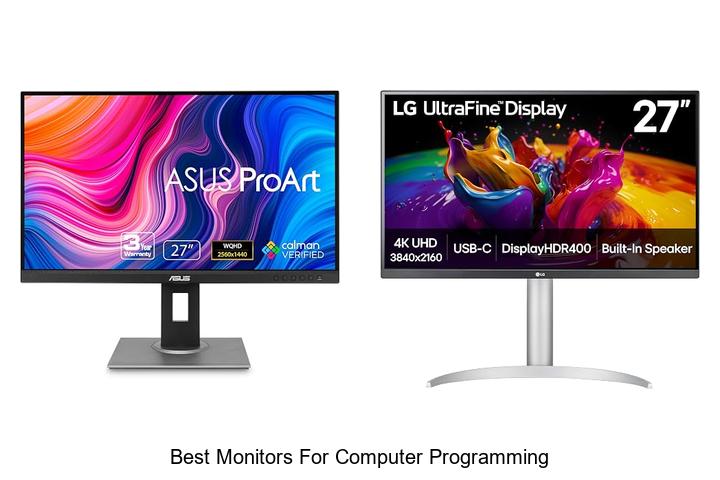
High-resolution displays, adjustable refresh rates, and ergonomic design are critical factors that significantly influence productivity in coding environments. For developers working with extensive lines of code, debugging tools, and multiple simultaneous windows, selecting the best monitors for computer programming becomes essential to reduce eye strain and enhance workflow efficiency.
Moreover, color accuracy and flicker-free technology contribute to extended coding sessions without fatigue. As the demand for creating seamless and efficient coding setups grows, understanding which monitor features align with programming needs is more important than ever.
Dive deeper to discover the key specifications that differentiate the best monitors for computer programming from the rest.
Enhance Your Coding Efficiency with These Top Display Picks
| Image | Product | Price |
|---|---|---|
Our Picks 1  | ASUS ProArt PA278QV 27 Inch QHD Monitor | Check Price On Amazon |
Our Picks 2  | LG 27UP850K-W 27-inch 4K UHD Monitor | Check Price On Amazon |
Our Picks 3  | BenQ RD280UG Programming Monitor | Check Price On Amazon |
1. ASUS ProArt PA278QV 27 Inch QHD Monitor
Experience unparalleled color accuracy and vibrant visuals with the ASUS ProArt PA278QV 27 Inch QHD Monitor, designed to meet the demanding needs of creative professionals and programmers. This monitor delivers outstanding display precision and ergonomic comfort, making it an ideal choice for intensive work sessions and detailed digital projects.
Featuring a 27-inch WQHD IPS display with 2560 x 1440 resolution, it ensures sharp images and wide viewing angles. Calman Verified with Delta E < 2 color accuracy, along with 100% sRGB and Rec.
709 coverage, guarantees true-to-life colors. Extensive connectivity options including DisplayPort, HDMI, and USB hub streamline your setup for all devices.
Pros
- Professional-grade color fidelity with Calman Verification and Delta E < 2 accuracy.
- Ergonomic stand offering tilt, swivel, pivot, and height adjustments for personalized comfort.
- Wide connectivity options including DisplayPort, HDMI, DVI-D, Mini DP, plus integrated USB hub.
Cons
- Refresh rate capped at 75Hz, which may not suit high-frame-rate gaming enthusiasts.
An exceptional monitor well-suited for programming, photo editing, and video work, the ASUS ProArt PA278QV combines superior color accuracy with versatile ergonomic features. Compared to other monitors in its class, it delivers premium performance without the premium price, making it one of the best monitors for computer programming and creative workflows.
2. LG 27UP850K-W 27-inch 4K UHD Monitor
Elevate your computing experience with the LG 27UP850K-W, a 27-inch 4K UHD monitor designed to deliver stunning visual clarity and vibrant colors. Tailored for professionals and creatives alike, its high-resolution display and versatile features make it a top contender among the best monitors for computer programming and multimedia tasks.
Featuring a 3840 x 2160 resolution with 95% DCI-P3 color gamut, the monitor offers lifelike images and hues. Its VESA DisplayHDR 400 certification enhances contrast and brightness, while multiple connectivity options like USB-C with 90W power delivery simplify workspace setups. The ergonomic adjustable stand and built-in stereo speakers with Waves MaxxAudio further enrich usability and entertainment.
The ergonomic adjustable stand and built-in stereo speakers with Waves MaxxAudio further enrich usability and entertainment.
Pros
- Crystal-clear 4K UHD resolution with wide color gamut for accurate visuals.
- Comprehensive connectivity including USB-C, DisplayPort, and dual HDMI ports.
- Ergonomic stand allowing height, tilt, and pivot adjustments for comfortable long-term use.
Cons
- 60Hz refresh rate may be limiting for high-speed gaming compared to specialized gaming monitors.
Combining exceptional image quality with user-friendly features, the LG 27UP850K-W stands out as a versatile and durable choice for programmers and content creators who demand precision and flexibility in their display. Its price point and feature set make it a compelling alternative to other 4K monitors in its class.
3. BenQ RD280UG Programming Monitor
Experience unparalleled clarity and comfort with the BenQ RD280UG Programming Monitor, designed specifically to cater to the needs of developers and programmers. Its innovative display features ensure fatigue-free long coding sessions, making it an essential tool for any serious coder seeking productivity and visual precision.
Equipped with a Nano Matte Panel and exclusive coding modes, this monitor enhances code readability while minimizing reflections. The 120Hz refresh rate delivers smooth navigation, and the MoonHalo Backlight technology reduces eye strain during extended hours.
Pros
- Low-reflection Nano Matte Panel ensures clear visuals without glare interference.
- Exclusive coding modes optimize readability and maintain eye comfort during long use.
- 120Hz refresh rate allows smooth scrolling and precise cursor movement for efficient coding.
- MoonHalo Backlight provides balanced lighting to reduce eye strain, especially in low-light environments.
- 3:2 aspect ratio offers increased vertical screen space, minimizing frequent scrolling through code and documents.
- Wide 178-degree viewing angle and HDR400 support enhance overall picture quality.
Cons
- Priced at $699, it might be a significant investment compared to standard monitors.
For programmers seeking a specialized monitor that enhances productivity and reduces eye fatigue, the BenQ RD280UG stands out with its tailored features and display technology. While it comes at a premium price, the focused design and performance offer excellent value compared to general-purpose monitors.
4. LG 27US500-W 27-Inch 4K UHD Monitor

Experience unparalleled visual clarity with the LG 27US500-W 27-Inch 4K UHD Monitor, designed to elevate your workspace. Ideal for professionals and programming enthusiasts, it combines stunning 4K resolution with vibrant color accuracy, delivering an immersive viewing experience that enhances productivity and creativity.
Equipped with a 1000:1 contrast ratio and IPS technology, this monitor produces deep blacks and vivid colors from wide viewing angles. It supports HDR10 and up to 90% DCI-P3 color gamut, ensuring lifelike visuals. The ergonomic stand allows comfortable tilt adjustments, while Onscreen Control lets you customize your layout effortlessly.
Pros
- Crystal-clear 4K UHD resolution with HDR10 for vibrant, true-to-life images
- Wide 170-degree viewing angles thanks to IPS panel technology
- Ergonomic stand with flexible tilt adjustments for personalized comfort
Cons
- Refresh rate limited to 60Hz, which may not suit fast-paced gaming needs
With its blend of superb visuals and practical features, the LG 27US500-W is a top contender among monitors tailored for computer programming and professional use. Its balance of performance and price point makes it a smart choice compared to other 4K options in the same range.
5. Dell S2725DSM 27-inch QHD Monitor

Discover exceptional clarity and performance with the Dell S2725DSM 27-inch QHD Monitor, tailored to enhance productivity and visual comfort. Its sharp QHD resolution and rapid 144Hz refresh rate make it an excellent choice for computer programming and multitasking, delivering a seamless and immersive workspace experience.
Featuring an IPS LCD panel with a 1500:1 contrast ratio and 178-degree wide viewing angles, this monitor ensures vivid colors and detailed visuals from virtually any perspective. Integrated dual 3W speakers provide quality audio, while TÜV-certified blue light reduction safeguards eye health during extended use.
Pros
- Vibrant QHD (2560 x 1440) resolution paired with a 144Hz refresh rate for smooth, sharp visuals ideal for programming and multitasking.
- Eye-friendly TÜV certification reduces harmful blue light emissions without sacrificing color accuracy or brightness.
- Ergonomic adjustability combined with Dell Display and Peripheral Manager software streamlines workspace organization and comfort.
Cons
- Brightness level of 350 nits may be less ideal for very bright environments compared to higher-end professional monitors.
With its balance of sharp visuals, ergonomic design, and built-in audio, the Dell S2725DSM stands out as a top contender in the realm of computer programming monitors. It delivers reliable performance at an attractive price point, making it a practical upgrade over standard 1080p displays for those seeking enhanced productivity and eye comfort.
6. Dell S3425DW 34-Inch Monitor

Experience a blend of performance and comfort with the Dell S3425DW 34-Inch Monitor, designed to elevate productivity for programming and multimedia tasks. Its expansive 34-inch curved display delivers immersive visuals while minimizing eye strain, making it an exceptional choice for extended computer use sessions.
Featuring a 21:9 aspect ratio and a matte VA panel with 3000:1 contrast, this monitor offers vivid colors through 99% sRGB and 95% DCI-P3 coverage. Enjoy silky-smooth motion supported by a 120Hz refresh rate and AMD FreeSync Premium. The integrated ComfortView Plus reduces blue light emissions, ensuring sustained comfort during long coding marathons.
Pros
- Wide 34-inch curved screen with 21:9 aspect ratio enhances multitasking efficiency.
- ComfortView Plus technology lowers harmful blue light emissions without compromising color accuracy.
- High refresh rate (120Hz) and ultra-low 0.03ms response time deliver smooth, tear-free visuals.
Cons
- Premium features come with a higher price point compared to some traditional 16:9 monitors.
Balancing rich color fidelity and ergonomic features, the Dell S3425DW stands out among monitors ideal for programming and creative work. While priced slightly above basic models, its combination of comfort, connectivity, and visual performance offers excellent value for professionals seeking superior display quality.
7. Dell SE2426H 24-inch FHD Monitor

Discover impressive clarity and seamless performance with the Dell SE2426H 24-inch FHD Monitor, designed to elevate your computing experience. Its fast 144Hz refresh rate and IPS technology make it an excellent choice for programmers seeking smooth visuals combined with eye comfort and accurate color reproduction.
Equipped with a matte finish and a 178° wide viewing angle, this monitor ensures consistent color and sharp images from almost any position. TÜV Rheinland 3-star certification minimizes harmful blue light exposure, making long coding sessions easier on your eyes. Thin bezels maximize screen space, enhancing focus and aesthetics.
Pros
- High 144Hz refresh rate and 1ms response for fluid, tear-free motion
- TÜV Rheinland 3-star certification reduces eye strain while maintaining color accuracy
- Wide 178° viewing angle with IPS technology for consistent visuals
- Matte screen finish reduces glare, ideal for prolonged work sessions
- Ultra-thin bezels enhance multi-monitor setups and viewing immersion
Cons
- Lacks advanced ergonomic adjustments found on some higher-end models
Offering excellent visual performance and eye care features at a competitive price, the Dell SE2426H stands out as a reliable monitor for computer programming. It strikes a fine balance between functionality and comfort, making it a smart choice among similar FHD monitors.
8. Acer KB220Q H2bi 21.5in FHD Office Monitor

Experience stunning visuals and smooth performance with the Acer KB220Q H2bi 5-inch FHD Office Monitor. Designed for professional and everyday use, its crisp Full HD display brings vibrant colors and clear details, making it ideal for programming, office tasks, and multimedia consumption.
Designed for professional and everyday use, its crisp Full HD display brings vibrant colors and clear details, making it ideal for programming, office tasks, and multimedia consumption.
Equipped with a 1920×1080 resolution and a 16:9 aspect ratio, the monitor delivers sharp, true-to-life images. The 100Hz refresh rate combined with Adaptive-Sync technology ensures fluid motion without screen tearing, while the fast 1ms response time eliminates ghosting for seamless productivity and entertainment.
Pros
- Vibrant Full HD 1080p display with 99% color gamut for exceptional clarity
- 100Hz refresh rate and Adaptive-Sync support provide smooth, tear-free visuals
- Near bezel-less ZeroFrame design allows multi-monitor setups with minimal distraction
Cons
- 21.5-inch screen size might feel compact for users accustomed to larger monitors
Combining vivid picture quality with responsive performance and a sleek design, the Acer KB220Q H2bi stands out as an excellent choice for those seeking a reliable and stylish monitor for programming and everyday computing needs at an affordable price point.
9. Dell S2425HSM 24-Inch Plus Monitor

Experience sharp visuals and responsive performance with the Dell S2425HSM 24-Inch Plus Monitor, an ideal choice for computer programming and multitasking demands. Combining Full HD clarity with smooth display technology, it enhances productivity and reduces eye strain during prolonged coding sessions or creative tasks.
Equipped with a 144Hz refresh rate and rapid 1ms MPRT, this monitor guarantees tear-free, fluid visuals while integrated dual 3W speakers deliver immersive audio. Its TÜV-certified eye care technology minimizes harmful blue light exposure, all housed in a matte-finished 16:9 screen offering wide 178-degree viewing angles and vibrant colors supported by AMD FreeSync.
Pros
- High 144Hz refresh rate with 1ms response time ensures smooth, lag-free visuals ideal for programming and multitasking.
- Ergonomic adjustability allows personalized positioning for comfortable long working hours.
- Eye-friendly TÜV certification reduces blue light without sacrificing color accuracy or brightness.
Cons
- Speakers offer moderate sound quality that may not replace dedicated audio devices for audiophiles.
Balancing performance, comfort, and eye care, the Dell S2425HSM stands out as a reliable monitor tailored for developers and professionals seeking quality visuals at an affordable price point. Compared to other monitors in a similar range, it delivers superior refresh rates and ergonomic features, making it a compelling choice for programming tasks.
10. Samsung 32 Flat Computer Monitor

Experience an expansive and modern viewing experience with the Samsung 32 Flat Computer Monitor, designed for professionals seeking clarity and comfort during long programming sessions. Its minimalist three-sided borderless design seamlessly integrates into multi-monitor setups, enhancing productivity without distractions.
Equipped with a 75Hz refresh rate and AMD FreeSync technology, the display delivers smooth, tear-free visuals, ideal for both work and entertainment. Advanced eye care features like Flicker Free technology and Eye Saver Mode reduce eye strain, making extended screen time more comfortable and safer.
Pros
- Borderless three-sided design for a seamless multi-monitor experience
- 75Hz refresh rate with AMD FreeSync ensures smooth and fluid on-screen motion
- Advanced eye care technology minimizes blue light and flicker for reduced eye fatigue
Cons
- Brightness level of 250 cd/m² may be less suitable for brightly lit environments
The Samsung 32 Flat Computer Monitor stands out by blending visual performance with ergonomic eye care, making it an excellent choice for programmers and everyday users alike seeking both productivity and comfort. Compared to other monitors in its price range, it offers a refined balance of features tailored for long-hour use.
Top Picks for the Best Monitors to Elevate Your Computer Programming Experience
Display Size and Resolution
Ideal screen size for programming. Importance of screen resolution. Benefits of ultrawide vs. standard monitors.Having multiple ports and upgrade options directly impacts how efficiently a setup can accommodate various devices and future needs. Programmers often rely on connecting external peripherals such as keyboards, mice, and multiple storage devices, making ample and diverse input options essential.
Without sufficient versatility in how a monitor interfaces with other equipment, users might face limited productivity and costly replacements down the road.
Panel Type and Color Accuracy
IPS vs. TN vs. VA panels. Color reproduction for clear code readability. Viewing angles and screen consistency.High-quality displays often feature different panel technologies that directly affect code clarity and comfort during long programming sessions. IPS panels stand out for their exceptional color accuracy and wide viewing angles, making them ideal for maintaining consistent screen visibility from various positions.
In contrast, TN panels typically respond faster but sacrifice color richness and viewing uniformity, which can lead to eye strain over time. VA panels offer deeper contrast levels, enhancing text clarity in low-light environments, yet they may exhibit narrower viewing angles compared to IPS. Choosing a monitor with superior color reproduction ensures that syntax highlighting and interface elements appear crisp, reducing the effort needed to distinguish subtle differences in code.
Additionally, maintaining consistent brightness and color across the entire screen prevents distractions caused by color shifts or washed-out areas, ultimately contributing to a more productive and comfortable workspace.
Ergonomics and Build Quality
Adjustable stands and tilt options. Blue light filter and flickerfree technology. Durable materials and design.Having multiple ports such as HDMI, DisplayPort, USB-C, and USB hubs enhances a monitor’s versatility, allowing effortless connection to various devices like laptops, desktops, or peripherals without the need for extra adapters. This flexibility is crucial for creating an efficient workspace, where switching between different setups or adding external hardware is seamless. Moreover, the ability to connect several monitors through daisy-chaining or additional inputs supports multitasking, which improves productivity and workflow management.
Expansion possibilities also play a vital role, providing room to upgrade or customize your setup as your needs evolve. Monitors that offer extra USB ports or docking station features can serve as a central hub, reducing cable clutter and simplifying device management.
This forward-thinking design saves time and frustration, making it easier to integrate new tools or accessories without overhauling your entire setup.
Connectivity and Compatibility
Available ports (HDMI, DisplayPort, USBC). Multimonitor setup support. Compatibility with various operating systems.Having a variety of ports such as HDMI, DisplayPort, and USB-C is essential for a versatile workstation. These options allow seamless connection to different devices and peripherals without the need for additional adapters. For programmers who rely on multiple screens, the ability to easily set up dual or even triple monitor configurations enhances productivity by providing ample screen real estate for coding, debugging, and reference materials. Additionally, compatibility across various operating systems ensures that the display functions smoothly whether you are working on Windows, macOS, or Linux, avoiding unnecessary driver issues and maintaining consistent performance.
Additionally, compatibility across various operating systems ensures that the display functions smoothly whether you are working on Windows, macOS, or Linux, avoiding unnecessary driver issues and maintaining consistent performance. Choosing a screen that supports these features will help create a future-proof setup that adapts to evolving technology and workflow needs.
Refresh Rate and Response Time
Importance for programming vs. gaming. Recommended refresh rates. Impact on eye strain during long coding sessions.Refresh rate and response time play distinct roles depending on the intended use of a monitor. For programming, a moderate refresh rate of around 60Hz is typically sufficient, unlike gaming where higher rates like 120Hz or 144Hz enhance motion smoothness and responsiveness.
Lower response times minimize ghosting and motion blur, which can contribute to visual fatigue. Choosing a screen that balances a steady refresh rate with quick response helps maintain comfort and focus, making it easier to work efficiently without unnecessary distractions or discomfort.
Ultimately, prioritizing these features ensures a more pleasant viewing experience that supports productivity over long coding sessions.
Price and Warranty Considerations
Budget vs. feature tradeoffs. Warranty and customer support options. Longterm reliability and value for money.Having multiple ports and the ability to easily add peripherals significantly enhances the overall functionality of a monitor in a programming setup. This flexibility allows for seamless connection of devices such as keyboards, external storage, or additional displays without requiring constant swapping of cables or adapters. It also future-proofs your workspace by accommodating new tech upgrades as they become available.
When evaluating these features, it’s important to weigh the upfront cost against what is offered, ensuring that essential connections do not come at the expense of other important specs. Monitors that provide versatile connectivity options often deliver better value in the long run by reducing the need for extra accessories or replacements.
Additionally, having robust customer support and warranty coverage brings peace of mind, especially since screens can be prone to issues over time. A solid warranty signals confidence from the manufacturer in the durability and reliability of their product, making it easier to justify a higher price point. Investing in these aspects can lead to greater satisfaction and fewer disruptions during extended use.
FAQ’s
What Are The Key Features To Look For In A Monitor For Computer Programming?When choosing a monitor for computer programming, key features include a high resolution for clear text, an ergonomic design for comfortable long hours, and good color accuracy to reduce eye strain. Additionally, a large screen size or multiple monitor support can enhance productivity by allowing more code and resources to be visible simultaneously.
Which Monitor Size Is Ideal For Programming And Multitasking?An ideal monitor size for programming and multitasking is typically between 27 to 32 inches, offering ample screen real estate to view multiple windows and code simultaneously. Ultra-wide monitors in this size range can further enhance productivity by reducing the need for multiple screens.
How Important Is Screen Resolution And Aspect Ratio For Programming Monitors?Screen resolution and aspect ratio are important for programming monitors as higher resolution provides clearer text and more screen real estate to view code and multiple windows simultaneously. A wider aspect ratio, like ultrawide, can enhance productivity by allowing easier multitasking without needing multiple monitors.
Are Curved Monitors Beneficial For Programmers?Yes, curved monitors can be beneficial for programmers as they reduce eye strain and provide a more immersive viewing experience by matching the natural curvature of the eyes. This can enhance focus and comfort during long coding sessions.
What Are The Best Budget-Friendly Monitors Suitable For Coding?The best budget-friendly monitors for coding typically include models like the Dell P2422H and Acer SB220Q, which offer good screen resolution, eye-care features, and comfortable screen size. These monitors provide clear text display and reduce eye strain, making them ideal for long coding sessions without breaking the bank.
Conclusion
Choosing the best monitors for computer programming enhances productivity and reduces eye strain. Look for features like high resolution, ample screen size, adjustable stands, and eye-care technology.
Investing in the right monitor ensures a comfortable and efficient coding environment, ultimately improving your workflow and focus.

- Top 7 Best Monitors for Computer Programming You Need Now! - October 8, 2026
- Unlock the Best Monitor Screen Size for Ultimate Viewing! - October 8, 2026
- Best Monitor for Programming: Unlock Ultimate Coding Comfort! - October 8, 2026
