
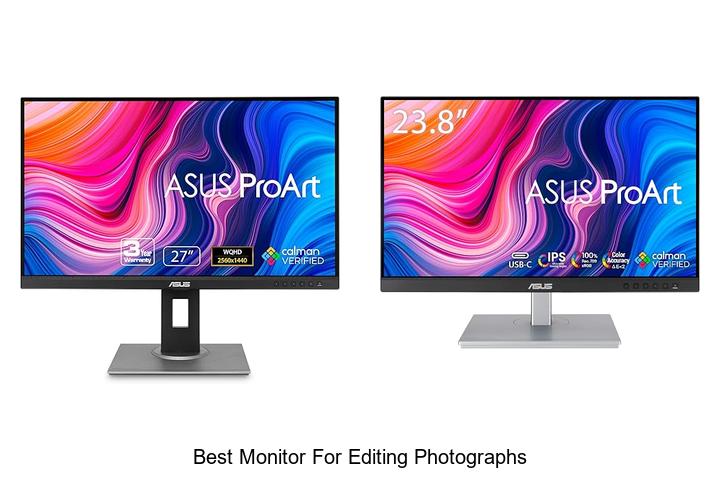
Color accuracy, wide color gamut, high resolution, and precise calibration are fundamental factors that define an ideal workspace for professional photographers and digital artists. When it comes to post-processing and retouching, the choice of display significantly influences the outcome, as subtle differences in contrast and hue can affect the final image quality. Understanding the critical specifications such as IPS panels, 10-bit color depth, and uniform brightness distribution is essential in discerning the best monitor for editing photographs.
Selecting a monitor that meets these technical criteria ensures that every shade and detail is rendered faithfully, preserving the integrity of your creative vision. Exploring these features in depth reveals why not all monitors are created equal in the realm of photo editing.
Unlock Stunning Visual Precision with These Top Display Picks for Photo Editing Enthusiasts
| Image | Product | Price |
|---|---|---|
Our Picks 1  | ASUS ProArt PA278QV Professional Monitor | Check Price On Amazon |
Our Picks 2  | ASUS ProArt PA247CV 24-inch Professional Monitor | Check Price On Amazon |
Our Picks 3  | ASUS ProArt PA278CV 27 Inch QHD Monitor | Check Price On Amazon |
1. ASUS ProArt PA278QV Professional Monitor
Discover unparalleled color accuracy and clarity with the ASUS ProArt PA278QV Professional Monitor, tailored for photographers and creative professionals. Its stunning 27-inch WQHD display delivers vibrant visuals that make photo editing precise, helping you bring your artistic vision to life with ease and confidence.
Engineered for true-to-life color reproduction, the monitor features Calman Verified Delta E < 2 accuracy alongside 100% sRGB and 100% Rec. 709 color gamut coverage. The ergonomic stand and versatile connectivity options—including DisplayPort, HDMI, and USB hubs—support seamless workflow integration for extended editing sessions.
Pros
- Exceptional color precision with factory calibration ensures edits reflect real-world results.
- Extensive connectivity options and built-in USB hub simplify device management and desk setup.
- Ergonomic adjustable stand provides comfort during long hours of detailed editing work.
Cons
- The 75 Hz refresh rate might be less appealing for users seeking ultra-smooth performance beyond professional editing needs.
Combining professional-grade accuracy with user-centric features, the ASUS ProArt PA278QV stands out as an outstanding monitor for photo editors. While similar models offer 4K resolution, its balance of crisp WQHD clarity and color fidelity makes it a smart investment for precision-led creative workflows.
2. ASUS ProArt PA247CV 24-inch Professional Monitor
Elevate your photo editing experience with the ASUS ProArt PA247CV 24-inch Professional Monitor, engineered for precision and vibrant color reproduction. Its stunning Full HD IPS display and factory-calibrated color accuracy make it an ideal choice for photographers seeking true-to-life visuals and seamless workflow integration.
Featuring a 24-inch LED screen with 100% sRGB and Rec. 709 wide color gamut coverage, this monitor delivers exceptional color fidelity validated by Calman certification.
Equipped with versatile connectivity options, including USB-C with 65W power delivery and daisy-chain DisplayPort support, it ensures smooth multitasking and multi-monitor setups.
Pros
- Factory-calibrated for Delta E < 2 accuracy ensuring color precision critical for editing photographs.
- Extensive input options like USB-C with power delivery, DisplayPort, HDMI, and USB 3.1 hub enhance versatility.
- Multi-display support via DisplayPort daisy chaining facilitates efficient workspace expansion.
Cons
- Full HD resolution might be limiting for users preferring 4K detail for ultra-high-resolution edits.
Combining professional-grade color accuracy with robust connectivity and a comfortable 178° viewing angle, the ASUS ProArt PA247CV stands out as a reliable investment for photo editors prioritizing quality and efficiency within a reasonable budget.
3. ASUS ProArt PA278CV 27 Inch QHD Monitor
Discover unparalleled color accuracy and stunning visual clarity with the ASUS ProArt PA278CV 27 Inch QHD Monitor, designed specifically for professional photo editors and creative artists. This monitor delivers an expansive 27-inch workspace with precise color reproduction, making it a top choice for those seeking the best monitor for editing photographs.
Featuring a Calman Verified Delta E < 2 and 100% sRGB color gamut, this IPS display guarantees true-to-life colors essential for detailed image work. Its versatile USB-C port supports 65W power delivery, simplifying connectivity for Mac and PC users.
Noteworthy ergonomic and display features include a 90° pivot stand and daisy-chaining capability to enhance productivity.
Pros
- Exceptional color accuracy with Calman Verified calibration and 100% sRGB & 100% Rec. 709 coverage for professional-grade visuals.
- USB-C connectivity offers power delivery and data transfer via a single cable, reducing workspace clutter.
- Ergonomic stand supports comfortable long-term use and flexible orientation options, including vertical pivot.
Cons
- Refresh rate capped at 75Hz, which might be less ideal for high-frame-rate video editing or gaming.
Balancing advanced color precision with user-friendly connectivity and ergonomic features, the ASUS ProArt PA278CV stands out as a reliable, professional monitor for detailed photo editing tasks. Its comprehensive feature set and excellent warranty coverage provide strong value for both creatives and professionals alike.
4. ASUS ProArt PA248QV Professional Monitor

Discover unmatched color precision and clarity with the ASUS ProArt PA248QV Professional Monitor, designed specifically for photographers and creative professionals. Its exceptional color accuracy and versatile ergonomic features make it an ideal choice for editing photographs with true-to-life detail and comfortable long hours at work.
Boasting a 1920 x 1200 WUXGA resolution and 100% sRGB/Rec.709 color space coverage, this monitor delivers vivid and sharp visuals. Calman verified with DeltaE < 2 ensures consistent color fidelity, while its IPS panel and anti-glare technology reduce eye strain.
Calman verified with DeltaE < 2 ensures consistent color fidelity, while its IPS panel and anti-glare technology reduce eye strain. Multiple connectivity options and a fully adjustable stand complete this professional-grade package.
Pros
- Exceptional color accuracy with 100% sRGB/Rec.709 and Calman verification for professional-grade editing
- Ergonomic design featuring tilt, swivel, pivot, and height adjustments for personalized comfort
- Versatile connectivity including DisplayPort, HDMI, and D-Sub for seamless device integration
- Includes a free 3-month Adobe Creative Cloud subscription, enhancing creative workflows
- Long-lasting support with an extended 5-year warranty after online registration
Cons
- Refresh rate of 75Hz may be limiting for users requiring higher frame rates beyond photo editing
Offering a premium balance between professional color fidelity and user comfort, the ASUS ProArt PA248QV stands out as one of the best monitors for editing photographs under $ Compared to similar models, it excels in color accuracy and ergonomics, making it a valuable investment for both amateur and professional photographers.
5. Yodoit 4K 16 Portable Monitor UHD IPS Display

Discover unparalleled clarity and vibrant color accuracy on the go with the Yodoit 4K 16 Portable Monitor UHD IPS Display. Designed for creative professionals and digital nomads, its sunlight-readable screen and ultra-high resolution elevate photo editing and graphic work to a new level of convenience and precision.
Boasting a true 4K 3840×2400 resolution on a 16:10 aspect ratio, this portable monitor delivers 145% sRGB color gamut and a 2000:1 contrast ratio, providing stunning visuals with rich color depth and sharp detail. Its sunlight-readable 1200 nit brightness and matte anti-glare coating make outdoor editing effortless, while versatile connectivity options and built-in speakers support a wide range of devices and usage scenarios.
Pros
- Exceptional 4K resolution with a 16:10 aspect ratio offers more vertical workspace ideal for editing photos and videos.
- Sunlight-readable 1200 nits brightness combined with matte anti-glare finish enables outdoor use without compromise.
- Comprehensive connectivity including USB-C and Mini HDMI, compatible with laptops, gaming consoles, and cameras.
Cons
- Full brightness may require dual power cables on certain USB-C laptops for optimal performance.
For professionals seeking the best portable display for photo editing, the Yodoit 4K 16 combines stellar image quality, flexible connectivity, and outdoor usability at a competitive price point. Compared to standard portable monitors with limited brightness and narrower color gamuts, it offers a superior on-the-go solution without bulk.
6. Samsung 27 S40GD Borderless Business Monitor

Discover vibrant visual clarity with the Samsung 27 S40GD Borderless Business Monitor, designed to elevate your editing and creative projects. Its expansive 27-inch IPS display delivers consistent colors and sharp details, making it an excellent choice for photographers and professionals seeking precision and style in one sleek package.
Equipped with a 100Hz refresh rate and ultra-thin bezels, this monitor reduces motion blur and maximizes screen space. The height-adjustable stand and blue light reduction technology ensure comfort during extended use, while versatile connectivity options provide seamless integration with your workflow and devices.
Pros
- IPS panel guarantees vivid, consistent colors across a wide 178° viewing angle, ideal for accurate photo editing.
- 100Hz refresh rate minimizes lag and motion blur, enhancing smooth performance during creative tasks and multimedia consumption.
- Ergonomic features including height adjustment and screen pivot allow personalized, comfortable setups for prolonged sessions.
Cons
- Brightness at 250 cd/m² might be lower than some monitors optimized for HDR and ultra-high brightness environments.
Balancing style, performance, and user comfort, the Samsung 27 S40GD stands out as a reliable option for detailed photo editing and everyday use. Compared to similar models, it offers an excellent refresh rate and ergonomic flexibility at a competitive price point, making it a worthy investment for creatives.
7. ASUS ProArt PA27JCV 27-Inch Professional Monitor

Discover unparalleled clarity and color precision with the ASUS ProArt PA27JCV 27-Inch Professional Monitor, crafted specifically for photographers and creative professionals. Its stunning 5K resolution and wide color gamut deliver vivid, true-to-life images, making it an excellent choice for those seeking the best monitor for editing photographs.
Equipped with a 27-inch 5K HDR IPS panel, the ASUS ProArt PA27JCV offers 5120 x 2880 resolution, 99% DCI-P3, and 100% sRGB coverage for vibrant, accurate colors. Factory-calibrated to Delta E<2, it guarantees professional-grade color fidelity, enhanced further by intelligent brightness and color temperature adjustments. USB-C connectivity with 96W power delivery and an auto KVM feature add versatility for efficient workflows.
USB-C connectivity with 96W power delivery and an auto KVM feature add versatility for efficient workflows.
Pros
- Exceptional 5K HDR display with wide color gamut ensures precise and vibrant color reproduction
- Factory pre-calibrated with Calman verification for Delta E<2 color accuracy
- Intelligent brightness adjustment uses ambient light sensors for consistent image quality
- Versatile USB-C port supports fast data transfer, DisplayPort, and provides up to 96W power delivery
- Built-in Auto KVM enables seamless switching between two computers using one set of keyboard and mouse
- Includes a free 3-month Adobe Creative Cloud subscription for enhanced creative capabilities
- Long-term peace of mind with a 5-year extended warranty (requires online registration)
Cons
- Refresh rate capped at 60Hz, which might not cater to users requiring higher frame rates for other tasks
The ASUS ProArt PA27JCV stands out as a top-tier choice for photo editors seeking premium resolution, accurate color fidelity, and professional-grade features. While its refresh rate may not suit fast-motion needs, its unparalleled visual performance and workflow enhancements make it an outstanding investment compared to typical 4K monitors.
8. ASUS ProArt 27 WQHD Professional Monitor

Discover unparalleled color accuracy and crystal-clear details with the ASUS ProArt 27 WQHD Professional Monitor, designed explicitly for photo editors and creative professionals. Its 27-inch IPS panel and wide 178° viewing angles offer expansive workspace fluidly blending precision and comfort for demanding visual tasks.
Equipped with a 2560×1440 resolution and 100% sRGB & Rec.709 color gamut, this monitor ensures true-to-life colors through factory calibration and Calman Verified ΔE<2 accuracy.
Pros
- Exceptional color precision with factory calibration and Calman verification for consistent results.
- Wide viewing angles and high-resolution WQHD panel deliver sharp, detailed images.
- Ergonomic stand featuring tilt, swivel, pivot, and height adjustment for personalized comfort.
- Comprehensive connectivity including DisplayPort, HDMI, DVI, and a USB hub streamlines device integration.
- Eye care technologies reduce flicker and blue light, minimizing strain during extended use.
Cons
- Refresh rate capped at 75Hz, which is sufficient for editing but less ideal for fast-paced gaming.
The ASUS ProArt 27 WQHD Professional Monitor stands out as a leading choice for photo editors seeking color fidelity and ergonomic design without compromising budget. While similar monitors may offer higher refresh rates, this display excels in delivering professional-grade accuracy and comfort, essential for detailed photographic editing workflows.
9. BenQ PD2725U 27 4K IPS Creative Pro Monitor
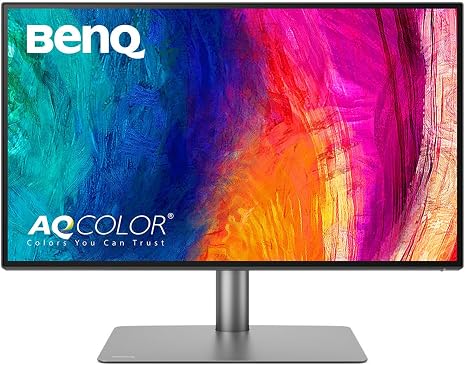
Discover unparalleled precision and vivid clarity with the BenQ PD2725U 27 4K IPS Creative Pro Monitor, designed specifically for photographers and creative professionals. Its 4K UHD resolution combined with accurate color reproduction empowers you to edit photographs with incredible detail and true-to-life colors.
Equipped with Thunderbolt 3 connectivity and Daisy-Chain technology, the PD2725U allows seamless multi-monitor setups and high-speed data transfers. The monitor’s factory calibration covers 100% sRGB, 95% P3, and Rec.709 color gamuts, complemented by Pantone validation and DeltaE≤3 accuracy to ensure professional-grade color fidelity.
Pros
- Comprehensive Thunderbolt 3 ports enable up to dual 4K monitor daisy-chaining with fast data and power delivery.
- Advanced factory calibration with BenQ ICCsync supports Display P3 and Mac compatibility for instant color accuracy.
- Ergonomically designed stand allows height adjustment, tilt, swivel, and pivot for comfortable long editing sessions.
Cons
- Standard 60Hz refresh rate may not suit high-frame-rate video editing or fast-paced gaming.
For creatives seeking the best monitor for editing photographs, the BenQ PD2725U combines exceptional 4K detail, color precision, and versatile connectivity with ergonomic comfort—making it a reliable investment compared to similar monitors that lack this comprehensive feature set.
10. ASUS ProArt PA27UCDMR Professional 27-Inch Monitor

Discover unparalleled precision and vibrant visuals with the ASUS ProArt PA27UCDMR Professional 27-Inch Monitor. Designed specifically for photographers and creative professionals, this 4K UHD QD-OLED display delivers exceptional color accuracy and brightness, making it an ideal choice for those seeking the best monitor for editing photographs.
Featuring a 5-inch 4K UHD resolution and a rapid 240 Hz refresh rate, it offers smooth rendering and stunning detail. With 1000 nits peak brightness and VESA DisplayHDR True Black 400 certification, the screen delivers deep contrast and lifelike images.
The monitor covers 100% sRGB, 99% DCI-P3, and Rec. 2020 color gamuts, enhanced by ASUS ProArt Hardware Calibration for professional-grade color accuracy.
Pros
- Exceptional color precision with world-leading E < 1 calibration and True 10-bit color depth for true-to-life photo editing.
- Comprehensive connectivity including dual Thunderbolt 4 ports with up to 96W Power Delivery, HDMI 2.1, DisplayPort 1.4 DSC, and a built-in USB hub for versatile workstation setup.
- Includes a complete accessory package and a free 3-month Adobe Creative Cloud subscription, enhancing value for creative professionals.
Cons
- Premium price point may exceed the budget of casual users or hobbyists.
The ASUS ProArt PA27UCDMR stands out as a top-tier monitor crafted for detailed and color-critical photographic work. Its advanced technology and professional features justify the investment, making it a leading choice over standard editing displays in this category.
The Ultimate Guide to Choosing the Best Monitor for Editing Photographs
Display Quality
Resolution and screen size. Color accuracy and color gamut (sRGB, AdobeRGB, DCIP3). Panel type (IPS vs. TN vs. VA).Having multiple input ports and options to connect various devices ensures a smoother workflow, especially for photographers who often switch between cameras, external drives, and computers. Monitors equipped with modern interfaces like USB-C, HDMI, and DisplayPort allow for seamless integration with a range of equipment, reducing the need for adapters and cables.
Many monitors also offer USB hubs or card readers, which streamline transferring files directly to the display, saving valuable time in the editing process. Considering these features ahead of time helps avoid compatibility issues and future-proofs the investment as technology evolves.
Ensuring that the display has enough ports and versatile options makes managing a creative workspace more efficient and less cluttered.
Calibration and Color Management
Factory calibration and color profiles. Hardware calibration support. Compatibility with calibration tools.Having a wide range of ports and connection options plays a crucial role in ensuring your editing setup is both versatile and future-proof. Different cameras, computers, and peripherals may require specific interfaces such as HDMI, DisplayPort, USB-C, or legacy VGA ports, so a monitor equipped with multiple input types allows seamless integration without the need for constant adapters.
Additionally, extra USB hubs or expansion slots on the monitor can simplify your workspace by enabling direct connection of calibration tools, storage devices, or other accessories, improving workflow efficiency.
For photographers who work with high-resolution files and color-critical tasks, the ability to connect to hardware calibration devices directly through the monitor is invaluable. This compatibility ensures accurate color rendition by maintaining consistent color profiles tailored to the specific device, leading to more precise edits and prints.
Some monitors even support on-screen adjustments via software when paired with calibration tools, making fine-tuning easier and more reliable over time.
| Feature | Benefit |
|---|---|
| Multiple Input Ports (HDMI, DisplayPort, USB-C) | Flexible device connection without extra adapters |
| USB Hub Integration | Convenient peripheral and calibration tool attachment |
| Hardware Calibration Support | Ensures colors remain accurate and consistent over time |
| Compatibility with Calibration Software & Devices | Simplifies workflow and improves editing precision |
Connectivity Options
HDMI, DisplayPort, and USBC ports. Secondary USB hubs and card readers. Compatibility with multiple devices.Having a variety of ports such as HDMI, DisplayPort, and USB-C on a monitor allows for seamless connection with different devices, from laptops and desktops to cameras and external drives. This versatility ensures that photographers can easily switch between devices without needing additional adapters or docks. Additionally, integrated USB hubs and card readers simplify workflow by providing direct access to memory cards and peripherals, reducing clutter and making file transfers faster and more efficient.
Additionally, integrated USB hubs and card readers simplify workflow by providing direct access to memory cards and peripherals, reducing clutter and making file transfers faster and more efficient. Monitors equipped with these features enhance overall productivity by supporting multiple devices simultaneously, making the editing process smoother and more streamlined.
Ergonomics and Build Quality
Adjustable stand (height, tilt, swivel, pivot). Screen uniformity and antiglare coating. Build materials and durability.Having multiple ports and options for connecting different devices and peripherals is essential for a photography workstation. It ensures seamless integration with cameras, external storage, color calibration tools, and even secondary displays, which helps streamline the editing process.
This flexibility reduces downtime and frustration caused by needing adapters or constantly swapping cables.
| Feature | Benefit | Example Use |
|---|---|---|
| Multiple HDMI/DisplayPort Inputs | Connects multiple devices without unplugging | Switching between laptop and desktop easily |
| USB Hubs / USB-C Ports | Allows direct connection of peripherals | Attaching drawing tablets or calibration tools |
| Thunderbolt or Proprietary Ports | Supports high-speed data transfer and charging | Quickly transferring large RAW image files |
Additional Features
Blue light filter and flickerfree technology. Multiple monitor setups and bezels. Warranty and customer support.Having multiple ports and connection options on a display is crucial for photographers who often use a variety of devices and peripherals. This flexibility allows for seamless integration with cameras, external drives, and calibration tools, ensuring a smooth workflow without constant unplugging and plugging.
Additionally, the ability to daisy-chain or connect multiple screens facilitates expanded workspace, helping editors view their images on larger or dual displays, which is essential for detailed retouching and color accuracy.
Beyond just connections, features like a blue light filter and flicker-free technology reduce eye strain during long editing sessions, promoting better focus and less fatigue. Thin bezels enhance the experience in multi-monitor setups by minimizing visual distractions and creating a more immersive, continuous image across screens.
| Feature | Benefit |
|---|---|
| Multiple Ports | Easy connection of cameras, storage, and calibration devices |
| Daisy-Chaining Capabilities | Supports extended screen setups for improved workflow |
| Blue Light Filter & Flicker-Free | Reduces eye fatigue during extended use |
| Thin Bezels | Better visual flow in multi-monitor arrangements |
Lastly, having a solid warranty and responsive customer support provides peace of mind, ensuring any technical issues or defects can be addressed promptly without disrupting important projects. This kind of backing is particularly valuable given the investment involved in professional-grade displays.
Price and Budget Considerations
Balancing features with cost. Longterm investment vs. entrylevel options. Availability of professionalgrade monitors within budget.Modern professional screens often come equipped with multiple ports like USB-C, HDMI, and DisplayPort, which streamline connection to various devices such as laptops, cameras, and external drives. Having a wide range of input options ensures smooth data transfer and reduces the need for additional adapters, saving time and effort during photo editing sessions.
Additionally, the ability to easily connect extra peripherals, such as color calibration tools or external storage, supports a more efficient and organized workspace. Expandable slots or hubs integrated into the display can further future-proof the setup by accommodating new technologies or additional devices, making the editing process more versatile and adaptable over time.
FAQ’s
What Features Should I Look For In The Best Monitor For Editing Photographs?The best monitor for editing photographs should have high color accuracy with wide color gamut support (such as AdobeRGB or DCI-P3) and a high resolution for detailed image clarity. Additionally, look for features like excellent contrast ratio, uniform brightness, and factory calibration to ensure consistent and precise color reproduction.
How Important Is Color Accuracy When Choosing A Monitor For Photo Editing?Color accuracy is crucial when choosing a monitor for photo editing because it ensures that images are displayed true to life, allowing precise color corrections and consistent results across different devices. Without accurate color representation, edited photos may appear incorrect or inconsistent when viewed elsewhere.
Which Monitor Brands Are Recommended For Professional Photo Editing?Recommended monitor brands for professional photo editing include Eizo, NEC, and BenQ, known for their color accuracy and calibration tools. Dell UltraSharp and ASUS ProArt series are also popular choices among photographers for high-quality displays.
What Is The Ideal Screen Size And Resolution For A Photo Editing Monitor?The ideal screen size for a photo editing monitor is typically between 24 to 32 inches, providing ample workspace without causing eye strain. A resolution of at least 2560 x 1440 (QHD) or higher, such as 4K (3840 x 2160), is preferred for sharp detail and accurate image editing.
How Does An Ips Panel Compare To Other Panel Types For Photo Editing Tasks?An IPS panel offers superior color accuracy and wider viewing angles compared to TN and VA panels, making it ideal for photo editing tasks. Its consistent color reproduction ensures more precise and reliable image adjustments.
Conclusion
In summary, the best monitor for editing photographs offers accurate color reproduction, high resolution, and wide color gamut support. Features like IPS panels, adjustable brightness, and factory calibration ensure precise editing results. Investing in such a monitor enhances workflow efficiency and guarantees your photos look stunning across all devices and print formats.
Investing in such a monitor enhances workflow efficiency and guarantees your photos look stunning across all devices and print formats.

- Best Monitor for Editing Photographs: Top Picks Revealed! - October 6, 2026
- Best Large Monitor Picks That Will Blow Your Mind! - October 6, 2026
- Best Large Computer Monitor Deals You Can’t Miss Today! - October 6, 2026
