
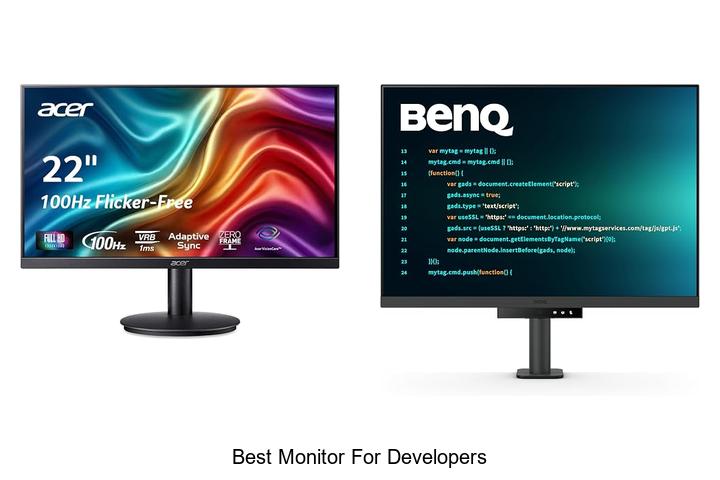
In the realm of software development, optimal screen resolution, color accuracy, refresh rate, and ergonomic design play a crucial role in enhancing productivity and reducing eye strain during long coding sessions. Developers require a display that supports high pixel density for crisp text rendering, wide viewing angles for collaboration, and connectivity options that accommodate multiple devices seamlessly.
As the market offers a plethora of displays with varying features and price points, understanding the critical factors that differentiate one monitor from another becomes essential. Dive into this comprehensive guide to uncover what truly defines the best monitor for developers and how to select one that elevates your coding experience.
Top Picks to Boost Productivity and Enhance Your Coding Experience
| Image | Product | Price |
|---|---|---|
Our Picks 1  | Acer KB220Q H2bi 21.5in FHD Office Monitor | Check Price On Amazon |
Our Picks 2  | BenQ RD280UA 28.2 4K Programming Monitor | Check Price On Amazon |
Our Picks 3  | Amzfast AMZG27C1 27-inch Curved Gaming Monitor | Check Price On Amazon |
1. Acer KB220Q H2bi 21.5in FHD Office Monitor
Discover the Acer KB220Q H2bi 5in FHD Office Monitor, designed to deliver vibrant visuals and smooth performance for everyday computing and professional tasks.
Its sleek ZeroFrame design and crisp Full HD resolution make it an excellent choice for developers and office users seeking clarity and seamless multi-monitor setups.
Featuring a 1920×1080 resolution with a 16:9 aspect ratio, this monitor offers true-to-life colors and sharp image quality. Adaptive-Sync support ensures tear-free graphics, while a fast 100Hz refresh rate and 1ms response time provide fluid motion, reducing input lag and ghosting during both work and multimedia applications.
Pros
- Vivid Full HD display with accurate color reproduction ideal for coding and design
- Adaptive-Sync support for smooth visuals without screen tearing
- Near bezel-less ZeroFrame design allows seamless multi-monitor configurations
Cons
- Brightness level at 250 nits may not be optimal for very bright environments
Balancing performance and affordability, the Acer KB220Q H2bi stands out as a reliable option within its category. While not as bright as some high-end models, it delivers excellent image quality and responsiveness, making it a top contender for developers seeking an efficient and budget-friendly monitor solution.
2. BenQ RD280UA 28.2 4K Programming Monitor
The BenQ RD280UA 2 4K Programming Monitor is engineered to elevate developers’ workspaces with superior clarity and eye comfort. Combining high-resolution display technology with specialized coding modes, it delivers an exceptional experience tailored for programming efficiency and prolonged screen time.
Featuring a Nano Matte Panel to reduce glare and reflections, this monitor ensures clear visibility in any lighting environment. Advanced coding modes differentiate syntax with precision, while BenQ’s unique MoonHalo backlight provides a soothing illumination. The Ergo Arm stand offers flexible positioning for ergonomic comfort, complemented by eye-care technologies such as Night Hours Protection and Brightness Intelligence Gen2.
Pros
- Anti-glare Nano Matte Panel for reduced eye strain in varied lighting conditions.
- Advanced coding display modes that enhance code readability and productivity.
- Ergo Arm stand allowing infinite flexibility and customized ergonomic setup.
Cons
- Limited refresh rate of 60Hz, which may not suit users seeking faster motion handling.
For developers prioritizing eye comfort and coding clarity, the BenQ RD280UA stands out as a specialized and reliable choice. While its refresh rate is standard, its combination of ergonomic design and coding-focused features make it an impressive option against typical 4K monitors.
3. Amzfast AMZG27C1 27-inch Curved Gaming Monitor
Elevate your development and gaming experience with the Amzfast AMZG27C1 27-inch Curved Gaming Monitor, designed to deliver crisp visuals and seamless performance. Its high refresh rate and vibrant color spectrum make it an excellent choice for developers and gamers who demand both clarity and speed.
Featuring a 200Hz refresh rate and a 27-inch curved FHD display, this monitor provides smooth animations and sharp details. Equipped with built-in upgraded 2W speakers and optimized game modes, it enhances both work productivity and immersive gameplay. HDR10 and 130% sRGB color coverage ensure true-to-life images, while anti-glare and low blue light technologies reduce eye strain during extended use.
HDR10 and 130% sRGB color coverage ensure true-to-life images, while anti-glare and low blue light technologies reduce eye strain during extended use.
Pros
- High 200Hz refresh rate for fluid visuals and reduced motion blur
- Wide 130% sRGB gamut and HDR10 support for vibrant and accurate colors
- Built-in speakers with improved sound quality eliminate the need for external audio devices
Cons
- 1080p resolution may not satisfy preference for higher-resolution monitors at similar size
Offering robust features tailored to both developers and gamers, the Amzfast AMZG27C1 stands out as a versatile and cost-effective option. Its combination of speed, color fidelity, and ergonomic design provides excellent value when compared to other monitors in this category.
4. BenQ RD280U 28.2 Programming Monitor

Designed specifically for developers, the BenQ RD280U 2 Programming Monitor combines cutting-edge display technology with ergonomic comfort, making it an ideal choice for coding marathons. Its Nano Matte Panel reduces glare and reflections, helping programmers maintain sharp focus and productivity throughout the day.
Featuring a 2-inch screen with a 3:2 aspect ratio, this monitor provides ample vertical space for viewing code. The advanced coding modes differentiate syntax effortlessly, while the MoonHalo backlight enhances comfort with subtle, immersive lighting.
The advanced coding modes differentiate syntax effortlessly, while the MoonHalo backlight enhances comfort with subtle, immersive lighting. Eye-care technologies like Brightness Intelligence Gen2 and Night Hours Protection reduce eye strain during prolonged night-time work sessions.
Pros
- Anti-glare Nano Matte Panel ensures clear visibility without distracting reflections.
- Unique backlighting (MoonHalo) promotes comfortable, focused working environments.
- Incorporates Brightness Intelligence Gen2 and Night Hours Protection to minimize eye fatigue.
- 3:2 aspect ratio offers more vertical workspace, ideal for coding and document review.
- Ergonomically designed to support optimal posture during long programming sessions.
Cons
- Limited refresh rate of 60Hz may not suit users seeking high-frame-rate responsiveness for other tasks.
Overall, the BenQ RD280U stands out as a premium programming monitor that balances display quality, eye care, and ergonomic design. For developers who spend extensive time in front of the screen, it offers enhanced comfort and efficiency unavailable in many competing models within the same price range.
5. 15.6 Laptop Screen Extender Portable Monitor USB-C

Enhance your productivity with the 6 Laptop Screen Extender Portable Monitor USB-C, designed to add a seamless second display to your laptop setup. Its ultra-slim, stylish design and hassle-free connectivity make it an ideal choice for professionals seeking a lightweight and efficient dual-screen experience on the go.
Its ultra-slim, stylish design and hassle-free connectivity make it an ideal choice for professionals seeking a lightweight and efficient dual-screen experience on the go.
Equipped with two 6 full HD IPS displays, this extender delivers vivid visuals with a wide 178° viewing angle and 280 nits brightness. The portable monitor simplifies connections via dual USB-C cables for compatible devices, supporting triple-screen setups that boost multitasking efficiency by up to 300%.
Its durable aluminum shell combines portability with protection, while broad compatibility covers Mac, Windows, Chrome OS, and more.
Pros
- Effortless dual-screen setup with minimal cables, reducing clutter and simplifying workspace organization.
- High-quality 15.6″ FHD IPS displays provide clear, true-to-life colors and wide viewing angles for immersive multitasking.
- Lightweight and durable aluminum construction coupled with a leather carry bag ensures easy portability and durability.
Cons
- Requires additional H5-T cable and power setup for laptops without full-featured USB-C ports or M1/M2/M3 MacBooks, which may add complexity.
Offering excellent visual performance and a sleek, portable design, this laptop screen extender stands out among similar products by reducing cable clutter and enhancing multitasking capabilities for professionals. Its versatility and straightforward setup make it a valuable addition for developers and remote workers looking to optimize their workspace.
6. Philips 22E2N1100 22 Inch Computer Monitor

Discover the perfect blend of performance and eye comfort with the Philips 22E2N1100 22 Inch Computer Monitor. Designed to meet the demands of developers and casual gamers alike, its Full HD IPS display offers sharp visuals and wide viewing angles to boost productivity and enjoyment throughout the day.
Equipped with a 120Hz overclockable refresh rate and 1ms MPRT response time, this monitor ensures smooth, blur-free motion ideal for fast-paced tasks. Adaptive-Sync technology eliminates screen tearing, while LowBlue Mode and Flicker-Free features reduce eye strain during extended working hours.
Its ultra slim bezel complements multi-monitor setups and offers flexible mounting options.
Pros
- Vivid Full HD 1920 x 1080 IPS display with accurate color reproduction and 178° wide viewing angles
- Overclockable 120Hz refresh rate plus 1ms MPRT reduces motion blur for smooth visuals
- Eye-friendly technologies including LowBlue Mode, Flicker-Free, and EasyRead mode enhance comfort during long use
Cons
- Glossy screen finish may cause reflections in bright environments
Balancing affordability and advanced features, the Philips 22E2N1100 stands out as a reliable, user-friendly choice for developers seeking an efficient, comfortable display. It outperforms many entry-level monitors by offering higher refresh rates and superior eye care technologies, making it a solid investment for both work and casual gaming.
7. BenQ RD280UG Programming Monitor

The BenQ RD280UG Programming Monitor is engineered to elevate a developer’s workspace, combining cutting-edge display technology with ergonomic features. Tailored to enhance productivity and reduce eye strain, it makes long coding sessions more comfortable and efficient.
This 28-inch LED monitor incorporates a Nano Matte Panel and MoonHalo Backlight for reduced glare and balanced illumination, ensuring clear code visibility even during extended use. Its 3:2 aspect ratio provides increased vertical screen space, while a 120Hz refresh rate enables smooth scrolling and precise cursor movements, ideal for faster navigation through complex projects.
Pros
- Enhanced readability with exclusive coding modes designed specifically for developers
- Reduced eye strain via MoonHalo Backlight and low-reflection Nano Matte Panel
- Expanded vertical workspace due to 3:2 aspect ratio, minimizing the need for frequent scrolling
Cons
- Premium price point may be higher than standard monitors without specialized features
Overall, the BenQ RD280UG stands out among developer monitors with its thoughtful blend of visual clarity, ergonomic comfort, and performance. For professionals seeking a dedicated coding display that minimizes fatigue and improves workflow, this model offers compelling value compared to typical 16:9 monitors lacking specialized developer-centric features.
8. Amazon Basics 27-inch IPS Monitor

Experience crisp visuals and vibrant colors with the Amazon Basics 27-inch IPS Monitor, designed for professionals seeking reliable display performance. Its sleek design and Full HD resolution make it an excellent choice for developers and digital workers who need clarity and accuracy in every pixel.
Featuring a 27-inch flat IPS panel, this monitor delivers rich color reproduction and wide 170-degree viewing angles. Equipped with 1920×1080 resolution and AOC brand technology, it ensures smooth visuals supported by a 75Hz refresh rate, perfect for multitasking, coding, or streaming high-quality content.
Pros
- IPS panel technology for accurate color and wide viewing angles
- Adjustable stand tilting from -5 to 20 degrees for ergonomic comfort
- Energy Star certified, promoting reduced power consumption and eco-friendliness
Cons
- Limited to Full HD resolution; might not satisfy users requiring 4K or higher detail
Overall, the Amazon Basics 27-inch IPS Monitor offers an excellent balance between performance and price, making it a solid option among the best monitors for developers. Its user-friendly features and dependable display quality make it a worthwhile investment, especially for those prioritizing clarity and energy efficiency.
9. Sceptre 27-inch IPS Gaming Monitor E275B-FP240
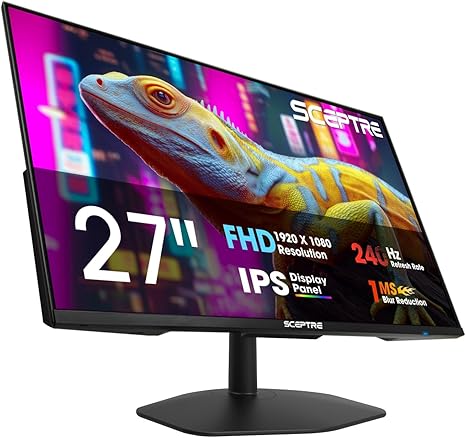
Discover unparalleled visual clarity and comfort with the Sceptre 27-inch IPS Gaming Monitor E275B-FP240. Designed to support extended use whether for intensive gaming sessions or professional development tasks, this monitor combines vibrant colors, fast refresh rates, and eye-friendly technology to elevate your screen experience.
Equipped with a 240Hz refresh rate and an IPS panel offering 100% sRGB color gamut, it delivers smooth, accurate visuals essential for developers and gamers alike. Blue-Light Shift technology minimizes eye strain during prolonged use, while integrated speakers and multiple connectivity options add practicality and convenience to any workspace.
Pros
- Blue-Light Shift technology reduces harmful emissions, enhancing eye comfort during long hours.
- 240Hz refresh rate combined with Adaptive Sync ensures seamless motion clarity and responsiveness.
- IPS panel with 100% sRGB color gamut guarantees vivid, true-to-life images perfect for coding and creative tasks.
- Built-in speakers and audio out jack provide versatile sound options, keeping your desk clutter-free.
- Minimal bezel design supports multi-monitor setups for an expanded, distraction-free workspace.
- Multiple input ports including HDMI and two DisplayPorts allow flexible device connections.
Cons
- Does not include height adjustment or swivel stand, which may limit ergonomic customization.
Overall, the Sceptre E275B-FP240 balances high performance and eye-friendly features at an affordable price point. It stands out among similarly priced monitors, making it a smart choice for developers seeking vibrant visuals with reduced eye strain and gamers wanting smooth gameplay.
10. CRUA 34 WQHD Ultrawide Curved Gaming Monitor

Experience immersive and vivid visuals with the CRUA 34 WQHD Ultrawide Curved Gaming Monitor, designed to elevate your workspace and gaming setup. Its expansive 34-inch ultrawide screen offers a perfect balance of detail and comfort, ideal for developers seeking focus and precision in every task.
Featuring a 3440×1440 resolution with a 21:9 aspect ratio and a 1500R curvature, this monitor ensures a panoramic view that reduces eye strain and maximizes screen real estate. With a 165Hz refresh rate paired with AMD FreeSync technology, it delivers fluid motion perfect for both coding and gaming sessions.
Pros
- Ultra-wide 34-inch curved display with 1500R curvature for immersive viewing and less eye fatigue
- High-resolution 3440×1440 WQHD screen offering crisp and detailed visuals ideal for multitasking
- 165Hz refresh rate combined with FreeSync technology ensures smooth, tear-free video performance
Cons
- HDMI ports are limited to 100Hz refresh rate, requiring DisplayPort for full 165Hz experience
Combining wide color gamut support and advanced display technology, the CRUA ultrawide monitor stands out as an excellent option for developers and gamers alike. Its competitive price and comprehensive connectivity options make it a practical alternative to other ultrawide monitors in the market.
Top Picks and Expert Tips for Choosing the Best Monitor for Developers
Screen Size and Resolution
Ideal screen size for coding and multitasking. Recommended resolution for crisp text and detailed visuals. Aspect ratio considerations for developers.Having multiple ports and the ability to connect various devices seamlessly can significantly enhance a developer’s workflow. It ensures compatibility with different peripherals such as external hard drives, keyboards, and multiple computers without needing extra adapters or hubs. Additionally, monitors that offer versatile input options like USB-C, HDMI, and DisplayPort allow smoother integration with modern laptops and desktops, reducing cable clutter and improving desk ergonomics.
Another aspect to prioritize involves the capability to upgrade or add functionality through extra slots or built-in hubs. This flexibility supports evolving work setups, whether that means incorporating a docking station, adding more USB ports, or connecting additional monitors. A setup that can grow with the user’s needs helps maintain productivity and future-proofs the investment.
A setup that can grow with the user’s needs helps maintain productivity and future-proofs the investment.
Panel Type and Color Accuracy
Differences between IPS, VA, and TN panels. Importance of color accuracy for designrelated development. Viewing angles and eye comfort.Monitors equipped with multiple ports such as USB-C, HDMI, and DisplayPort offer greater flexibility in connecting various devices simultaneously, streamlining workflow and reducing desk clutter. Having options for additional slots or hubs allows for future upgrades and peripheral attachments without needing external adapters, which is especially beneficial for developers who require multiple screens or input devices. This adaptability ensures that the monitor can keep pace with evolving technology and multitasking demands.
Ergonomics and Adjustability
Height, tilt, swivel, and pivot adjustments. Importance of VESA mount compatibility. Reducing eye strain with flickerfree and blue light filters.Ensuring a monitor offers multiple adjustment options such as height, tilt, swivel, and pivot is crucial for creating an ergonomic workstation that adapts to your natural posture, reducing strain during long coding sessions. Compatibility with VESA mounts adds versatility by allowing easy installation on adjustable arms or wall mounts, which helps save desk space and further customize your setup. Features like flicker-free technology and built-in blue light filters play a significant role in minimizing eye fatigue, making extended hours in front of the screen more comfortable and less damaging over time.
Features like flicker-free technology and built-in blue light filters play a significant role in minimizing eye fatigue, making extended hours in front of the screen more comfortable and less damaging over time.
Connectivity Options
Common ports: USBC, HDMI, DisplayPort, Thunderbolt. Multimonitor setup support. Integrated USB hubs and charging capabilities.Having a variety of ports and interfaces significantly boosts a developer’s productivity by enabling seamless connection to multiple devices and peripherals. Modern screens often come equipped with USB-C, HDMI, DisplayPort, and Thunderbolt ports, allowing flexibility to link laptops, desktops, and other gadgets without the need for extra adapters. Supports for multiple displays is another crucial aspect, as it lets users create an extended workspace that enhances multitasking and code management.
Supports for multiple displays is another crucial aspect, as it lets users create an extended workspace that enhances multitasking and code management.
Additionally, built-in USB hubs provide convenient access points for plugging in keyboards, mice, or external drives directly through the monitor, reducing cable clutter on the desk. Some models also offer charging capabilities through USB-C, which means powering laptops or mobile devices happens efficiently using a single cable, streamlining the entire setup.
Refresh Rate and Response Time
Suitable refresh rates for programming versus gaming. Impact of response time on user experience. Adaptive sync technologies relevance for developers.The choice of ports and connectivity options directly impacts how easily a monitor integrates with various devices and peripherals. Having multiple USB-C, HDMI, or DisplayPort inputs allows seamless connection to laptops, desktops, and external gadgets without constantly swapping cables. Additionally, the presence of USB hubs or additional slots enables developers to extend their workspace efficiently by attaching accessories such as keyboards, mice, or external storage.
This flexibility ensures a clutter-free and productive environment, which is crucial during long coding sessions or multitasking with multiple displays. Ensuring future-proof compatibility also helps avoid frequent upgrades, making it a smart investment over time.
Additional Features and Budget Considerations
Builtin speakers and webcams. Cable management and design aesthetics. Balancing features with budget constraints.Modern development environments often require more than just a crisp display; integrated speakers and webcams can significantly enhance video conferencing and multimedia experiences without the need for extra peripherals. Proper cable management options and sleek design aesthetics contribute to a clutter-free workspace, promoting focus and efficiency.
Striking this balance allows for a setup that is both functional and visually harmonious, tailored to professional needs.
FAQ’s
What Features Should Developers Look For When Choosing The Best Monitor?Developers should look for monitors with high resolution and accurate color representation to ensure clear and precise visuals. Additionally, features like adjustable ergonomics, multiple connectivity options, and eye-care technologies enhance comfort and productivity during long coding sessions.
Which Monitor Size And Resolution Are Ideal For Coding And Software Development?An ideal monitor size for coding and software development is typically between 24 to 32 inches, offering enough screen real estate for multiple windows and comfortable viewing. A resolution of at least 1920×1080 (Full HD) is recommended, with higher resolutions like 2560×1440 (QHD) or 4K providing sharper text and more workspace.
How Important Is Color Accuracy And Refresh Rate For Programming Tasks?Color accuracy is generally less important for programming tasks, as code readability relies more on clear font rendering and contrast. However, a high refresh rate can enhance eye comfort during long coding sessions by reducing flicker and screen fatigue.
What Are The Top Monitor Brands Recommended For Developers In 202Top monitor brands recommended for developers in 2024 include Dell, LG, and ASUS, known for their high-resolution displays, accurate color reproduction, and ergonomic designs. These brands offer models that support extended screen time and multitasking, essential for coding and development work.
Should Developers Consider Ultrawide Or Dual Monitor Setups For Increased Productivity?Yes, developers should consider ultrawide or dual monitor setups as they provide more screen real estate for multitasking, code comparison, and debugging, which can enhance productivity. The choice depends on personal preference and workflow, with ultrawide monitors offering a seamless display and dual monitors providing flexible window management.
Conclusion
In summary, the best monitor for developers combines high resolution, accurate color reproduction, ample screen real estate, and ergonomic design to enhance productivity and reduce eye strain. Whether you prioritize ultra-wide displays, 4K clarity, or adjustable stands, choosing a monitor that fits your coding and multitasking needs is essential for an efficient development environment.

- Top 7 Best Desktop Monitors for Gaming You Can’t Miss! - October 5, 2026
- Top Picks for the Best Computer Display Monitor Today! - October 5, 2026
- Best 4K Creator Monitor to Boost Your Editing Game Today! - October 5, 2026
