
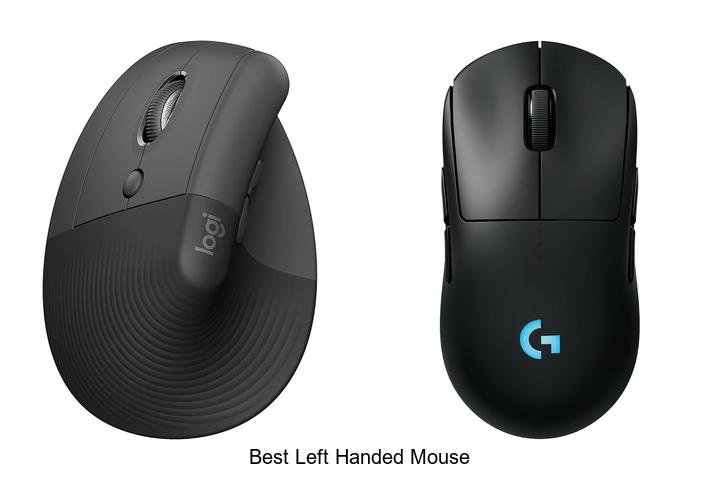
Ergonomic design and precision tracking are critical factors in selecting peripheral devices, particularly when accommodating the unique needs of left-handed users. A mouse engineered for left-hand dominance addresses challenges such as button layout symmetry, cursor accuracy, and comfortable grip orientation, which standard right-handed models often overlook.
As left-handed individuals seek devices that harmonize with their natural hand dynamics, the search for the best left handed mouse becomes essential for both productivity and comfort. Delving into the features that distinguish top-tier models reveals innovations that redefine usability for left-handed users—explore what truly sets the best options apart in this specialized category.
Discover Top Contenders Crafted for Comfortable Control and Precision
| Image | Product | Price |
|---|---|---|
Our Picks 1  | Logitech Lift Left-Handed Vertical Wireless Mouse | Check Price On Amazon |
Our Picks 2  | Logitech G PRO 2 Lightspeed Wireless Gaming Mouse | Check Price On Amazon |
Our Picks 3  | MEETION Left-Handed Ergonomic Vertical Mouse | Check Price On Amazon |
1. Logitech Lift Left-Handed Vertical Wireless Mouse
Experience unparalleled comfort and productivity with the Logitech Lift Left-Handed Vertical Wireless Mouse, expertly crafted to support small to medium left hands. Its ergonomic vertical design elevates your wrist positioning, making long hours at your desk feel effortless and pain-free.
Designed with a softly textured grip and a snug thumb rest tailored for left-hand use, this mouse promotes a natural forearm posture at a 57-degree angle. Featuring whisper-quiet clicks, customizable buttons, and a SmartWheel for precise scrolling, it is compatible across multiple operating systems via Bluetooth Low Energy or Logi Bolt USB connection.
Pros
- Ergonomic vertical shape reduces wrist strain and promotes natural hand posture for all-day comfort.
- Broad compatibility including Windows, macOS, iPadOS, Chrome OS, and Linux enhances versatility.
- Long-lasting battery life of up to 24 months minimizes interruptions and maintenance.
Cons
- Best suited for small to medium left hands; larger hands may find it less comfortable.
Offering a smart blend of ergonomic design and advanced features, the Logitech Lift Left-Handed Vertical Wireless Mouse stands out as an excellent choice for left-handed users seeking comfort and efficiency. It outperforms many standard mice by focusing on wrist health and multi-device connectivity, making it well worth the investment.
2. Logitech G PRO 2 Lightspeed Wireless Gaming Mouse
Elevate your gaming performance with the Logitech G PRO 2 Lightspeed Wireless Gaming Mouse, expertly crafted for competitive gamers seeking speed, precision, and adaptability. Designed to seamlessly support both left- and right-handed users, this mouse ensures an optimized experience tailored to your play style.
Equipped with the HERO 2 sensor, the PRO 2 delivers pro-level accuracy with up to 44K DPI and 888+ IPS tracking, guaranteeing pinpoint responsiveness. Its LIGHTSPEED wireless technology provides a reliable, lag-free connection, while LIGHTFORCE optical-mechanical switches offer swift, satisfying clicks.
The ambidextrous modular design includes programmable magnetic side buttons, perfect for customizing your setup. With up to 95 hours of battery life and USB-C charging, uninterrupted gaming sessions are within reach.
Pros
- Advanced HERO 2 sensor ensures champion-level precision and fast tracking
- Ambidextrous, modular design supports left- and right-handed use with customizable side buttons
- LIGHTSPEED wireless technology delivers tournament-grade responsiveness with up to 95 hours battery life
Cons
- Premium price point may be a consideration for budget-conscious gamers
Combining cutting-edge technology with versatile design, the Logitech G PRO 2 Lightspeed Wireless Gaming Mouse stands out as an exceptional choice for gamers desiring precision and flexibility. Its features position it favorably against comparable gaming mice, especially for users seeking a high-performance left-handed option.
3. MEETION Left-Handed Ergonomic Vertical Mouse
Experience unparalleled comfort and precision with the MEETION Left-Handed Ergonomic Vertical Mouse, expertly designed specifically for left-handed users. Its innovative vertical shape significantly reduces hand strain, making it an ideal choice for extended computer sessions, combining ergonomic excellence with sleek aesthetics.
Engineered with dual Bluetooth and 4G wireless connectivity, this mouse offers seamless device switching for enhanced productivity. Four adjustable DPI levels—from 800 to 2400—allow customization based on your workflow needs, while the USB-C rechargeable battery supports up to three months of use, complemented by a smart power-saving mode.
Pros
- Ergonomic vertical design minimizes hand fatigue for left-handed users
- Dual wireless connectivity (Bluetooth and 2.4G) enables effortless device switching
- Adjustable DPI settings provide precise cursor control tailored to different tasks
- Long-lasting USB-C rechargeable battery with energy-saving sleep mode
- Compatible with multiple devices including PCs, Macs, tablets, and smartphones
Cons
- Designed exclusively for left-handed users, limiting usability for right-handed individuals
Combining ergonomic innovation, versatile connectivity options, and energy-efficient design, the MEETION Left-Handed Ergonomic Vertical Mouse stands out as a top contender among left-handed mice. It delivers both comfort and functionality, making it a smart investment for professionals and casual users seeking sustained productivity.
4. MEETION Left-Handed Wireless Vertical Mouse

Experience natural comfort and efficiency with the MEETION Left-Handed Wireless Vertical Mouse, expertly crafted for left-handed users seeking an ergonomic and stylish solution. Its vertical design reduces wrist strain, making it an excellent choice for all-day use whether at work or home.
This mouse boasts versatile connectivity options, including Bluetooth 0, 0, and 4G wireless, compatible with Windows 10/11 and macOS 15+, ensuring seamless integration with various devices.
Pros
- Ergonomic vertical design specifically tailored to reduce wrist and forearm strain for left-handed users.
- Multiple connectivity options with Bluetooth and 2.4G wireless provide flexible device compatibility.
- Adjustable DPI settings (1200-3200) and forward/backward buttons boost precision and productivity.
- Rechargeable battery eliminates the need for replacements, paired with vibrant customizable RGB lighting.
- Durable build quality with smooth scrolling wheel ensures long-lasting reliable performance.
Cons
- Not compatible with Android TV or older Linux distributions, limiting use on some platforms.
Offering a balance of ergonomic comfort, advanced functionality, and modern aesthetics, the MEETION Left-Handed Wireless Vertical Mouse stands out as a top contender for users looking to enhance their workspace. Its tailored features make it a smart upgrade compared to generic ambidextrous mice.
5. ELECOM EX-G Left Handed Wireless Trackball Mouse M-XT4DRBK-G

Discover precision and comfort tailored specifically for left-handed users with the ELECOM EX-G Left Handed Wireless Trackball Mouse M-XT4DRBK-G. Combining ergonomic design and advanced optical tracking, it delivers smooth, accurate cursor control that enhances productivity without causing hand fatigue during extended use.
Designed exclusively for left-hand operation, this wireless trackball mouse features six programmable buttons customizable via ELECOM’s dedicated software. With a high-performance sensor offering adjustable DPI settings, alongside a distinctive red ball for optimal tracking accuracy, it ensures responsive navigation suitable for both work and gaming environments.
Pros
- Ergonomic thumb-controlled trackball reduces wrist strain and enhances comfort during prolonged use.
- Six programmable buttons allow personalized functionality to streamline workflow or gaming commands.
- Wireless 2.4 GHz connectivity ensures a clutter-free workspace with reliable, responsive operation up to 5 meters.
Cons
- Horizontal scrolling function is unsupported on Windows RT8.1, limiting full feature use on some systems.
The ELECOM EX-G stands out in the niche of left-handed mice by blending ergonomic precision and customizable features at an accessible price point. For left-handed users seeking enhanced cursor control without compromise, this wireless trackball is a compelling choice, outperforming many standard ambidextrous models in comfort and usability.
6. Lekvey Ergonomic Left Handed Wireless Mouse

Discover unparalleled comfort and precision with the Lekvey Ergonomic Left Handed Wireless Mouse, designed specifically for left-handed users. Its vertical ergonomic design promotes a natural handshake posture, reducing wrist strain and enhancing productivity—making it an essential accessory for those seeking comfort without compromising on performance.
Crafted exclusively for lefties, this wireless mouse offers seamless plug-and-play connectivity via a 4GHz USB receiver with a reliable 33-foot range. Adjustable DPI settings (1000/1200/1600) and forward/backward navigation buttons provide customizable control, while its quiet clicks and extended 6-month battery life keep distractions and downtime to a minimum.
Pros
- Ergonomic vertical design tailored for left-hand comfort, minimizing repetitive strain injuries.
- Simple plug-and-play wireless setup with long-range connectivity and stable signal.
- Adjustable DPI and navigation buttons enhance precision and ease of web browsing.
- Quiet clicking suitable for shared workspaces and libraries.
- Extended battery life up to six months on two AAA batteries (not included).
- Wide compatibility with Windows, Mac OS, and Linux without additional drivers.
Cons
- Does not support Bluetooth or USB-C connectivity, which may limit use with certain devices.
The Lekvey Ergonomic Left Handed Wireless Mouse offers a well-rounded, user-friendly solution that elevates comfort and workflow for left-handed users. Its tailored design and functional features make it a standout choice compared to generic ambidextrous models, ideal for daily office, home, or study use at an affordable price.
7. MEETION Left-Handed Wireless Vertical Mouse

Experience comfort and efficiency tailored for left-handed users with the MEETION Left-Handed Wireless Vertical Mouse. Its ergonomic design minimizes wrist strain, making it ideal for extended computer use.
Combining style and functionality, this mouse supports seamless connectivity across multiple devices, enhancing productivity in every situation.
Crafted with a unique vertical shape, the MEETION mouse promotes natural hand positioning to reduce forearm fatigue. It features Bluetooth 0, 0, and 4G wireless connections compatible with Windows, Mac, and Linux systems. Adjustable DPI settings, RGB lighting, and forward/backward buttons add versatility, while a rechargeable battery ensures eco-friendly, uninterrupted performance.
Pros
- Ergonomic vertical design specifically for left-handed users reduces wrist and forearm strain.
- Multiple connectivity options including Bluetooth 5.0, 3.0, and 2.4G wireless for cross-device compatibility.
- Adjustable DPI (1200–3200) and intuitive navigation buttons enhance precision and workflow efficiency.
Cons
- Some users may prefer a more conventional shape if unfamiliar with vertical mice ergonomics.
For left-handed individuals seeking an ergonomic and versatile mouse, the MEETION Left-Handed Wireless Vertical Mouse delivers reliable comfort and advanced features at an affordable price. Its thoughtful design and connectivity options make it a strong contender among best left handed mouse choices in the market.
8. ELECOM EX-G Left Handed Wireless Trackball Mouse

Discover precision and comfort tailored specifically for left-handed users with the ELECOM EX-G Left Handed Wireless Trackball Mouse. Engineered to reduce hand movement and boost efficiency, this wireless trackball mouse combines advanced optical tracking with customizable functionality to elevate your everyday computing experience.
Featuring six programmable buttons, including horizontal scroll functionality, and a DPI switch for adjustable cursor speed, the ELECOM EX-G delivers responsiveness and versatility. Its durable design incorporates smooth artificial ruby ball bearings for low maintenance, ensuring longevity and consistent performance in both work and gaming environments.
Pros
- Ergonomic design specifically for left-handed users enhances comfort and reduces strain.
- Adjustable DPI settings (750/1500) offer precise control over cursor speed and accuracy.
- Low-maintenance trackball with large artificial ruby ball bearings prevents clogging and ensures smooth operation.
Cons
- Horizontal scrolling function is not supported on Windows RT8.1, limiting compatibility for some users.
The ELECOM EX-G Left Handed Wireless Trackball Mouse stands out as a reliable choice for left-handed users seeking accuracy, customization, and ease of use. Compared to other left-handed mice, it offers a superior blend of precision tracking and comfort, making it an excellent investment for productivity and gaming alike.
9. Perixx Perimice-513L Wired Vertical Ergonomic Mouse

Discover the Perixx Perimice-513L Wired Vertical Ergonomic Mouse, specially crafted for left-handed users seeking comfort and precision. Its vertical design promotes a natural palm and wrist position, reducing strain during extended computer use, making it an ideal choice for those dealing with repetitive strain injuries.
Equipped with six easily accessible buttons and adjustable DPI settings (1000/1600), this wired mouse offers versatile control tailored to your needs. The high-quality rubber coating ensures a comfortable grip, while plug-and-play USB connectivity guarantees effortless setup on Windows PCs.
Pros
- Ergonomic vertical design specifically for left-handed users ensures natural hand positioning and reduced muscle strain.
- Six-button configuration with two-level DPI adjustment provides customizable and precise navigation.
- Plug-and-play wired USB connection supports easy installation and broad compatibility with Windows 7, 8, and 10.
Cons
- Lacks wireless connectivity, which might limit mobility compared to some competing ergonomic mice.
Offering an excellent balance of comfort, functionality, and affordability at around $17, the Perixx Perimice-513L stands out among left-handed ergonomic mice. Its user-focused features and reliable performance make it a practical option for those prioritizing wrist health and precise control during long computing sessions.
10. Wireless Left Handed Ergonomic Mouse

Discover comfort and precision tailored specifically for left-handed users with the Wireless Left Handed Ergonomic Mouse. Engineered to reduce wrist strain, this vertical mouse ensures a natural handshake grip for prolonged, pain-free usage—making it an ideal accessory for work or leisure on your PC or Mac.
Featuring a 4 GHz wireless connection for reliable and responsive performance up to 10 meters, it offers adjustable DPI settings (800/1200/1600) to customize cursor sensitivity. Integrated next and previous navigation buttons enhance browsing efficiency, while its ergonomic design promotes natural hand positioning to minimize discomfort.
Pros
- Specifically designed for left-handed users, supporting a neutral handshake position to alleviate wrist pain.
- Seamless 2.4 GHz wireless connectivity with a range of up to 10 meters for clutter-free use.
- Adjustable DPI settings allow personalized sensitivity for diverse tasks and environments.
Cons
- Forward and back browser buttons are not supported on Mac OS systems.
For left-handed individuals seeking an ergonomic and wireless mouse, this model balances comfort, functionality, and affordability. While certain features like browser navigation buttons have OS limitations, the overall design excels in reducing strain compared to standard mice, making it a standout choice within its price range.
Top Picks and Expert Tips for Choosing the Best Left-Handed Mouse
Ergonomics and Comfort
Lefthanded specific design vs. ambidextrous models. Grip styles (palm, claw, fingertip). Size and weight considerations.Ensuring seamless interaction with your computer often depends on how well the mouse connects to your device and adapts to future needs. Wireless options offer freedom of movement, reducing cable clutter, while wired models provide reliable, lag-free performance.
It’s important to check compatibility with your computer’s ports or wireless standards to avoid any setup issues. Additionally, some mice include extra USB ports or customizable buttons, boosting versatility by allowing you to plug in other devices or tailor functions for productivity or gaming.
| Connection Type | Advantages | Considerations |
|---|---|---|
| Wireless (Bluetooth or RF) | Freedom of movement, reduced cable clutter | Battery life, potential latency, compatibility |
| Wired (USB) | Stable connection, no battery needed, minimal latency | Cable management, limited range |
Expandable features such as extra programmable buttons or onboard memory can dramatically enhance efficiency. These allow users to customize shortcuts or macros, streamlining workflows and gaming commands.
Planning ahead for such flexibility ensures that the mouse remains a valuable tool as your setup or usage demands evolve over time.
Connectivity Options
Wired vs. wireless mice. Bluetooth compatibility. Receiver reliability and range.Devices that connect through a wired setup often provide a stable and lag-free experience, ideal for tasks requiring precision, while wireless options offer greater freedom of movement and less desk clutter. Wireless models compatible with Bluetooth technology can easily pair with multiple devices without needing a separate dongle, simplifying transitions between laptops, tablets, or desktops. However, the reliability of wireless receivers plays a crucial role in maintaining seamless communication; a high-quality receiver ensures minimal interference and an extended operational range, allowing users to work comfortably even at a distance from their computer.
However, the reliability of wireless receivers plays a crucial role in maintaining seamless communication; a high-quality receiver ensures minimal interference and an extended operational range, allowing users to work comfortably even at a distance from their computer.
| Connection Type | Advantages | Potential Drawbacks |
|---|---|---|
| Wired | Consistent signal, no battery concerns, low latency | Limited mobility, cable clutter |
| Wireless (Bluetooth) | High device compatibility, clutter-free setup | Possible latency, requires battery, occasional interference |
| Wireless (Receiver) | Stable connection, longer range than Bluetooth | Receiver can be lost, may occupy USB port |
Sensor and Performance
DPI range and adjustability. Sensor type (optical vs. laser). Polling rate and responsiveness.Devices that support multiple connection options can greatly enhance flexibility, allowing users to switch seamlessly between wired and wireless modes depending on their needs. Compatibility with different interfaces, such as USB receivers, Bluetooth, or standard USB cables, ensures the device integrates smoothly with various computers and setups.
Button Configuration and Customization
Number of buttons and their placement. Programmable buttons and software support. Scroll wheel functionality.Number of buttons and their placement play a crucial role in enhancing user efficiency and comfort. Devices designed with an optimal button count ensure that essential commands are easily accessible without awkward hand movements, especially for those who prefer left-hand use. Programmable buttons add a layer of customization that can tailor the device to specific workflows or gaming needs, significantly boosting productivity.
Programmable buttons add a layer of customization that can tailor the device to specific workflows or gaming needs, significantly boosting productivity. This capability is often supported by dedicated software, allowing users to assign macros, shortcuts, or different profiles seamlessly.
Scroll wheel functionality also impacts overall performance; a high-quality scroll wheel can offer smooth, precise scrolling or tactile feedback, depending on individual preference. Some models include tilt-functions or adjustable resistance to further adapt the experience to various tasks like browsing, editing, or gaming. Ultimately, the combination of button arrangement, programmability, and scroll wheel responsiveness forms the foundation for a versatile and comfortable user interface.
Ultimately, the combination of button arrangement, programmability, and scroll wheel responsiveness forms the foundation for a versatile and comfortable user interface.
Battery Life and Power Management
Rechargeable vs. replaceable batteries. Battery life duration. Powersaving features.Opting for a device with versatile options for connecting to computers or other gadgets ensures hassle-free use across various setups. Devices that offer both wireless and wired connections provide flexibility, allowing seamless switching between battery-saving wired mode and the convenience of wireless freedom.
Additionally, having multiple ports or slots for adding extra peripherals can greatly enhance functionality, enabling users to integrate additional tools without needing separate hubs.
| Feature | Rechargeable Battery | Replaceable Battery |
|---|---|---|
| Convenience | Easy to charge via USB; no frequent replacements needed | Quick to swap out without waiting for charging |
| Cost Over Time | Initial cost may be higher, but saves money over time | Lower upfront cost but ongoing expense of replacements |
| Battery Life Duration | Typically offers consistent performance over weeks of use | Varies depending on battery quality; easy to extend usage by swapping |
- Automatic sleep mode after inactivity to extend operational time
- Low-battery indicators to notify users in advance
- Quick wake-up functionality to resume use instantly
All these factors play a crucial role in ensuring uninterrupted productivity and comfort, tailoring the device’s energy management to fit your workflow seamlessly.
Build Quality and Additional Features
Material durability and finish. RGB lighting and aesthetic options. Price and warranty considerations.Ensuring a seamless connection to your device and the ability to easily upgrade or add features can significantly enhance the overall user experience. Devices that support multiple connection types, such as Bluetooth and USB dongle options, offer more flexibility in different work environments.
Keeping these aspects in mind helps avoid frustration from compatibility issues or limited functionality down the line.
FAQ’s
What Features Should I Look For In The Best Left-Handed Mouse?The best left-handed mouse should have an ergonomic design specifically shaped for left-hand use, customizable buttons for improved productivity, and adjustable sensitivity (DPI) for precise control. Additionally, wireless connectivity and a comfortable grip enhance ease of use and convenience.
Which Brands Offer The Best Left-Handed Computer Mice?Brands like Logitech, Razer, and Microsoft offer some of the best left-handed computer mice, featuring ergonomic designs and customizable buttons. These brands are well-regarded for their quality, comfort, and performance tailored to left-handed users.
Are There Ergonomic Left-Handed Mice Designed To Reduce Strain?Yes, there are ergonomic left-handed mice specifically designed to reduce strain by fitting the natural shape and movements of the left hand. These mice help improve comfort and prevent repetitive stress injuries during extended use.
What Is The Difference Between Ambidextrous And Dedicated Left-Handed Mice?Ambidextrous mice are designed symmetrically to be comfortable for both left- and right-handed users, while dedicated left-handed mice are specifically shaped to fit the contours of the left hand for enhanced ergonomics. The key difference lies in their design focus—universal use versus specialized left-hand comfort.
How Do Left-Handed Gaming Mice Compare To Regular Left-Handed Mice?Left-handed gaming mice are specifically designed with features tailored for gaming, such as customizable buttons and enhanced sensitivity, whereas regular left-handed mice typically focus on general use without specialized gaming functions. This makes gaming mice more suitable for competitive play and precision, while regular mice are adequate for everyday tasks.
Conclusion
Finding the best left-handed mouse enhances comfort and productivity for left-handed users. Top choices feature ergonomic designs, customizable buttons, and precise tracking to suit various needs, from gaming to office work.

- Top Best Computer Speakers with Microphone for Clear Sound! - November 11, 2026
- Best Wired Computer Speakers That Blow Your Mind! - November 11, 2026
- Top Best External Speakers for Laptop Computers Revealed! - November 11, 2026
