
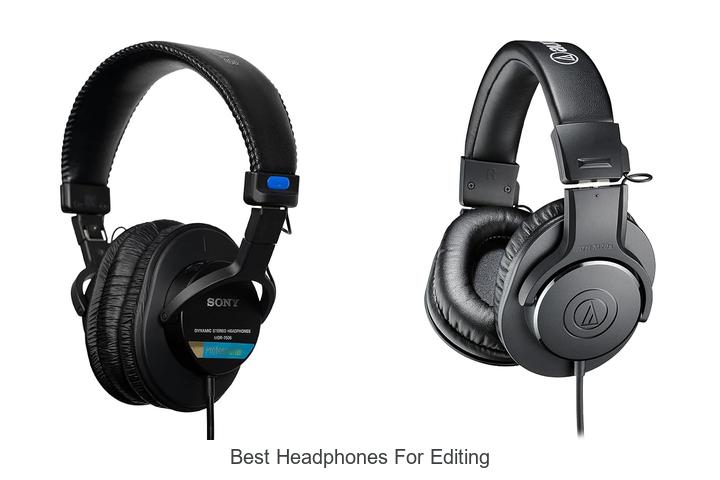
When it comes to audio post-production and video editing, factors such as frequency response, soundstage accuracy, and noise isolation play pivotal roles in ensuring precision and clarity. Selecting the best headphones for editing involves more than just comfort; it requires devices capable of delivering flat, uncolored sound to accurately represent every detail of the audio track.
Latency, driver type, and impedance further influence how effectively headphones translate complex sonic textures during the editing process. For professionals striving for impeccable sound fidelity and seamless workflow, understanding these technical specifications is essential. This article delves into the critical considerations behind choosing the best headphones for editing, uncovering the nuances that separate good options from truly exceptional tools.
Read on to discover which models excel in meeting the rigorous demands of audio and video editors alike.
Discover Top Audio Gear That Transforms Your Creative Workflow
| Image | Product | Price |
|---|---|---|
Our Picks 1  | Sony MDR7506 Headphones | Check Price On Amazon |
Our Picks 2  | Audio-Technica ATH-M20x Studio Monitor Headphones | Check Price On Amazon |
Our Picks 3  | OneOdio Wired DJ Over-Ear Headphones Black | Check Price On Amazon |
1. Sony MDR7506 Headphones
Experience exceptional audio clarity and comfort with the Sony MDR7506 Headphones, a top choice for professional editors and audiophiles alike. Engineered to deliver precise sound reproduction, these headphones are perfect for detailed audio work, making them a reliable companion in both studio and home environments.
Featuring neodymium magnets and 40mm drivers, the headphones produce powerful, detailed sound with a frequency response ranging from 10 Hz to 20 kHz. Their closed-ear design ensures excellent noise isolation, while the 8-foot cable with a gold-plated plug provides sturdy connectivity.
Pros
- High-resolution sound with neodymium drivers ideal for precise audio editing
- Comfortable closed-ear design reduces external noise effectively
- Foldable design and included soft case enhance portability
Cons
- Non-detachable cable may limit flexibility during use
Combining durability, excellent audio performance, and comfort, the Sony MDR7506 remains a standout choice for anyone seeking the best headphones for editing. Its balance of professional features and user-friendly design ensures it meets the demands of both studio sessions and everyday listening.
2. Audio-Technica ATH-M20x Studio Monitor Headphones
Discover exceptional audio clarity with the Audio-Technica ATH-M20x Studio Monitor Headphones, designed to meet the demands of professional editing and mixing. These headphones combine advanced engineering with comfort, making them the ideal choice for those seeking precise sound reproduction and superior noise isolation during long work sessions.
Featuring 40 mm drivers with rare earth magnets and copper clad aluminum wire voice coils, the ATH-M20x delivers enhanced low-frequency response for deep, accurate bass. The circumaural earcup design offers excellent isolation, minimizing ambient noise in noisy environments. A convenient single-side cable exit adds ease of use, perfect for studio tracking and mixing work.
Pros
- High-quality 40 mm drivers for detailed and accurate sound reproduction
- Comfortable circumaural design ensures effective noise isolation during extended use
- Durable build with a single-side cable exit for practical studio usability
Cons
- May lack some advanced features found in higher-end models like ATH-M50x
Offering professional-grade audio performance at an affordable price, the Audio-Technica ATH-M20x strikes a fine balance between quality and value. For those who require reliable and clear sound for editing, these headphones provide an excellent foundation compared to other entry-level studio monitors.
3. OneOdio Wired DJ Over-Ear Headphones Black
Experience professional-grade audio with the OneOdio Wired DJ Over-Ear Headphones Black, designed to deliver powerful bass and crystal-clear sound. Perfectly suited for editing, mixing, and DJing, these headphones combine comfort with high-quality performance to enhance every listening session.
Featuring large 50mm drivers and neodymium magnets, these headphones provide balanced stereo sound with rich lows and crisp highs. The adjustable, padded headband and soft ear cushions offer extended comfort and effective noise isolation.
A 90° swiveling ear cup enables single-ear monitoring, ideal for precise audio work.
Pros
- Robust bass and clear audio quality for detailed editing and mixing
- Ergonomic design with padded cushions and adjustable headband for long-term comfort
- Single-ear monitoring capability through 90° swiveling ear cups, perfect for DJs and audio professionals
Cons
- Works only in wired mode, lacking Bluetooth connectivity for wireless convenience
The OneOdio Pro-10 headphones provide excellent value with superior sound and comfort, making them a top contender among the best headphones for editing. While lacking wireless options, their reliable wired connection and sharing capability make them ideal for professional and casual use alike.
4. OneOdio A70 Bluetooth Over-Ear Headphones

Discover the OneOdio A70 Bluetooth Over-Ear Headphones, designed for exceptional sound clarity and comfort during editing or casual listening. With dual mode connectivity and long-lasting battery life, these headphones cater perfectly to professionals and audiophiles seeking reliable, high-fidelity audio performance.
Equipped with 40mm neodymium drivers and a custom aluminum fascia, these headphones deliver dynamic stereo sound and powerful bass that bring out every detail in your audio projects. The ergonomic, foldable design offers extended comfort and portability, while the unique audio-sharing feature enables synchronized playback with other headphones, ideal for collaborative work.
Pros
- Up to 72 hours of wireless playback or unlimited use in wired mode with included cables
- High-resolution sound quality with professional-grade components for precise audio editing
- Comfortable over-ear fit with memory foam padding and foldable design for easy transport
- Innovative audio sharing capability allows multiple users to listen simultaneously
- Secure aux jack lock system ensures stable wired connections without interruption
- Built-in HD microphone with noise reduction for crystal-clear hands-free calls
Cons
- Sound signature may be bass-heavy for those preferring a flatter studio reference tone
Ideal for editors and music lovers alike, the OneOdio A70 headphones balance outstanding audio fidelity with day-long comfort and versatile connectivity. Compared to other headphones in the same price range, the A70 stands out for its extended battery life and collaborative sharing feature, making it a smart pick for professional use.
5. Audio-Technica ATH-M20x Studio Headphones White

Discover exceptional audio clarity and comfort with the Audio-Technica ATH-M20x Studio Headphones White, designed to meet the demands of audio professionals and enthusiasts alike. Perfectly suited for editing tasks, these headphones provide precise sound reproduction and noise isolation to ensure accurate monitoring in any environment.
Equipped with advanced 40 mm drivers featuring rare earth magnets and copper-clad aluminum wire voice coils, the ATH-M20x delivers enhanced low-frequency performance. Its circumaural earcup design offers excellent sound isolation, while a single-side cable exit provides convenience during extended editing sessions.
Pros
- High-quality 40 mm drivers for detailed and accurate sound reproduction
- Ergonomic circumaural design ensures comfort and effective noise isolation
- Durable construction with a single-sided cable for ease of use and longevity
Cons
- May lack some advanced features like wireless connectivity found in higher-end models
The Audio-Technica ATH-M20x Studio Headphones offer an excellent balance of sound quality, comfort, and durability at an attractive price point, making them an ideal choice for editors seeking reliable, professional-grade headphones without overspending.
6. beyerdynamic DT 770 Pro Closed-Back Studio Headphones

Experience professional-grade audio with the beyerdynamic DT 770 Pro Closed-Back Studio Headphones, designed for precision and comfort. Perfectly suited for editing and studio monitoring, these headphones deliver exceptional sound isolation and clarity, making them a favorite among audio engineers and recording artists alike.
Featuring an 80-ohm impedance, the DT 770 Pro excels when paired with audio interfaces or headphone amplifiers, ensuring powerful and detailed playback. The closed-back design provides excellent passive noise isolation, keeping unwanted sounds out during critical recording sessions.
Equipped with soft, replaceable velour ear pads and a durable spring-steel headband, these headphones promise long-lasting comfort for extended use.
Pros
- Superior closed-back isolation minimizes ambient noise for focused editing
- High-quality velour ear pads and sturdy headband enhance comfort during long sessions
- Comes with a 3-meter straight cable and 1/4-inch adapter for versatile connectivity
Cons
- Optimal performance requires connection to an audio interface or amplifier, which may be an additional investment
Combining robust build quality with precise sound reproduction, the beyerdynamic DT 770 Pro stands out as one of the best headphones for editing workflows. Its balance of comfort and isolation makes it a wise choice compared to competitors, especially for those seeking studio-grade monitoring without compromise.
7. OneOdio A71 Wired Over-Ear Studio Headphones

Experience studio-quality sound without breaking the bank with the OneOdio A71 Wired Over-Ear Studio Headphones. Ideal for audio professionals and enthusiasts alike, these headphones provide precise audio clarity and comfortable wear, making them an excellent choice for editing, mixing, and everyday listening sessions.
Equipped with 40mm high-resolution drivers, the A71 delivers rich, detailed sound essential for critical audio work. Its soft padded ear cushions and adjustable headband ensure extended comfort, while the versatile cable system includes both 5mm and 35mm plugs for compatibility with a wide range of devices. The 90° swiveling earcups allow for single-ear monitoring, and the shared audio port facilitates hassle-free music sharing.
The 90° swiveling earcups allow for single-ear monitoring, and the shared audio port facilitates hassle-free music sharing.
Pros
- Exceptional Hi-Res sound quality with 40mm drivers for precise audio detail
- Comfortable design featuring soft, noise-isolating ear cushions and adjustable headband
- Includes long coiled cable with dual plugs (3.5mm and 6.35mm) for broad device compatibility
- Single-sided 90° swiveling earcups enable easy single-ear monitoring
- Shared audio port allows connecting an additional headphone without extra accessories
Cons
- Wired design may limit mobility compared to wireless alternatives
Offering a blend of superior sound performance and comfort at an affordable price, the OneOdio A71 headphones stand out as one of the best headphones for editing available. While wired, their versatile compatibility and professional features make them a reliable tool for creators and audiophiles seeking quality and convenience.
8. beyerdynamic DT 770 Pro Headphones

Experience unparalleled audio precision with the beyerdynamic DT 770 Pro Headphones, the preferred choice for audio professionals and enthusiasts alike. Designed to deliver clear, balanced sound and exceptional comfort, these headphones elevate your editing and mixing sessions to studio-grade quality.
With a versatile impedance option starting at 80 Ohms, the DT 770 Pro adapts perfectly to various setups, from mobile devices to high-powered studio equipment. Its closed-back design minimizes sound leakage, ensuring an accurate soundstage essential for detailed editing.
The velour ear pads provide extended comfort during long use, complemented by a durable 3m cable equipped with professional-grade connectors.
Pros
- Balanced, detailed sound ideal for mixing and mastering tasks
- Soft, breathable velour ear pads offer fatigue-free comfort during prolonged sessions
- Multiple impedance options (32, 80, 250 Ohms) cater to various devices and power sources
- Robust build quality with replaceable parts extends the lifespan significantly
- Long 3-meter cable provides flexibility and freedom of movement at the workstation
Cons
- Closed-back design may feel a bit isolating for users preferring ambient sound awareness
Combining professional-grade sound accuracy with unmatched comfort, beyerdynamic DT 770 Pro Headphones remain a top contender among studio monitors. Whether upgrading from consumer models or comparing to competitors like Audio-Technica ATH-M50x, these headphones offer exceptional value for serious audio editing professionals.
9. Audio-Technica ATH-M30x Studio Monitor Headphones

Elevate your audio editing experience with the Audio-Technica ATH-M30x Studio Monitor Headphones, expertly crafted for clarity and precision. Designed to deliver exceptional sound isolation and enhanced mid-range detail, these headphones are a reliable choice for professionals seeking accurate monitoring in any environment.
Equipped with 40mm drivers featuring rare earth magnets and copper-clad aluminum voice coils, the ATH-M30x provides powerful, detailed sound reproduction. Its circumaural design comfortably fits around the ears, minimizing outside noise, while the single-side cable exit and collapsible frame offer practical convenience for studio and on-the-go use.
Pros
- Robust build quality ensures durability during intensive editing sessions
- Exceptional sound isolation with a circumaural ear design ideal for loud environments
- Compact, collapsible design enhances portability without compromising comfort
Cons
- Lower bass response compared to higher-end models may affect some genres
Offering a balanced combination of durability, sound accuracy, and comfort, the Audio-Technica ATH-M30x headphones stand out as an excellent investment for audio editors. Compared to pricier counterparts, they provide professional-grade sound quality at a more accessible price point, making them a smart choice for both budding and experienced editors alike.
10. Philips Over Ear Wired Stereo Headphones with 6.3mm Adapter

Discover exceptional audio clarity with the Philips Over Ear Wired Stereo Headphones, engineered for immersive listening and precise sound reproduction. Designed to meet the demands of audio professionals and casual listeners alike, these headphones combine powerful drivers and ergonomic comfort for an unrivaled auditory experience.
Equipped with 40mm drivers, the headphones deliver crisp, clear sound and excellent passive noise isolation thanks to their over-ear design. A soft cushioned headband and ear cups ensure all-day comfort, while the versatile 5mm jack paired with a 3mm adapter offers compatibility with a wide range of devices, from laptops to professional audio equipment.
Pros
- Powerful 40mm drivers provide detailed and balanced audio, ideal for editing and monitoring tasks.
- Comfortable over-ear design with soft padding supports extended listening sessions without fatigue.
- Includes both 3.5mm jack and snap-on 6.3mm adapter for versatile device connectivity.
- Long 2-meter cable offers flexibility and freedom of movement during use.
- Rotating ear cups allow easy one-ear monitoring, perfect for DJs and professionals.
Cons
- Cable length may be restrictive in larger studio environments requiring more mobility.
Combining affordability with professional-grade sound quality, the Philips Over Ear Wired Stereo Headphones stand out as a reliable choice for audio editing and everyday listening. They offer a balance of comfort, durability, and sound precision that rivals more expensive models, making them an excellent pick for both beginners and seasoned users.
Crystal Clear Sound: Your Ultimate Guide to the Best Headphones for Editing
Sound Quality and Accuracy
Frequency response range. Sound signature (neutral vs. colored). Detail and clarity for audio editing.A wide frequency response range is crucial for audio editing, as it ensures that every sound detail—from the deepest bass to the highest treble—is accurately represented. A neutral sound signature is often preferred because it provides an uncolored, true-to-source audio experience, allowing editors to make precise adjustments without any frequency bias.
Comfort and Build Quality
Ear cushion material and padding. Headband adjustability and weight. Durability of materials and construction.Having multiple options to connect headphones to your devices ensures versatility and ease of use across different editing setups. Whether through wired analog jacks, USB ports, or wireless protocols like Bluetooth, the ability to switch between connections can significantly enhance workflow efficiency. Additionally, enough ports or compatibility with adapters allows for hooking up additional peripherals such as audio interfaces or microphones without hassle.
This flexibility supports seamless integration into complex audio environments and future-proofs your investment as technology advances.
- Compatibility with a variety of audio equipment and devices
- Reduced need for extra adapters or converters
- Ability to connect multiple devices simultaneously or switch quickly
- Improved signal quality and lower latency through dedicated cables
- Wireless freedom when mobility is crucial
Wired vs. Wireless Options
Latency considerations for editing. Battery life and charging (for wireless). Cable length and connector types.Wired vs wireless options play a crucial role in the performance and convenience of headphones used for detailed audio work. Latency is a key factor; wired headphones typically offer near-zero delay, ensuring audio syncs perfectly during editing, whereas wireless models may introduce slight lag, which can disrupt precise timing adjustments. For wireless headphones, battery life and charging times become important, as frequent recharging can interrupt workflow and reduce overall productivity.
For wireless headphones, battery life and charging times become important, as frequent recharging can interrupt workflow and reduce overall productivity. In addition, the length of the cable and the types of connectors available directly affect flexibility and compatibility with various audio equipment. A longer cable can provide more freedom of movement without compromising sound quality, while having multiple connector options ensures seamless integration with devices like mixers, audio interfaces, and computers.
Noise Isolation and Cancellation
Passive noise isolation effectiveness. Active noise cancellation features. Impact on audio accuracy.Having versatile input options and the ability to connect with various devices is crucial for a smooth and efficient editing workflow. Headphones that support multiple connection types, such as wired and wireless, ensure compatibility across different equipment, whether it’s a computer, audio interface, or mobile device. Additionally, the possibility to add features or enhance sound quality through detachable cables, adapters, or built-in amplifiers can greatly extend the functionality and lifespan of the headphones.
- Availability of multiple port types (e.g., 3.5mm jack, USB-C, Bluetooth) for seamless integration.
- Support for high-quality audio codecs that maintain sound fidelity across connections.
- Options for firmware updates or modular components that allow upgrades without replacing the entire unit.
| Feature | Advantage | Potential Limitation |
|---|---|---|
| Wired Connection | Stable signal with minimal latency | Less mobility, cable tangling |
| Wireless Connection | Enhanced convenience and freedom of movement | Possible latency issues, battery dependency |
| Detachable Cables & Adapters | Easy replacement and customization options | Extra parts might get lost or cause hassle |
Such flexibility not only improves compatibility but also ensures that the headphones can adapt to evolving technological needs, ultimately delivering more accurate and consistent audio reproduction during critical editing tasks.
Compatibility and Connectivity
Compatibility with editing software and devices. Connector types (3.5mm, USB, XLR). Requirement for amplifiers or DACs.Ensuring your headphones are compatible with various editing software and devices is crucial for a seamless workflow. Different connectors such as 5mm jacks, USB ports, or XLR inputs each offer distinct advantages depending on your setup and sound quality needs. For instance, while 5mm connectors provide universal compatibility with most devices, USB headphones can deliver digital audio signals directly, often resulting in clearer sound without external interference.
XLR connections, commonly used in professional audio environments, usually require additional equipment like amplifiers or DACs (digital-to-analog converters) to maximize audio fidelity. Understanding the types of connectors and whether your setup demands extra hardware not only prevents compatibility issues but also ensures that your audio experience remains consistent and high-quality throughout the editing process.
Price and Warranty
Value for budget vs. premium options. Warranty and customer support policies. Availability of replacement parts or accessories.Having versatile connection options and the ability to add accessories can significantly enhance the editing experience. Headphones with multiple input methods—such as wired, wireless, or USB—offer flexibility across different devices, ensuring seamless integration with your editing setup. Additionally, models that support expandable features like detachable cables or modular components allow for easier upgrades and repairs, extending the lifespan of your gear.
| Feature | Benefit |
|---|---|
| Wired Connection | Stable audio quality with virtually no latency, ideal for precise editing tasks. |
| Wireless Connection | Freedom of movement and convenience, though may introduce slight latency or interference. |
| Detachable Cables | Easy cable replacement reduces downtime and long-term costs. |
| Modular Components | Ability to upgrade specific parts like ear pads or drivers to maintain performance.FAQ’sWhat Features Should I Look For In The Best Headphones For Editing?Look for headphones with accurate, flat frequency response to ensure true sound reproduction, along with good noise isolation or active noise cancellation to minimize distractions. Additionally, prioritize comfort for long editing sessions and durable build quality. Are Wired Or Wireless Headphones Better For Video And Audio Editing?Wired headphones are generally better for video and audio editing because they provide more stable, high-quality sound with lower latency. Wireless headphones may introduce slight delays and potential signal interference, which can affect precise audio work. Which Headphones Offer The Most Accurate Sound Quality For Professional Editing?Headphones like the Sony MDR-7506 and Sennheiser HD 650 are renowned for their accurate sound reproduction, making them ideal for professional editing. These models provide a flat frequency response and clear detail, essential for critical audio work. What Is The Price Range For High-Quality Editing Headphones?High-quality editing headphones typically range from $150 to $400, depending on the brand and features. Premium models with advanced sound accuracy and comfort can cost even more. Can Noise-Cancelling Headphones Improve Focus During Editing Sessions?Yes, noise-cancelling headphones can improve focus during editing sessions by reducing background distractions and creating a quieter environment. This allows editors to concentrate better on details and maintain productivity. ConclusionIn summary, the best headphones for editing combine excellent sound accuracy, comfort for long sessions, and effective noise isolation. Whether you prefer wired or wireless options, investing in a quality pair ensures precise audio monitoring and enhances your editing workflow.  Latest posts by tanvirdipto (see all)
 |