
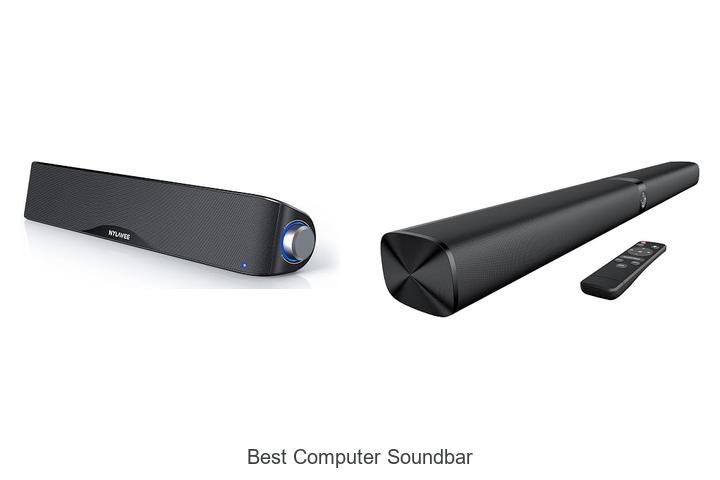
Enhancing audio output through sophisticated sound projection and crystal-clear frequency response has become essential for modern computing setups. As users demand immersive experiences—whether for gaming, video editing, or multimedia consumption—the significance of integrating a high-quality sound system cannot be overstated.
The best computer soundbar delivers balanced acoustics, robust bass, and minimal distortion, transforming standard audio into a rich auditory environment without cluttering desk space. With advancements in digital signal processing (DSP) and compact design, these devices offer an efficient alternative to traditional speakers, optimizing sound clarity and spatial effects. Understanding the critical features and performance metrics that define the best computer soundbar will help elevate your workstation’s auditory capabilities.
Dive deeper to uncover which models stand out in today’s competitive landscape.
Elevate Your Audio Experience with Top-Tier Choices in Desktop Sound Solutions
| Image | Product | Price |
|---|---|---|
Our Picks 1  | Nylavee Bluetooth AUX Computer Sound Bar | Check Price On Amazon |
Our Picks 2  | Sound Bar with Bluetooth and ARC Connectivity | Check Price On Amazon |
Our Picks 3  | Bluedee Bluetooth AUX Computer Sound Bar | Check Price On Amazon |
1. Nylavee Bluetooth AUX Computer Sound Bar
Enhance your audio experience with the Nylavee Bluetooth AUX Computer Sound Bar, designed to deliver crystal-clear sound and powerful bass. Perfect for work, gaming, or entertainment, this sleek soundbar combines modern technology with superior craftsmanship to upgrade any desktop or laptop setup effortlessly.
Equipped with 4 speaker units and 2 independent bass diaphragms, the Nylavee soundbar produces rich highs and deep bass tones. Its unique cavity design amplifies loudness, while double-layer neodymium magnets and mica fiber diaphragms ensure high-fidelity audio. Connect easily via Bluetooth 0 or 5mm AUX, and power conveniently through USB for seamless integration with multiple devices.
Pros
- High-quality stereo sound with powerful bass, thanks to advanced speaker and diaphragm design
- Dual connectivity: wireless Bluetooth 5.0 and wired AUX support for versatile device compatibility
- Simple one-knob control and USB-powered operation for user-friendly setup and use
Cons
- Lacks built-in battery, requiring constant USB power connection for use
Combining modern audio technology and thoughtful design, the Nylavee Bluetooth AUX Computer Sound Bar offers exceptional sound quality at an accessible price point. It stands out among similar PC soundbars, making it an excellent choice for those seeking enhanced audio without complexity.
2. Sound Bar with Bluetooth and ARC Connectivity
Upgrade your audio experience with the Sound Bar featuring Bluetooth and ARC connectivity, designed to deliver immersive, high-quality sound for any space. Its versatile placement options and powerful 80W output make it perfect for gaming, home theaters, and everyday entertainment, transforming ordinary audio into dynamic soundscapes.
Equipped with four advanced drivers and three custom equalizer modes, this soundbar enhances clarity and depth whether you’re watching movies, listening to music, or catching up on news. Easy Bluetooth 0, ARC, OPT, and AUX connections ensure seamless setup and control, with added durability from eco-conscious ABS and metal materials.
Pros
- Powerful 80W stereo output with four high-performance drivers for clear, rich sound
- Three equalizer modes (movie, music, news) to tailor audio to your preferences
- Multiple placement options including horizontal, vertical, tabletop, and wall mount for optimal sound distribution
Cons
- Does not feature waterproof capabilities, limiting outdoor use
Offering customizable sound settings, effortless connectivity, and solid construction, this soundbar stands out as an affordable and versatile choice for enhancing your home audio setup. Compared to similar products in its price range, it provides exceptional value with robust features and reliable support.
3. Bluedee Bluetooth AUX Computer Sound Bar
Elevate your desktop audio experience with the Bluedee Bluetooth AUX Computer Sound Bar, designed to deliver crisp, powerful sound in a sleek, space-saving design. Ideal for both work and entertainment, it merges impressive Hi-Fi sound quality with versatile connectivity and ambient lighting for a modern upgrade to your setup.
Boasting dual drivers with anti-magnetic technology, this soundbar produces clear highs and deep bass for immersive audio. It offers dual connectivity via Bluetooth 0 and a 5mm AUX input, ensuring compatibility with a wide range of devices. The USB-powered design eliminates clutter, while ambient light strips add sophistication to your desk environment.
Pros
- High-fidelity sound with dual drivers and anti-magnetic technology eliminates static for outstanding audio clarity.
- Multiple connection options including Bluetooth 5.0 and 3.5mm AUX ensure seamless compatibility with computers, smartphones, and more.
- Compact, slim profile fits neatly below monitors, complemented by relaxing ambient lighting for an enhanced workspace mood.
Cons
- Not water-resistant, limiting use to indoor environments only.
Combining superior sound performance with convenient power and connectivity features, the Bluedee soundbar is a smart choice for users seeking the best computer soundbar at an affordable price. Its eco-conscious build and tidy cable management further set it apart from similar models.
4. Computer Soundbar USB Wired Desktop Monitor Speakers

Enhance your desktop audio experience with the Computer Soundbar USB Wired Desktop Monitor Speakers, designed for crystal-clear sound and convenience. Compact yet powerful, these speakers are perfect for users seeking high-quality stereo sound with rich bass in a space-saving design.
Compatible with a wide range of USB and USB-C devices, this soundbar features dual ultra-magnetic drivers and passive radiators for deep bass and vibrant audio. Its innovative adaptive-channel-switching technology ensures accurate sound direction, while a clip-on mount saves valuable desk space. Easy touch controls add to the streamlined user experience.
Easy touch controls add to the streamlined user experience.
Pros
- Broad device compatibility with USB and USB-C, including Windows, macOS, ChromeOS, Linux, and popular tablets and phones.
- Adaptive-channel-switching powered by a built-in G-sensor maintains precise left-right audio alignment regardless of mounting position.
- Space-saving clip-on design that secures to various positions on your monitor or desktop, optimizing workspace efficiency.
Cons
- Incompatible with monitors, TVs, and projectors, limiting use to compatible USB-enabled computers and devices.
For a modest investment, these computer soundbar speakers deliver impressive audio quality and versatile compatibility, making them a standout choice for desktop users seeking immersive sound without clutter. Compared to conventional desktop speakers, this model’s clip-on mount and adaptive sound technology provide enhanced flexibility and precision.
5. Razer Leviathan V2 X Soundbar

Discover an immersive audio experience tailored for your PC setup with the Razer Leviathan V2 X Soundbar. Combining compact design and powerful sound delivery, it perfectly elevates gaming, streaming, and everyday listening while seamlessly integrating with your desktop environment.
Equipped with dual full-range drivers and passive radiators, the Leviathan V2 X produces rich stereo sound up to 90dB. Its sleek, compact form fits neatly under any monitor, powered by a single USB Type-C cable.
Bluetooth 0 support offers low-latency wireless streaming, enhanced by customizable Razer Chroma RGB lighting for an immersive atmosphere.
Pros
- Compact desktop-friendly design that reduces clutter
- Robust stereo sound with full-range drivers and passive radiators
- Seamless Bluetooth 5.0 connectivity with low latency
- Customizable RGB lighting via Razer Chroma for personalized ambiance
- Simple setup using a single USB Type-C cable for power and audio
Cons
- Lacks waterproofing, limiting outdoor or high-moisture use
The Razer Leviathan V2 X Soundbar is an excellent choice among the best computer soundbars, merging powerful audio, sleek styling, and smart features into a compact package. Its uniquely integrated RGB capabilities and straightforward connectivity make it ideal for gamers and multimedia enthusiasts alike.
6. Bose TV Speaker Soundbar with Bluetooth and HDMI-ARC

Experience clear, immersive sound that brings your favorite TV shows and movies to life with the Bose TV Speaker Soundbar. Designed for simplicity and powerful audio performance, this compact soundbar enhances dialogue and delivers a wide, natural soundstage to elevate your home entertainment setup.
Featuring two angled full-range drivers, the soundbar ensures vocal clarity and spatial depth, making conversations easily understandable. Bluetooth connectivity lets you stream music and podcasts directly, while HDMI-ARC and optical inputs provide versatile compatibility for a seamless audio upgrade.
Pros
- Enhanced dialogue feature clarifies speech for better comprehension.
- Compact design fits comfortably in front of your TV or on the wall.
- Bluetooth and multiple input options enable easy wireless and wired connections.
Cons
- Wall mounting brackets and HDMI cable sold separately, adding to setup cost.
With its balance of clear sound, sleek design, and versatile connectivity, the Bose TV Speaker Soundbar stands out as an excellent choice for anyone seeking to improve their TV audio without the bulk of larger systems. Compared to similar compact soundbars, it offers superior dialogue enhancement and easy pairing features.
7. LENRUE G11 Computer Speakers with USB-C and AUX

Enhance your desktop audio experience with the LENRUE G11 Computer Speakers, designed to deliver crisp, distortion-free sound in a sleek, compact form. Ideal for gamers, movie lovers, and music enthusiasts, these speakers bring immersive stereo quality with convenient USB-C and AUX connectivity, perfect for any modern setup.
Equipped with four large amplifier IC horns, the LENRUE G11 ensures clear, noiseless audio output that enriches your multimedia consumption. Its unique touch-activated angular game lights add an engaging ambiance without complicated controls, while the all-in-one compact design fits neatly under your monitor, keeping your workspace tidy and cable clutter-free.
Pros
- Powerful stereo sound with no distortion thanks to 4 amplifier IC horns
- Innovative touch control for dynamic game lighting enhances desktop aesthetics
- Space-saving compact size fits conveniently beneath monitors with glued cables for minimal clutter
Cons
- Lacks Bluetooth, headphone port, and microphone, limiting wireless and multifunctional use
Offering straightforward plug-and-play use with USB-C and 5mm AUX connections, the LENRUE G11 stands out as an excellent choice for those seeking the best computer soundbar experience at an affordable price point. Its crystal-clear sound and stylish design make it a strong contender among compact desktop speakers.
8. Computer Speakers USB Plug-and-Play External Sound Bar

Enhance your computer audio experience with the Computer Speakers USB Plug-and-Play External Sound Bar, designed to deliver clear, dynamic sound without the hassle of complicated installations. Perfect for work, gaming, or entertainment, this compact soundbar seamlessly integrates with multiple operating systems, providing an effortless upgrade to your desktop or laptop audio.
Featuring built-in dual 3W high-excursion drivers and a passive radiator, it produces rich bass and crisp sound with minimal distortion. Its single USB connection powers both audio and energy needs, eliminating cable clutter, while easy plug-and-play compatibility supports Windows, macOS, Linux, and Chrome OS devices.
Pros
- Universal compatibility with Windows (7/8/10/11), macOS, Linux, and Chrome OS laptops
- Simple plug-and-play setup with single USB cable for audio and power
- High-quality sound output with dual 3W drivers and enhanced bass performance
Cons
- Limited to USB power; no 3.5mm audio jack for broader connectivity options
For those seeking a streamlined and powerful audio upgrade at an affordable price, this USB soundbar stands out as a reliable choice. While it lacks auxiliary input, its ease of use and sound quality make it a standout option compared to traditional multimedia speakers that often require multiple cables and complex setups.
9. Nylavee 2.1 Bluetooth Computer Speakers with Subwoofer

Experience exceptional audio clarity and powerful bass with the Nylavee 1 Bluetooth Computer Speakers with Subwoofer. Designed for desktop and monitor setups, these speakers bring immersive, balanced sound to gaming, movies, and music, making your computer audio experience truly captivating and enjoyable.
Featuring dual soft-dome silk tweeters and full-range drivers paired with a standalone 25” subwoofer, this soundbar delivers crystal-clear highs, rich mids, and deep bass. With Bluetooth 4 connectivity and a 5mm AUX input, it ensures effortless wireless or wired audio streaming, compatible with PCs, Macs, and gaming consoles alike.
Pros
- Clear and balanced 2.1 sound system with focused highs and punchy bass
- Bluetooth 5.4 and wired AUX connections for versatile device compatibility
- Easy-to-use side knob controls for power, mode switching, volume, and reset
Cons
- Requires external power adapter as it has no built-in battery
Combining powerful bass performance with seamless connectivity, the Nylavee 1 Bluetooth Computer Speakers offer a competitive edge over similar soundbars in this price range. Perfect for anyone seeking an upgrade to their desktop audio setup, it guarantees an immersive sound experience without complexity.
10. Redragon GS560 RGB Desktop Soundbar

Enhance your desktop audio experience with the Redragon GS560 RGB Desktop Soundbar, designed to deliver rich, crystal-clear sound and immersive bass. Its sleek 16-inch compact design coupled with vibrant RGB lighting makes it perfect for gamers, professionals, and music lovers seeking premium sound and eye-catching aesthetics.
Equipped with upgraded drivers, the GS560 offers superior stereo sound output complemented by four distinct LED backlit modes, including dynamic and static effects that synchronize with your music. Its tabletop mount and USB power with 5mm connectivity ensure broad compatibility across PCs, laptops, TVs, and smartphones, making setup effortless.
Pros
- High-quality stereo sound with clear audio and rich bass for an enhanced listening experience.
- Four customizable RGB backlight modes that sync perfectly with music playback for vibrant visual effects.
- Compact 16-inch design fits neatly under monitors and integrates seamlessly with various devices via USB and 3.5mm inputs.
Cons
- Limited waterproof capabilities, making it less suitable for outdoor or high-humidity environments.
Combining impressive audio performance with customizable RGB lighting and versatile connectivity, the Redragon GS560 RGB Desktop Soundbar stands out among budget-friendly soundbars. It offers an excellent balance between sound quality and visual appeal, ideal for those seeking an affordable yet feature-rich desktop audio upgrade.
Top Tips to Choose the Best Computer Soundbar for Ultimate Audio Experience
Sound Quality and Performance
Audio clarity and bass strength. Surround sound and stereo capabilities. Frequency response range.Ensuring the device easily connects to your computer and other peripherals is crucial for seamless audio performance. Multiple input options such as USB, optical, and Bluetooth can offer flexibility to match various setups, while available ports for additional speakers or subwoofers allow you to tailor the sound environment to your liking. This adaptability not only enhances overall sound quality by supporting advanced surround sound and stereo configurations but also future-proofs your setup for upgrades.
This adaptability not only enhances overall sound quality by supporting advanced surround sound and stereo configurations but also future-proofs your setup for upgrades. Having a wide range of connection choices can significantly impact audio clarity and bass strength, as it reduces the chances of signal loss or interference, delivering a richer, more immersive experience. Additionally, the ability to expand your sound system ensures that frequency response ranges are fully utilized, providing crisp highs, balanced mids, and deep lows that bring your audio to life.
Compatibility and Connectivity
USB, Bluetooth, and auxiliary input options. Compatibility with operating systems and devices. Wireless vs wired connections.Having a variety of connection options such as USB, Bluetooth, and auxiliary inputs ensures the soundbar can easily link with different devices, from laptops and desktops to smartphones and tablets. Compatibility with diverse operating systems like Windows, macOS, and even Linux plays a crucial role in guaranteeing seamless integration without additional adapters or complicated setup processes.
Understanding whether the device offers wireless or wired connections can affect both convenience and audio quality; wireless connections provide flexibility and reduce cable clutter, while wired options often deliver more stable, lag-free sound performance.
Design and Size
Dimensions and space requirements. Aesthetic design and build quality. Mounting options and portability.Ensuring the soundbar can easily connect to your devices without hassle is crucial for a seamless audio experience. Most modern units offer multiple input options, such as USB, Bluetooth, HDMI, and optical ports, enabling compatibility with various setups.
Without these features, you might find yourself limited by the hardware’s capabilities, leading to frustration or additional expenses down the line.
- Multiple input options allow for effortless device pairing and versatile use.
- Expandable connections give room for enhancing sound performance over time.
- Check if the device supports wireless connections to reduce cable clutter.
- Consider whether additional ports allow integration with other audio accessories.
Power and Volume
Wattage and amplifier quality. Maximum volume levels without distortion. Energy consumption and efficiency.Ensuring your soundbar offers robust power through high wattage and a quality amplifier is crucial for delivering clear, immersive audio without strain. A well-designed amplifier handles peak volumes smoothly, allowing maximum loudness without distortion, which enhances the overall listening experience, especially during intense gaming or movie scenes. Additionally, understanding how much energy the soundbar consumes is important for balancing performance with efficiency, as models with advanced power management can provide impressive sound output while keeping electricity usage in check.
This combination of strong audio performance and energy-conscious design results in a device that not only sounds great but is practical for regular use.
Additional Features
Remote control and app integration. Builtin microphones for voice commands. Equalizer settings and sound customization.Having multiple ways to connect your audio device can significantly enhance your overall experience by ensuring compatibility with various gadgets and setups. Features like remote control functionality and app integration provide a convenient way to manage sound settings without interrupting your workflow. Many modern soundbars include built-in microphones that allow voice commands, making hands-free operation possible and adding a layer of smart functionality.
Many modern soundbars include built-in microphones that allow voice commands, making hands-free operation possible and adding a layer of smart functionality. Additionally, the presence of equalizer settings and sound customization options lets you tailor audio output to match your preferences or the type of content you’re enjoying, whether it’s gaming, movies, or music.
| Feature | Benefit |
|---|---|
| Remote Control & App Integration | Eases volume adjustments and sound profile changes from anywhere in the room |
| Built-in Microphones for Voice Commands | Enables hands-free control, allowing quick and intuitive interaction with the device |
| Equalizer & Sound Customization | Offers personalized audio experiences suited to different types of media and user preferences |
Price and Warranty
Price range and value for money. Warranty period and customer support. Return policy and trial options.Devices with multiple input options such as HDMI, USB, and Bluetooth offer greater flexibility, allowing seamless connection to various computers, gaming consoles, and other multimedia devices. This versatility ensures compatibility with both current setups and future upgrades, making the soundbar a lasting addition to your workspace or entertainment area.
Additionally, having available ports for auxiliary inputs or the ability to connect external speakers means you can easily expand your audio system over time without needing to replace your equipment entirely.
- Price range and value for money: Soundbars can vary greatly in price depending on features and brand reputation. It’s important to balance your budget with the features offered to ensure you get the best performance for your investment.
- Warranty period and customer support: A solid warranty gives peace of mind by protecting against defects and malfunctions. Reliable customer support is equally important for assistance with setup or troubleshooting.
- Return policy and trial options: Flexible return policies and trial periods provide opportunities to test the soundbar in your own environment, ensuring it meets your expectations before fully committing.
FAQ’s
What Are The Key Features To Look For In The Best Computer Soundbar?The best computer soundbar should have clear, high-quality audio with good bass response and multiple connectivity options like Bluetooth and USB. Additionally, compact design and built-in controls for volume and playback enhance usability.
Which Computer Soundbars Offer The Best Sound Quality For Gaming And Movies?Computer soundbars like the Razer Leviathan and Creative Stage V2 offer excellent sound quality for gaming and movies, delivering clear, immersive audio with strong bass. These models feature multi-driver setups and virtual surround sound technology to enhance the overall experience.
How Does A Computer Soundbar Compare To Traditional Desktop Speakers?A computer soundbar offers a compact, all-in-one design that saves desk space and often includes built-in features like Bluetooth connectivity, while traditional desktop speakers typically provide more powerful, higher-quality sound with separate left and right channels. Soundbars are ideal for convenience and aesthetics, whereas desktop speakers are preferred for audiophiles seeking richer audio performance.
What Is The Ideal Price Range For A High-Quality Computer Soundbar?The ideal price range for a high-quality computer soundbar typically falls between $100 and $300. This range balances good audio performance, build quality, and additional features without overspending.
Are There Any Computer Soundbars That Also Offer Bluetooth Or Wireless Connectivity?Yes, many computer soundbars offer Bluetooth or wireless connectivity, allowing for easy pairing with devices without the need for cables. Popular models from brands like Creative, Logitech, and Bose often include these features for enhanced convenience and flexibility.
Conclusion
In summary, the best computer soundbar enhances your audio experience with clear, immersive sound while fitting seamlessly into your workspace. Whether for gaming, streaming, or video calls, choosing a soundbar with rich bass, easy connectivity, and compact design ensures improved sound quality without the bulk, making it an ideal upgrade for any computer setup.

- Top 7 Best Samsung Sound Bars for Epic Home Audio! - November 8, 2026
- Best Sound Bars for TV That Will Blow Your Mind! - November 8, 2026
- Best TV Sound Bars That Will Blow Your Mind Today! - November 8, 2026
