
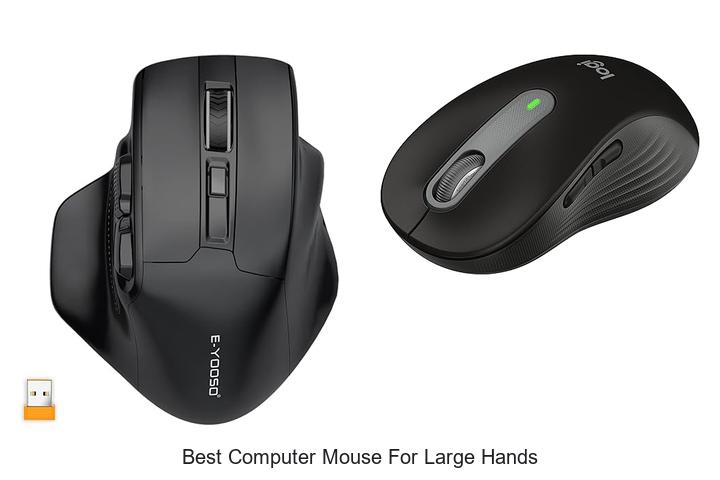
Ergonomics and precision play critical roles in enhancing user experience when selecting peripherals, especially for individuals with larger hand dimensions. The interplay between grip style, sensor accuracy, and button placement becomes increasingly significant to prevent discomfort and optimize performance during extended use.
For users with above-average hand sizes, typical mouse designs often fall short, leading to compromised control and potential strain. Identifying the best computer mouse for large hands involves balancing dimensions, weight distribution, and customizable features tailored to accommodate broader grips while maintaining responsiveness. As the market evolves with diverse options catering to varied hand anatomies, understanding the technical nuances behind these devices is essential.
Delve deeper to explore how specific design elements influence usability and why certain models stand out as top contenders for those seeking comfort without sacrificing functionality.
Find the Perfect Fit: Top Picks Designed for Extra Comfort and Control
| Image | Product | Price |
|---|---|---|
Our Picks 1  | E-YOOSO Wireless Mouse for Large Hands | Check Price On Amazon |
Our Picks 2  | Logitech Signature M650 Wireless Mouse Large Black | Check Price On Amazon |
Our Picks 3  | Logitech Signature M550 Wireless Mouse Black | Check Price On Amazon |
1. E-YOOSO Wireless Mouse for Large Hands
Designed specifically for users with larger hands, the E-YOOSO Wireless Mouse offers both comfort and precision. Its ergonomic build paired with advanced features ensures seamless navigation for long hours, making it a top contender for the best computer mouse for large hands.
Featuring an anti-sweat, contoured grip with finger rests, this 6-button wireless mouse delivers customized comfort alongside practical functionality. Adjustable 5-level DPI settings up to 4800 and dual polling rates enable precise control, while a reliable 4GHz connection and power-saving design enhance overall efficiency and usability.
Pros
- Ergonomic shape with anti-slip material tailored for large hands, reducing fatigue during extended use.
- Adjustable DPI (800 to 4800) and polling rate options that cater to different tasks and sensitivity preferences.
- Stable 2.4GHz wireless connection with a long operating range (up to 33 feet) and plug-and-play USB nano receiver storage for convenience.
Cons
- Side buttons are not functional on macOS, which may limit usability for Mac users.
Combining ergonomic design with advanced wireless technology, the E-YOOSO Wireless Mouse provides an excellent balance of comfort and precision, especially suited for those with large hands. Its versatile compatibility and long battery life make it a dependable choice in its price range compared to similar models.
2. Logitech Signature M650 Wireless Mouse Large Black
Discover the Logitech Signature M650 Wireless Mouse Large Black, expertly designed for users seeking exceptional comfort and precision. Ideal for individuals with larger hands, it combines ergonomic design with advanced features to enhance productivity and reduce strain during extended use.
Engineered for smooth navigation, this mouse offers precise line-by-line scrolling and rapid web page movement with the innovative SmartWheel. Its soft thumb area and rubber grips ensure a secure, comfortable hold, while quiet clicks minimize distractions.
Pros
- Ergonomic shape with soft thumb rest and rubber side grips tailored for large hands
- Dual connectivity via Bluetooth Low Energy and Logi Bolt USB receiver for instant pairing
- SilentTouch technology reduces click noise by 90%, ideal for quiet environments
- Customizable side buttons using Logitech Options+ for personalized shortcuts on Windows and macOS
- Long-lasting 24-month battery life powered by a single included AA battery
- Supports multiple operating systems including Windows, macOS, Linux, ChromeOS, iPadOS, and Android
- Environmentally conscious design featuring recycled plastic components
Cons
- Right-hand orientation only, limiting use for left-handed users
Balancing thoughtful ergonomics with versatile functionality, the Logitech Signature M650 Wireless Mouse is a top contender among the best computer mice for large hands. Its quiet operation and extensive compatibility make it an excellent investment for both office and home environments.
3. Logitech Signature M550 Wireless Mouse Black
Discover unparalleled comfort and precision with the Logitech Signature M550 Wireless Mouse Black, expertly crafted for users with larger hands. Its ergonomic design ensures a perfect fit while delivering smooth and accurate control, making it an ideal choice for professionals and everyday users alike.
The M550 combines quiet operation with versatile connectivity options, including Bluetooth Low Energy and a Logi Bolt USB receiver. Featuring a SmartWheel for effortless switching between line-by-line precision and fast scrolling, it also boasts up to 24 months of battery life and compatibility across major operating systems.
Pros
- Ergonomic full-size design tailored for larger hands, enhancing comfort during extended use
- SilentTouch technology reduces clicking noise by 90%, ideal for quiet work environments
- Dual connectivity with Bluetooth and USB receiver ensures versatile and quick pairing
Cons
- Limited to right-handed users, which may not suit everyone
Balancing comfort, quiet operation, and long battery life, the Logitech Signature M550 Wireless Mouse stands out as an excellent option for those seeking the best computer mouse for large hands. Compared to other models in its category, it offers superior ergonomics and noise reduction, enhancing productivity whether at home or the office.
4. Acer Wireless 2.4GHz Adjustable DPI Mouse

Discover the Acer Wireless 4GHz Adjustable DPI Mouse, expertly crafted to provide exceptional comfort and precision for medium to large-sized hands. Its ergonomic design and reliable wireless connectivity make it an ideal companion for home, office, or school use, ensuring effortless control throughout your day.
Featuring a stable 4GHz connection with up to 32 feet range, this mouse offers three customizable DPI settings (800, 1200, 1600) to adapt to various tasks. The forward and backward buttons enhance browsing efficiency, while the visual DPI indicator and smart sleep mode optimize performance and battery life.
Pros
- Ergonomically designed for medium to large hands, ensuring all-day comfort
- Three adjustable DPI levels provide precise control for different activities
- Long battery life with smart sleep mode and visible indicators for DPI and power status
Cons
- Side buttons are not functional on Mac systems
Balancing comfort, precision, and durability, the Acer Wireless Adjustable DPI Mouse delivers excellent value for users with larger hands seeking a versatile and dependable device. Its intuitive features set it apart from standard models, making it a strong contender among wireless mice in the same price range.
5. Redragon Wireless Ergonomic Gaming Mouse

Discover unparalleled comfort and precision with the Redragon Wireless Ergonomic Gaming Mouse, expertly designed to fit medium to larger hands perfectly. Its contoured shape, supportive finger rests, and secure rubber grips provide a snug yet comfortable hold, making it an excellent choice for extended gaming or work sessions.
Engineered for flexibility, this mouse offers versatile connectivity through Bluetooth, USB receiver, and wired modes, allowing seamless switching among multiple devices. Customizable buttons and high-performance optical sensor with up to 12,800 DPI ensure responsive control while vibrant RGB backlighting adds a personalized visual flair.
Pros
- Ergonomic full-size design tailored for larger hands, enhancing comfort during prolonged use
- Multi-device connection via Bluetooth, USB receiver, and wired options for ultimate versatility
- Highly customizable buttons and adjustable DPI settings up to 12,800 for precise control
Cons
- Driver software supports only Windows for advanced customization, limiting full functionality on other OS
Offering a superior blend of comfort, customization, and connectivity, the Redragon Wireless Ergonomic Gaming Mouse stands out as a top contender for users with larger hands seeking reliable performance across multiple devices. Its competitive price point further enhances its value compared to other high-end gaming mice.
6. Acer Wireless Computer Mouse 2.4GHz

Experience seamless navigation and superior comfort with the Acer Wireless Computer Mouse 4GHz, an ideal choice for medium to large hands. Its ergonomic design and reliable wireless connectivity make it perfect for home office and everyday use, enhancing your productivity without compromising comfort.
Featuring 4GHz plug-and-play technology, this wireless mouse offers a stable connection up to 33 feet. It includes five adjustable DPI settings from 800 to 4000, allowing precise control tailored to various tasks. The visible indicator light ensures you’re always aware of DPI levels and battery status, while forward and backward buttons streamline workflow efficiency.
The visible indicator light ensures you’re always aware of DPI levels and battery status, while forward and backward buttons streamline workflow efficiency.
Pros
- Ergonomically designed for medium to large hands, providing all-day comfort.
- Five-level adjustable DPI settings for customized sensitivity up to 4000 DPI.
- Long wireless range with stable 2.4GHz connection and easy USB-A receiver plug-and-play setup.
- Visible indicator light for DPI mode and low battery alerts maximizes usability.
- Forward and backward buttons enhance browsing and file navigation efficiency.
- Energy-saving click-to-wake feature prolongs battery life with standby mode.
Cons
- Requires a single AA battery (not included), which may require replacement over time.
The Acer Wireless Computer Mouse 4GHz offers a blend of ergonomic design, versatile sensitivity, and dependable wireless performance at an affordable price. Its feature set rivals similar models while excelling in comfort for larger hands, making it a highly recommended choice for users seeking both functionality and ease of use.
7. Logitech Signature M550 Wireless Mouse Blue

Discover the perfect blend of comfort, precision, and quiet operation with the Logitech Signature M550 Wireless Mouse Blue. Crafted specifically to accommodate larger hands, it offers exceptional control and ease whether scrolling through lengthy documents or navigating complex workflows.
Engineered for ergonomic support, this full-size mouse features a contoured shape and soft rubber grips to reduce hand fatigue during extended use. Seamlessly connect via Bluetooth Low Energy or Logi Bolt USB receiver, and enjoy silent clicks alongside an impressive 24-month battery lifespan—all tailored for versatile multi-platform compatibility.
Pros
- Designed for larger hands, ensuring an optimal and comfortable fit
- Switch easily between precise line-by-line scrolling and rapid web page navigation with the SmartWheel
- SilentTouch technology minimizes click noise by 90%, promoting a quiet working environment
Cons
- Lacks customizable buttons often found on gaming or premium productivity mice
Providing a balance of ergonomic design, silent operation, and multi-device compatibility, the Logitech Signature M550 is an excellent choice for those seeking comfort and efficiency. Compared to other mice targeting large hands, it delivers superior quiet use and extended battery life, making it a standout option for office and home environments alike.
8. Anker Wireless Ergonomic Right Hand Vertical Mouse

Discover unparalleled comfort and efficiency with the Anker Wireless Ergonomic Right Hand Vertical Mouse, designed to perfectly accommodate larger hands while promoting healthier wrist positioning. Its vertical design reduces strain, making long hours of use easier and more productive, ideal for professionals and gamers alike.
Engineered with 4 GHz wireless connectivity and advanced optical tracking technology, this mouse offers adjustable DPI settings (800/1200/1600) for precise control on various surfaces. Additional features include next/previous navigation buttons and an energy-saving mode for lasting performance, all housed in a durable, ergonomic frame.
Pros
- Ergonomic vertical design reduces wrist and arm strain, perfect for large hands
- Adjustable DPI settings enhance tracking precision across multiple surfaces
- Energy-efficient with automatic power-saving mode after 8 minutes of inactivity
Cons
- Key click sounds are noticeable during use
For those seeking ergonomic support without sacrificing performance, the Anker Wireless Vertical Mouse stands out as an excellent choice. Compared to traditional mice, it offers superior comfort and precision tailored specifically for larger hands, making daily computer tasks less taxing and more enjoyable.
9. TECKNET Wireless Ergonomic Mouse Purple

Discover superior comfort and precision with the TECKNET Wireless Ergonomic Mouse Purple, designed especially for users seeking the best computer mouse for large hands. Its compact yet contoured structure ensures ease of use while delivering exceptional performance, making it an ideal companion for productivity and travel alike.
Ergonomically sculpted to fit the natural curve of your hand, this mouse offers a firm grip enhanced by rubber side supports for improved thumb stability. Adjustable DPI settings up to 2600 provide smooth, responsive cursor control, while a long-lasting 24-month battery life and plug-and-play wireless connectivity guarantee uninterrupted use across multiple operating systems.
Pros
- Ergonomic design with rubber side-grips ensures comfort for prolonged use, especially suitable for larger hands.
- Five-level adjustable DPI (800 to 2600) allows precise control tailored to diverse work surfaces (excluding glass).
- Outstanding 24-month battery life combined with power-saving features reduces the need for frequent replacements.
Cons
- Side buttons are not compatible with Mac systems, limiting functionality for some users.
Combining ergonomic design, long battery endurance, and versatile connectivity, the TECKNET Wireless Ergonomic Mouse Purple stands out as a reliable choice, especially for those with larger hands. Compared to similar models, it offers excellent portability without compromising comfort or precision, making it a practical investment for both work and travel needs.
10. ProtoArc EM11 NL Wireless Ergonomic Vertical Mouse

Discover comfort and precision tailored for users with smaller hands with the ProtoArc EM11 NL Wireless Ergonomic Vertical Mouse. Its innovative vertical design reduces wrist strain while offering multi-device connectivity and silent clicks, making it an ideal companion for enhanced productivity and long hours of use.
Engineered for hand lengths under 5 inches, this vertical mouse promotes a natural wrist position and features seamless connection to up to three devices via Bluetooth and 4G USB-A. The rechargeable 500mAh battery and adjustable DPI up to 2400 ensure reliable performance and precise tracking in a quiet, ergonomic package.
Pros
- Ergonomic vertical design reduces wrist strain and improves comfort for smaller hands.
- Supports connectivity with up to three devices simultaneously via Bluetooth and 2.4G USB-A.
- Rechargeable battery with USB-C charging and adjustable DPI settings for enhanced precision.
Cons
- Designed specifically for small to medium hands, less suitable for users with large hands.
The ProtoArc EM11 NL Wireless Ergonomic Vertical Mouse offers a well-rounded solution for users seeking wrist health and multi-device connectivity in one affordable and rechargeable package. Its focus on ergonomic benefits makes it a standout choice for smaller-handed users compared to standard mice.
Top Picks and Expert Tips for Choosing the Best Computer Mouse for Large Hands
Ergonomics and Comfort
Size and shape suitable for large hands. Grip styles compatibility (palm, claw, fingertip). Weight and balance considerations.Devices designed for larger hands typically offer enhanced versatility in how they connect to your setup, ranging from wired options to various wireless technologies. Ensuring compatibility with your preferred connection type not only guarantees lag-free performance but also helps maintain a clutter-free desk environment.
Expandable options may include additional programmable buttons or adjustable DPI settings, catering specifically to different grip styles such as palm, claw, or fingertip grips. These enhancements contribute to better control and precision, which is crucial for comfort and accuracy during prolonged use.
- Connection types that match your device setup (USB, Bluetooth, or proprietary wireless).
- Availability of upgrade options for buttons, weights, or software customization.
- Compatibility with different grip styles, supporting natural hand positioning.
Sensitivity and Precision
DPI range and adjustability. Sensor type (optical vs. laser). Polling rate and response time.Devices equipped with a wide DPI range and the ability to adjust sensitivity on-the-fly offer a tailored experience that fits various tasks, from detailed graphic design to fast-paced gaming. Optical sensors generally provide consistent tracking on most surfaces, while laser sensors excel on glossy or uneven surfaces, ensuring accurate cursor movement regardless of hand size or grip style.
| Feature | Benefits |
|---|---|
| DPI Range & Adjustability | Allows users to switch sensitivity levels easily to match different activities and enhance control precision. |
| Sensor Type | Optical sensors deliver reliable tracking on most surfaces, while laser sensors work well on reflective or uneven surfaces, improving versatility. |
| Polling Rate & Response Time | Higher polling rates and quicker response times ensure smoother cursor movement and faster reaction, which is essential for efficient use. |
Build Quality and Durability
Materials and finish. Button lifespan and quality. Cable durability or wireless reliability.Devices designed for users with larger hands often require reliable connections and the option to enhance their functionality through additional features. The way a mouse links to your system—be it through wired or wireless means—can greatly impact responsiveness and convenience.
Equally important is the ability to add peripherals or customize settings, allowing the mouse to adapt to evolving needs. This might include extra programmable buttons or compatibility with different software suites.
Additional Features
Programmable buttons and customization. RGB lighting and aesthetics. Software support and compatibility.Devices equipped with programmable buttons offer enhanced functionality, allowing users to tailor commands and shortcuts to their workflow, which can significantly improve productivity, especially for those with larger hands who benefit from easily accessible controls. Customizable RGB lighting not only adds a personal touch to the device’s appearance but also provides practical visual cues for different profiles or modes, enhancing user interaction. Robust software support ensures seamless integration with various operating systems and enables deep customization, from button assignments to sensitivity adjustments.
Robust software support ensures seamless integration with various operating systems and enables deep customization, from button assignments to sensitivity adjustments. Compatibility with popular software enhances the overall experience, making the device versatile across different tasks and environments.
| Feature | Benefit |
|---|---|
| Programmable Buttons | Increased efficiency via personalized shortcuts and commands |
| RGB Lighting | Enhanced aesthetics and visual feedback |
| Software Support | Customizable settings ensuring broad compatibility |
Connectivity Options
Wired vs. wireless performance. Battery life and charging methods. Bluetooth and USB receiver options.Understanding the differences between wired and wireless performance is crucial for a smooth and responsive experience. Wired models often provide a stable connection with minimal input lag, making them ideal for tasks that demand precision. Wireless devices, on the other hand, offer greater freedom of movement and reduce cable clutter but may introduce slight latency depending on the technology used.
Battery life and charging methods play a significant role in maintaining uninterrupted use. Some wireless options feature rechargeable batteries with USB-C or micro-USB charging, allowing for convenient top-ups without the need to replace batteries frequently. Others might rely on replaceable batteries, which could mean extra costs and downtime. It’s important to ensure that the mouse can keep up with your usage habits without constant recharging or replacements.
Different connection types add versatility to how the device pairs with various systems. Many wireless mice support both Bluetooth and USB receiver options, giving flexibility to connect with a wide range of computers, tablets, or laptops. Bluetooth connectivity eliminates the need for a dongle, which is useful for devices with limited USB ports, while USB receivers often provide a more robust connection with less interference.
Price and Warranty
Cost vs. features balance. Warranty period and customer support. Return policy and trial options.Having multiple options for connecting the mouse to your device ensures compatibility with various systems and setups, whether you prefer wireless freedom or a steady wired connection. It’s equally important to check if the mouse offers additional ports or customizable slots that allow for upgrades or added functionality, providing flexibility to enhance your user experience over time. Devices equipped with versatile interface options and room for adjustments tend to offer greater longevity and adaptability, which is essential for users who value comfort and efficiency in daily tasks.
Devices equipped with versatile interface options and room for adjustments tend to offer greater longevity and adaptability, which is essential for users who value comfort and efficiency in daily tasks.
FAQ’s
What Features Should I Look For In A Computer Mouse Designed For Large Hands?For large hands, look for a computer mouse with a larger, ergonomic design that provides ample palm support and comfortable grip. Additionally, ensure it has customizable buttons and adjustable DPI settings for better control and precision.
Which Computer Mice Are Recommended For People With Large Hands?Computer mice recommended for people with large hands typically have a larger, ergonomic design such as the Logitech MX Master series or the Razer DeathAdder. These models provide ample space for hand placement and comfortable grip, reducing strain during extended use.
How Does Hand Size Affect The Choice Of A Computer Mouse?Hand size affects the choice of a computer mouse because a properly sized mouse ensures comfort and reduces strain during use. Users with larger hands typically need bigger mice for better grip, while those with smaller hands benefit from compact mice for precise control.
Are Ergonomic Computer Mice Better For Large Hands?Yes, ergonomic computer mice designed with larger sizes and adjustable features are generally better for large hands as they provide improved comfort and support. Using a mouse that fits well helps reduce strain and prevent repetitive stress injuries.
What Are The Benefits Of Using A Larger Mouse If You Have Big Hands?Using a larger mouse if you have big hands provides better comfort and reduces strain by allowing your hand to rest naturally. It also improves control and precision, enhancing overall productivity and ease of use.
Conclusion
In summary, finding the best computer mouse for large hands involves prioritizing ergonomic design, size, and comfort. Models like the Logitech MX Master 3 and Razer Basilisk V3 offer excellent support and precision for bigger hands. Choosing a mouse that fits well reduces strain and enhances productivity, making it essential for users seeking comfort during extended computer use.
Choosing a mouse that fits well reduces strain and enhances productivity, making it essential for users seeking comfort during extended computer use.

- Top Best Computer Speakers with Microphone for Clear Sound! - November 11, 2026
- Best Wired Computer Speakers That Blow Your Mind! - November 11, 2026
- Top Best External Speakers for Laptop Computers Revealed! - November 11, 2026
