
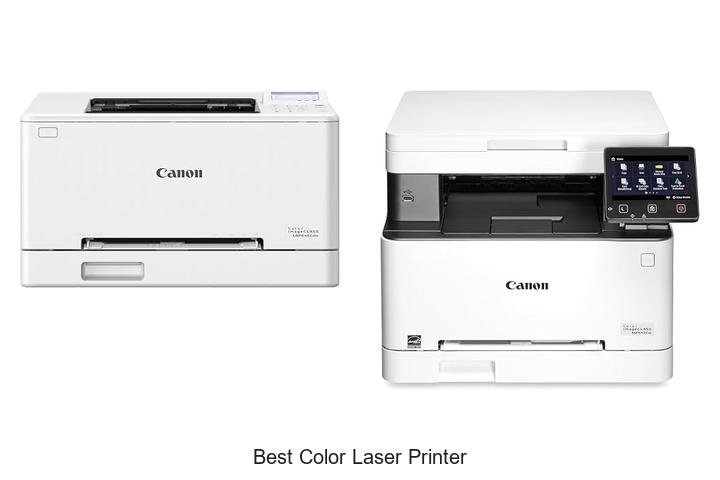
In the realm of advanced printing technology, precision, toner efficiency, and color accuracy remain pivotal factors influencing both productivity and output quality. The best color laser printer integrates high-resolution laser scanning, electro-photographic imaging, and robust color management systems to deliver sharp, vibrant prints with remarkable speed.
Toner fusion processes and duplex printing capabilities further enhance performance, catering to the demanding environments of modern offices and creative studios alike. As businesses and individuals increasingly prioritize cost-effectiveness without compromising on professional-quality color output, understanding the technical nuances behind leading laser printers becomes essential. Exploring the features that distinguish the best color laser printer will reveal key insights into achieving optimal print results and operational efficiency.
Keep reading to discover which models excel in balancing innovation and functionality.
Achieve Vibrant Prints and Unmatched Efficiency with These Top Choices
| Image | Product | Price |
|---|---|---|
Our Picks 1  | Canon imageCLASS LBP646Cdw Wireless Laser Printer | Check Price On Amazon |
Our Picks 2  | Canon imageCLASS MF652Cw Wireless Laser Printer | Check Price On Amazon |
Our Picks 3  | HP Color LaserJet Enterprise M554dn Printer | Check Price On Amazon |
1. Canon imageCLASS LBP646Cdw Wireless Laser Printer
Experience vibrant, high-quality color printing with the Canon imageCLASS LBP646Cdw Wireless Laser Printer. Designed for efficiency and convenience, this reliable printer delivers sharp prints at fast speeds, making it an ideal choice for home offices or small workgroups seeking professional results without unnecessary features.
Built exclusively for printing, the Canon imageCLASS LBP646Cdw boasts up to 26 pages per minute in both color and black-and-white, complemented by a quick first-page-out time of just 3 seconds.
Its wireless setup is straightforward, and the 5-line LCD screen ensures easy navigation. Enjoy automatic duplex printing, mobile device compatibility, and high-capacity toner cartridges tailored to meet high-volume demands efficiently.
Pros
- Fast print speed of up to 26 ppm with quick first-page output
- Wireless connectivity with simple setup and mobile device compatibility via Canon PRINT app, Apple AirPrint, and Mopria
- Automatic two-sided printing reduces paper usage and increases convenience
Cons
- Lacks scanning, copying, and faxing functions, focusing solely on printing
For users prioritizing clear, fast, and wireless color printing without multifunction distractions, the Canon imageCLASS LBP646Cdw offers excellent value. Compared to similar printers in its class, its high-capacity toner and efficient duplex printing stand out as practical advantages for productivity-focused environments.
2. Canon imageCLASS MF652Cw Wireless Laser Printer
Discover the Canon imageCLASS MF652Cw Wireless Laser Printer, an all-in-one solution designed for vibrant color output and versatile functionality. Ideal for both home offices and small businesses, it offers fast printing, wireless convenience, and professional-quality results with ease.
Combining print, scan, and copy features, this color laser printer delivers up to 22 pages per minute in both color and black & white. Compatible with various mobile apps like Canon PRINT and Chromebook devices, it supports on-the-go printing and includes a 250-sheet cassette alongside a multipurpose tray for diverse media handling.
Pros
- Wireless 3-in-1 functionality streamlines printing, scanning, and copying tasks.
- Fast print speeds with first print output in approximately 10.3 seconds.
- Energy-efficient design certified by ENERGY STAR and EPEAT Silver standards.
Cons
- Heavier footprint at nearly 40 pounds can limit portability.
Designed to meet diverse printing needs without sacrificing speed or quality, the Canon imageCLASS MF652Cw stands out as a reliable and feature-rich color laser printer. Its wireless capabilities and robust build make it an excellent choice compared to similar models in its class, offering great value backed by a 3-year limited warranty.
3. HP Color LaserJet Enterprise M554dn Printer
Experience professional-grade printing with the HP Color LaserJet Enterprise M554dn Printer, designed for businesses that demand consistent, high-quality color documents rapidly and securely. Its robust duplex capabilities and smart security features make it an ideal choice for efficient office environments.
Equipped with HP Wolf Enterprise Security, this color laser printer defends your printing workflow against malware and unauthorized access. Its large 650-sheet capacity, automatic two-sided printing, and speeds up to 35 pages per minute ensure productivity remains uninterrupted, while energy-saving technologies reduce operational costs.
Pros
- Advanced security framework that detects and self-heals from malware threats.
- Fast printing of up to 35 ppm with reliable duplex color output for professional documents.
- Energy-efficient HP Auto-On/Auto-Off Technology reduces power consumption automatically.
Cons
- Weighing over 60 pounds, it requires dedicated space and may be less portable than smaller models.
The HP Color LaserJet Enterprise M554dn Printer blends speed, security, and sustainability, offering an outstanding solution for businesses seeking the best color laser printer performance. When compared to other models in its class, it stands out for its comprehensive security features and efficient workflow integration.
4. HP LaserJet Pro M254dw Wireless Color Laser Printer

Discover the HP LaserJet Pro M254dw Wireless Color Laser Printer, designed to deliver vibrant, sharp prints with remarkable speed and efficiency. Perfect for home offices or small businesses, this compact device combines powerful performance with wireless convenience, making it a top contender for the best color laser printer in its class.
Engineered for productivity, the printer offers fast two-sided printing at up to 22 pages per minute and a crisp 1200 x 1200 dpi resolution. Equipped with a 7-inch color touchscreen and compatibility with iOS and Android devices, it supports mobile printing and Wi-Fi Direct, ensuring seamless connectivity and ease of use.
Pros
- High-speed printing with up to 22 ppm for black and color outputs
- Intuitive 2.7-inch color touchscreen for simple control and navigation
- Wireless and mobile printing support including Wi-Fi Direct for convenient access
Cons
- Toner cartridges are not included, necessitating separate purchase
Balancing fast print speeds, wireless functionality, and sharp color output, the HP LaserJet Pro M254dw offers excellent value for users seeking a reliable and efficient color laser printer. Its compact design and advanced features make it a smart choice over similar models in its price range.
5. HP Color LaserJet Pro 3201dw Wireless Laser Printer

Experience vibrant, professional-quality prints with the HP Color LaserJet Pro 3201dw Wireless Laser Printer, designed for small teams who demand efficiency and sharp color output. Combining fast print speeds with reliable wireless connectivity, it elevates your everyday business tasks effortlessly.
Equipped with next-generation TerraJet toner, this laser printer delivers vivid colors and crisp text at speeds up to 26 pages per minute. Features include auto two-sided printing and a spacious 250-sheet input tray, while dual-band Wi-Fi ensures seamless wireless connection and automatic network issue resolution.
Pros
- Fast, high-quality color and black-and-white print output up to 26 ppm
- Auto duplex printing and large 250-sheet tray for increased productivity
- Reliable dual-band wireless connectivity with automatic self-reset for smooth operation
Cons
- Compatible only with original HP cartridges featuring proprietary chips, limiting third-party options
The HP Color LaserJet Pro 3201dw strikes an excellent balance between color quality, speed, and connectivity, making it a strong contender among office laser printers. Its user-friendly features and dependable performance offer great value for small business environments.
6. HP Color LaserJet Pro MFP 3301sdw All-in-One Printer

Experience vibrant, professional-quality printing with the HP Color LaserJet Pro MFP 3301sdw, designed to meet the needs of small teams seeking reliable all-in-one functionality. Combining speed, color accuracy, and versatility, it effortlessly handles printing, scanning, and copying with business-grade results.
Equipped with next-generation TerraJet toner, this laser printer offers rapid color and black-and-white print speeds up to 26 ppm. Features like automatic two-sided printing, a 250-sheet input tray, and an automatic document feeder streamline workflow, making it ideal for busy offices demanding consistent, high-quality output.
Pros
- High-quality color and black-and-white prints at speeds up to 26 pages per minute
- Efficient all-in-one functionality with scanning, copying, and wireless printing
- Reliable performance supported by Original HP 218A and 218X toner cartridges
Cons
- Printer firmware restricts use to only HP Original toner cartridges, limiting third-party cartridge options
Combining speed, advanced toner technology, and essential office features, the HP Color LaserJet Pro MFP 3301sdw stands out as a dependable choice for small teams. Its seamless integration and award-winning reliability make it a compelling option among the best color laser printers available today.
7. Brother HL-L3280CDW Wireless Color Laser Printer

Experience crisp, vibrant prints with the Brother HL-L3280CDW Wireless Color Laser Printer, designed specifically for small offices and home environments. Combining compactness with powerful laser precision, it transforms everyday printing tasks into professional-quality documents effortlessly.
Equipped with wireless connectivity and a user-friendly 7 touchscreen, this printer streamlines your workflow by supporting cloud-based printing from platforms like Google Drive and Dropbox. Its fast output speed of up to 27 pages per minute, automatic duplexing, and compatibility with various media types ensure efficiency without sacrificing quality.
Pros
- High-speed printing at 27 ppm with automatic double-sided printing to save time and paper.
- Seamless wireless and cloud connectivity, allowing printing directly from smartphones, tablets, and laptops.
- Compact design that fits comfortably in small office spaces without compromising functionality.
Cons
- Limited to a single paper tray, which may require frequent refills for heavy print volumes.
The Brother HL-L3280CDW offers a balanced blend of speed, quality, and convenience, making it a top choice for those seeking the best color laser printer for small-scale, professional use. Its features stand strong against competitors, especially in environments valuing compactness and wireless versatility.
8. Canon imageCLASS MF662Cdw Wireless Duplex Laser Printer

Discover the Canon imageCLASS MF662Cdw Wireless Duplex Laser Printer, designed to deliver vibrant color prints with fast, reliable performance. Perfect for home offices and small businesses, it combines advanced wireless connectivity, duplex printing, and a user-friendly touchscreen to enhance productivity and reduce operational hassle.
Equipped with a 5-inch color touchscreen and intuitive Application Library, this versatile 3-in-1 device prints, scans, and copies at speeds up to 26 pages per minute in both color and black-and-white. Wireless setup is effortless, while high-capacity Canon Genuine Toner ensures long-lasting quality and fewer replacements.
Pros
- Automatic two-sided printing saves paper and reduces costs.
- Supports mobile printing through Canon PRINT app, Apple AirPrint, and Mopria Print Service for on-the-go convenience.
- High-capacity toner cartridges provide sharp, consistent output with fewer interruptions.
Cons
- Relatively heavyweight at 55.1 pounds, making it less ideal for frequent relocation.
Offering a solid balance of speed, quality, and connectivity, the Canon imageCLASS MF662Cdw is a top contender for users seeking the best color laser printer within a mid-range budget. Its feature set surpasses many competitors in its class, making it a smart investment for efficient document management.
9. Brother HL-L3220CDW Color Laser Printer

Experience exceptional print quality and efficiency with the Brother HL-L3220CDW Color Laser Printer, designed to elevate home and office productivity. Its combination of sharp text, vibrant color output, and rapid speed ensures professional results without compromise.
Equipped with advanced wireless connectivity, this printer accommodates seamless printing from multiple devices, including smartphones and laptops. Its substantial 250-sheet tray and automatic duplex feature optimize workflow, while compatibility with major mobile platforms simplifies document management on the go.
Pros
- Fast printing speed of up to 19 pages per minute enhances productivity
- High-quality color output with a resolution up to 2400 x 600 dpi delivers crisp text and vibrant graphics
- Robust wireless features support printing from various devices securely and conveniently
Cons
- Weighs 24.7 pounds, which may affect portability compared to compact models
Overall, the Brother HL-L3220CDW stands out with its blend of speed, color precision, and versatile connectivity, making it a compelling choice for users seeking a reliable best color laser printer. When compared to similar printers in its category, it offers a balanced mix of features and performance suitable for both personal and business needs.
10. Brother MFC-L3720CDW Wireless Color Laser Printer

Experience professional-grade printing with the Brother MFC-L3720CDW Wireless Color Laser Printer, designed to deliver vibrant color output and rapid print speeds up to 19 pages per minute. Ideal for small to medium businesses seeking reliability and advanced connectivity, this printer enhances document quality and workflow efficiency seamlessly.
Equipped with dual-band wireless networking, Wi-Fi Direct, and a USB 0 interface, it allows effortless multi-device printing. Features such as a 50-sheet auto document feeder, 250-sheet adjustable paper tray, and automatic duplex printing boost productivity.
Its intuitive 5 color touchscreen offers direct cloud service access, making document management straightforward and efficient.
Pros
- High-quality laser color prints at speeds up to 19 ppm for professional documents.
- Advanced wireless and USB connectivity options support seamless mobile and desktop use.
- Efficient workflow with auto document feeder, duplex printing, and customizable touchscreen shortcuts.
Cons
- Relatively bulky with a weight of 44 pounds, requiring adequate space.
Combining versatility, speed, and smart features, the Brother MFC-L3720CDW is an excellent choice among best color laser printers, especially when compared to similar models that lack its comprehensive connectivity and user-friendly interface. It effectively balances performance and convenience, offering solid value for demanding business environments.
The Ultimate Guide to Choosing the Best Color Laser Printer for Your Needs
Print Quality and Performance
Resolution and color accuracy. Print speed (pages per minute). Monthly duty cycle and volume capacity.Ensuring a printer seamlessly integrates with your devices and adapts to your growing needs is crucial for uninterrupted workflow and future-proofing your investment. Having multiple options for connecting to computers and mobile devices, such as USB, Ethernet, and wireless networks, allows for versatile usage across different environments, whether at home or in a busy office. Additionally, the ability to easily add extra paper trays, memory, or even network cards means the device can evolve alongside your demands, preventing the need for frequent replacements.
| Feature | Benefits | Considerations |
|---|---|---|
| Multiple connection ports | Supports various devices and network setups | Check for USB, Ethernet, Wi-Fi compatibility |
| Wireless options | Enables printing from smartphones and tablets | Look for reliable signal strength and security features |
| Modular upgrades | Enhances capacity and performance over time | Availability and cost of additional trays, memory, accessories |
Connectivity Options
Wireless and network capabilities. Compatibility with mobile devices and apps. USB and Ethernet ports.Having multiple ways to connect a printer ensures seamless integration into various work environments. Wireless and network capabilities allow several users to access the device without the hassle of cables, enhancing convenience in both home and office settings. Compatibility with mobile devices and dedicated apps enables printing directly from smartphones or tablets, streamlining workflows and supporting on-the-go productivity.
Additionally, USB and Ethernet ports provide reliable wired connections that are essential for stable, high-speed data transfer, especially in offices with heavy printing demands. Considering these features helps ensure the printer fits smoothly into your existing setup and adapts to different usage scenarios.
Cost and Consumables
Initial purchase price. Cost per page and toner cartridge prices. Availability and yield of replacement cartridges.Modern printers often support multiple ways to connect with various devices, including wireless options, USB ports, and Ethernet connections. This flexibility ensures smooth integration into different work environments, whether you need to print directly from a laptop, smartphone, or a shared office network. Additionally, the ability to add extra components like additional paper trays, memory upgrades, or finishing features such as staplers and duplexers can extend the printer’s functionality over time, making it adaptable to growing or changing needs.
Taking these factors into account guarantees smoother workflows and better long-term value, avoiding limitations that could slow down productivity or require frequent replacements.
Features and Functionality
Duplex (doublesided) printing. Multifunction options (scan, copy, fax). Paper handling and capacity.Modern color laser printers often support duplex printing, which allows automatic double-sided printing to save paper and reduce costs. Multifunction models provide additional value by incorporating scanning, copying, and faxing capabilities, turning the device into an all-in-one office solution rather than just a printer. Equally important is the printer’s ability to handle various paper sizes and types, along with a sufficient paper capacity to minimize frequent refills during heavy printing tasks.
Equally important is the printer’s ability to handle various paper sizes and types, along with a sufficient paper capacity to minimize frequent refills during heavy printing tasks. These aspects ensure smooth workflow integration and help accommodate growing or changing printing needs over time.
Size and Design
Printer footprint and workspace fit. Build quality and durability. User interface and ease of use.Ensuring that a printer can easily connect to various devices and support future upgrades plays a crucial role in its overall functionality and longevity. Printers equipped with multiple connection options, such as wireless, Ethernet, and USB ports, offer greater flexibility for different office setups and allow seamless integration with computers, smartphones, and tablets. Additionally, models designed with expandable features like additional paper trays, memory slots, or finishing options can adapt to growing printing demands, saving time and cost in the long run.
- Versatile device compatibility: Multiple interface options mean fewer connectivity hurdles in diverse environments.
- Scalability: Upgrade paths help maintain high performance without the need to replace the entire machine.
- Improved workflow efficiency: Enhanced networking capabilities allow for smoother print job management and sharing among multiple users.
Support and Warranty
Manufacturer warranty coverage. Customer support services. Availability of software and driver updates.Ensuring a device offers robust manufacturer warranty coverage is essential, as it provides peace of mind against potential defects or malfunctions. Reliable customer support services play a crucial role in resolving any issues quickly and efficiently, minimizing downtime. Additionally, the regular availability of software and driver updates helps maintain optimal performance and compatibility with evolving operating systems, preventing frustrating interruptions during use.
Additionally, the regular availability of software and driver updates helps maintain optimal performance and compatibility with evolving operating systems, preventing frustrating interruptions during use. Together, these factors contribute to a smooth and hassle-free experience over the printer’s lifespan.
FAQ’s
What Are The Top Features To Look For In The Best Color Laser Printer?The best color laser printer should offer high-quality, vivid color output with fast printing speeds and reliable performance. Additionally, look for features like wireless connectivity, duplex printing, and cost-efficient toner usage for ease of use and affordability.
Which Brand Offers The Most Reliable Color Laser Printers In 202In 2024, HP is widely regarded as offering the most reliable color laser printers due to its consistent performance and strong customer support. Brother and Canon also provide dependable options, but HP remains the top choice for overall reliability.
How Do Color Laser Printers Compare To Inkjet Printers In Terms Of Print Quality And Cost?Color laser printers typically offer faster print speeds and sharper text output, making them ideal for professional documents, while inkjet printers excel at producing high-quality photo prints with more vibrant colors. However, laser printers usually have a higher upfront cost but lower cost per page, whereas inkjet printers are generally cheaper initially but can be more expensive to maintain due to frequent ink cartridge replacements.
What Is The Average Cost Of A High-Quality Color Laser Printer For Home Or Office Use?The average cost of a high-quality color laser printer for home or office use typically ranges from $300 to $600. Prices may vary based on features such as speed, connectivity, and print resolution.
Are There Any Energy-Efficient Color Laser Printers Available On The Market?Yes, there are energy-efficient color laser printers available that feature ENERGY STAR certification, which ensures lower power consumption and eco-friendly operation. Brands like HP, Brother, and Canon offer models designed to minimize energy use without compromising print quality.
Conclusion
In summary, the best color laser printer combines vibrant print quality, fast performance, and cost efficiency, making it ideal for both home and office use. When choosing, consider factors like print speed, resolution, connectivity options, and running costs to ensure the printer meets your specific needs and budget. Investing wisely guarantees professional results and long-term satisfaction.
Investing wisely guarantees professional results and long-term satisfaction.

- Best Monitor for Eyes: Top Picks That Reduce Strain Fast! - October 10, 2026
- Best Monitor for Editing Pictures: See Every Detail Now! - October 10, 2026
- Best Monitor for CAD: Ultimate Guide to Boost Your Design! - October 10, 2026
