
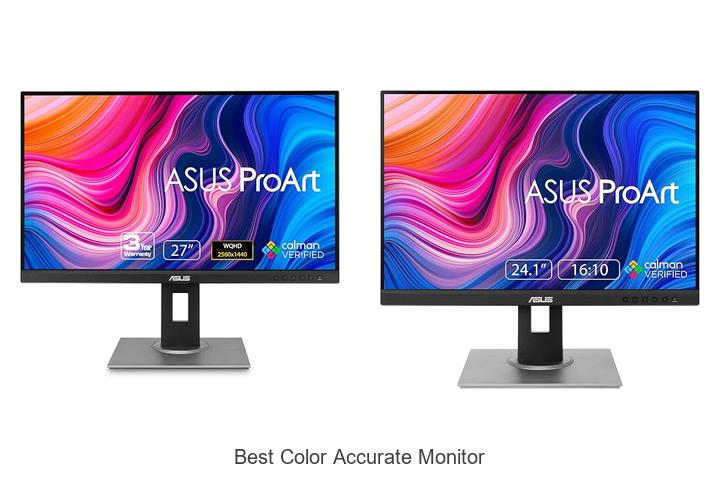
Color gamut, Delta E, and color calibration are critical factors when evaluating display performance, especially for professionals in photography, graphic design, and video production. Achieving precise color accuracy on a monitor ensures that the hues, saturation, and luminance you see on-screen correspond exactly to real-world standards or print outputs.
As digital workflows become increasingly reliant on fidelity, understanding the capabilities and limitations of various screens is essential. The best color accurate monitor not only supports wide color gamuts like Adobe RGB and DCI-P3 but also maintains minimal color deviation over time through robust hardware and software calibration tools. Navigating through these technical specifications can be daunting, but grasping their significance is key to elevating your creative work—read on to discover what sets the top monitors apart.
Discover Top Choices for Exceptional Visual Precision and True-to-Life Colors
| Image | Product | Price |
|---|---|---|
Our Picks 1  | ASUS ProArt PA278QV 27 Inch Professional Monitor | Check Price On Amazon |
Our Picks 2  | ASUS ProArt PA248QV Monitor | Check Price On Amazon |
Our Picks 3  | ASUS ProArt PA247CV Professional Monitor | Check Price On Amazon |
1. ASUS ProArt PA278QV 27 Inch Professional Monitor
Experience unparalleled color precision and stunning visuals with the ASUS ProArt PA278QV 27 Inch Professional Monitor. Designed for creative professionals, it offers exceptional accuracy and clarity, making it the perfect choice for photo editing, video production, and graphic design projects that demand the highest standards.
Equipped with a 27-inch WQHD IPS display providing 2560 x 1440 resolution, this monitor delivers sharp details and vivid colors using 100% sRGB and Rec. 709 color gamuts.
Connectivity options include DisplayPort, HDMI, DVI-D, and USB hubs for streamlined workflow integration.
Pros
- Exceptional color accuracy with Calman Verified and Delta E < 2 for professional-grade color reproduction
- Comprehensive color gamut coverage—100% sRGB and 100% Rec. 709—ideal for video and photo editing
- Ergonomic adjustable stand with tilt, swivel, pivot, and height options for comfortable, prolonged use
Cons
- Refresh rate limited to 75Hz, which may not suit high-frame-rate gaming needs
Combining advanced color fidelity, versatile connectivity, and ergonomic design, the ASUS ProArt PA278QV offers excellent value for professionals seeking a dependable, best-in-class color accurate monitor. Its comprehensive feature set makes it a superior alternative to competitors in the mid-range professional display segment.
2. ASUS ProArt PA248QV Monitor
Discover the exceptional clarity and color precision of the ASUS ProArt PA248QV Monitor, designed for professionals and creatives who demand the best color accuracy in their work. Its stunning WUXGA resolution paired with full sRGB and Rec.709 color spaces guarantees unmatched visual fidelity for photo editing, design, and content creation.
Equipped with a 1-inch IPS panel, this monitor delivers vibrant, true-to-life colors with DeltaE < 2 accuracy and Calman verification. The ergonomic stand and multiple connectivity options allow flexible setups, while features like anti-glare technology and a 5-year warranty enhance comfort and reliability for long-term use.
Pros
- 100% sRGB and Rec.709 color space coverage with Calman Verified color accuracy ensuring true-to-life hues.
- Ergonomic design including tilt, swivel, pivot, and height adjustments for personalized comfort.
- Multiple connectivity options including DisplayPort, HDMI, and D-Sub ports for versatile device compatibility.
Cons
- Refresh rate limited to 75Hz, which may not satisfy high-frame-rate gaming needs.
Balancing professional-grade color accuracy with ergonomic flexibility, the ASUS ProArt PA248QV stands out as a top choice for creatives seeking reliable and vivid displays. Compared to competitors, it offers superior calibration and extended warranty support, making it a valuable investment for detailed color work and long-term productivity.
3. ASUS ProArt PA247CV Professional Monitor
Discover exceptional color precision and professional-grade performance with the ASUS ProArt PA247CV Professional Monitor. Designed for creatives and professionals, this 24-inch IPS display offers vibrant visuals and remarkable accuracy, making it a top choice for anyone seeking the best color accurate monitor for detailed image and video work.
Featuring a 1920 x 1080 Full HD resolution and 178° wide viewing angles, the ASUS ProArt PA247CV ensures consistent color from every perspective. Factory calibrated and Calman Verified, it delivers Delta E < 2 accuracy covering 100% sRGB and Rec. 709 gamuts.
709 gamuts. Connectivity options include USB-C with 65W power delivery, DisplayPort, HDMI, and a USB 1 hub for versatile multi-device setups.
Pros
- Exceptional color accuracy with factory calibration and Calman certification
- Comprehensive connectivity including USB-C with power delivery and daisy-chaining via DisplayPort
- Free 3-month Adobe Creative Cloud subscription and extended 5-year warranty offer added value
Cons
- Full HD resolution might be limiting for users requiring 4K detail
Ideal for professionals demanding precise color representation, the ASUS ProArt PA247CV balances quality, functionality, and support features. Compared to similar models, it stands out with superior calibration and extended warranty, making it a reliable investment for photographers, designers, and video editors alike.
4. ASUS ProArt PA279CRV 27 4K UHD Professional Monitor

Experience exceptional visual clarity and professional-grade color accuracy with the ASUS ProArt PA279CRV 27” 4K UHD Monitor. Designed for creatives and professionals, this display provides stunning 4K resolution combined with extensive color gamut coverage, ensuring every detail is reproduced with remarkable precision and vibrancy.
Featuring a 27-inch 3840 x 2160 HDR IPS panel with 178° wide viewing angles, the monitor delivers sharp images and consistent colors across the screen. It boasts 99% DCI-P3 and Adobe RGB gamut coverage along with factory calibration verified by Calman to achieve Delta E < 2, ensuring reliable color accuracy right out of the box.
Pros
- Ultra-high 4K UHD resolution for crystal-clear detail and sharpness
- Wide color gamut with 99% coverage of DCI-P3 and Adobe RGB for vibrant and true-to-life colors
- Extensive connectivity including USB-C with 96W power delivery, DisplayPort, HDMI, and USB hub for versatile setup options
- Ergonomic adjustable stand offering tilt, swivel, pivot, and height adjustments to ensure comfortable viewing during long workflows
- Includes a free 3-month Adobe Creative Cloud subscription to complement creative projects
- 5-year warranty providing long-term peace of mind
Cons
- 60Hz refresh rate may not be ideal for fast-paced gaming or high frame-rate video editing
For professionals seeking the best color accurate monitor within a reasonable budget, the ASUS ProArt PA279CRV stands out by combining superior image quality, versatile connectivity, and ergonomic design. It offers tangible benefits over standard monitors and even many professional-grade displays, making it a wise investment for graphic designers, photographers, and video editors.
5. ASUS ProArt PA278CV 27-Inch Professional Monitor

Discover unmatched color accuracy and exceptional clarity with the ASUS ProArt PA278CV 27-Inch Professional Monitor, engineered for creative professionals demanding precise visuals. Its advanced calibration and vibrant QHD display bring your artwork and video editing projects to life with stunning realism and vibrancy.
Featuring a 27-inch 2560 x 1440 IPS panel, the monitor delivers expansive workspace and sharp details for multitasking. USB-C connectivity with 65W power delivery simplifies your setup by charging laptops and transferring data seamlessly. Factory-calibrated color settings and 100% sRGB plus Rec.
709 color gamut guarantee true-to-life images ideal for photographers and content creators.
Pros
- Calman Verified with Delta E < 2 for professional-grade color precision
- Versatile USB-C port supports power delivery and data transfer via one cable
- Ergonomic stand with 90° pivot to customize viewing angles for comfort and productivity
- Supports DisplayPort daisy-chaining to expand multiple-monitor setups effortlessly
- Includes free 3-month Adobe Creative Cloud subscription for creative software access
- Comes with a comprehensive 5-year warranty for long-term peace of mind
Cons
- Refresh rate capped at 75Hz, which may not suit fast-paced gaming requirements
For professionals focused on color-accurate workflows, the ASUS ProArt PA278CV offers a compelling balance of precision, connectivity, and ergonomic design, making it a standout choice among mid-range professional monitors. It excels over generic displays by delivering consistent color performance essential for creative projects.
6. ViewSonic VP2756A-2K 27 Inch Monitor

Discover exceptional visual clarity with the ViewSonic VP2756A-2K 27 Inch Monitor, designed for professionals who demand precise color accuracy and expansive workspace. Its high-refresh 2K display and sleek design elevate both productivity and creative projects, making it an ideal choice for graphic designers, photographers, and video editors.
Featuring a 27-inch Quad HD IPS panel at 120Hz, this monitor delivers striking visuals with 100% sRGB and Rec.709 color gamut coverage. Factory-calibrated for Delta E<2 precision and Pantone validation, it ensures true-to-life color reproduction.
Factory-calibrated for Delta E<2 precision and Pantone validation, it ensures true-to-life color reproduction. An integrated 90W USB-C docking station simplifies connectivity and cable management for a streamlined desktop.
Pros
- Factory-calibrated for exceptional color accuracy with Delta E<2 and Pantone validation
- Smooth 120Hz refresh rate enhances display fluidity and reduces eye strain
- Versatile connectivity including USB-C, HDMI, DisplayPort with daisy chain support
- Ergonomic stand offering tilt, swivel, rotate, and height adjustments for personalized comfort
- USB-C docking station delivers 90W power, data, audio, and video over a single cable
Cons
- Premium features come at a higher price point compared to some entry-level monitors
Combining professional-grade color precision with ergonomic versatility, the ViewSonic VP2756A-2K stands out as a top contender among color-accurate monitors. Its advanced features and reliable performance make it a worthy investment for creatives seeking superior image fidelity and an optimized workspace.
7. Acer KB272 G0bi 27in FHD IPS Monitor

Experience breathtaking visuals and seamless performance with the Acer KB272 G0bi 27 FHD IPS Monitor. Designed to deliver exceptional color accuracy and fluid motion, this monitor is perfect for gaming, office work, and multimedia consumption, bringing your content to life with crystal-clear detail and vibrant colors.
The 27-inch Full HD display features a 1920 x 1080 resolution with a 16:9 aspect ratio, enhanced by an IPS panel that ensures wide viewing angles and consistent color accuracy. Adaptive-Sync (FreeSync Compatible) technology minimizes screen tearing while a lightning-fast 1ms response time and 120Hz refresh rate offer smooth, blur-free visuals for fast-paced action.
Pros
- High-quality IPS panel with accurate color reproduction and wide viewing angles
- Adaptive-Sync support ensures tear-free gaming and video playback
- Fast 1ms response time and 120Hz refresh rate deliver smooth motion and reduced ghosting
Cons
- Brightness level of 250 nits may be less ideal for extremely bright environments
Offering excellent performance at an affordable price point, the Acer KB272 G0bi stands out as a versatile monitor for those seeking vivid visuals and responsiveness. Compared to similar models, it balances image quality and motion clarity, making it a worthy choice whether for gaming or professional use.
8. ASUS ProArt PA279CV 27 Inch Monitor

Discover unparalleled color precision with the ASUS ProArt PA279CV 27 Inch Monitor, designed specifically for professionals and content creators who demand the highest level of accuracy in their visuals. Its 4K UHD display and factory-calibrated color profiles ensure your work is presented exactly as intended.
Featuring a 27-inch IPS panel with 100% sRGB and Rec. 709 wide color gamuts, this monitor delivers vibrant, true-to-life colors with a Delta E < 2 accuracy.
Connectivity is versatile, with USB-C powering devices while transmitting DisplayPort signals, along with HDMI and USB 1 hubs to accommodate multiple peripherals seamlessly.
Pros
- Exceptional color accuracy with Calman Verified factory calibration for professional-grade visuals.
- Multiple connection options including USB-C with 65W Power Delivery for streamlined workspace setup.
- Includes a free 3-month Adobe Creative Cloud subscription to enhance creative workflows.
Cons
- Refresh rate capped at 60Hz, which may not suit high-frame-rate gaming or video editing needs.
Offering a perfect balance of advanced color fidelity and versatile functionality, the ASUS ProArt PA279CV stands out as an excellent choice for creative professionals seeking reliable, accurate visual performance, making it a worthwhile investment over many standard monitors in its class.
9. Dell SE2426H 24-Inch FHD Monitor

Experience vibrant, accurate visuals and smooth performance with the Dell SE2426H 24-Inch FHD Monitor. Designed for both work and play, this display combines advanced technology with eye comfort to deliver an immersive viewing experience tailored to your daily computing and entertainment needs.
Featuring a 144Hz refresh rate and 1ms MPRT response time, the Dell SE2426H ensures fluid, tear-free motion ideal for gaming, streaming, and professional tasks. Its IPS panel offers wide 178° viewing angles and excellent color consistency, while TÜV Rheinland 3-star certification reduces blue light exposure without sacrificing color vibrancy.
Pros
- High 144Hz refresh rate for smooth, responsive visuals
- IPS technology delivers consistent and accurate colors across wide viewing angles
- TÜV Rheinland 3-star eye comfort certification minimizes harmful blue light
Cons
- Standard 1080p resolution may be less sharp compared to higher-resolution options
Offering a blend of performance and comfort at an affordable price, the Dell SE2426H stands out among budget-friendly monitors. Its superior motion handling and color accuracy make it a reliable choice for users seeking the best color accurate monitor without investing in high-end displays.
10. Dell S2725QC 27-Inch 4K UHD Monitor

Discover stunning clarity and vibrant visuals with the Dell S2725QC 27-Inch 4K UHD Monitor, designed for professionals and entertainment enthusiasts who demand precision in color accuracy and immersive performance. This monitor blends advanced technology with user comfort for an exceptional viewing experience.
Equipped with a 27-inch 4K UHD IPS display, the Dell S2725QC delivers vivid colors with 99% sRGB coverage and a 1500:1 contrast ratio. The ultra-smooth 120Hz refresh rate and rapid 03ms response time combined with AMD FreeSync Premium ensure tear-free motion clarity. Enhanced ComfortView Plus technology minimizes blue light without compromising color fidelity, while integrated speakers provide richer sound for both work and play.
Enhanced ComfortView Plus technology minimizes blue light without compromising color fidelity, while integrated speakers provide richer sound for both work and play.
Pros
- Exceptional color accuracy with 99% sRGB and IPS technology for wide viewing angles
- ComfortView Plus reduces blue light emissions, ensuring eye comfort during prolonged use
- Seamless connectivity via USB-C cable supporting up to 65W power delivery, reducing desk clutter
Cons
- Brightness at 350 nits is adequate but may be less optimal in very bright environments
With premium features tailored for vibrant visuals, eye comfort, and streamlined connectivity, the Dell S2725QC stands out among color-accurate monitors in its class—ideal for creative professionals and multimedia users seeking balanced performance and reliability.
Find Your Perfect Hue: The Ultimate Guide to Choosing the Best Color Accurate Monitor
Color Accuracy and Calibration
Factory calibration vs. user calibration. Color gamut coverage (sRGB, Adobe RGB, DCIP3). Delta E value and its importance.Ensuring a monitor supports multiple input options and offers room for additional ports can greatly enhance workflow efficiency and versatility. Different devices and peripherals often require specific connections such as HDMI, DisplayPort, or USB-C, so having a variety of these ports helps maintain seamless compatibility without constantly swapping cables.
This flexibility not only supports current needs but also future-proofs the setup, making it easier to integrate new technologies or peripherals as they become available.
Display Technology and Panel Type
IPS vs. VA vs. TN panels for color consistency. HDR support and its impact on color accuracy. Backlighting technologies (LED, OLED).Understanding the importance of various connection ports and upgrade options can significantly enhance the overall experience with a high-quality color-accurate display. Multiple input options such as HDMI, DisplayPort, and USB-C ensure seamless compatibility with different devices, including laptops, desktops, and creative tools. This versatility allows for effortless switching between sources without compromising image quality.
Future-proofing also plays a role, as the ability to support adapters or additional hardware ensures the display remains useful even as technology evolves, providing long-term value and reducing the need for frequent replacements.
Strong connection and upgrade capabilities are especially vital for professionals who demand precise color representation across multiple devices and workflows, making these features an essential aspect to assess for a reliable and efficient setup.
Resolution and Screen Size
Impact of resolution on color detail and sharpness. Ideal screen size for colorcritical work. Aspect ratio considerations.Ensuring your monitor supports a range of ports and connection types is essential for seamless integration with various devices. Multiple input options like HDMI, DisplayPort, and USB-C allow for greater flexibility, whether plugging into a desktop, laptop, or external hardware.
Additionally, having extra slots for peripherals and storage expansions can future-proof your setup, giving room to add devices like calibration tools or external drives without needing constant adapter swaps. This adaptability not only maintains signal quality but also enhances workflow efficiency, especially for professionals who rely on accurate color reproduction across multiple platforms and sources.
Connectivity and Compatibility
Available ports for color calibration tools. Compatibility with your computer and graphics card. Support for hardware calibration devices.Having the right ports on a monitor is crucial for ensuring seamless integration with color calibration tools, which are essential for maintaining precise color accuracy over time. Monitors equipped with multiple input options such as USB-C, DisplayPort, and HDMI offer greater flexibility, making it easier to connect with various devices, including your computer and professional graphics cards. Additionally, support for hardware calibration devices allows the monitor to be fine-tuned at a system level, providing more reliable and consistent results compared to software-based adjustments alone.
| Feature | Benefit |
|---|---|
| Multiple Input Ports (USB-C, DisplayPort, HDMI) | Ensures compatibility with a wide range of devices and simplified connections |
| Support for Hardware Calibration Tools | Enables precise color adjustments directly on the monitor for consistent accuracy |
| Compatibility with Graphics Cards | Guarantees optimal performance and color output tailored to your system |
Additional Features and Ergonomics
Adjustable stands for optimal viewing angles. Antiglare coating and screen finish. Onscreen display (OSD) controls for color adjustments.Ensuring the monitor offers multiple ports such as HDMI, DisplayPort, or USB-C is essential for connecting to various devices without needing extra adapters. This versatility not only supports seamless workflow but also allows for easy attachment of peripherals like calibration tools and external storage, enhancing overall productivity.
Additionally, having options to add accessories or devices through USB hubs or daisy-chaining capabilities future-proofs the setup, making it adaptable as your needs evolve.
Budget and Warranty Considerations
Price ranges for different color accuracy levels. Cost vs. professional needs balance. Manufacturer warranty and customer support options.Ensuring the monitor offers a variety of ports and connectivity options is essential for seamless integration with different devices like cameras, computers, and storage drives. This flexibility allows for smooth workflow transitions and easy access to external calibration tools that maintain color precision over time.
FAQ’s
What Features Should I Look For In A Color Accurate Monitor?Look for a monitor with high color accuracy standards such as IPS panel technology, a wide color gamut (covering Adobe RGB or DCI-P3), and factory calibration. Additionally, features like a high resolution, uniform brightness, and adjustable color settings enhance precise color reproduction.
Which Brands Are Known For Producing The Best Color Accurate Monitors?Brands like Eizo, ASUS ProArt, and BenQ are renowned for producing some of the best color accurate monitors. These brands are favored by professionals in photography, design, and video editing for their precise color calibration and high-quality display panels.
How Does Color Accuracy Impact Photo And Video Editing?Color accuracy is crucial in photo and video editing because it ensures that the colors displayed on screen match the true colors of the original content, leading to consistent and professional results. Inaccurate colors can mislead editors, resulting in poor color grading and a final product that looks different across various devices.
What Is The Difference Between Srgb, Adobe Rgb, And Dci-P3 In Color Accurate Monitors?sRGB is a standard color space widely used for web and general displays with a relatively narrow gamut, while Adobe RGB offers a wider gamut, especially in greens, making it preferred for professional photo editing and printing. DCI-P3 provides an even broader gamut focused on reds and greens, commonly used in digital cinema and high-end monitors for vibrant video and film content.
Are There Affordable Color Accurate Monitors Suitable For Beginners?Yes, there are affordable color-accurate monitors suitable for beginners, such as models from brands like ASUS, Dell, and BenQ that offer good color calibration out of the box. These monitors provide reliable color accuracy without the high price, making them ideal for entry-level photo editing and graphic design.
Conclusion
Choosing the best color accurate monitor is essential for photographers, designers, and creative professionals who demand precise color reproduction. Look for features like wide color gamut support, factory calibration, high resolution, and IPS panels for consistent viewing angles. Investing in a reliable monitor ensures your work appears true-to-life across all devices and media, enhancing overall productivity and quality.
Investing in a reliable monitor ensures your work appears true-to-life across all devices and media, enhancing overall productivity and quality.

- Top 10 Best Color Accurate Monitor Picks You Can’t Miss! - October 2, 2026
- Discover the Best Camera Monitor for Stunning Shots Today! - October 2, 2026
- PCGamer Best Monitors That Will Blow Your Mind Today! - October 2, 2026
