
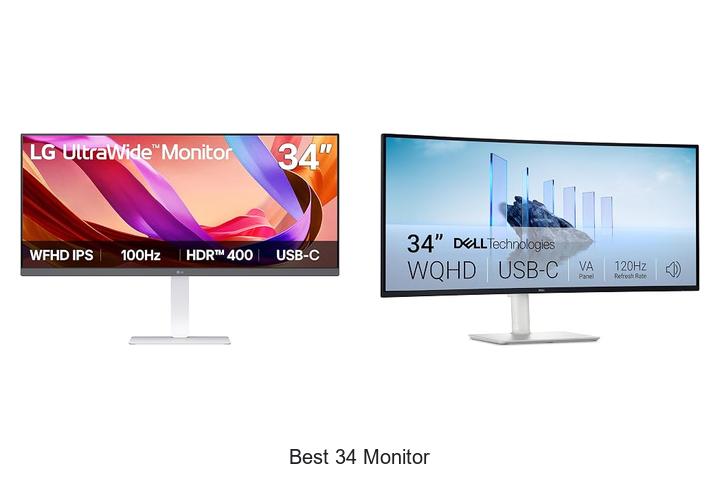
With advancements in screen resolution, refresh rates, and aspect ratios, the demand for expansive yet high-performing displays continues to rise. Among these, the best 34 monitor options stand out by offering an ultrawide 21:9 aspect ratio that enhances multitasking capabilities and provides immersive viewing experiences. Coupled with features such as QHD or higher resolutions, HDR support, and adaptive sync technologies, these monitors cater to a variety of professional and entertainment needs.
Whether for video editing, gaming, or productivity, the balance between screen real estate and image quality makes selecting the best 34 monitor a critical decision. Delving deeper into key specifications and use-case scenarios reveals what truly separates the top contenders from the rest.
Top Picks for Exceptional Screen Performance and Visual Clarity
| Image | Product | Price |
|---|---|---|
Our Picks 1  | LG 34U530A-W 34-Inch UltraWide Monitor | Check Price On Amazon |
Our Picks 2  | Dell S3425DW 34-Inch WQHD Monitor | Check Price On Amazon |
Our Picks 3  | SANSUI 34-Inch Curved Ultrawide Gaming Monitor | Check Price On Amazon |
1. LG 34U530A-W 34-Inch UltraWide Monitor
Experience enhanced productivity and immersive viewing with the LG 34U530A-W 34-Inch UltraWide Monitor. Its expansive 21:9 Full HD display delivers stunning visuals and ample screen real estate, perfect for multitasking, creative work, and entertainment in a sleek, modern design.
Featuring a vibrant IPS panel with DisplayHDR 400 and 99% sRGB coverage, this monitor produces crisp colors and sharp details from wide viewing angles. The 100Hz refresh rate ensures smooth motion, while USB Type-C connectivity simplifies setup. Integrated Waves MaxxAudio speakers and customizable screen layouts boost both functionality and comfort.
Pros
- Expansive 21:9 UltraWide Full HD (2560 × 1080) IPS display for enhanced multitasking
- VESA DisplayHDR 400 and 99% sRGB coverage deliver vivid, lifelike colors
- 100Hz refresh rate offers fluid motion ideal for gaming, streaming, and video calls
- USB Type-C connectivity supports display output and data transfer with a single cable
- Built-in stereo speakers powered by Waves MaxxAudio provide rich, immersive sound
- Adjustable stand allows height, tilt, and swivel for optimal ergonomic comfort
Cons
- Resolution (2560 × 1080) may be lower compared to some higher-end ultrawide monitors with 3440 × 1440 resolution
For users seeking a spacious, vibrant display with smooth performance and versatile connectivity at a competitive price, the LG 34U530A-W is an excellent choice. Its combination of features stands out against typical 34-inch monitors, balancing quality and affordability for both professional and casual use.
2. Dell S3425DW 34-Inch WQHD Monitor
Discover unparalleled visual immersion with the Dell S3425DW 34-Inch WQHD Monitor, designed to elevate both productivity and entertainment. Its expansive 21:9 ultrawide display combines vivid color accuracy with ergonomic features, making it an excellent choice for professionals and gamers seeking enhanced screen real estate and superior image quality.
The monitor features a sleek VA panel boasting a 3000:1 contrast ratio and 99% sRGB coverage for rich and true-to-life colors. With a 120Hz refresh rate and AMD FreeSync Premium, users enjoy smooth, tear-free visuals alongside an ultra-fast 03ms response time. Enhanced sound quality and a clutter-free USB-C connection further enrich the user experience.
Pros
- ComfortView Plus technology reduces harmful blue light emissions without compromising color accuracy, ensuring eye comfort during extended use.
- High 120Hz refresh rate paired with AMD FreeSync Premium delivers fluid, lag-free visuals ideal for gaming and multimedia.
- Single USB-C cable supports up to 65W power delivery, simplifying connectivity and reducing desk clutter.
Cons
- No built-in webcam, which may be a drawback for users requiring integrated video conferencing features.
Combining cutting-edge display technology with ergonomic design, the Dell S3425DW stands out as an exceptional 34-inch monitor option. Whether upgrading from traditional 16:9 screens or competing models, it offers vibrant visuals and user comfort, making it a compelling investment for those seeking the best 34 monitor experience.
3. SANSUI 34-Inch Curved Ultrawide Gaming Monitor
Experience immersive gaming and productivity like never before with the SANSUI 34-Inch Curved Ultrawide Gaming Monitor. Its expansive 34-inch ultrawide display, combined with a sharp 3440 x 1440 UWQHD resolution and smooth 200Hz refresh rate, elevates visuals to stunningly fluid and detailed levels.
Designed with Fast VA panel technology and AI-enhanced features such as Blue Light Reduction, Crosshair, and Picture Quality optimization, this monitor delivers vibrant colors, deep contrast, and reduced eye strain. The ergonomic stand and versatile connectivity options cater to both gamers and professionals seeking comfort and performance.
Pros
- Ultra-smooth gameplay with up to 200Hz refresh rate and 1ms response time supported by HDMI 2.1 and DisplayPort 1.4 inputs.
- Immersive 1500R curved ultrawide screen offering a 21:9 aspect ratio and wide 178° viewing angles for enhanced field of view.
- AI-powered features including Blue Light Reduction, Crosshair overlay, and Picture Quality adjustments improve user comfort and gaming accuracy.
Cons
- Absence of built-in speakers may require separate audio solutions.
Combining advanced performance with ergonomic design and intelligent AI enhancements, the SANSUI 34-Inch Curved Ultrawide Gaming Monitor stands out as an excellent choice for gamers and creative professionals seeking versatility and vivid visuals in a single package.
4. Samsung ViewFinity S50GC 34 Ultra-WQHD Monitor

Experience expansive productivity and breathtaking visuals with the Samsung ViewFinity S50GC 34 Ultra-WQHD Monitor. Its ultra-wide 21:9 aspect ratio and vibrant HDR10 support deliver immersive multitasking and stunning image quality, making it an exceptional choice for professionals and creatives seeking the best 34 monitor to elevate their workspace.
Designed for enhanced clarity and comfort, this monitor features a 34-inch Ultra WQHD (3440 x 1440) matte display with 300 cd/m² brightness and a dynamic 3000:1 contrast ratio. Equipped with a 100Hz refresh rate and AMD FreeSync technology, it ensures smooth visuals with minimal motion blur — ideal for gaming, video editing, and seamless content consumption.
Pros
- Ultra-wide 21:9 aspect ratio maximizes screen real estate for multitasking and productivity.
- HDR10 support delivers over a billion colors, enhancing contrast and depth for true-to-life visuals.
- Eye Saver Mode with ambient light sensor reduces blue light and flicker, promoting comfortable extended use.
- Multiple inputs including 2 HDMI 2.2 and 1 DisplayPort 1.2 with Picture-by-Picture (PBP) and Picture-in-Picture (PIP) enable versatile connectivity and multitasking.
- 100Hz refresh rate combined with AMD Radeon FreeSync provides smooth, tear-free visuals for gaming and multimedia.
Cons
- Price point may be higher compared to some competitors with similar size but lower color and refresh capabilities.
The Samsung ViewFinity S50GC sets itself apart with a perfect balance of expansive screen space, rich colors, and eye-care technologies. For users seeking a premium 34-inch monitor that excels in both professional and entertainment settings, it offers excellent value and performance beyond standard offerings in this category.
5. Sceptre R1500 34-Inch Curved Ultrawide WQHD Monitor

Experience immersive widescreen visuals with the Sceptre R1500 34-Inch Curved Ultrawide WQHD Monitor, designed to elevate both gaming and productivity. Its expansive 21:9 aspect ratio and crystal-clear resolution deliver stunning clarity, making multitasking and entertainment more engaging than ever before.
Featuring a rapid 1ms MPRT response time and a 165Hz refresh rate, this monitor minimizes motion blur and ghosting for smooth, vibrant imagery. The 3440 x 1440 WQHD resolution coupled with a curved VA panel enhances color accuracy and contrast, while the dynamic LED backcover adds a modern aesthetic to your setup.
Pros
- Ultra-wide 21:9 aspect ratio offers 30% more screen space compared to standard monitors
- High refresh rate of 165Hz paired with 1ms response time ensures fluid motion and reduced lag
- Vivid WQHD resolution (3440 x 1440) provides detailed, sharp visuals for enhanced productivity and gaming
- AMD FreeSync Premium support reduces screen tearing for seamless gameplay
- Modern LED backcover lighting adds stylish ambiance to any room
Cons
- Brightness peak of 280 cd/m² may be insufficient for very bright environments
Combining advanced display technology with a sleek curved design, the Sceptre R1500 34-Inch Ultrawide Monitor is a versatile choice for users seeking expansive, sharp visuals. Compared to conventional 27-inch monitors, it offers broader workspace and enhanced image clarity at a competitive price point, making it a standout option in its category.
6. Sceptre C345B-QU240T Curved 34-inch Gaming Monitor

Discover unparalleled visual immersion with the Sceptre C345B-QU240T Curved 34-inch Gaming Monitor. Its expansive 21:9 ultrawide screen and 240Hz refresh rate deliver fluid, captivating visuals perfect for gamers and professionals seeking both performance and style in one sleek package.
Equipped with dual HDMI and DisplayPort connections, this monitor ensures seamless multi-device connectivity. Enjoy vibrant, true-to-life colors with 100% sRGB coverage, built-in speakers for rich audio, and Blue-Light Shift technology that safeguards your eyes during extended use. The ultra-fast 1ms response time enhances every gaming moment with precision.
Pros
- Ultra-smooth 240Hz refresh rate combined with 1ms response time minimizes motion blur for flawless gameplay.
- Comprehensive connectivity options include two HDMI ports and two DisplayPorts for versatile device integration.
- Blue-Light Shift technology reduces eye strain, promoting comfortable viewing during long sessions.
Cons
- Lacks advanced HDR support found in some competing ultrawide monitors.
Balancing immersive visuals, fast performance, and ergonomic features, the Sceptre C345B-QU240T stands out as an excellent choice for users seeking a premium 34-inch gaming monitor under $ Its broad connectivity and eye-friendly design provide distinct advantages over similarly priced models.
7. Sceptre 34-inch Prime Gaming Monitor E345B-QU180D

Discover expansive visuals with the Sceptre 34-inch Prime Gaming Monitor E345B-QU180D, designed to elevate both work and play with its immersive 21:9 ultrawide display. Ideal for gamers and professionals, this monitor offers a stunning UWQHD resolution that enhances every detail and boosts productivity with ample screen real estate.
Featuring a 3440×1440 resolution and a 180Hz refresh rate via dual HDMI and DisplayPort connections, the monitor delivers ultra-smooth graphics and seamless multitasking capabilities. Its Blue-Light Shift technology protects your eyes during extended use, while integrated speakers and customizable gaming modes provide a rich, tailored multimedia experience.
Pros
- Expansive 34-inch ultrawide UWQHD display offers enhanced workspace and immersive gaming visuals.
- High refresh rate of up to 180Hz ensures fluid and responsive performance for fast-paced games.
- Blue-Light Shift technology reduces eye strain, making long sessions more comfortable.
- Multiple connectivity options with two HDMI and two DisplayPort inputs for versatile device compatibility.
- Built-in speakers provide quality audio while minimizing desk clutter.
- Custom gaming modes optimized for FPS and RTS titles enhance the gaming experience.
- Wall-mount compatibility allows flexible positioning and cable management.
Cons
- Matte screen finish may reduce vibrancy compared to glossy panels, which some users might prefer.
Combining high resolution, rapid refresh rates, and eye-friendly features, the Sceptre 34-inch Prime Gaming Monitor stands out as an excellent choice for gamers and professionals seeking immersive visuals and reliable performance. Its competitive pricing further positions it as a compelling alternative to other ultrawide monitors in the market.
8. SANSUI 34 Inch Curved UWQHD Monitor

Experience immersive gaming and productivity like never before with the SANSUI 34 Inch Curved UWQHD Monitor. Its expansive 21:9 ultrawide screen coupled with a sharp 3440×1440 resolution delivers stunning visuals that enhance every detail and broaden your field of view for a truly captivating display experience.
Designed for high performance, this curved monitor boasts a blazing 240Hz refresh rate and a rapid 1ms MRPT response time on a VA panel, ensuring silky-smooth motion and minimal blur. Features like AI Crosshair, AI Bluelight protection, and HDR400 add precision and eye comfort, while wide connectivity options including HDMI 1 and DisplayPort 4 support up to 2K resolution at 240Hz, perfect for competitive gamers and multimedia enthusiasts alike.
Pros
- Ultra-wide 34-inch curved VA LED with 3440×1440 resolution for immersive viewing
- High-speed 240Hz refresh rate and 1ms response time ideal for gaming
- Advanced AI features including AI Crosshair and Bluelight filter for enhanced precision and eye comfort
Cons
- Lacks built-in speakers, requiring external audio solutions
The SANSUI 34 Inch Curved UWQHD Monitor delivers excellent value with its fast refresh rate, expansive ultrawide display, and intelligent visual enhancements. Ideal for gamers and professionals seeking a smooth, immersive experience without compromise, it stands out as a competitive choice in its price range.
9. CRUA 34 WQHD Ultrawide Curved Gaming Monitor

Experience immersive gaming and productivity with the CRUA 34 WQHD Ultrawide Curved Gaming Monitor. Its expansive 34-inch screen with a 3440×1440 resolution and 1500R curvature brings games and media to life, providing a panoramic view that enhances every visual detail for a captivating user experience.
Equipped with a 165Hz refresh rate and AMD FreeSync technology, this ultrawide gaming monitor guarantees smooth, tear-free visuals for fast-paced scenes. The 120% sRGB wide color gamut alongside 4000:1 contrast ratio delivers vibrant, true-to-life colors, while multiple connectivity options ensure seamless integration with PCs and consoles.
Pros
- Immersive 1500R curvature with 21:9 aspect ratio enhances viewing comfort and depth.
- High 165Hz refresh rate combined with FreeSync minimizes screen tearing and lag.
- Wide color gamut (120% sRGB) and 4000:1 contrast ratio for vivid, accurate visuals.
- Flexible connectivity featuring 2x HDMI, 2x DisplayPort, and an audio out port.
- Adjustable tilt angles (-15° to 15°) and VESA wall mount compatibility save space.
Cons
- HDMI port limits refresh rate to 100Hz; maximum 165Hz requires DisplayPort connection.
Offering a combination of ultrawide immersive visuals, high refresh rates, and color precision, the CRUA 34 WQHD Curved Gaming Monitor stands out as a versatile choice for gamers and professionals alike. Its competitive price point of $179 makes it an excellent option compared to similar monitors in its category.
10. LG 34WR55QK-B 34-inch UltraWide Curved Monitor

Experience enhanced productivity and immersive visuals with the LG 34WR55QK-B 34-inch UltraWide Curved Monitor. Designed to elevate multitasking and entertainment, its expansive 21:9 UltraWide WQHD display provides ample screen real estate to keep multiple windows visible and accessible simultaneously.
Featuring a 3440 x 1440 resolution and HDR10 support, this curved monitor delivers vibrant colors and sharp contrast with up to 99% sRGB color gamut. Its ergonomic design, multiple input options—including USB Type-C with 65W power delivery—and OnScreen Control software make it a versatile choice for both work and play.
Pros
- Immersive 21:9 UltraWide curved display ideal for multitasking and immersive viewing
- HDR10 and 99% sRGB color gamut ensure vivid, accurate colors for work and gaming
- USB Type-C port supports up to 65W power delivery for simple laptop charging and connectivity
Cons
- Refresh rate capped at 100 Hz, which may not suit high-end gaming enthusiasts
Blending a spacious curved UltraWide screen with advanced color features and flexible connectivity, the LG 34WR55QK-B stands out as a strong contender among the best 34-inch monitors for professionals and casual users alike, offering a balanced mix of performance and ergonomic comfort.
Top Picks and Expert Tips for Choosing the Best 34-Inch Monitor
Display Quality and Resolution
Screen resolution options (e.g., 3440×1440, 2560×1080). Panel types (IPS vs. VA vs. TN). Color accuracy and HDR support.Screen resolution plays a crucial role in determining the clarity and detail visible on a 34-inch ultrawide display. Popular resolutions include 3440×1440 and 2560×1080, with the higher 3440×1440 offering sharper images and more screen real estate, making it ideal for multitasking and immersive experiences. The type of panel also significantly impacts visual performance.
IPS panels are favored for their excellent color accuracy and wide viewing angles, while VA panels provide deeper blacks and higher contrast ratios, perfect for media consumption. TN panels, although faster in response times, often fall short in color reproduction and viewing angles.
Color accuracy and HDR support are essential for users who prioritize vibrant and true-to-life images. Monitors with factory-calibrated colors and support for HDR (High Dynamic Range) technology can display richer colors and a broader range of brightness levels, enhancing gaming, video editing, and cinematic enjoyment. Evaluating these factors ensures the display delivers superior picture quality tailored to specific needs.
Evaluating these factors ensures the display delivers superior picture quality tailored to specific needs.
| Aspect | Options | Benefits |
|---|---|---|
| Resolution | 3440×1440 vs. 2560×1080 | Higher resolution offers sharper images and more workspace |
| Panel Type | IPS, VA, TN | IPS for color accuracy, VA for contrast, TN for fast response |
| Color & HDR | Calibrated color profiles and HDR support | Richer colors and improved brightness for immersive visuals |
Size and Aspect Ratio
Understanding the 34inch ultrawide format. Optimal desk space considerations. Viewing distance and ergonomics.Ultrawide 34-inch displays offer a unique viewing experience by expanding horizontal screen real estate, which requires adequate support for multiple input options to maximize productivity and entertainment setups. Ensuring the monitor includes a variety of ports like HDMI, DisplayPort, and USB hubs allows seamless connection to different devices such as laptops, gaming consoles, and peripherals without constantly swapping cables. Additionally, having ports that support fast data transfer and charging can enhance workflow efficiency and reduce desktop clutter.
Another important aspect is the ability to upgrade or connect additional accessories to complement the monitor’s functionality. Monitors equipped with extra slots or docking features enable users to easily add sound systems, external storage, or even multiple displays to create a versatile workspace. Without these features, expanding your setup might require inconvenient adapters or extra hardware, which could limit overall convenience.
Without these features, expanding your setup might require inconvenient adapters or extra hardware, which could limit overall convenience.
| Port Type | Function | Benefit |
|---|---|---|
| HDMI | Video & audio input | Connects gaming consoles, Blu-ray players |
| DisplayPort | High-resolution video | Supports higher refresh rates and resolutions |
| USB-C | Data transfer & charging | Reduces cable clutter and supports laptop charging |
| USB Hub | Connecting peripherals | Easy access to keyboard, mouse, external drives |
Refresh Rate and Response Time
Importance for gaming and professional use. Common refresh rates (60Hz, 100Hz, 144Hz). Response time impact on visual clarity.The ability to connect multiple devices and expand your setup is crucial for maximizing the functionality of an ultrawide display. Having a variety of ports such as HDMI, DisplayPort, and USB-C ensures compatibility with gaming consoles, laptops, external drives, and other peripherals without the need for constant unplugging.
Additionally, some monitors offer USB hubs or additional slots for accessories, making it easier to organize your workspace and maintain efficient workflows. This flexibility is especially valuable for professionals who juggle several devices at once and gamers who require seamless switching between consoles and PCs.
- Multiple video input options to support diverse devices simultaneously
- USB ports or hubs integrated into the monitor for easy peripheral management
- Upgradeable options or daisy-chaining capabilities to expand your display setup over time
| Feature | Benefit |
|---|---|
| Multiple HDMI/DisplayPort Inputs | Allows switching between devices without unplugging cables |
| USB-C Port | Enables video, power, and data transfer with a single cable |
| USB Hub | Convenient connection point for peripherals like keyboards and mice |
| Daisy-Chaining Support | Expand your workspace with additional monitors seamlessly |
Connectivity and Compatibility
Available ports (HDMI, DisplayPort, USBC). Multimonitor setup compatibility. Compatibility with laptops, desktops, and consoles.Having a variety of ports such as HDMI, DisplayPort, and USB-C ensures seamless connections with different devices, whether it’s a laptop, desktop, or gaming console. This variety allows for greater flexibility in setting up your workspace or entertainment area without needing extra adapters or hubs.
For those looking to create a multi-monitor setup, it’s essential to confirm that the display supports daisy-chaining or multiple input sources, enabling smooth integration with other screens. Moreover, USB-C ports often offer power delivery and data transfer, which can significantly declutter your desk and simplify cable management while maintaining compatibility with modern laptops. Ensuring the monitor supports multiple connection types guarantees better future-proofing and a more versatile experience across various devices.
Ergonomics and Design Features
Adjustable stands and VESA mount options. Screen curvature benefits for productivity. Build quality and bezel size.Having multiple input options and ports is crucial for maximizing the functionality of an ultrawide display, especially when connecting various devices like laptops, gaming consoles, and external storage simultaneously. A monitor equipped with USB hubs or Thunderbolt support can streamline your workspace by reducing cable clutter and allowing seamless data transfer or peripheral connections.
Additionally, the ability to connect multiple displays or easily upgrade with additional accessories hinges on available ports such as DisplayPort, HDMI, and USB-C. Evaluating these features ensures compatibility with your existing setup and offers room for future enhancements, making the investment more versatile and long-lasting.
Additional Features and Price Considerations
Builtin speakers and USB hubs. Eyecare technologies (blue light filter, flickerfree). Budget versus premium models and warranty options.Modern ultra-wide screens often come equipped with built-in speakers and integrated USB hubs, making it easier to connect peripherals and enjoy audio without extra devices cluttering your workspace. These features add convenience and reduce the need for additional accessories. Additionally, many models incorporate eyecare technologies such as blue light filters and flicker-free screens, which help minimize eye strain during extended use—an important factor for those who spend long hours in front of the display.
The choice between budget-friendly and premium options significantly impacts the available features and overall user experience. Premium screens typically offer enhanced color accuracy, better panel quality, and longer-lasting components, often backed by extended warranty plans that provide peace of mind. In contrast, budget models may offer essential functions but might lack advanced eye protection or extended service support, making it crucial to weigh the value of added features against cost.
In contrast, budget models may offer essential functions but might lack advanced eye protection or extended service support, making it crucial to weigh the value of added features against cost.
| Feature | Budget Models | Premium Models |
|---|---|---|
| Audio & Peripheral Integration | Basic or missing | Built-in speakers and multiple USB ports |
| Eyecare Technology | Limited or none | Blue light filter, flicker-free |
| Warranty | Standard (1 year) | Extended coverage (2+ years) |
| Build & Display Quality | Standard panels | High-end panels with better color accuracy |
Understanding these differences helps ensure the chosen screen not only fits the budget but also delivers a comfortable and versatile setup tailored to daily needs.
FAQ’s
What Are The Top Features To Look For In The Best 34-Inch Monitors?The best 34-inch monitors should offer a high resolution (preferably 3440×1440), an ultrawide aspect ratio for enhanced productivity and immersive viewing, along with excellent color accuracy and fast refresh rates for smooth performance. Additional features like curved screens, multiple connectivity options, and ergonomic adjustability also enhance the overall user experience.
Which 34-Inch Monitor Offers The Best Value For Gaming?The LG UltraGear 34GN850-B offers the best value for gaming with its 144Hz refresh rate, 1ms response time, and vibrant Nano IPS display. It combines excellent performance and color accuracy at a competitive price point ideal for gamers.
How Does A 34-Inch Ultrawide Monitor Improve Productivity Compared To Standard Monitors?A 34-inch ultrawide monitor improves productivity by providing a larger, seamless workspace that allows users to view multiple applications side-by-side without the need for multiple screens. This reduces the time spent switching between windows and enhances multitasking efficiency.
What Are The Best 34-Inch Monitors For Graphic Design And Photo Editing?The best 34-inch monitors for graphic design and photo editing typically feature wide color gamut support, high resolution (such as 3440×1440), and excellent color accuracy, with top models including the LG UltraFine 34WN80C-B and Dell UltraSharp U3419W. These monitors offer precise color reproduction and ample screen real estate, making them ideal for detailed creative work.
How Do Curved 34-Inch Monitors Compare To Flat Ones In Terms Of Viewing Experience?Curved 34-inch monitors offer a more immersive viewing experience by slightly wrapping the screen around your field of vision, reducing distortion and glare compared to flat ones. This curvature can enhance depth perception and comfort during extended use, especially for gaming and multimedia.
Conclusion
In summary, choosing the best 34-inch monitor depends on your specific needs, whether for gaming, professional work, or multimedia. Look for features like resolution, refresh rate, color accuracy, and connectivity options to ensure an optimal experience. Investing in a high-quality 34-inch monitor can significantly enhance productivity and entertainment with its immersive ultrawide display.
Investing in a high-quality 34-inch monitor can significantly enhance productivity and entertainment with its immersive ultrawide display.

- Top Best Computer Speakers with Microphone for Clear Sound! - November 11, 2026
- Best Wired Computer Speakers That Blow Your Mind! - November 11, 2026
- Top Best External Speakers for Laptop Computers Revealed! - November 11, 2026
