
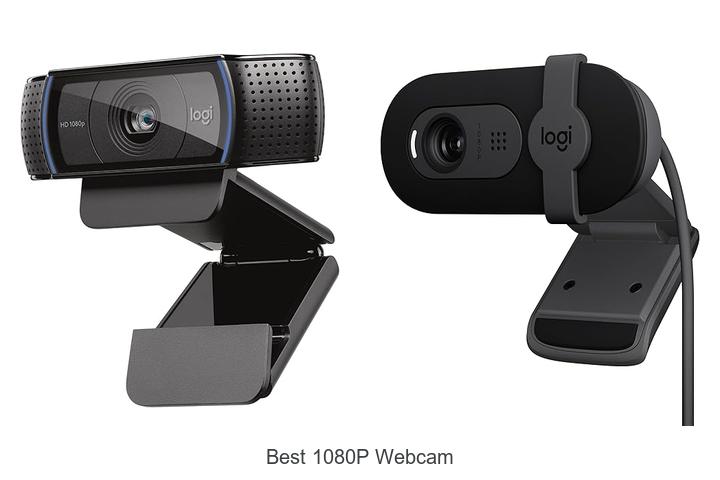
In an era where high-definition video streaming and crystal-clear virtual communication are paramount, the importance of selecting the best 1080p webcam cannot be overstated. With advancements in sensor technology, autofocus capabilities, frame rate optimization, and low-light performance, webcams have evolved far beyond simple video capture devices.
Achieving sharp 1920×1080 resolution at a smooth 30fps or higher requires a careful balance of lens quality, image processing algorithms, and connectivity options such as USB Whether for professional conferencing, live streaming, or content creation, understanding these technical nuances is essential to identify the webcam that delivers consistent, vibrant visuals. Dive deeper to explore what sets apart the best 1080p webcam models in today’s competitive market.
Discover Top Picks That Deliver Crisp, Clear Video Quality at an Affordable Price
| Image | Product | Price |
|---|---|---|
Our Picks 1 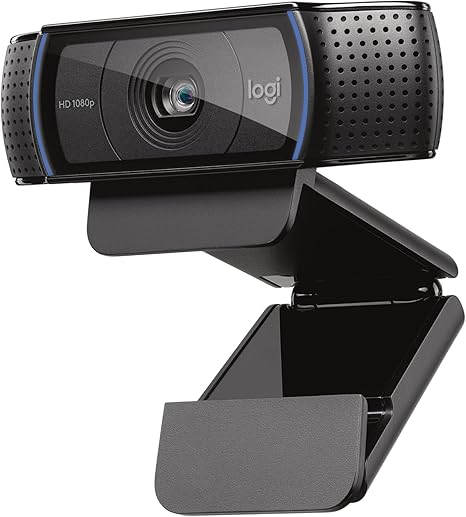 | Logitech C920x HD Pro Webcam | Check Price On Amazon |
Our Picks 2  | Logitech Brio 101 Webcam | Check Price On Amazon |
Our Picks 3 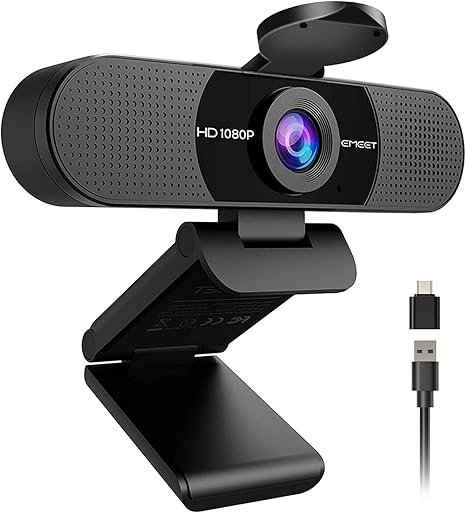 | EMEET C960 1080P Webcam | Check Price On Amazon |
1. Logitech C920x HD Pro Webcam
Experience crystal-clear video quality with the Logitech C920x HD Pro Webcam, designed for professional-level streaming, video conferencing, and content creation. Its full HD 1080p resolution and advanced features ensure stunning visuals and natural audio, making it an indispensable tool for remote work, gaming, and online communication.
Equipped with HDR lighting adjustment and autofocus, the webcam delivers sharp images even in challenging lighting conditions. Dual stereo microphones capture clear, natural sound while the included XSplit VCam software allows custom background effects without needing a green screen. Compatible with multiple operating systems and USB-ready for effortless setup.
Compatible with multiple operating systems and USB-ready for effortless setup.
Pros
- Full HD 1080p video recording and calling at 30 fps for crisp and vibrant visuals
- Automatic HDR lighting and precise autofocus optimize image quality in various environments
- Dual stereo microphones provide natural, clear audio perfect for video calls and streaming
- Includes 3-month XSplit VCam license to blur or replace backgrounds without a green screen
- Seamless USB plug-and-play compatibility with Windows 11 and other operating systems
Cons
- Absence of a privacy shutter might be a concern for users prioritizing webcam security
The Logitech C920x HD Pro Webcam stands out as an excellent choice for users seeking superior video and audio performance at a competitive price. Compared to similar models, it offers advanced image correction and versatile software integration, ensuring a professional presence whether in meetings or live streams.
2. Logitech Brio 101 Webcam
Discover exceptional video clarity with the Logitech Brio 101 Webcam, designed to elevate your video calls and streaming experience. Offering sharp 1080p resolution, it ensures you look professional and vibrant in every meeting or content session.
Equipped with Auto-Light Balance for enhanced brightness and reduced shadows, this webcam supports popular platforms like Zoom and Microsoft Teams with effortless plug-and-play USB-A connectivity. The integrated privacy shutter and customizable settings via Logi Options+ app make it a versatile choice for home or office setups.
Pros
- Auto-Light Balance enhances image quality by boosting brightness up to 50%
- Privacy slide cover ensures security when not in use
- Made from over 77% recycled plastic for an eco-conscious option
Cons
- Not water resistant, limiting use in damp environments
The Logitech Brio 101 Webcam combines advanced features with environmental responsibility, making it a reliable and stylish choice in the best 1080p webcam category. Its ease of use and professional quality provide great value for users seeking seamless video communication.
3. EMEET C960 1080P Webcam
Experience crystal-clear video calls and professional streaming with the EMEET C960 1080P Webcam. Designed for sharp image quality and privacy, this webcam enhances your virtual presence with Full HD resolution and smart features tailored for seamless communication in any setting.
The EMEET C960 delivers vibrant 1920x1080p video using a fixed-focus 5-layer anti-glare lens, ensuring smooth and clear visuals from 8 to
Equipped with dual omnidirectional microphones, it captures crisp audio, while an automatic light adjustment feature optimizes image quality in varying environments. A privacy cover adds security, and versatile USB connectivity supports both Type-A and Type-C ports for easy plug-and-play use.
Pros
- Excellent Full HD 1080p video with anti-glare technology for sharp, natural visuals
- Dual omnidirectional microphones providing clear and balanced voice capture
- Automatic exposure and color adjustment for optimal image performance in diverse lighting
- Privacy cover that can be auto-removed, ensuring security when not in use
- Wide 90° lens angle accommodating group calls without constant repositioning
- Universal compatibility across Windows, macOS, and Android TV with versatile USB-A and USB-C connections
Cons
- Lacks built-in speakers, requiring separate audio output devices for sound playback
Offering a balanced blend of high-definition video, clear audio, and user-friendly features, the EMEET C960 stands out as a reliable and budget-friendly choice for enhancing your online communication. Compared to other webcams in its class, it excels in privacy and lighting adaptability, making it a top contender for those seeking quality and convenience.
4. NexiGo N60 1080P USB Webcam

Discover crisp, clear video quality with the NexiGo N60 1080P USB Webcam, engineered to elevate your video calls, streaming, and conferencing experiences. Its Full HD resolution and versatile compatibility make it a reliable choice for both professional and casual use in any indoor setting.
Equipped with a 1080p Full HD two-megapixel CMOS sensor and a 6mm glass lens, the NexiGo N60 captures sharp images optimized for distances from 6 inches up to 13 feet. It offers plug-and-play USB 0/0 connectivity, a built-in noise-cancelling microphone, and a privacy cover for enhanced security, meeting diverse user needs across multiple platforms.
It offers plug-and-play USB 0/0 connectivity, a built-in noise-cancelling microphone, and a privacy cover for enhanced security, meeting diverse user needs across multiple platforms.
Pros
- Delivers 1080p Full HD video at 30fps for clear, smooth visuals
- Wide compatibility with Windows, macOS, Linux, Android, and Chrome OS without drivers
- Integrated noise-cancelling microphone ensures clear audio during calls and recordings
- Privacy cover safeguards lens when not in use, enhancing user security
- Compact design with adjustable field of view and low light correction for improved image quality
Cons
- Not compatible with gaming consoles like XBOX and PlayStation (PS4/PS5)
For users seeking the best 1080p webcam with robust features and broad compatibility at an affordable price, the NexiGo N60 offers outstanding value. Its reliable performance across multiple platforms makes it a smart alternative to more expensive webcams without sacrificing quality or convenience.
5. Logitech C922x HD Pro Webcam

Experience unmatched clarity and smooth video streaming with the Logitech C922x HD Pro Webcam, designed for professionals and casual users alike. Its full HD 1080p resolution and advanced lighting adjustment ensure you look sharp and vibrant whether you’re gaming, conferencing, or creating content.
The webcam features autofocus and automatic low-light correction to deliver bright, razor-sharp images even in dim environments. Equipped with dual stereo microphones, it captures clear, natural sound to complement your crystal-clear video.
Pros
- Full HD 1080p video quality at 30 fps ensures crisp, detailed visuals.
- Advanced HDR lighting and autofocus provide excellent image clarity in various lighting conditions.
- Dual stereo microphones capture rich, natural audio, enhancing communication and recordings.
Cons
- Lacks a physical privacy shutter, which some users may prefer for security reasons.
The Logitech C922x HD Pro Webcam stands out as a versatile and reliable choice within the best 1080p webcam category, offering superb video and audio performance ideal for streaming and professional calls. Its ease of use and high-quality output make it a worthy investment compared to other webcams in its price range.
6. TRAUSI 1080P FHD Webcam with Privacy Cover and Noise-Canceling Mic
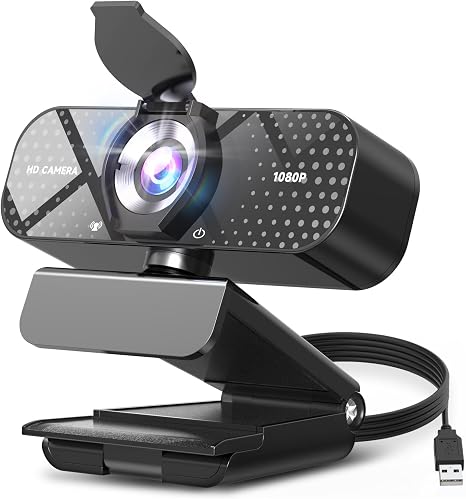
Elevate your video communication with the TRAUSI 1080P FHD Webcam, designed to deliver stunning Full HD clarity coupled with a wide-angle lens. Perfect for gamers, professionals, and creators alike, it offers vibrant visuals and seamless streaming to enhance every online interaction.
Equipped with a noise-canceling microphone and automatic light correction, this webcam guarantees crisp audio and optimal video quality regardless of environment. Its convenient privacy cover and effortless plug-and-play setup make it an ideal choice for secure, high-quality streaming without complicated installations.
Pros
- 1080P Full HD resolution with a wide-angle lens providing clear and vibrant visuals at 30fps.
- Advanced noise-canceling microphone ensures clear voice transmission in noisy settings.
- Automatic light correction technology adjusts brightness and color for outstanding video in any lighting condition.
- Privacy cover offers physical lens protection, enhancing security and peace of mind.
- Plug-and-play compatibility with USB 2.0/3.0/3.1 and OTG support enables hassle-free installation across devices.
- Eco-friendly design utilizing sustainable materials and energy-efficient technology.
Cons
- Priced at $169, it may be considered a premium option compared to basic webcams.
Combining superior video quality, clear audio, and privacy features, the TRAUSI 1080P FHD Webcam stands out as a reliable investment for anyone seeking enhanced online presence. Its advanced capabilities and sustainable design position it competitively against other webcams in its class, offering excellent value for professional and personal use.
7. 1080P HD USB Webcam with Microphone

Experience crystal-clear video calls and professional-quality streaming with the 1080P HD USB Webcam with Microphone. Designed for sharp visuals and reliable performance, this compact device enhances your online presence with full HD clarity and integrated audio features.
Equipped with a CMOS sensor and USB connectivity, the webcam captures crisp 1080p video even in low-light environments. Its built-in microphone features noise cancellation and correction for clear sound transmission, making it ideal for work, gaming, and virtual meetings.
Pros
- Full HD 1080p resolution ensures sharp and detailed video quality
- Integrated microphone with noise cancellation for clear audio
- Compact and stylish design fits seamlessly into any setup
Cons
- Not water resistant, limiting outdoor or high-moisture usage
Offering excellent value at an affordable price, this webcam stands out as a reliable choice for those seeking enhanced video and audio quality without complexity. Compared to similar models, it provides effective low-light performance and noise reduction features, making it a sound investment for everyday use.
8. Logitech C920S HD Pro Webcam

Experience crystal-clear video calls and recordings with the Logitech C920S HD Pro Webcam, designed to elevate your online presence. Combining full HD 1080p clarity with ease of use, it ensures professional-quality visuals whether you’re streaming, video conferencing, or creating content from home or the office.
Equipped with a privacy shutter to protect your lens and enhance security, this webcam delivers vibrant 1080p video alongside HD autofocus and advanced light correction. Dual stereo microphones provide natural sound, making every interaction crisp and engaging, while USB plug-and-play connectivity ensures effortless setup across multiple operating systems.
Pros
- Full HD 1080p video quality with sharp glass lens and vivid colors
- Privacy shutter offers lens protection and user control
- Dual microphones capture clear, natural stereo audio
Cons
- Does not include the 3-month XSplit VCam license that some other models offer
The Logitech C920S HD Pro Webcam strikes an excellent balance between performance and privacy, making it a reliable choice among best 1080p webcams. Its rich features and dependable build quality ensure high-value usage for professionals and casual users alike.
9. Acer A610 1080p Webcam with Microphones

Upgrade your video communication with the Acer A610 1080p Webcam, designed to deliver crisp and smooth Full HD video for all your remote work, virtual meetings, and online classes. Equipped with advanced imaging technology, it ensures you stay perfectly framed and clearly seen, making every interaction more professional and engaging.
Featuring a 1080P CMOS sensor for enhanced image clarity and color accuracy, this webcam comes with dual noise-reduction microphones for crystal-clear audio. Its easy plug-and-play setup, flexible 360° rotation, and privacy cover provide convenience and security.
Pros
- High-definition 1080p Full HD video with automatic low-light correction for professional-quality visuals
- Dual noise-reduction microphones ensuring clear voice capture during calls and streams
- Built-in privacy cover plus flexible 360° rotation for optimal positioning and security
Cons
- Lacks built-in speakers, requiring external audio solutions
The Acer A610 strikes an excellent balance between quality and affordability, making it ideal for professionals, educators, and content creators seeking reliable 1080p video performance and clear audio without complex setups. Compared to similar webcams, it stands out with its privacy cover and dual microphones, offering added security and sound clarity.
10. Acer A640 4K Webcam

Discover the Acer A640 4K Webcam, designed to elevate your video calls and streaming sessions with stunning clarity and professional-grade performance. Equipped with advanced autofocus and a premium Sony sensor, it ensures crisp, vibrant visuals that make every interaction more engaging and lifelike.
This versatile webcam features instant PDAF autofocus to lock onto subjects swiftly, eliminating distracting focus delays. Experience smooth 4K video at 30fps or vibrant 1080p and 2K at 60fps, all powered by a genuine Sony 1/8-inch CMOS sensor. The built-in AI noise-canceling microphone filters unwanted background sounds for crystal-clear communication, while the physical privacy shutter guarantees security when not in use.
The built-in AI noise-canceling microphone filters unwanted background sounds for crystal-clear communication, while the physical privacy shutter guarantees security when not in use. Plug-and-play connectivity with USB-C support makes setup effortless across a wide range of devices and platforms.
Pros
- Phase Detection Autofocus ensures sharp, stable video without focus hunting.
- Supports 4K resolution at 30fps and crisp 1080p/2K at 60fps for versatile streaming quality.
- AI noise cancellation delivers clear audio by minimizing background distractions.
- Physical privacy shutter offers peace of mind by blocking the lens when not in use.
- Universal plug-and-play compatibility works seamlessly with major platforms like Zoom, Teams, and Twitch.
- Automatic low-light correction enhances image quality even in challenging lighting environments.
Cons
- Lacks built-in speakers, so external audio devices are necessary for sound output.
Combining superior image fidelity with intelligent features, the Acer A640 4K Webcam stands out among best 1080p webcams by delivering both resolution and responsiveness. Its user-friendly setup and privacy options make it an excellent choice for professionals, content creators, and remote workers aiming for clear, distraction-free communication.
Top Picks and Expert Tips for Choosing the Best 1080p Webcam
Video Quality and Resolution
True 1080p Resolution vs. Upscaled Video. Frame Rate and Smoothness (30fps vs 60fps). Lens Quality and Field of View.Devices featuring true 1080p resolution deliver sharp and clear images, unlike those that rely on upscaled video, which can appear grainy or pixelated. The frame rate significantly affects video smoothness; 60fps offers noticeably fluid motion compared to the standard 30fps, making video calls and recordings more natural to the eye.
Audio Features
Builtin Microphone Quality. Noise Cancellation and Echo Reduction. Stereo vs Mono Audio.Ensuring your device offers seamless connection options and room for additional peripherals can significantly enhance your overall experience. Devices equipped with versatile ports and compatibility support allow you to integrate effortlessly with various setups, whether it’s for streaming, video conferencing, or content creation. Additionally, having the ability to expand functionality through extra USB ports or auxiliary inputs provides flexibility for future upgrades or adding external microphones, lighting, or other accessories.
Additionally, having the ability to expand functionality through extra USB ports or auxiliary inputs provides flexibility for future upgrades or adding external microphones, lighting, or other accessories. This adaptability not only saves time but also improves convenience, ensuring your system remains up-to-date and versatile without frequent replacements or complicated workarounds.
Connectivity and Compatibility
USB Type and PlugandPlay Support. Compatibility with Operating Systems (Windows, macOS, Linux). Software and Driver Requirements.Modern webcams often connect through different USB types, such as USB-A or USB-C, which can affect how easily they integrate with your existing devices. Plug-and-play functionality is a major convenience, allowing immediate use without the hassle of manual driver installation.
Compatibility across operating systems like Windows, macOS, and Linux also plays a crucial role in ensuring smooth operation, as some models offer broader support than others.
Software requirements vary; some webcams need proprietary drivers or dedicated apps to unlock features, while others work seamlessly with default system drivers. It’s important to confirm that the webcam supports your preferred platform and whether any additional software downloads are necessary to ensure full functionality.
| Aspect | Implication |
|---|---|
| USB Type (A vs. C) | Determines physical compatibility and may require adapters |
| Plug-and-Play | Enables immediate use without installing drivers |
| Operating System Support | Ensures webcam works seamlessly with your computer |
| Software and Driver Needs | Affects installation complexity and feature availability |
Design and Build
Mounting Options (Clip, Tripod, Magnetic). Portability and Size. Durability and Material Quality.Having a range of mounting options such as clip-on, tripod compatibility, or magnetic bases allows for versatile placement to suit different setups, whether attaching your device to a laptop, desktop monitor, or a fixed stand. The physical dimensions and weight play a crucial role in portability, making it easier to carry the camera between workspaces or for travel without adding unnecessary bulk. Additionally, the choice of materials and overall build quality directly impacts the durability of the device, ensuring it withstands daily use and occasional bumps without compromising performance or appearance.
Additionally, the choice of materials and overall build quality directly impacts the durability of the device, ensuring it withstands daily use and occasional bumps without compromising performance or appearance.
| Feature | Benefits |
|---|---|
| Mounting Options | Flexible placement on various surfaces; improved stability and convenience |
| Portability and Size | Easy to carry; ideal for on-the-go use without sacrificing space |
| Durability and Material Quality | Long-lasting construction; resistance to wear and tear enhancing reliability |
Additional Features
Autofocus and LowLight Correction. Privacy Shutter or Lens Cover. Software Enhancements (Background Replacement, Filters).High-quality video calls require more than just clear resolution; the ability of a webcam to adjust focus and perform well in dim environments significantly impacts the overall experience. Autofocus ensures that your image remains sharp even if you move, while low-light correction helps maintain visibility without grainy or dark footage. Additionally, privacy shutters or lens covers provide peace of mind by physically blocking the camera when it’s not in use, offering a simple yet effective security measure.
Additionally, privacy shutters or lens covers provide peace of mind by physically blocking the camera when it’s not in use, offering a simple yet effective security measure. Modern webcams also often come equipped with software enhancements such as background replacement and filters, allowing users to customize their visual presence and maintain professionalism or creativity effortlessly.
Price and Warranty
Budget vs Premium Options. Value for Money Based on Features. Warranty Period and Customer Support.Having the right ports and connection options ensures smooth compatibility with your existing devices, reducing setup hassles and preventing interruptions during important video calls. USB Type-A remains the most common interface, but webcams featuring USB Type-C or wireless options offer more flexibility for newer laptops and mobile setups. Additionally, the availability of additional ports or hubs built into the webcam can allow easy attachment of peripherals like microphones or lighting, enhancing overall functionality.
Additionally, the availability of additional ports or hubs built into the webcam can allow easy attachment of peripherals like microphones or lighting, enhancing overall functionality.
Expanding the capabilities of your device may also mean checking if the webcam supports external accessories or has adjustable settings for added convenience. This future-proofing aspect helps in adapting to evolving technology requirements without needing to replace the entire setup frequently.
FAQ’s
What Features Should I Look For In The Best 108Webcam?The best 1080p webcam should offer clear full HD resolution, good low-light performance, and a wide field of view for versatile use. Additionally, look for features like built-in noise-canceling microphones, easy plug-and-play setup, and adjustable mounting options.
Which Brands Offer The Highest Quality 108Webcams?Logitech and Microsoft are widely recognized for offering the highest quality 1080p webcams, known for their excellent image clarity and reliable performance. Razer and Sony also provide premium options that cater to both professional and casual users.
How Does The Best 108Webcam Perform In Low-Light Conditions?The best 1080p webcam performs well in low-light conditions by utilizing advanced sensor technology and noise reduction algorithms to deliver clear and sharp video. It adjusts automatically to varying light levels, ensuring consistent image quality even in dim environments.
What Is The Average Price Range For Top-Rated 108Webcams?The average price range for top-rated 1080p webcams typically falls between $50 and $150. Prices vary based on features such as frame rate, autofocus, built-in microphones, and brand reputation.
Are There Any Webcams With Built-In Microphones That Provide Clear Audio Along With 108Video Quality?Yes, many webcams such as the Logitech C920 and Razer Kiyo offer built-in microphones with clear audio quality along with 1080p video resolution. These models are popular for their balanced performance in both video and audio.
Conclusion
In summary, choosing the best 1080p webcam depends on your specific needs, whether for streaming, video calls, or content creation. Look for features like sharp image quality, reliable autofocus, good low-light performance, and clear audio.

- Top Picks for the Best 1080p Webcam You Can’t Miss! - November 10, 2026
- Best Webcam for MacBook Pro That Will Blow Your Mind! - November 10, 2026
- Unlock Earnings with the Best Paying Webcam Jobs Now! - November 10, 2026
