
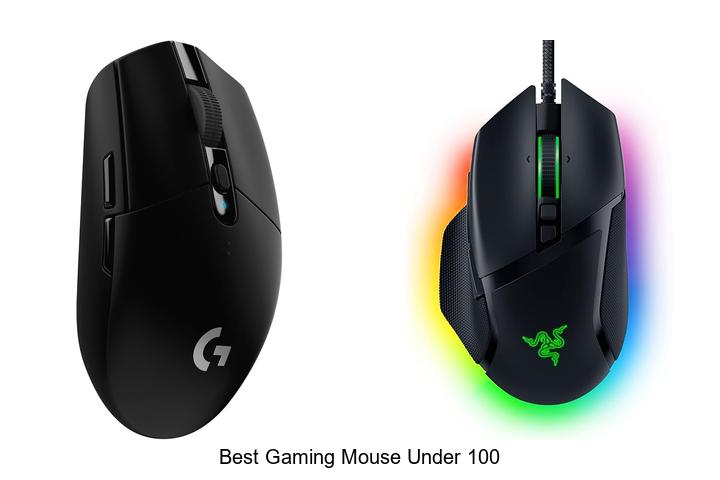
Precision tracking, high DPI sensors, and ergonomic design are critical factors that define the performance of a gaming mouse. For gamers seeking to enhance responsiveness and comfort without exceeding budget constraints, identifying the best gaming mouse under 100 dollars becomes essential.
This price range often balances advanced features like customizable buttons, adjustable DPI settings, and durable build quality, which directly impact competitive play and prolonged sessions. Navigating through numerous models that boast varying specifications yet fit within this budget can be challenging. Understanding how these technical aspects influence gameplay can make all the difference when selecting a device tailored to specific gaming styles.
Continue exploring to uncover how to optimize your setup with the best gaming mouse under 100 while maximizing value and functionality.
Top Picks for High-Performance Gaming Without Breaking the Bank
| Image | Product | Price |
|---|---|---|
Our Picks 1  | Logitech G305 Wireless Gaming Mouse | Check Price On Amazon |
Our Picks 2  | Razer Basilisk V3 Wired Ergonomic Gaming Mouse Black | Check Price On Amazon |
Our Picks 3  | Logitech G502 Hero Wired Gaming Mouse | Check Price On Amazon |
1. Logitech G305 Wireless Gaming Mouse
For gamers seeking outstanding performance without breaking the bank, the Logitech G305 Wireless Gaming Mouse stands out as a top contender. Combining advanced optical sensor technology with ultra-fast wireless connectivity, it delivers precision and responsiveness tailored for intense gaming sessions.
Equipped with Logitech’s next-generation HERO optical sensor and LIGHTSPEED wireless technology, the G305 offers up to 12,000 DPI sensitivity and a 1 ms report rate for lag-free gameplay. Its lightweight design and exceptional battery life ensure comfort and endurance, perfect for marathon gaming or competitive play.
Pros
- HERO sensor provides high-precision tracking with up to 12,000 DPI and 400 IPS.
- LIGHTSPEED wireless technology guarantees fast, reliable connectivity with a 1 ms response time.
- Impressive battery longevity, offering 250 hours of gameplay on a single AA battery, extendable up to 9 months via Endurance mode.
Cons
- Lacks customizable RGB lighting found in some competing gaming mice.
Delivering professional-grade features at an affordable price point, the Logitech G305 Wireless Gaming Mouse is a reliable and portable choice for gamers wanting superior control and battery efficiency. Its balance of performance and value makes it one of the best gaming mice under $100 available today.
2. Razer Basilisk V3 Wired Ergonomic Gaming Mouse Black
Experience superior control and comfort with the Razer Basilisk V3 Wired Ergonomic Gaming Mouse Black, designed to elevate your gaming sessions. Its iconic shape and advanced features cater perfectly to dedicated gamers seeking precision, responsiveness, and customization without breaking the bank.
Engineered with 11 programmable buttons and the fastest Optical Mouse Switches Gen 2, this mouse ensures zero misclicks and rapid action execution. The Hyperscroll tilt wheel allows seamless navigation, while the Focus+ 26K DPI sensor delivers pinpoint accuracy, making it one of the best gaming mice under 100 dollars.
Pros
- Ergonomic design with thumb rest enhances comfort during extended gameplay.
- Highly customizable RGB lighting with 11 distinct zones and over 16.8 million color options.
- Advanced Focus+ 26K DPI optical sensor provides pixel-perfect precision and smooth tracking.
Cons
- Wired connection may limit mobility compared to wireless alternatives.
Combining ergonomic comfort with cutting-edge technology, the Razer Basilisk V3 offers exceptional value for gamers seeking high performance under $ Its robust feature set and customization options make it a standout choice against competitors like Logitech G502 and Corsair M65.
3. Logitech G502 Hero Wired Gaming Mouse
Experience precision and performance with the Logitech G502 Hero Wired Gaming Mouse, a top contender among the best gaming mice under $ Designed for serious gamers, its advanced features enhance accuracy and customization, delivering an edge in competitive gameplay.
Equipped with the next-generation HERO sensor, the mouse offers up to 25600 DPI tracking without smoothing or acceleration. It boasts 11 programmable buttons, a dual-mode hyper-fast scroll wheel, adjustable weights for personalized balance, and vibrant LIGHTSYNC RGB lighting, all engineered for superior control and responsiveness.
Pros
- Exceptional precision with HERO sensor capable of sub-micron accuracy up to 25600 DPI
- Fully customizable controls featuring 11 programmable buttons and adjustable weights for tailored feel
- Immersive LIGHTSYNC RGB lighting that synchronizes with gameplay via Logitech Gaming Software
Cons
- Wired connection might limit mobility compared to wireless alternatives
The Logitech G502 Hero stands out as a versatile and powerful gaming mouse under $100, offering robust features typically found in higher-end models. Its blend of precision, customization, and aesthetic appeal makes it a worthy choice for gamers seeking top-tier performance without breaking the bank.
4. Logitech G305 Wireless Gaming Mouse White
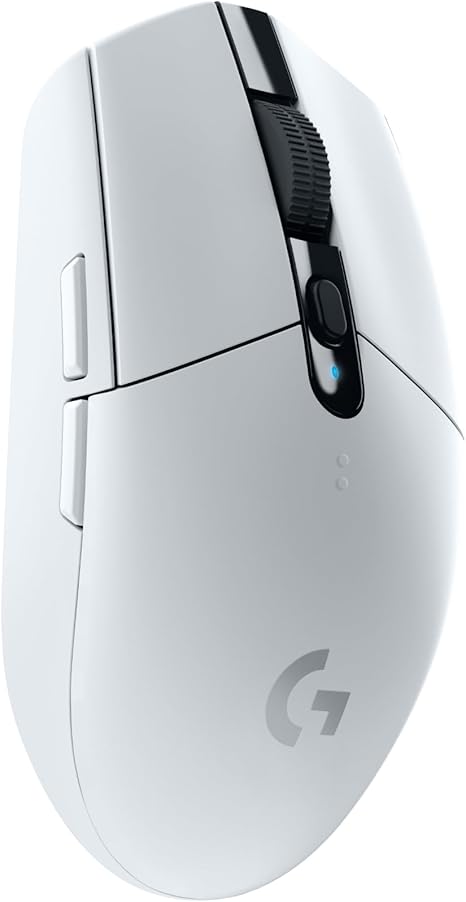
Discover exceptional gaming precision and wireless freedom with the Logitech G305 Wireless Gaming Mouse White, a top contender in the best gaming mouse under 100 category. Designed for gamers seeking accuracy, speed, and endurance, this mouse combines cutting-edge technology and comfort for an unbeatable experience.
Equipped with the advanced 12,000 DPI HERO optical sensor, the G305 delivers superior accuracy and power efficiency. Its LIGHTSPEED wireless technology ensures a lightning-fast 1 ms response time, outperforming many wired mice.
Featuring a lightweight, ambidextrous design and long-lasting battery life, it offers up to 250 hours of play on a single AA battery—perfect for marathon gaming sessions.
Pros
- High-precision 12,000 DPI HERO sensor for accurate tracking
- LIGHTSPEED wireless technology with 1 ms response time
- Ultra-long battery life up to 250 hours on one AA battery
- Lightweight, ambidextrous design suitable for extended use
- Compact size with built-in USB receiver storage for portability
Cons
- Limited range of approximately 1 meter may restrict some setups
The Logitech G305 Wireless Gaming Mouse White stands out with its high-performance sensor and reliable wireless connection, making it an excellent option for gamers on a budget. Compared to other wireless mice under $100, it balances speed, accuracy, and battery life exceptionally well, delivering professional-grade gameplay without breaking the bank.
5. Redragon M810 PRO Wireless Gaming Mouse

Elevate your gaming experience with the Redragon M810 PRO Wireless Gaming Mouse, engineered for precision and freedom. Its cable-free design empowers swift movements, while customizable DPI and programmable buttons adapt seamlessly to your unique playstyle, helping you dominate every match with confidence and speed.
Featuring a 4GHz wireless connection with up to 10 meters range, the M810 PRO boasts a PAW3325 Optical Pixart sensor delivering up to 10,000 DPI sensitivity. Eight fully programmable buttons, including rapid fire and macro keys, provide unmatched control, complemented by RGB lighting customizable via the Redragon Pro driver, creating an immersive gaming ambiance.
Pros
- Wireless 2.4GHz connectivity offers lag-free, unrestricted movement
- Adjustable DPI levels from 500 to 10,000 for pinpoint accuracy
- Eight programmable buttons with macro support enhance gaming versatility
- Long-lasting rechargeable battery supports up to 45 hours in eco-mode
- Customizable RGB lighting with multiple dynamic effects via dedicated software
Cons
- Minimum OS requirement is Windows 10; limited support for older systems
Offering a compelling balance of performance and affordability, the Redragon M810 PRO Wireless Gaming Mouse is an excellent pick among the best gaming mice under $ Its advanced features rival higher-end models, making it a reliable companion for both casual and competitive gamers seeking precision and freedom.
6. Razer DeathAdder Essential Wired Gaming Mouse

Experience precision and durability with the Razer DeathAdder Essential Wired Gaming Mouse, an exceptional choice for gamers seeking reliable performance without breaking the bank. Designed for both casual and competitive players, its high-precision sensor and ergonomic build deliver a seamless gaming experience under $
Equipped with a 6,400 DPI optical sensor and durable mechanical switches rated for up to 10 million clicks, this mouse offers on-the-fly sensitivity adjustments and reliable responsiveness. Featuring five programmable buttons and a rubberized scroll wheel, it’s tailored for accuracy and customization through Razer Synapse software.
Pros
- High-precision 6,400 DPI optical sensor with real-time sensitivity adjustment for precise control.
- Durable mechanical switches lasting up to 10 million clicks ensure long-lasting reliability.
- Ergonomic design with rubberized scroll wheel enhances grip and comfort during extended gaming sessions.
Cons
- Lacks wireless connectivity, which may limit flexibility for some users.
Combining affordability with high-end features, the Razer DeathAdder Essential stands out among gaming mice under $ Its blend of durability, precision, and customizability makes it an excellent pick for gamers aiming to elevate their gameplay without sacrificing quality or budget.
7. Razer Viper V3 HyperSpeed Wireless Gaming Mouse
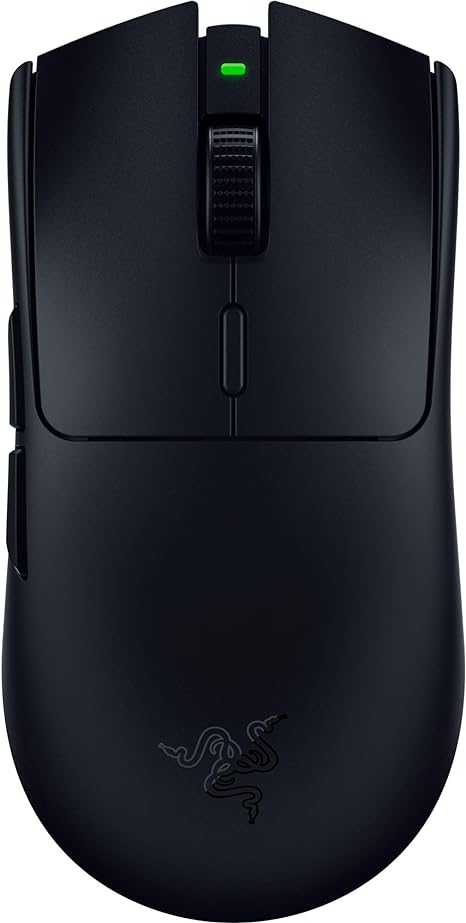
Discover precision and speed with the Razer Viper V3 HyperSpeed Wireless Gaming Mouse, designed for esports enthusiasts seeking a lightweight and highly responsive tool. Its advanced features cater to competitive gamers aiming for flawless performance without cable constraints.
Weighing only 82 grams with a mass centralized design, this mouse ensures effortless, balanced swipes. Equipped with the flagship Focus Pro 30K optical sensor, it delivers impeccable accuracy on diverse surfaces, including glass.
Pros
- Ultra-lightweight at 82 grams for enhanced control and reduced fatigue during long gaming sessions.
- Focus Pro 30K optical sensor provides precise tracking and works smoothly on various surfaces, including glass.
- Exceptional battery efficiency offers up to 280 hours of wireless gameplay with just one AA battery.
- Durable mechanical mouse switches (Gen-2) rated for 60 million clicks with gold-plated contact points.
- On-mouse DPI control featuring 5 customizable stages for quick sensitivity adjustments.
- Ambidextrous design suits both left- and right-handed users, enhancing versatility.
Cons
- Lacks onboard memory for profile storage, requiring software for customization.
As one of the best gaming mice under $100, the Razer Viper V3 HyperSpeed offers outstanding wireless freedom, precision, and durability. It stands out among competitors by balancing performance, battery life, and ergonomic design, making it a top choice for serious gamers seeking value and quality.
8. Redragon M612 Wired Optical Gaming Mouse

Experience precision and comfort with the Redragon M612 Wired Optical Gaming Mouse, an exceptional choice for gamers seeking reliable performance without exceeding budget limits. Its customizable DPI settings and ergonomic design make it a top contender among the best gaming mouse under 100 dollars, striking the perfect balance between affordability and functionality.
Equipped with 11 programmable buttons and 5 DPI levels adjustable up to 8000 via software, the Redragon M612 adapts seamlessly to diverse gaming styles. The skin-friendly frosted coating and rubberized grip ensure extended comfort during long sessions, while vibrant RGB lighting enhances the aesthetic appeal of any gaming setup.
Pros
- Highly customizable with 11 programmable buttons and adjustable DPI up to 8000.
- Ergonomic claw-grip design with textured rubber side for superior comfort and control.
- Dynamic RGB backlighting with five distinct modes to personalize your gaming space.
Cons
- Corded design may limit mobility compared to wireless alternatives.
Combining precision, comfort, and customization, the Redragon M612 Wired Optical Gaming Mouse stands out as an ideal budget-friendly option for gamers aiming to enhance their gameplay experience. When compared to other products in its price range, it offers superior features that cater to both casual and competitive play.
9. Razer Orochi V2 Wireless Gaming Mouse White

Discover the Razer Orochi V2 Wireless Gaming Mouse White, a sleek and powerful tool designed for gamers seeking premium performance without breaking the bank. Featuring dual wireless modes and ultra-long battery life, this mouse keeps you in the game longer with remarkable precision and lightweight comfort.
Engineered for both productivity and competitive gaming, the Orochi V2 boasts the advanced Razer 5G Optical Sensor with up to 18,000 DPI sensitivity for pixel-perfect accuracy. Its efficient Bluetooth and Razer HyperSpeed Wireless technology reduce latency, while the compact design under 60 grams enables swift, fatigue-free movements that last through marathon sessions.
Pros
- Exceptional battery longevity: Up to 950 hours on Bluetooth and 425 hours on HyperSpeed Wireless for extended use.
- Dual wireless connectivity offering versatile performance for gaming and everyday tasks.
- Durable 2nd Gen Razer Mechanical Mouse Switches rated for 60 million clicks ensuring long-term reliability.
Cons
- Right-handed design limits suitability for left-handed users.
For gamers hunting the best gaming mouse under 100, the Razer Orochi V2 Wireless is a top contender combining excellent precision, unmatched battery life, and comfortable portability. Compared to similar options, it provides superior connectivity flexibility and durable switches, making it a smart investment for both casual and competitive players.
10. Razer Cobra Wired Gaming Mouse

Discover the Razer Cobra Wired Gaming Mouse, a perfect combination of lightweight comfort and precision control designed to elevate your gameplay. Its innovative features cater to both casual and competitive gamers seeking performance without breaking the bank, making it one of the best gaming mouse options under $
Engineered with Gen-3 optical switches offering a rapid 2 ms actuation time and exceptional durability, the mouse guarantees responsiveness and longevity. The 58g lightweight design suits most grip styles, while customizable Chroma RGB lighting enhances immersion.
With up to 8500 DPI sensitivity, Speedflex cable, and PTFE feet, it ensures smooth and accurate tracking on any surface.
Pros
- Ultra-fast Gen-3 optical switches with 90 million click lifespan and debounce-free actuation
- Customizable Chroma RGB lighting with gradient underglow for dynamic visual effects
- Lightweight 58g body combined with Speedflex cable for minimal drag and enhanced control
- Precise DPI adjustments in 50 DPI increments up to 8500 for tailored sensitivity
- High-quality PTFE mouse feet ensure smooth gliding on diverse surfaces
- Ambidextrous design compatible with Windows, macOS, and Linux systems
Cons
- Lacks wireless capability; wired connection may limit mobility for some users
Balancing affordability with advanced features, the Razer Cobra Wired Gaming Mouse stands out as a reliable choice for gamers seeking top performance without exceeding a $100 budget. Compared to similarly priced alternatives, it offers superior durability, customization, and precision, making it a smart investment for serious gaming.
Top Picks and Tips for Finding the Best Gaming Mouse Under 100
Ergonomics and Design
Grip style compatibility (claw, palm, fingertip). Weight and size considerations. Button layout and accessibility.Devices that offer multiple options for connection types, such as wired, wireless, or Bluetooth, provide greater flexibility in different gaming setups. Ensuring the mouse supports your preferred connection method can minimize input lag and prevent interruptions during gameplay. Additionally, having additional ports or the ability to customize buttons enhances the overall user experience by allowing extra peripherals or accessories to be added seamlessly.
This adaptability can future-proof your setup, making it easier to upgrade components without having to overhaul your entire system. In essence, a mouse that supports diverse connection protocols and expansion features ensures smoother performance and greater versatility for intense gaming sessions.
Sensor Performance
DPI range and adjustability. Sensor type (optical vs. laser). Tracking accuracy and responsiveness.High DPI range and easy adjustability allow gamers to switch sensitivity on the fly, providing precise control in different gaming scenarios. Optical sensors generally offer better tracking accuracy on various surfaces compared to laser sensors, which can sometimes be overly sensitive and cause jitter. Responsiveness plays a crucial role in competitive gaming, as a mouse with minimal input lag ensures that every movement translates instantly on screen, enhancing overall performance and gameplay experience.
Responsiveness plays a crucial role in competitive gaming, as a mouse with minimal input lag ensures that every movement translates instantly on screen, enhancing overall performance and gameplay experience.
Build Quality and Durability
Material and finish. Switch lifespan and reliability. Wired vs. wireless options.Reliable performance in fast-paced gaming heavily depends on how well a mouse connects and adapts to different setups. A stable wired connection often offers consistent responsiveness with zero input lag, making it ideal for competitive play. However, wireless options have improved significantly, providing more freedom of movement without sacrificing much in terms of speed or stability.
Ensuring compatibility with various devices and the ability to expand functionality through additional accessories can make a considerable difference in long-term satisfaction and usability.
| Aspect | Wired | Wireless |
|---|---|---|
| Latency | Minimal, highly consistent | Very low, improved with modern tech |
| Mobility | Restricted by cable length | Complete freedom of movement |
| Reliability | Less prone to interference | Possible signal disruptions, but rare |
| Customization | Sometimes limited ports | Varies; some support modular accessories |
Additional Features
Programmable buttons and customization. RGB lighting and aesthetics. Software support and ease of configuration.Having access to programmable buttons and customization options can significantly enhance gameplay by allowing quick access to complex commands and macros. A mouse equipped with vibrant RGB lighting not only adds a visually appealing element to your setup but can also provide practical feedback during intense gaming sessions.
| Feature | Benefit |
|---|---|
| Programmable Buttons | Streamline commands and improve in-game efficiency |
| RGB Lighting | Enhances aesthetics and provides customizable visual cues |
| Software Support | User-friendly customization and fast configuration |
Compatibility and Connectivity
Operating system support. Connection type (USB, Bluetooth, wireless dongle). Plug and play vs. driver installation.A functional pairing with your device starts with checking which operating systems the mouse supports, ensuring smooth performance whether you’re on Windows, macOS, or even Linux. The method of linking to your computer plays a big role in convenience and responsiveness; options typically include USB cables, Bluetooth, or wireless dongles, each offering different trade-offs in latency and freedom of movement.
Some models offer simple plug-and-play use, allowing immediate functionality without extra setup, while others require dedicated driver installation to unlock customizable features or macros. Understanding these differences helps avoid potential compatibility headaches and ensures the mouse integrates seamlessly into your gaming setup right from the start.
Price and Warranty
Value for money considerations. Warranty length and customer support. Availability of replacement parts or accessories.The way a gaming mouse connects to your system and the options it offers for additional features can greatly influence both performance and long-term usability. A wired connection typically provides a more stable and lag-free experience, which is crucial for fast-paced gameplay, while wireless models offer greater freedom of movement but might introduce latency or require frequent charging. Additionally, having extra ports or slots for customization, such as programmable buttons or adjustable weights, allows you to tailor the mouse to your personal style and improve in-game efficiency.
Thinking about how easily the device can adapt or expand ensures that it won’t become obsolete quickly as gaming preferences evolve or new accessories emerge. This flexibility also means fewer headaches down the line if you want to upgrade components like additional buttons, DPI settings, or ergonomic enhancements. Overall, the connection type and modular features combine to affect both comfort during extended sessions and the mouse’s ability to keep pace with your gaming demands.
Overall, the connection type and modular features combine to affect both comfort during extended sessions and the mouse’s ability to keep pace with your gaming demands.
FAQ’s
What Are The Top Features To Look For In A Gaming Mouse Under $10The top features to look for in a gaming mouse under $10 include a responsive sensor with adjustable DPI settings for accurate tracking and customizable buttons for better control. Additionally, a comfortable ergonomic design and durable build quality enhance long-term gaming performance.
Which Gaming Mice Under $1Offer The Best Performance For Fps Games?There are no gaming mice available under $1 that offer reliable performance for FPS games, as quality components and precise sensors typically cost more. For the best FPS experience on a budget, it’s advisable to consider mice priced at least $20-$30.
How Does The Durability Of Budget Gaming Mice Under $1Compare To Higher-End Models?Budget gaming mice under $1 generally have significantly lower durability compared to higher-end models, as they use cheaper materials and components. Higher-end gaming mice are built with robust construction and quality parts to withstand extensive use over time.
Are Wireless Gaming Mice Under $1Reliable For Competitive Gaming?Wireless gaming mice under $100 can be reliable for competitive gaming if they offer low latency, good sensor accuracy, and durable build quality; however, higher-end models typically provide better performance and consistency. It’s important to research specific models and user reviews to ensure they meet competitive standards.
What Are The Best Gaming Mice Under $1For Ergonomic Comfort During Long Sessions?Finding quality ergonomic gaming mice under $10 is challenging, but options like the Redragon M601 and Logitech G203 offer decent comfort and performance for budget-conscious gamers. These models feature adjustable DPI and ergonomic designs suitable for extended play sessions.
Conclusion
In summary, finding the best gaming mouse under 100 doesn’t mean compromising on quality or performance. Many options offer precision, comfort, and customizable features ideal for both casual and competitive gamers.

- Top Best Computer Speakers with Microphone for Clear Sound! - November 11, 2026
- Best Wired Computer Speakers That Blow Your Mind! - November 11, 2026
- Top Best External Speakers for Laptop Computers Revealed! - November 11, 2026
