
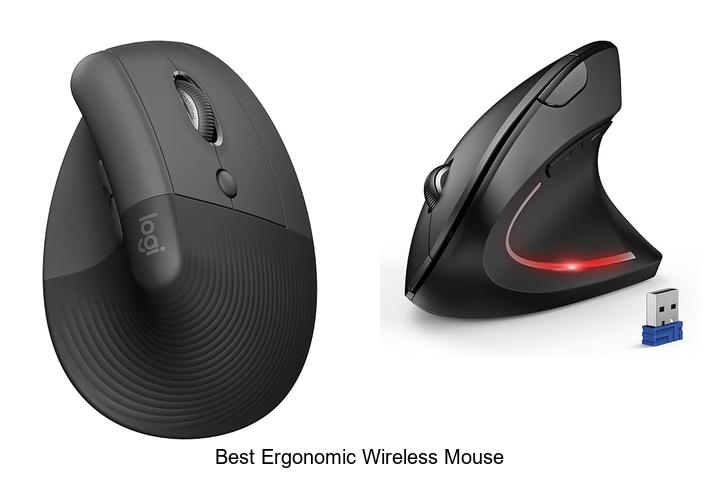
Precision sensor technology, adjustable DPI settings, and ergonomic design principles play crucial roles in enhancing user comfort and productivity during extended computer use. As the demand for seamless mobility and wrist-friendly peripherals grows, the best ergonomic wireless mouse has become an essential tool for professionals and gamers alike.
Combining advanced wireless connectivity with sculpted contours that support natural hand posture, these devices aim to reduce strain and prevent repetitive stress injuries. However, with numerous models boasting varied features such as customizable buttons, battery life optimization, and compatibility across operating systems, selecting the ideal mouse can be a complex task. Delving into the key attributes that define superior ergonomic wireless mice will reveal insights that elevate both comfort and efficiency.
Keep reading to discover what sets the best ergonomic wireless mouse apart from the rest.
Discover Top Picks That Combine Comfort, Efficiency, and Wireless Freedom
| Image | Product | Price |
|---|---|---|
Our Picks 1  | Logitech Lift Vertical Wireless Mouse Graphite | Check Price On Amazon |
Our Picks 2  | TECKNET Wireless Bluetooth Vertical Ergonomic Mouse | Check Price On Amazon |
Our Picks 3  | TECKNET Wireless Ergonomic Vertical Mouse | Check Price On Amazon |
1. Logitech Lift Vertical Wireless Mouse Graphite
Experience unparalleled comfort and productivity with the Logitech Lift Vertical Wireless Mouse Graphite. Designed specifically for small to medium right hands, this ergonomic mouse reduces wrist strain by encouraging a natural hand position, making it the perfect companion for long hours at your desk.
Featuring a 57-degree vertical tilt, the Lift mouse promotes healthier forearm posture, while its softly textured grip and snug thumb rest enhance comfort throughout the day. Equipped with customizable buttons, whisper-quiet clicks, and a SmartWheel for seamless scrolling, it delivers precise control wirelessly via Bluetooth or Logi Bolt USB.
Pros
- Ergonomically certified design promoting natural wrist and forearm alignment
- Wireless connectivity with multi-device compatibility, including Windows, macOS, iPadOS, Chrome OS, and Linux
- Long-lasting battery life of up to 24 months combined with sustainable recycled plastic components
Cons
- Right-hand orientation limits use for left-handed individuals
Balancing ergonomic innovation with wireless freedom, the Logitech Lift Vertical Wireless Mouse is ideal for anyone seeking comfort and efficiency in their daily workflow. Compared to traditional flat mice, it significantly reduces wrist fatigue, making it a smart choice for health-conscious users.
2. TECKNET Wireless Bluetooth Vertical Ergonomic Mouse
Experience enhanced comfort and seamless connectivity with the TECKNET Wireless Bluetooth Vertical Ergonomic Mouse. Designed to reduce wrist strain while supporting multiple devices, this mouse offers a perfect blend of ergonomic excellence and advanced functionality for professionals and casual users alike.
Equipped with Bluetooth 0/0 and a 4GHz USB receiver, it connects effortlessly to up to three devices. The vertical design positions your hand naturally, minimizing discomfort.
Pros
- Seamless switching between three devices via Bluetooth and USB receiver for optimal convenience.
- Six adjustable DPI settings (up to 4800) that adapt to diverse tasks and surfaces smoothly.
- Ergonomic vertical design reduces wrist strain during prolonged use for improved comfort.
- Silent left and right clicks enable quiet operation, perfect for libraries or shared spaces.
- Broad compatibility with Windows, Mac, Chrome, and Linux, plus low battery alerts and energy-saving sleep mode.
- Generous 36-month warranty backed by responsive customer support.
Cons
- Side buttons are not compatible with macOS, limiting full feature use for Mac users.
Combining ergonomic innovation with versatile connectivity and precise control, the TECKNET Wireless Bluetooth Vertical Ergonomic Mouse stands out as a top choice for anyone seeking both comfort and efficiency. Its competitive pricing and feature set make it a worthwhile alternative to other ergonomic mice on the market.
3. TECKNET Wireless Ergonomic Vertical Mouse
Experience unparalleled comfort and precision with the TECKNET Wireless Ergonomic Vertical Mouse, expertly crafted to reduce wrist strain while enhancing productivity. This stylish, ergonomically designed mouse supports seamless multi-device connectivity, ensuring smooth transitions and reliable performance throughout your busy day.
Combining Bluetooth 0/0 and 4G wireless technologies, this ergonomic marvel offers lag-free operation and effortless pairing. Featuring a 52° vertical design tailored for medium and small hands, it promotes a natural handshake grip that minimizes forearm fatigue.
The rechargeable 600mAh battery powers up swiftly, delivering up to two months of use on a single charge, complemented by whisper-quiet clicks perfect for quiet environments.
Pros
- Versatile connectivity options including Bluetooth 5.0/3.0 and 2.4G wireless for seamless device switching
- Ergonomic 52° vertical angle reduces wrist and forearm strain, promoting comfort during extended use
- Long-lasting rechargeable battery offering up to 2 months per 1.5-hour charge, with eco-friendly Type-C charging
- Highly durable build rated for 6 million clicks with 6 programmable buttons for increased productivity
- Adjustable DPI settings up to 4800 for precise tracking across various surfaces including wood and paper
- Whisper-quiet click technology ideal for noise-sensitive environments like libraries and open offices
Cons
- Forward and Back side buttons are disabled when used with Mac OS
Offering a perfect blend of ergonomic design, versatile connectivity, and exceptional battery life, the TECKNET Wireless Ergonomic Vertical Mouse stands out for professionals seeking comfort and efficiency. Compared to traditional wireless mice, its vertical orientation and multi-device support provide a significant edge in reducing strain and enhancing workflow.
4. Anker Wireless Ergonomic Right Hand Vertical Mouse

Discover comfort and precision with the Anker Wireless Ergonomic Right Hand Vertical Mouse, designed to enhance your computing experience while reducing wrist strain. Its innovative vertical design supports a natural hand position, making it an ideal choice for professionals and frequent computer users seeking both ergonomics and functionality.
Equipped with 4 GHz wireless connectivity via a USB receiver, this mouse delivers reliable and lag-free performance. It features adjustable DPI settings (800/1200/1600) for smooth and accurate cursor tracking across various surfaces.
Pros
- Ergonomic vertical design promotes a neutral wrist position, reducing fatigue and strain.
- High sensitivity with 1600 DPI optical tracking adapts well to different surfaces for precise control.
- Energy-efficient power-saving mode extends battery life and ensures long-term reliability.
- Convenient next/previous buttons enhance navigation and web browsing efficiency.
- Compatible with multiple operating systems including Windows 10, Linux, and Mac platforms.
Cons
- Includes audible key click sounds, which may be distracting in very quiet environments.
The Anker Wireless Ergonomic Right Hand Vertical Mouse stands out as a well-rounded choice for users looking to combine comfort with precision. Compared to traditional mice, its vertical design significantly reduces wrist discomfort, making it a valuable tool for long hours of use at a budget-friendly price point.
5. Logitech M510 Wireless Mouse
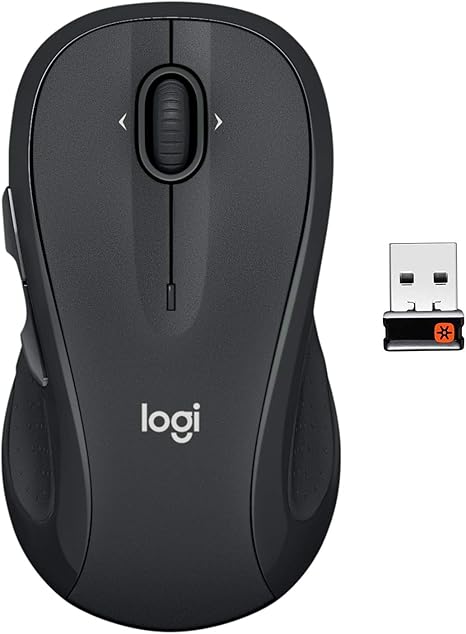
Experience unmatched comfort and precise control with the Logitech M510 Wireless Mouse, a top choice for users seeking the best ergonomic wireless mouse. Its thoughtfully contoured design and multi-functional buttons make it ideal for extended work sessions and seamless navigation across various applications.
Designed for right-handers, the M510 features soft rubber grips and a broad palm area to reduce fatigue throughout the day. The five programmable buttons, including Back/Forward and side-to-side scroll, enhance productivity, while the long-lasting two-year battery life and compact Logitech Unifying receiver provide convenience and consistent performance.
Pros
- Ergonomic shape with soft rubber grips ensures comfortable use during extended periods.
- Five programmable buttons and advanced scrolling options improve efficiency and navigation.
- Two-year battery life combined with smart sleep mode minimizes maintenance and enhances convenience.
Cons
- Only compatible with right-handed users, which may limit options for left-handers.
Combining ergonomic design with reliable wireless technology, the Logitech M510 stands out as a versatile option for those wanting comfort and functionality. When compared to similar models, it offers superior battery life and customizable controls, making it a compelling choice for anyone upgrading their workspace mouse.
6. ProtoArc EM11 NL Wireless Ergonomic Vertical Mouse

Experience comfort and efficiency with the ProtoArc EM11 NL Wireless Ergonomic Vertical Mouse, crafted to perfectly fit small to medium hands. Its ergonomic vertical design reduces wrist strain by promoting a natural hand position, making it an ideal choice for anyone seeking relief from repetitive strain injuries during long hours of computer use.
Equipped with dual Bluetooth and 4G USB-A connectivity, this versatile mouse supports simultaneous connection to up to three devices. Featuring adjustable DPI settings up to 2400 for precise tracking, quiet clicking, and a rechargeable 500mAh battery, it delivers seamless, high-performance operation while enhancing comfort and productivity.
Pros
- Ergonomic vertical design minimizes wrist strain and promotes a natural hand posture.
- Supports multi-device connectivity with dual Bluetooth and 2.4G USB-A receiver.
- Rechargeable battery with convenient USB-C charging offers up to one month of use per charge.
Cons
- Learning curve required to adjust grip; recommended 1–2 weeks acclimation period.
For users seeking a reliable and comfortable alternative to traditional mice, the ProtoArc EM11 NL stands out by combining ergonomic benefits with multi-device flexibility and long-lasting battery life. While it may take some time to get accustomed to the vertical grip, its benefits in reducing wrist discomfort make it an excellent investment for daily computer use.
7. TECKNET Wireless Ergonomic Mouse Purple

Experience effortless navigation and all-day comfort with the TECKNET Wireless Ergonomic Mouse Purple. Designed to complement the natural contour of your hand, it delivers precise control and superior comfort, making it an ideal companion for both work and travel. Its sleek, compact form ensures portability without sacrificing performance.
Its sleek, compact form ensures portability without sacrificing performance.
Equipped with advanced optical tracking and a 5-level adjustable DPI (800 to 2600), this wireless mouse offers accurate cursor movement on most surfaces. Its ergonomic design features rubber side-grips for enhanced thumb support, while a long-lasting battery life of up to 24 months lets you stay productive without frequent replacements. Plug-and-play compatibility across Windows, Mac, Linux, and Chrome OS devices adds versatility to its user-friendly experience.
Pros
- Ergonomic contour and rubber side-grips provide exceptional hand comfort during extended use.
- Adjustable DPI settings allow customization for precise cursor control on various surfaces.
- Impressive 24-month battery life with power-saving mode minimizes maintenance and downtime.
Cons
- Side buttons are not compatible with Mac systems, limiting functionality for some users.
Combining portability, ergonomic design, and advanced tracking technology, the TECKNET Wireless Ergonomic Mouse Purple is an excellent choice for users seeking comfortable precision control. Compared to similar wireless mice in its price range, it stands out with its extended battery life and thoughtful ergonomic features.
8. Logitech Ergo M575S Wireless Bluetooth Trackball Mouse

Experience superior comfort and precision with the Logitech Ergo M575S Wireless Bluetooth Trackball Mouse, designed to reduce muscle strain and enhance productivity. Its innovative thumb-controlled trackball enables smooth cursor movement with minimal hand motion, perfect for extended use and compact workspaces.
Engineered in collaboration with Logi Ergo Lab experts, this ergonomic mouse supports a natural forearm posture, cutting muscle strain by 25%. Featuring customizable buttons and adjustable cursor speed through the Logi Options+ app, it offers tailored control that adapts to your workflow. Connectivity options include Bluetooth and the Logi Bolt USB receiver, with an impressive 18-month battery life powered by an included AA battery.
Pros
- Ergonomically sculpted design reduces forearm strain and promotes comfortable use all day.
- Customizable buttons and Smart Actions provide efficient and personalized control.
- Long-lasting battery life of up to 18 months with easy Bluetooth or USB connection.
Cons
- Right-hand orientation may not suit left-handed users.
The Logitech Ergo M575S stands out as an excellent choice among ergonomic wireless mice, balancing comfort with functionality while fitting seamlessly into space-conscious setups. Its thoughtful design and eco-friendly materials make it a smart investment for users seeking lasting performance and reduced physical strain.
9. Logitech MX Vertical Wireless Mouse Graphite

Experience next-level comfort and precision with the Logitech MX Vertical Wireless Mouse Graphite, engineered to promote healthier hand positioning and reduce strain during extended use. Its ergonomic design coupled with advanced tracking technology offers a seamless, fatigue-free workflow for professionals and casual users alike.
Designed with a natural handshake posture and a unique 57° vertical angle, this mouse minimizes wrist pressure and muscular activity by 10% compared to standard models. Featuring a high-precision 4000 DPI sensor, customizable cursor speed, and a textured rubber grip, it ensures exceptional control and comfort over long periods.
Pros
- Ergonomic vertical design reduces wrist strain and promotes better posture.
- Advanced 4000 DPI optical sensor allows for precise tracking with less hand movement.
- Multi-device compatibility including Windows, macOS, iPadOS, and more.
Cons
- Higher price point compared to traditional wireless mice.
Balancing ergonomic innovation with high-performance features, the Logitech MX Vertical Wireless Mouse Graphite is an excellent choice for users seeking comfort without compromising productivity. Compared to standard mice, its design uniquely targets wrist health, making it ideal for those with demanding daily computer use.
10. ProtoArc EM11 NL Wireless Ergonomic Vertical Mouse

Discover unparalleled comfort and efficiency with the ProtoArc EM11 NL Wireless Ergonomic Vertical Mouse, expertly crafted to support small to medium hands. Its innovative 58° vertical design reduces wrist strain, making it the ideal companion for extended computer use and enhancing productivity throughout your busy day.
Engineered for precision and convenience, this mouse connects effortlessly to up to three devices via Bluetooth and a 4G USB-A receiver, allowing seamless transitions between your laptop, desktop, and tablet. The USB-C rechargeable battery offers up to 100 hours of use, while adjustable DPI settings ensure smooth navigation tailored to your workflow.
Pros
- Ergonomically designed with a natural 58° vertical angle to minimize wrist fatigue and improve posture
- Multi-device connectivity via dual Bluetooth and 2.4G USB-A with one-click switching
- Long-lasting built-in 500mAh rechargeable battery with USB-C charging for sustainability and convenience
Cons
- Designed specifically for hand sizes under 7.5 inches, limiting suitability for larger hands
Combining ergonomic innovation with versatile connectivity and sustainable power, the ProtoArc EM11 NL Wireless Ergonomic Vertical Mouse stands out as a smart choice for users seeking comfort without sacrificing functionality. Compared to traditional flat mice, it significantly reduces wrist strain, and when matched against generic ergonomic mice, it offers superior build quality and multi-device support at an attractive price point.
Discover Ultimate Comfort: How to Choose the Best Ergonomic Wireless Mouse for You
Ergonomics and Design
Hand size and grip style compatibility. Shape and contour for wrist support. Button placement for ease of use.A wireless mouse that offers versatile connection options such as Bluetooth and USB receivers ensures seamless compatibility across different devices, reducing interruptions and improving workflow efficiency. Additionally, having multiple ports or slots to connect other peripherals or accessories can dramatically enhance the mouse’s functionality, allowing for a more customized and integrated setup.
- Device compatibility: Ensure the mouse supports various connection methods to avoid compatibility issues with laptops, desktops, or tablets.
- Connection reliability: Opt for technologies that offer stable, interference-free connections for uninterrupted use.
- Upgradeable features: Ability to add accessories or attach extra modules can improve usability over time.
Wireless Connectivity Options
Bluetooth vs. USB receiver. Signal range and stability. Compatibility with devices and operating systems.Understanding the differences between Bluetooth and USB receiver connections can significantly impact your overall experience. Bluetooth offers the convenience of a cable-free setup and the ability to connect with multiple devices without occupying a USB port. However, USB receivers typically provide a more stable and faster response, especially in environments with potential wireless interference.
However, USB receivers typically provide a more stable and faster response, especially in environments with potential wireless interference.
Signal range and stability are crucial for maintaining smooth and uninterrupted use. USB receivers often support longer ranges and stronger connections compared to standard Bluetooth, which may occasionally experience lag or dropouts depending on the surroundings. This can be especially important if you tend to work at a distance from your computer or move around frequently.
This can be especially important if you tend to work at a distance from your computer or move around frequently.
| Feature | Bluetooth | USB Receiver |
|---|---|---|
| Port Usage | No USB port needed | Occupies one USB port |
| Device Compatibility | Works with most Bluetooth-enabled devices | Generally compatible with Windows and some macOS devices |
| Signal Range | Short to medium range | Often longer and more stable range |
| Interference | Can be affected by other Bluetooth or wireless devices | Less prone to interference |
Device and operating system compatibility should also be checked to ensure seamless integration. While Bluetooth connections tend to work across a wide variety of platforms including Windows, macOS, and mobile devices, some USB receivers may face limitations depending on the drivers and support available.
Considering these factors can lead to a smoother, more reliable user experience without connectivity hiccups.
Battery Life and Charging
Battery type (rechargeable vs. replaceable). Usage time per charge. Charging options and indicators.Modern wireless mice often feature different power solutions that significantly impact their convenience and usability. Some models come with rechargeable batteries, allowing users to easily top up power via USB cables or charging docks, while others rely on replaceable batteries, offering the advantage of quick swaps without downtime.
Understanding how long the device can operate on a single charge or set of batteries helps ensure uninterrupted productivity, especially during extended work sessions. Additionally, handy charging indicators and customizable charging options—such as fast charging or wireless charging pads—add another layer of user-friendly design that keeps devices ready to go without guesswork.
Performance and Features
DPI settings and sensitivity adjustment. Programmable buttons and customization. Scroll wheel type and responsiveness.Devices with versatile connection options offer seamless compatibility across various systems, ensuring a hassle-free setup whether using a laptop, desktop, or tablet. Having multiple ways to link the device, such as Bluetooth and a USB receiver, also provides flexibility in crowded wireless environments and prevents connectivity interruptions. Equally important is the ability to enhance the device’s functionality over time.
Extra ports or slots can allow for additional accessories or upgrades, extending the lifespan and adaptability of the tool to evolving user needs. This means not only improved performance from the start but also future-proofing against changing technology requirements.
Build Quality and Materials
Durability and finish. Weight and balance considerations. Sweat and texture resistance.Wireless mice that offer reliable connection options, such as Bluetooth and USB receivers, provide greater flexibility for different devices and environments. It’s important to verify compatibility with your computer’s ports and operating system to avoid any pairing issues or lag during use.
Equally valuable is the ability to enhance functionality through additional ports or slots that allow for accessories or future upgrades. This can include extra USB ports, customizable buttons, or even software-based customization options. Such features help ensure the device remains versatile and efficient over time, adapting to evolving needs without the need to replace hardware.
Price and Warranty
Price range vs. features offered. Warranty length and coverage. Customer support and return policy.Understanding how a mouse connects and the options it offers for additional peripherals can greatly influence its overall usefulness and convenience. A device that supports multiple connection methods, such as Bluetooth and a USB receiver, provides flexibility across different devices and environments. Additionally, the availability of extra ports or programmable buttons can enhance productivity by allowing customization and easy integration with other tools.
| Connection Type | Advantages | Potential Limitations |
|---|---|---|
| Bluetooth | Wireless, no dongle needed, easy pairing with most laptops | Can have occasional lag or interference in crowded wireless environments |
| USB Receiver | Stable and fast connection, works with devices lacking Bluetooth | Requires a dedicated USB port, risk of loss of small receiver |
- Additional ports and buttons: These allow users to attach other devices or customize controls, increasing workflow efficiency.
- Compatibility: Checking if the mouse works seamlessly with your operating system and hardware ensures smooth operation without interruptions.
FAQ’s
What Features Should I Look For In The Best Ergonomic Wireless Mouse?Look for features like adjustable DPI settings for precise control, a comfortable contoured design that supports your hand to reduce strain, and customizable buttons to enhance productivity. Additionally, ensure it has reliable wireless connectivity and long battery life for uninterrupted use.
Which Brands Offer The Most Reliable Ergonomic Wireless Mice?Logitech and Microsoft are widely recognized for offering the most reliable ergonomic wireless mice, known for their comfortable designs and durable performance. Additionally, brands like Logitech’s MX series and Microsoft’s Sculpt Ergonomic Mouse receive consistent praise from users and experts alike.
How Does An Ergonomic Wireless Mouse Help Reduce Wrist Strain And Improve Comfort?An ergonomic wireless mouse is designed to fit the natural shape of your hand, promoting a more relaxed grip that reduces wrist strain. Its wireless feature eliminates cable drag, allowing for smoother and more comfortable movements during extended use.
What Is The Price Range For Top-Rated Ergonomic Wireless Mice?The price range for top-rated ergonomic wireless mice typically falls between $40 and $150. Premium models with advanced features may cost upwards of $150.
Can Ergonomic Wireless Mice Be Used Effectively For Gaming And Professional Work?Yes, ergonomic wireless mice can be used effectively for both gaming and professional work, as they provide comfort and reduce strain during extended use. Many models also offer high precision and customizable features suitable for gaming performance and productivity tasks.
Conclusion
In summary, the best ergonomic wireless mouse combines comfort, precision, and convenience to reduce strain during extended use. Features like adjustable DPI, customizable buttons, and a design that supports natural hand posture make it ideal for both work and gaming. Investing in a high-quality ergonomic wireless mouse enhances productivity while promoting long-term wrist health.

- Top Best Computer Speakers with Microphone for Clear Sound! - November 11, 2026
- Best Wired Computer Speakers That Blow Your Mind! - November 11, 2026
- Top Best External Speakers for Laptop Computers Revealed! - November 11, 2026
