
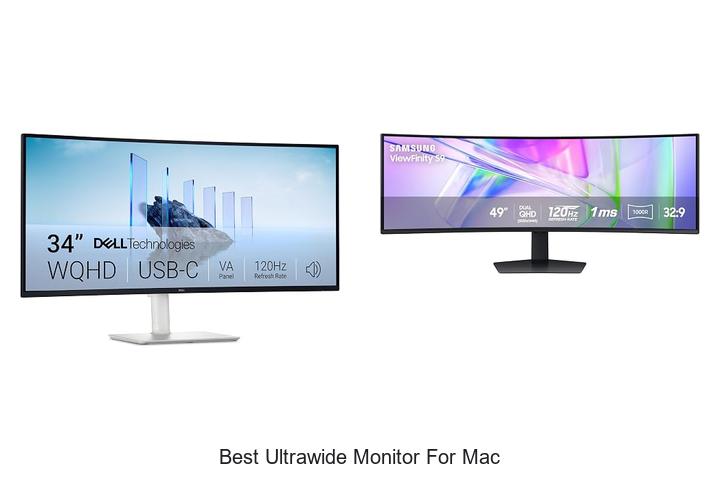
Color accuracy, resolution, and aspect ratio play pivotal roles when selecting a display tailored for macOS environments. Ultrawide monitors, with their expansive screen real estate and high pixel density, offer an immersive experience ideal for multitasking, creative workflows, and detailed graphical work.
However, optimizing compatibility with Mac’s unique Retina display scaling and ensuring seamless integration with macOS color profiles requires careful consideration. The best ultrawide monitor for Mac must strike a balance between hardware specifications and software synergy, delivering crystal-clear visuals without compromising performance. As professionals and enthusiasts seek to elevate their workspace beyond standard widescreens, understanding the technical nuances behind these monitors becomes essential.
Delve deeper to discover which features truly set the best ultrawide monitor for Mac apart from the rest.
Discover the Ultimate Viewing Experience Tailored for Mac Users
| Image | Product | Price |
|---|---|---|
Our Picks 1  | Dell S3425DW 34-inch Monitor | Check Price On Amazon |
Our Picks 2  | Samsung LS49C954UANXZA Business Curved Ultrawide Monitor | Check Price On Amazon |
Our Picks 3  | INNOCN 34 5K Wide Monitor | Check Price On Amazon |
1. Dell S3425DW 34-inch Monitor
Discover unparalleled productivity and immersive visuals with the Dell S3425DW 34-inch Monitor, an exceptional ultrawide display designed to elevate your Mac experience. Combining stunning picture quality with ergonomic comfort, it stands out as an ideal solution for professionals and creatives seeking expansive screen real estate and true-to-life colors.
Equipped with a 21:9 aspect ratio and a vibrant VA panel, this monitor delivers 99% sRGB and 95% DCI-P3 color coverage alongside a 3000:1 contrast ratio for deep blacks and bright highlights. Enhanced by AMD FreeSync Premium technology and a 120Hz refresh rate, it ensures smooth, tear-free visuals. The ComfortView Plus reduces blue light for all-day eye comfort without compromising color fidelity.
Pros
- Exceptional color accuracy with 99% sRGB and 95% DCI-P3 coverage, perfect for creative work on Mac.
- Seamless connectivity through USB-C with up to 65W power delivery, minimizing desk clutter.
- High refresh rate (120Hz) with AMD FreeSync Premium and ultra-low response time for fluid visuals.
- Enhanced ComfortView Plus reduces harmful blue light emissions for prolonged usage comfort.
- Re-engineered built-in speakers provide richer, more detailed sound than previous generations.
Cons
- Matte finish may slightly reduce vibrancy compared to glossy displays, which may not suit all preferences.
The Dell S3425DW strikes a powerful balance between advanced display technologies and user-centric features, making it one of the best ultrawide monitors for Mac users who demand color precision, smooth performance, and comfortable viewing for both work and entertainment. Its integration of performance and convenience positions it favorably against competitors in the same category.
2. Samsung LS49C954UANXZA Business Curved Ultrawide Monitor
Experience expansive visual workspace with the Samsung LS49C954UANXZA Business Curved Ultrawide Monitor. Its immersive 49-inch 1000R curved screen and 32:9 aspect ratio bring unparalleled panoramic productivity, ideal for multitasking, creative projects, and seamless workflow on Mac devices and beyond.
Combining a high-resolution Dual QHDA display with versatile connectivity options, this monitor serves as both a display and docking hub. Features like DisplayPort, dual HDMI, USB, and USB-C with 90W charging simplify your setup.
Pros
- Immersive 49″ curved 1000R screen with 32:9 aspect ratio maximizing workspace
- Integrated docking station with DisplayPort, HDMI, USB, and USB-C supporting 90W charging
- Smooth 120Hz refresh rate ideal for reduced lag during work and entertainment
- VESA DisplayHDR 400 support for richer colors and improved contrast fidelity
- Built-in speakers free up desk space while enhancing audio convenience
Cons
- Premium price point may be a consideration compared to smaller or less feature-rich ultrawide monitors
Combining expansive screen real estate, advanced connectivity, and vivid color performance, the Samsung LS49C954UANXZA stands out as an excellent choice for professionals and creatives seeking the best ultrawide monitor for Mac. Its unique curved format and docking capabilities offer a streamlined, productive workspace worth the investment.
3. INNOCN 34 5K Wide Monitor
Discover unparalleled clarity and expansive workspace with the INNOCN 34 5K Wide Monitor, designed to elevate your Mac experience. Its stunning 5120 x 2160 resolution combined with a sleek ultrawide 34-inch VA panel delivers vibrant colors and sharp visuals, perfect for professionals and creatives alike.
Equipped with a 120Hz refresh rate and HDR400 support, this monitor achieves exceptional smoothness and dynamic range. Offering 135% sRGB and 106% DCI-P3 gamut coverage, alongside factory-calibrated color accuracy (delta-E < 2), it ensures true-to-life images. Connectivity options include dual HDMI 1 ports, DisplayPort 4, and 65W USB-C power delivery, facilitating seamless multitasking and device integration.
Connectivity options include dual HDMI 1 ports, DisplayPort 4, and 65W USB-C power delivery, facilitating seamless multitasking and device integration.
Pros
- Impressive 5K ultrawide resolution for detailed and immersive visuals.
- Comprehensive connectivity with USB-C docking, HDMI, DisplayPort, and USB 3.0 ports.
- Ergonomic design featuring height, swivel, and tilt adjustments plus VESA mount compatibility.
Cons
- Premium price point may be a consideration for budget-conscious users.
Ideal for Mac users seeking the best ultrawide monitor, the INNOCN 34 5K Wide Monitor merges superior image fidelity with flexible connectivity and ergonomic comfort, making it an excellent investment for enhanced productivity and creativity.
4. INNOCN 49 Curved Ultrawide Monitor 49C1R

Experience the ultimate in screen real estate and immersive visuals with the INNOCN 49 Curved Ultrawide Monitor 49C1R. Boasting a stunning 49-inch curved VA panel and an ultra-wide 32:9 aspect ratio, this monitor is designed to elevate both your productivity and gaming sessions on Mac and other devices.
Featuring a remarkable 5120 x 1440 dual QHD resolution at 120Hz refresh rate, the 49C1R delivers crisp, fluid images enhanced by HDR 400 and Adaptive-Sync technology. Its extensive connectivity options, including USB-C with 65W power delivery, DisplayPort 4, HDMI 1, and multiple USB ports, make it versatile for any setup, especially for Mac users seeking the best ultrawide experience.
Pros
- Massive 49-inch 32:9 curved VA panel with ultra-wide dual QHD resolution ensures expansive, immersive visuals.
- Comprehensive port selection including USB-C 65W power delivery for seamless Mac connectivity and device charging.
- Ergonomic stand with tilt, swivel, and height adjustments enhances comfort for extended usage sessions.
Cons
- Glossy screen finish may cause reflections in brightly lit environments.
Delivering unmatched screen space and smooth, vivid visuals, the INNOCN 49C1R is an excellent ultrawide monitor choice for Mac users and gamers alike. Its combination of high resolution, diverse connectivity, and user comfort features positions it as a top contender for anyone seeking to maximize productivity and entertainment on a single expansive screen.
5. Dell UltraSharp U4025QW 40 Curved LED Monitor

Experience unparalleled productivity and immersive visuals with the Dell UltraSharp U4025QW 40 Curved LED Monitor. Designed to elevate your workspace, this ultrawide display delivers exceptional clarity and vibrant colors, making it an ideal choice for Mac users who demand expansive screen real estate and reliable performance.
Boasting a 7-inch curved LED screen with a 21:9 aspect ratio and 600 nits brightness, the UltraSharp U4025QW ensures sharp imagery and vivid details even in brightly lit environments.
Pros
- Expansive 39.7″ curved display with UltraWide 21:9 aspect ratio for enhanced multitasking
- USB Type-C port providing streamlined data transfer and power delivery in a single cable
- Impressive 600 nits brightness combined with 99% color gamut and advanced picture enhancement technologies for true-to-life visuals
Cons
- Premium price point that may be a consideration for budget-conscious buyers
For Mac users seeking the best ultrawide monitor, the Dell UltraSharp U4025QW stands out by merging expansive, vibrant display quality with robust connectivity and swift responsiveness. Compared to similar high-end ultrawide monitors, it balances professional-grade features with reliable performance, making it a smart investment for productivity and creative workflows.
6. INNOCN 40C1U 40 Inch Ultrawide Monitor

Discover exceptional visual clarity and immersive productivity with the INNOCN 40C1U 40 Inch Ultrawide Monitor. Its stunning 5120 x 2160p 5K resolution combined with a 21:9 aspect ratio makes it an ideal choice for Mac users seeking a premium display tailored for creative and professional workflows.
Equipped with an IPS panel delivering 135% sRGB and 106% DCI-P3 color gamut, this ultrawide monitor ensures vivid and accurate colors right out of the box. Multiple connectivity options including HDMI 1, DisplayPort 4, and USB Type-C with 65W power delivery support seamless integration with various devices, enhancing workflow and entertainment experiences.
Pros
- Exceptional 5K ultrawide resolution (5120 x 2160p) for detailed and expansive screen real estate
- Wide color gamut (135% sRGB and 106% DCI-P3) with factory calibration (delta-E < 2) ensuring professional color accuracy
- Versatile connectivity featuring HDMI 2.1, DisplayPort 1.4, and USB-C with 65W power delivery for diverse device compatibility
Cons
- Premium price point may be a consideration for budget-conscious buyers
Combining breathtaking visuals, accurate color performance, and robust connectivity, the INNOCN 40C1U stands out as one of the best ultrawide monitors for Mac users. This monitor offers an impressive balance of features and quality, making it a solid investment for professionals and creatives demanding top-tier display performance.
7. Philips 346E2CUAE 34 Inch Curved Computer Monitor

Enhance your Mac workspace with the Philips 346E2CUAE 34 Inch Curved Computer Monitor, designed to deliver an expansive UltraWide Quad HD experience. Its 1500R curved VA panel offers immersive viewing angles ideal for productivity and gaming, making it a top contender among the best ultrawide monitors for Mac users.
Featuring a stunning 3440 x 1440 resolution and Philips Ultra Wide-Color technology, this monitor reproduces lifelike colors across 3% sRGB and 5% NTSC gamuts.
The single USB-C cable supports power delivery, charging your MacBook effortlessly while ensuring smooth visuals with a 100Hz refresh rate and 1ms response time.
Pros
- Immersive 1500R curved screen enhances wide-viewing angles and user comfort
- USB-C connectivity with power delivery simplifies setup by charging and data transfer through one cable
- Exceptional color accuracy with Ultra Wide-Color technology for vibrant and precise image reproduction
Cons
- Glossy screen finish may cause reflections under strong lighting conditions
Balancing performance, color fidelity, and connectivity, the Philips 346E2CUAE stands out as a versatile ultrawide monitor for Mac users seeking enhanced productivity and immersive gaming. Its superior features make it a compelling choice against other ultrawide displays in the same price range.
8. LG 34U530A-W 34-inch UltraWide Monitor

Enhance your Mac workspace with the LG 34U530A-W 34-inch UltraWide Monitor, designed to maximize productivity and immersive viewing. Its expansive 21:9 aspect ratio and vibrant HDR display provide ample screen real estate and stunning visuals, making it ideal for multitasking, creative work, and everyday use.
The ultra-wide 2560 × 1080 IPS panel delivers sharp images with vivid colors backed by 99% sRGB coverage and DisplayHDR 400 certification. A 100Hz refresh rate ensures smooth motion, while USB Type-C connectivity simplifies setup by supporting data transfer and display output through a single cable.
Plus, Waves MaxxAudio speakers add rich sound quality, removing the need for external audio devices.
Pros
- Expansive 21:9 aspect ratio facilitates efficient multitasking with a virtually borderless full HD display.
- High brightness and color accuracy from HDR 400 and IPS technology, ensuring vivid, consistent visuals at wide viewing angles.
- Flexible connectivity options including USB Type-C for easy, clutter-free laptop integration.
Cons
- Resolution is Full HD rather than Quad HD, which may be a consideration for users seeking ultra-high pixel density.
Offering a balanced mix of immersive widescreen viewing, reliable performance, and seamless connectivity, the LG 34U530A-W stands out as an excellent ultrawide monitor tailored for Mac users looking to enhance productivity and entertainment without stretching their budget.
9. Philips 34E1C5600HE 34 UltraWide QHD Monitor

Experience a new level of productivity and immersive viewing with the Philips 34E1C5600HE 34 UltraWide QHD Monitor. Its expansive 21:9 aspect ratio and stunning 3440 x 1440 resolution bring clarity and ample screen space, ideal for multitasking and creative work on Mac systems and beyond.
Designed with a 1500R curved VA panel, this monitor offers natural eye comfort and rich color accuracy enhanced by Ultra Wide-Color technology covering 24% sRGB and
Featuring a built-in 5MP Windows Hello webcam and noise-canceling mic, it’s perfectly equipped for remote collaboration, while a USB-C dock simplifies connectivity and power delivery.
Pros
- UltraWide 21:9 aspect ratio with 3440 x 1440 resolution for expansive workspace and sharp images
- Curved 1500R VA panel reduces eye strain and enhances immersion during extended use
- Built-in Windows Hello webcam with noise-canceling microphone ensures secure and clear remote communication
- Ultra Wide-Color technology delivers vibrant, true-to-life colors, perfect for design and media tasks
- Single USB-C cable handles video, data, and up to 65W laptop charging for a clutter-free setup
Cons
- The glossy screen finish may reflect ambient light, potentially causing glare in brightly lit environments
With its combination of immersive visuals, productivity-enhancing features, and streamlined connectivity, the Philips 34E1C5600HE stands out as a compelling choice for users seeking the best ultrawide monitor for Mac. It competes favorably against similar models by balancing color fidelity, ergonomic design, and remote work capabilities.
10. Dell UltraSharp U3426WER Curved Thunderbolt Hub Monitor

Experience expansive productivity and vibrant visuals with the Dell UltraSharp U3426WER Curved Thunderbolt Hub Monitor. Tailored for creative professionals and Mac users, this ultrawide display merges superior color accuracy and a sleek curved design, elevating workspaces with its immersive and refined presence.
Featuring 98% Display P3 color coverage and factory calibration for precise Delta E accuracy under 2, images and designs come to life authentically. The IPS Black panel offers a striking 2000:1 contrast ratio, deeper blacks, and wide 178-degree viewing angles, while Thunderbolt connectivity ensures seamless Mac integration and efficient device switching via built-in KVM support.
Pros
- Exceptional color precision with 98% Display P3 and Delta E < 2 calibration ideal for creative work
- Curved 21:9 ultrawide screen enhances multitasking and immersive viewing experience
- Integrated Thunderbolt hub with KVM allows easy control of multiple devices simultaneously
Cons
- Premium price point may be a consideration for budget-conscious buyers
For professionals seeking the best ultrawide monitor for Mac, the Dell UltraSharp U3426WER offers unmatched color fidelity, sleek design, and connectivity features that justify its investment. Compared to standard ultrawide displays, it excels in color accuracy and multi-device workflow support, making it a top-tier option in its category.
Discover the Ultimate Guide to Choosing the Best Ultrawide Monitor for Your Mac
Display Quality and Resolution
Screen size and aspect ratio compatibility with macOS. Native resolution and pixel density for crisp visuals. Color accuracy and support for wide color gamuts (P3, sRGB).Ultrawide monitors designed for Mac systems need to offer seamless compatibility with macOS’s native display settings to ensure screen size and aspect ratios are perfectly aligned. This alignment not only enhances the visual experience but also prevents issues such as distorted images or ineffective screen real estate usage. Additionally, native resolution and pixel density play a crucial role in delivering sharp, crisp visuals; higher pixel density means finer detail, which is essential for tasks that demand precision, like photo editing or video production.
Equally important is the monitor’s ability to accurately reproduce colors. Support for wide color gamuts such as P3 and sRGB guarantees vibrant and true-to-life colors, matching the expectations set by Mac displays.
| Feature | Importance | Benefit for Mac Users |
|---|---|---|
| Screen size & aspect ratio | Ensures compatibility with macOS scaling | Optimized workspace without scaling issues |
| Native resolution & pixel density | Provides sharp and detailed images | Clear visuals for creative and professional tasks |
| Color accuracy & wide color gamut support | Delivers true-to-life color reproduction | Consistency between editing and final output |
Connectivity and Compatibility
Availability of Thunderbolt 3/4 or USBC ports. Compatibility with Mac hardware and software. Support for macOS features like True Tone and Night Shift.Having the right ports on a monitor can drastically enhance how seamlessly it integrates with a Mac system. Thunderbolt 3 or 4 and USB-C ports provide high-speed data transfer and power delivery through a single cable, reducing clutter and enabling one-cable connectivity for both display and charging. This not only simplifies the workspace but also ensures that the monitor works efficiently with Mac hardware, which often relies on these modern standards.
Compatibility with macOS features like True Tone and Night Shift is equally important. Monitors that support these functions help maintain consistent color temperatures and reduce eye strain by adjusting the display based on ambient lighting and time of day.
| Port Type | Benefit | Mac Compatibility |
|---|---|---|
| Thunderbolt 3/4 | High-speed data, single-cable display, and power delivery | Fully supports MacBook Pro, iMac, Mac Mini |
| USB-C | Versatile connection for video and peripherals | Widely compatible, supports charging and accessories |
Checking for these features guarantees smoother integration with macOS and maximizes the benefits of ultra-wide displays by aligning with Apple’s ecosystem expectations.
Design and Ergonomics
Adjustable stands (height, tilt, swivel). Bezel size and screen curvature options. Build quality and materials.Modern ultrawide displays designed for Mac systems often come equipped with adjustable stands that allow users to customize height, tilt, and swivel settings. This flexibility ensures comfortable viewing angles during extended work sessions, reducing neck and eye strain.
Build quality and the choice of materials directly impact durability and aesthetics. Monitors constructed with robust metals or high-grade plastics not only offer sturdiness but also contribute to a premium feel that complements a stylish workspace.
Performance and Features
Refresh rate and response time considerations. HDR support and brightness levels. Builtin speakers, USB hubs, and other peripherals.A smooth and responsive display experience heavily relies on refresh rate and response time, especially for tasks that involve fast-moving visuals or detailed design work. Monitors with higher refresh rates and lower response times reduce motion blur and ghosting, ensuring clarity and precision. Additionally, support for HDR and the ability to reach high brightness levels can dramatically enhance color vibrancy and contrast, making visuals pop with more lifelike detail.
Additionally, support for HDR and the ability to reach high brightness levels can dramatically enhance color vibrancy and contrast, making visuals pop with more lifelike detail.
Beyond image quality, integrated features such as built-in speakers, USB hubs, and other peripherals contribute significantly to convenience and desk organization. Having these extras directly in the monitor minimizes the number of external devices and cables needed, which can streamline your workspace and improve overall productivity.
| Feature | Impact | Benefit |
|---|---|---|
| Refresh Rate & Response Time | Reduces motion blur and latency | Smoother visuals and improved accuracy |
| HDR & Brightness Levels | Enhances color depth and contrast | More vibrant and realistic images |
| Built-in Speakers & USB Hubs | Consolidates peripheral connections | Cleaner setup and easier device management |
Price and Warranty
Budget vs. premium options for Mac users. Manufacturer warranty and customer support. Valueadded features worth investing in.Ensuring seamless integration with your Mac requires more than just a stunning display. Ports such as Thunderbolt 3 or USB-C enable effortless connection with Mac devices, supporting both video and power delivery. Having multiple input options like HDMI and DisplayPort allows flexibility for connecting additional gadgets or future upgrades. Additionally, extra USB hubs and audio jacks open up possibilities for peripherals without cluttering your workspace.
Additionally, extra USB hubs and audio jacks open up possibilities for peripherals without cluttering your workspace. Without sufficient connectivity options, compatibility issues could arise, hampering productivity and diminishing the overall experience.
Equally important is the ability to expand your setup as needs evolve. Some ultrawide monitors offer daisy-chaining capabilities or expandable slots for accessories, which can be a major advantage for creative professionals who rely on multitasking across various devices. Investing in a monitor that accommodates a growing toolset means saving time and money down the line by avoiding the need for costly adapters or replacements. This foresight ensures that your display remains a versatile hub, rather than a potential bottleneck.
This foresight ensures that your display remains a versatile hub, rather than a potential bottleneck.
FAQ’s
What Features Should I Look For In The Best Ultrawide Monitor For Mac?Look for an ultrawide monitor with excellent color accuracy, wide color gamut support (such as P3), and Thunderbolt/USB-C connectivity to ensure seamless integration with your Mac. Additionally, a high resolution and adjustable stand will enhance your productivity and viewing comfort.
Which Ultrawide Monitors Are Fully Compatible With Macos?Ultrawide monitors from LG, such as the LG 34WK95U-W and LG 38WN95C-W, are fully compatible with macOS and offer excellent color accuracy and resolution support. Additionally, models like the Dell UltraSharp U4021QW also work well with macOS, providing seamless integration and high performance.
How Does The Color Accuracy Of Ultrawide Monitors Affect Mac Users?The color accuracy of ultrawide monitors is crucial for Mac users, especially those in creative fields, as it ensures precise color representation that matches macOS’s color profiles. Inaccurate colors can lead to inconsistent work results and hinder tasks like photo editing and graphic design.
What Is The Ideal Ultrawide Monitor Size And Resolution For Mac Professionals?The ideal ultrawide monitor size for Mac professionals is typically 34 to 38 inches with a resolution of 3440×1440 or higher, such as 3840×1600, to ensure ample screen real estate and sharp image quality. This combination provides an optimal balance between workspace and clarity, enhancing productivity and visual comfort.
Are There Any Ultrawide Monitors With Thunderbolt Support For Seamless Mac Connectivity?Yes, there are ultrawide monitors with Thunderbolt support that offer seamless connectivity for Mac, such as the LG UltraFine 34BK95U-W and the Dell UltraSharp U4021QW. These monitors provide high-resolution displays and full Thunderbolt integration, ensuring easy plug-and-play compatibility with macOS devices.
Conclusion
In summary, the best ultrawide monitor for Mac combines vibrant color accuracy, seamless macOS compatibility, and sleek design. Leading models like the LG UltraFine and Dell UltraSharp offer impressive resolution and wide color gamut, enhancing productivity and creativity.
Investing in a top ultrawide display ensures an immersive, efficient workspace tailored to Mac users’ needs.

- Top Best Computer Speakers with Microphone for Clear Sound! - November 11, 2026
- Best Wired Computer Speakers That Blow Your Mind! - November 11, 2026
- Top Best External Speakers for Laptop Computers Revealed! - November 11, 2026
