
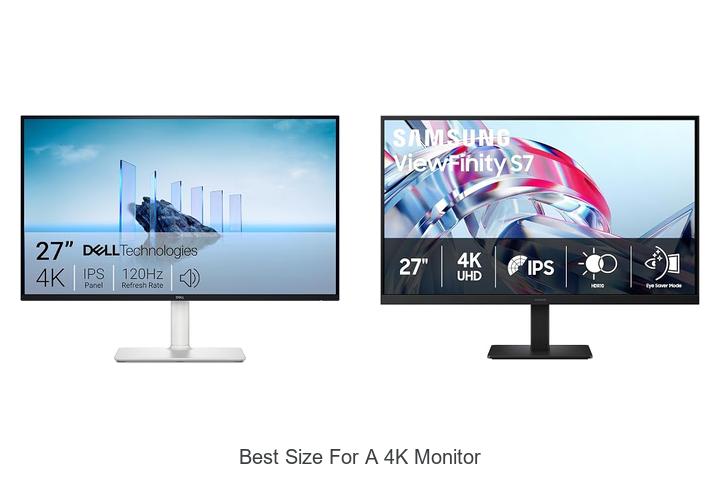
When evaluating display resolution and pixel density, the choice of monitor size plays a critical role in optimizing visual clarity and user experience. The 4K resolution, boasting 3840 x 2160 pixels, delivers exceptional detail and sharpness—but harnessing its full potential depends heavily on selecting the appropriate screen dimensions. Too large a display can lead to reduced pixel density, causing images and text to lose their crispness, while a screen that is too small may result in cramped visuals despite the high resolution.
Understanding the interplay between 4K resolution and monitor size is essential for professionals and enthusiasts seeking the best size for a 4k monitor. Explore the factors that influence this balance and discover how to choose the ideal display to elevate your viewing experience.
Discover the Ideal Dimensions That Maximize Clarity and Comfort for Ultra HD Displays
| Image | Product | Price |
|---|---|---|
Our Picks 1  | Dell S2725QS 27-Inch 4K UHD Monitor | Check Price On Amazon |
Our Picks 2  | Samsung ViewFinity S7 27-Inch Monitor | Check Price On Amazon |
Our Picks 3  | Dell S3225QS 32 Inch 4K UHD Monitor | Check Price On Amazon |
1. Dell S2725QS 27-Inch 4K UHD Monitor
Experience stunning visuals and exceptional comfort with the Dell S2725QS 27-Inch 4K UHD Monitor, an ideal choice for those seeking the best size for a 4K monitor. Combining crystal-clear imagery with thoughtful ergonomic features, it enhances productivity and entertainment alike.
Equipped with a 27-inch UHD display at a 16:9 aspect ratio, this monitor delivers vivid colors through 99% sRGB coverage and IPS technology. The 120Hz refresh rate and AMD FreeSync Premium ensure smooth, tear-free visuals, while ComfortView Plus reduces harmful blue light for prolonged viewing ease.
Pros
- Vibrant 4K UHD visuals with 99% sRGB and HDR readiness for rich color and depth
- ComfortView Plus technology reduces blue light emissions, promoting eye health during extended use
- High 120Hz refresh rate combined with AMD FreeSync Premium provides smooth, responsive gameplay and work experience
- Ultra-thin bezel and sleek ash white design complement modern workspaces
- Enhanced audio quality with more powerful output compared to previous generations
Cons
- Brightness of 350 nits may be less suitable for extremely bright environments
Overall, the Dell S2725QS offers a well-balanced 27-inch screen that perfectly suits 4K content, combining performance and comfort in an affordable package. It stands out for professional and casual users who want immersive visuals without compromising eye care, making it a top contender among mid-range 4K monitors.
2. Samsung ViewFinity S7 27-Inch Monitor
Experience stunning clarity and vibrant visuals with the Samsung ViewFinity S7 27-Inch Monitor, designed to elevate your productivity and entertainment with crisp 4K UHD resolution. Its ideal 27-inch size perfectly balances screen space and desk footprint, providing an immersive viewing experience without overwhelming your workspace.
Featuring high pixel density and HDR10 support, this IPS display delivers exceptional color accuracy and contrast, making details vivid and lifelike. The wide 178° viewing angle ensures consistent brightness and sharpness from any vantage point, while multiple connectivity options like HDMI and DisplayPort enhance versatility for various devices.
Pros
- 4K UHD resolution (3840×2160) with high pixel density for outstanding detail
- Eye Comfort Technology, certified by TÜV, reduces blue light and flicker for longer, strain-free use
- Wide 178° viewing angle maintains image clarity from diverse positions
Cons
- Standard 60 Hz refresh rate may not suit high-end gaming needs
Balancing premium 4K visuals and eye-friendly technology at an accessible price, the Samsung ViewFinity S7 is an excellent choice for professionals seeking sharp image quality in the best size for a 4K monitor. Compared to larger models, its 27-inch screen offers a perfect blend of detail and desk comfort, making it a smart upgrade for work and media consumption.
3. Dell S3225QS 32 Inch 4K UHD Monitor
Experience stunning clarity and exceptional comfort with the Dell S3225QS 32 Inch 4K UHD Monitor. Perfectly sized for immersive 4K viewing, this monitor balances a generous 32-inch display with advanced visual technologies, making it an ideal choice for professionals and gamers seeking vibrant imagery and smooth performance.
Equipped with a VA panel boasting 99% sRGB and 95% DCI-P3 color coverage, the Dell S3225QS delivers vivid, true-to-life colors enriched by HDR capabilities and a 1500:1 contrast ratio. Its 120Hz refresh rate paired with AMD FreeSync Premium ensures fluid visuals, while ComfortView Plus reduces harmful blue light for prolonged use without eye strain.
Pros
- Sharp 4K UHD resolution on a spacious 32-inch screen, ideal for detailed work and entertainment.
- Advanced ComfortView Plus technology minimizes blue light emissions for eye-friendly viewing.
- High refresh rate (120Hz) with AMD FreeSync Premium provides smooth, tear-free visuals during fast-paced content.
- Rich color accuracy with 99% sRGB and 95% DCI-P3 coverage enhances image fidelity.
- Ultra-thin bezels and an elegant ash white finish complement any modern workspace.
- Enhanced audio system delivers deeper, more powerful sound compared to previous models.
Cons
- The matte screen finish may reduce vibrancy slightly under certain lighting conditions compared to glossy panels.
Offering a perfect blend of performance, comfort, and design, the Dell S3225QS stands out as a top contender in its category. Its size and feature set make it one of the best options for anyone searching for the best size for a 4K monitor that supports both productivity and entertainment needs.
4. LG 27US500-W 27-Inch 4K UHD Monitor

Experience stunning visuals with the LG 27US500-W 27-Inch 4K UHD Monitor, designed to deliver crisp, vibrant images perfect for creative professionals and everyday users alike. Its 27-inch screen strikes an ideal balance, offering ample workspace while maintaining sharp clarity at UHD resolution.
Boasting a 1000:1 contrast ratio and an IPS panel with wide 170-degree viewing angles, this display showcases deeper blacks and vivid colors across a matte finish. HDR10 support combined with up to 90% DCI-P3 color gamut ensures enhanced color accuracy and brightness, making it a top choice for high-detail content creation or immersive media consumption.
Pros
- 4K UHD resolution with a 27-inch size provides an optimal workspace and sharp detail.
- Wide color gamut (up to 90% DCI-P3) and HDR10 compatibility deliver vibrant, true-to-life colors.
- Ergonomic stand allows easy tilt adjustments for comfortable viewing positions.
Cons
- Refresh rate limited to 60Hz, which may not suit high-frame-rate gaming needs.
Offering impressive color fidelity and a thoughtfully sized ultrafine display, the LG 27US500-W stands out as a reliable monitor for professionals and enthusiasts seeking a vibrant 4K experience without compromise. Compared to similar models, its color accuracy and ergonomic design add exceptional value.
5. Dell S2725QC 27-inch 4K UHD Monitor

Experience stunning clarity and vibrant colors with the Dell S2725QC 27-inch 4K UHD Monitor, expertly designed to deliver sharp visuals and seamless performance. Ideal for professionals and gamers alike, this monitor offers an immersive viewing experience that perfectly balances high resolution with eye comfort.
Equipped with a 27-inch 4K UHD display featuring in-plane switching (IPS) technology, the Dell S2725QC ensures vivid colors and wide viewing angles. Its low blue light ComfortView Plus filter reduces harmful emissions without compromising color accuracy, while AMD FreeSync Premium and a 120Hz refresh rate provide smooth, tear-free visuals for work and entertainment.
Pros
- Low blue light ComfortView Plus technology for prolonged eye comfort
- 120Hz refresh rate with AMD FreeSync Premium offers fluid and responsive visuals
- USB-C connectivity with up to 65W power delivery minimizes desk clutter
Cons
- No built-in height adjustment on the stand, which may require an additional monitor arm for ergonomic setups
The Dell S2725QC 27-inch 4K UHD Monitor stands out for its exceptional picture quality and user-friendly features, making it a top choice for those seeking the best size for a 4K monitor. Its combination of performance, eye care technology, and connectivity options offers excellent value at a competitive price point compared to similar models.
6. LG 32UR500K-B 32-inch 4K UHD Computer Monitor

Discover stunning visuals and immersive clarity with the LG 32UR500K-B 32-inch 4K UHD Computer Monitor, designed to offer superior image quality and vibrant colors on a large, crisp display. Ideal for creatives, gamers, and professionals seeking the best size for a 4K monitor.
Featuring a 32-inch UHD 4K (3840 x 2160) panel, this monitor delivers sharp detail and rich color accuracy with up to 90% DCI-P3 color gamut coverage. HDR10 support enhances high dynamic range content, while MaxxAudio speakers and ergonomic tilt adjustments maximize both sound and viewing comfort.
Pros
- Large 32-inch screen size perfect for 4K resolution, offering expansive workspace and immersive visuals.
- Up to 90% DCI-P3 color gamut and HDR10 support ensure vibrant, lifelike colors and detailed image depth.
- Enhanced gaming experience with Dynamic Action Sync and Black Stabilizer for reduced input lag and improved visibility in dark scenes.
Cons
- 60Hz refresh rate may not be ideal for competitive gamers seeking higher frame rates.
Offering excellent color performance and a comfortable viewing size, the LG 32UR500K-B stands out as a well-rounded 4K monitor suitable for both productivity and entertainment. Its features and design position it competitively against other 32-inch 4K screens, providing great value for its price point.
7. LG 27UP850K-W 27-inch Ultrafine 4K UHD Monitor

Elevate your visual experience with the LG 27UP850K-W 27-inch Ultrafine 4K UHD Monitor, designed to deliver stunning clarity and vibrant colors ideal for productivity, entertainment, and creative work. Its 27-inch size offers an optimal balance, making it one of the best sizes for a 4K monitor to maximize both detail and workspace without overwhelming your desk.
Featuring a 3840 x 2160 UHD resolution and up to 95% DCI-P3 color gamut, this IPS LED display promises crisp imagery with stunning color accuracy and wide viewing angles. VESA DisplayHDR 400 ensures enhanced dynamic range, while versatile connectivity options including USB Type-C with 90W power delivery, DisplayPort, and HDMI ports provide seamless integration with multiple devices.
Pros
- Exceptional 4K UHD image quality with 95% DCI-P3 color gamut coverage for true-to-life colors
- Ergonomic stand allowing height, tilt, and pivot adjustments for personalized comfort
- Comprehensive connectivity including USB-C with 90W charging, dual HDMI, DisplayPort, and USB 3.0 ports
Cons
- 60Hz refresh rate may not satisfy ultra-fast gaming enthusiasts seeking higher frame rates
Combining superb color precision, advanced HDR support, and ergonomic versatility, the LG 27UP850K-W stands out as a reliable 4K monitor ideally sized for users seeking both productivity and immersive media consumption. Its rich feature set and connectivity surpass many competitors in the mid-range segment, offering excellent value at $
8. Sceptre U325W-UPT 32-Inch 4K UHD Monitor

Discover stunning visual clarity with the Sceptre U325W-UPT 32-Inch 4K UHD Monitor, expertly designed to enhance productivity and entertainment. Its expansive 32-inch screen and true 4K resolution deliver vivid, lifelike images, making it an ideal choice for creatives, professionals, and gamers seeking immersive detail and smooth performance.
Equipped with a 3840 x 2160 IPS display, this monitor offers sharp contrast with a 1,000,000:1 ratio and wide 178-degree viewing angles. The built-in speakers provide quality sound without extra peripherals, while a 70Hz refresh rate ensures smooth visuals. Blue Light Shift and Flicker-Free technologies protect your eyes during extended use.
Blue Light Shift and Flicker-Free technologies protect your eyes during extended use.
Pros
- Massive 32-inch 4K UHD display for detailed workflows and immersive viewing
- Integrated high-quality speakers reduce desk clutter and enhance audio convenience
- Blue Light Shift and Flicker-Free features reduce eye strain during long sessions
Cons
- Refresh rate capped at 70Hz may limit ultra-smooth gaming compared to higher-end monitors
Offering exceptional image quality and user-friendly features at a competitive price, the Sceptre U325W-UPT is a top contender for those looking to balance professional-grade visuals with everyday functionality. Compared to similar 32-inch 4K monitors, its value and built-in sound system stand out for enhanced workspace and entertainment versatility.
9. LG 32UP83AK-W 32-inch Ultrafine 4K UHD IPS Monitor

Discover unparalleled clarity and color precision with the LG 32UP83AK-W 32-inch Ultrafine 4K UHD IPS Monitor, designed to elevate your visual experience. Its stunning 4K resolution and expansive
Equipped with HDR10 support and a wide 95% DCI-P3 color gamut, the monitor ensures dynamic visuals with exceptional brightness and contrast. Its ergonomic stand and USB Type-C connectivity provide flexible adjustment and streamlined device integration, making it a versatile tool for professionals and gamers seeking high-quality 4K displays.
Pros
- Impressive 4K UHD resolution (3840×2160) delivering sharp, detailed imagery on a 31.5-inch IPS panel
- HDR10 technology with up to 95% DCI-P3 color coverage enhances video and photo content vividly
- Ergonomic stand offers height, tilt, and pivot adjustments for comfortable prolonged use
- USB Type-C port supports 4K display, fast data transfer, and device charging up to 60W—all via one cable
- Gaming features like Dynamic Action Sync and Black Stabilizer improve responsiveness and dark scene visibility
Cons
- Limited 60Hz refresh rate may not satisfy competitive gamers seeking extremely high frame rates
The LG 32UP83AK-W stands out as an excellent choice for those searching for the best size for a 4K monitor, balancing immersive image quality, ergonomic design, and versatile connectivity. Compared to other 32-inch 4K displays, it offers a great blend of professional-grade color accuracy and gaming enhancements at a competitive price point.
10. Samsung ViewFinity S7 32 4K UHD Monitor

Discover unparalleled visual precision and expansive screen real estate with the Samsung ViewFinity S7 32 4K UHD Monitor. Designed for professionals seeking the ideal size to maximize productivity without sacrificing clarity, this monitor effortlessly balances detail-rich imagery with ergonomic comfort.
Boasting a 32-inch 4K UHD display (3840 x 2160 resolution), the ViewFinity S7 delivers stunning pixel density and vibrant color accuracy enhanced by HDR10 technology. Its IPS panel offers wide 178-degree viewing angles and a matte finish reduces glare, making it an exceptional choice for intricate design tasks, video editing, or immersive multimedia experiences.
Pros
- High-resolution 32″ 4K UHD screen provides ample workspace with crisp detail and accurate color.
- HDR10 support enhances contrast for deeper blacks and brighter highlights, enriching visual performance.
- Eye Saver Mode certified by TÜV minimizes eye strain by reducing blue light and flicker.
Cons
- Refresh rate capped at 60Hz, which may be limiting for high-frame-rate gaming or fast-motion content.
Overall, the Samsung ViewFinity S7 32 4K UHD Monitor strikes an excellent balance between size, resolution, and ergonomic features, positioning itself as one of the best screen sizes for 4K professional use. Compared to smaller 27 monitors, it provides significantly more workspace without compromising image quality, making it a compelling choice for demanding users.
Finding the Perfect Fit: How to Choose the Best Size for a 4K Monitor
Understanding 4K Resolution and Screen Size
What 4K resolution means for display clarity. How screen size affects pixel density. Viewing distance considerations for 4K monitors.4K resolution offers four times the pixels of a Full HD display, resulting in remarkably sharp and detailed images. However, the clarity you experience depends not just on the resolution but also on how the screen size influences pixel density—the number of pixels packed into each inch of the display.
Another crucial aspect involves how the monitor interfaces with other devices and the ability to connect multiple peripherals or add extra functionality through additional ports. Ensuring that the monitor supports the right types of connections, such as HDMI 1 or DisplayPort, ensures smooth video playback at full 4K refresh rates.
More ports also allow you to attach accessories like external drives, docking stations, or multiple input sources without constantly swapping cables.
Viewing distance plays a role in how you perceive the sharpness of 4K images. Sitting too far away from a larger screen can diminish the benefits of higher resolution because the human eye can no longer distinguish individual pixels, while sitting too close to a smaller screen might strain your eyes.
Determining the Ideal Monitor Size for Your Needs
Common 4K monitor sizes and their typical uses. Impact of screen size on productivity and gaming. Balancing desk space with monitor dimensions.4K monitors come in a variety of sizes, typically ranging from 27 to 32 inches for most users, with each size catering to different needs. Smaller models around 27 inches offer sharp image quality and work well for detailed tasks such as photo editing or office productivity without overwhelming the workspace. Larger screens, like 32 inches and above, provide a more immersive experience that enhances gaming and multimedia consumption, allowing for greater detail and easier multitasking.
Larger screens, like 32 inches and above, provide a more immersive experience that enhances gaming and multimedia consumption, allowing for greater detail and easier multitasking.
Beyond just the physical dimensions, the types and number of ports a monitor features play a crucial role in how seamlessly it integrates with your current setup. Having multiple input options such as HDMI, DisplayPort, and USB-C ensures compatibility with a range of devices including gaming consoles, laptops, and desktops.
This variety not only supports versatility but also future-proofs your setup as technology standards evolve.
Moreover, the availability of additional ports like USB hubs or audio jacks can significantly improve workflow by reducing cable clutter and making it easier to connect peripherals directly to the monitor. This convenience is especially valuable if desk space is limited and you want to keep your work area tidy.
| Screen Size | Typical Use | Desk Space Impact | Port Options |
|---|---|---|---|
| 27 inches | Photo editing, office productivity | Compact, fits most desks comfortably | Generally includes HDMI, DisplayPort, USB-C |
| 32 inches | Gaming, multimedia, multitasking | Requires more desk space, ideal for larger setups | Multiple HDMI/DisplayPort inputs, USB hub often included |
Balancing the physical size with the variety and positioning of available ports ensures the monitor not only fits your workspace but also supports your devices efficiently. This holistic approach leads to a more functional and enjoyable experience, whether for work or play.
Ergonomics and Viewing Comfort
Importance of monitor height and tilt adjustments. Optimal screen size for reducing eye strain. Positioning for maintaining proper posture.Most 4K monitors offer a variety of ports such as HDMI, DisplayPort, and USB-C, which are essential for connecting multiple devices like laptops, gaming consoles, and external storage. Ensuring the monitor has enough input options and future-proof interfaces can save you from needing extra adapters or hub devices later. Additionally, having multiple USB ports or an easily accessible hub built into the monitor allows for quick connection of peripherals like keyboards, mice, and charging cables, keeping your workspace tidy and efficient.
Equally important is the ability to add accessories or upgrade functionality through available slots or ports. Some monitors provide extra slots for mounting webcams, microphones, or additional screens, enhancing productivity without clutter.
Choosing a model with ample room for expansion ensures your setup can evolve as your needs grow.
- Opt for monitors with diverse and modern input ports to connect several devices simultaneously.
- Look for built-in USB hubs or easy access to peripheral connections for convenience.
- Consider the potential for adding accessories or linking additional monitors without hassle.
Compatibility with Hardware and Software
Ensuring your GPU can support desired monitor size and 4K resolution. Software scaling and readability on various screen sizes. Connectivity options and cable considerations.Compatibility with hardware and software is crucial for an optimal 4K viewing experience. Ensuring that your graphics card can effectively handle the resolution and the chosen screen dimensions will prevent performance issues such as lag or screen tearing. It’s important to verify that the GPU supports the necessary output standards and refresh rates for smooth visuals.
Additionally, the way your operating system manages scaling can greatly affect readability and interface usability; some screen sizes may require adjustments to text and icon scaling to avoid eye strain or distorted images.
Equally important are the types of ports and cables available to connect your display. Modern 4K screens often require HDMI 0 or DisplayPort 4 to achieve full resolution at higher refresh rates, so checking port compatibility on both the monitor and the computer is essential. Consider also having extra ports for peripheral devices or multiple displays, as this flexibility can enhance productivity and ease of use.
Consider also having extra ports for peripheral devices or multiple displays, as this flexibility can enhance productivity and ease of use.
Budget and Value Considerations
Price differences between various 4K monitor sizes. Evaluating features vs. screen size costs. Longterm investment and upgrade potential.Monitors with larger screens and higher resolutions often come with a variety of ports and slots that enable seamless connection to multiple devices, making it easier to integrate into different setups. Understanding the types and numbers of input options available can affect how well the monitor fits your workflow, especially if you plan to connect gaming consoles, external storage, or multiple computers. Additionally, the ability to add accessories like USB hubs or additional displays through expansion slots enhances the monitor’s versatility and future-proofs your investment.
- Ensure the monitor supports at least HDMI 2.0 or DisplayPort 1.4 to fully leverage 4K resolution at higher refresh rates.
- Extra USB ports and audio jacks provide added convenience and reduce desk clutter, especially for multitasking environments.
- Look for models that allow for docking or daisy-chaining, which can simplify setup and increase productivity without additional adapters.
Additional Features Influencing Size Choice
Curved vs. flat 4K monitors and their size implications. Refresh rates and panel types relative to monitor size. Integrated features like USB hubs and speakers affecting desk setup.Modern 4K displays come with various features that can impact the overall experience and desk arrangement. For instance, curved screens typically offer a more immersive feel and are often better suited to larger sizes, enhancing peripheral vision without straining the eyes. In contrast, flat panels provide a versatile option preferred for multi-monitor setups or smaller desks.
Refresh rates and panel technologies vary as well, with high refresh rates and IPS panels usually found in slightly larger monitors to balance image quality and smooth performance. Additionally, built-in USB hubs and speakers can reduce cable clutter and the need for extra peripherals, which is especially valuable for maximizing workspace efficiency.
FAQ’s
What Is The Ideal Screen Size For A Monitor For Productivity?The ideal screen size for a productivity monitor is typically between 24 to 27 inches, offering a balance of ample workspace and comfortable viewing. This range helps enhance multitasking and reduces eye strain without requiring excessive desk space.
How Does The Size Of A Monitor Affect Gaming Experience?The size of a monitor affects gaming experience by influencing immersion and field of view; larger screens provide a more immersive and engaging experience, while smaller screens can offer sharper visuals at higher pixel density. However, very large monitors may require more powerful hardware to maintain smooth performance.
What Screen Size Is Recommended For A Monitor For Photo And Video Editing?A recommended screen size for photo and video editing is typically between 27 to 32 inches, providing ample workspace and detail visibility. Larger screens in this range help enhance precision and reduce eye strain during editing tasks.
Is A Larger Monitor Always Better, Or Is There A Point Of Diminishing Returns?A larger monitor isn’t always better, as beyond a certain size, it can cause eye strain and reduce productivity due to excessive head movement. The point of diminishing returns depends on viewing distance and use case, with optimal sizes balancing screen space and comfort.
How Does Viewing Distance Influence The Best Size Choice For A Monitor?Viewing distance influences the best monitor size because larger screens are better suited for viewing from farther away, allowing for clear visibility without eye strain. Conversely, smaller monitors are ideal for closer viewing distances to maintain sharp image quality and comfortable viewing angles.
Conclusion
When choosing the best size for a 4K monitor, consider a display between 27 to 32 inches for optimal balance of clarity and screen real estate. This range allows for sharp visuals and comfortable viewing distances without excessive scaling.
Ultimately, select a size that fits your workspace and usage needs.

- Best 24 Inch PC Monitor for Ultimate Viewing Experience! - October 19, 2026
- Best 24 Gaming Monitor: Ultimate Power for Pro Gamers! - October 18, 2026
- Best Ultrawide Monitor for MacBook Pro You’ll Love! - October 18, 2026
