
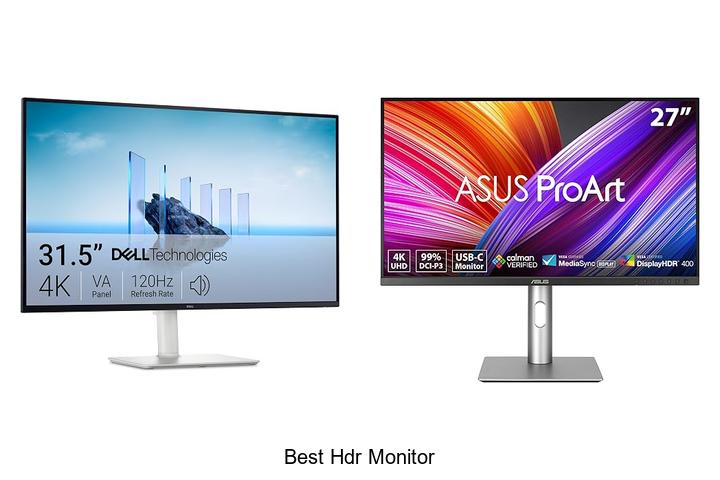
High dynamic range (HDR) technology has revolutionized display quality by significantly expanding the contrast ratio and color gamut, enabling visuals that are richer, more vivid, and closer to real-life perception. When evaluating the best HDR monitor, factors such as peak brightness, color accuracy, bit depth, and local dimming zones play a crucial role in delivering an immersive viewing experience.
Whether for professional photo editing, video production, or high-end gaming, the intricate balance of HDR specifications can drastically impact performance and visual fidelity. Exploring the nuances of HDR implementations, panel types, and certification standards becomes essential to understanding what truly defines the best HDR monitor on the market today. Delve deeper to uncover how these technical elements shape the ultimate display choice for your needs.
Elevate Your Visual Experience with Top-Tier Display Technology
| Image | Product | Price |
|---|---|---|
Our Picks 1  | Dell S3225QS 32 Inch 4K UHD Monitor | Check Price On Amazon |
Our Picks 2  | ASUS ProArt PA279CRV 27 Inch 4K UHD Monitor | Check Price On Amazon |
Our Picks 3  | Dell S2725QS 27-Inch 4K UHD Monitor | Check Price On Amazon |
1. Dell S3225QS 32 Inch 4K UHD Monitor
Experience stunning visuals and enhanced comfort with the Dell S3225QS 32 Inch 4K UHD Monitor. Designed for both professional work and immersive entertainment, this monitor delivers vibrant colors, sharp details, and smooth performance, making it an excellent choice for users seeking top-tier display quality.
Featuring a 32-inch VA panel with true 4K UHD resolution, the monitor supports 99% sRGB and 95% DCI-P3 color gamuts, providing true-to-life images with deep contrast thanks to a 1500:1 ratio. Enhanced with AMD FreeSync Premium and up to 120Hz refresh rate, the display offers a tear-free and fluid viewing experience. Added ComfortView Plus technology reduces harmful blue light emissions, allowing for comfortable extended use without compromising color accuracy.
Pros
- ComfortView Plus reduces blue light emissions for eye-friendly viewing over long periods.
- Ultra-fast 120Hz refresh rate combined with AMD FreeSync Premium delivers smooth and responsive visuals.
- Wide color gamut coverage and HDR readiness ensure vibrant, accurate, and detailed images.
- Reengineered speakers provide richer, more immersive audio with deeper frequency response.
- Sleek, ultra-thin bezel design complements modern setups with minimal distractions.
Cons
- Brightness peaks at 300 nits, which is modest compared to some high-end HDR monitors.
The Dell S3225QS strikes an excellent balance between color accuracy, refresh performance, and eye comfort, making it a strong contender among 4K HDR monitors. Its combination of features suits creatives and gamers alike, providing outstanding value for users desiring a premium, immersive display without stepping into prohibitively expensive territory.
2. ASUS ProArt PA279CRV 27 Inch 4K UHD Monitor
Experience stunning visual clarity and professional-grade color accuracy with the ASUS ProArt PA279CRV 27 Inch 4K UHD Monitor. Designed for creative professionals and enthusiasts alike, this monitor delivers exceptional HDR performance and expansive wide-view technology, making it an ideal choice for photo editing, video production, and graphic design.
Equipped with a 27-inch 4K UHD display featuring 3840 x 2160 resolution and 178° wide-view IPS panel, the ASUS ProArt PA279CRV covers 99% of both DCI-P3 and Adobe RGB color spaces. Factory calibrated to Delta E < 2 with Calman Verification, it guarantees superior color precision. Versatile connectivity options include USB-C with 96W power delivery, DisplayPort, HDMI, plus a USB hub.
Pros
- Impressive 4K UHD resolution with HDR support for vibrant and detailed images
- Factory calibrated with Calman Verified certification ensuring professional color accuracy
- Wide color gamut coverage of 99% DCI-P3 and Adobe RGB for true-to-life color reproduction
- Ergonomic adjustable stand allowing tilt, swivel, pivot, and height modification for comfortable viewing
- Strong connectivity suite including USB-C with power delivery, DisplayPort daisy-chaining, HDMI, and USB hub
- Complimentary 3-month Adobe Creative Cloud subscription adds value for creative users
- Extended 5-year warranty providing peace of mind and reliability
Cons
- Refresh rate limited to 60Hz, which may not suit high-frame-rate gaming demands
For professionals seeking the best HDR monitor to enhance their creative workflow, the ASUS ProArt PA279CRV offers an outstanding balance of visual fidelity, precise color calibration, and versatile functionality. Compared to similar offerings, it excels with factory accuracy and extensive connectivity, delivering exceptional value at a competitive price point.
3. Dell S2725QS 27-Inch 4K UHD Monitor
Experience stunning visuals and unmatched comfort with the Dell S2725QS 27-Inch 4K UHD Monitor. Designed for both productivity and immersive entertainment, it delivers crisp 4K resolution alongside advanced eye-care technology, making it an excellent choice for professionals and casual users seeking vibrant, accurate displays.
Featuring a 27-inch IPS panel with 99% sRGB color gamut and a 1500:1 contrast ratio, this monitor offers vivid, true-to-life colors and deep detail. With AMD FreeSync Premium support up to 120Hz refresh rate and an ultra-low 03ms response time, visuals remain smooth and tear-free. ComfortView Plus reduces harmful blue light emissions without compromising color accuracy, while its ultra-thin bezel design adds a modern touch to any workspace.
ComfortView Plus reduces harmful blue light emissions without compromising color accuracy, while its ultra-thin bezel design adds a modern touch to any workspace.
Pros
- Impressive 4K UHD resolution with vibrant 99% sRGB and HDR readiness for detailed visuals
- ComfortView Plus technology reduces blue light emissions for prolonged eye comfort
- High refresh rate of 120Hz and AMD FreeSync Premium support ensures fluid, tear-free images
Cons
- Brightness capped at 350 nits may be less suitable for extremely bright environments
Combining exceptional color quality, smooth performance, and eye-friendly technology, the Dell S2725QS stands out as one of the best HDR monitors in its class. Its competitive price and sleek design make it a smart investment compared to other 27-inch 4K monitors that may lack similar features or comfort enhancements.
4. Dell S2725QC 27-Inch 4K UHD Monitor

Discover stunning clarity and exceptional performance with the Dell S2725QC 27-Inch 4K UHD Monitor, designed to elevate your work and entertainment experience. Its 4K resolution and vibrant color accuracy provide crystal-clear visuals, making it an ideal choice for professionals and multimedia enthusiasts seeking top-tier display quality.
Equipped with advanced ComfortView Plus technology, this monitor reduces harmful blue light emissions while maintaining true-to-life colors. The 120Hz refresh rate paired with AMD FreeSync Premium ensures a smooth, tear-free viewing experience. Enjoy immersive visuals supported by a 1500:1 contrast ratio and 99% sRGB coverage, all wrapped in a sleek, clutter-free design thanks to USB-C connectivity.
Pros
- ComfortView Plus lowers blue light emissions for reduced eye strain without compromising color accuracy.
- 120Hz refresh rate and 0.03ms response time deliver fluid, tear-free visuals ideal for both work and gaming.
- 99% sRGB color gamut combined with HDR readiness offers vivid, lifelike images with excellent depth and detail.
- USB-C connectivity streamlines your workspace by supporting up to 65W power delivery and data transfer through a single cable.
- Re-engineered speakers produce richer and more detailed audio compared to previous models.
Cons
- Matte screen finish may slightly reduce glare but can lessen vibrancy compared to glossy displays.
The Dell S2725QC shines as a premium 4K HDR monitor that balances eye comfort, vibrant visuals, and seamless connectivity. It stands out among similar 27-inch 4K displays by integrating advanced blue light reduction and superior audio, making it a reliable investment for users demanding both quality and comfort.
5. MNN 15.6 Portable Monitor USB-C HDMI

The MNN 6 Portable Monitor USB-C HDMI is an exceptional choice for anyone seeking a versatile, high-quality secondary display.
With Full HD resolution and vibrant IPS technology, it elevates your visual experience whether you’re working, gaming, or streaming on the go. Its portability and smart features make it a top candidate for the best HDR monitor in its class.
Boasting a 6-inch matte IPS screen with a 1920×1080 resolution and 178° viewing angle, this portable monitor delivers sharp, lifelike colors with reduced blue light to minimize eye strain.
Its ultra-slim design and durable smart cover combine convenience and protection, suitable for travel and daily use. HDR mode further enhances visuals with brighter highlights and deeper contrast.
Pros
- Full HD IPS display ensures accurate colors and wide viewing angles for immersive visuals
- Dual USB-C ports with plug-and-play support for multiple devices including laptops, PS5, Xbox, and phones
- Lightweight, ultra-slim build with smart scratch-proof cover for portability and durability
Cons
- Requires Thunderbolt 3.0 or USB 3.1 Type-C DP ALT-MODE compatible device for full functionality
Offering a perfect blend of portability, visual quality, and connectivity, the MNN 6 Portable Monitor stands out as a reliable secondary screen for professionals and gamers alike.
6. LG 27UP850K-W 27-inch Ultrafine 4K UHD Monitor

Discover stunning visual clarity and vibrant colors with the LG 27UP850K-W 27-inch Ultrafine 4K UHD Monitor. Designed for creatives and entertainment enthusiasts alike, this monitor delivers precise color accuracy and immersive HDR performance, making it the perfect centerpiece for work, gaming, and multimedia enjoyment.
Featuring a 27-inch 4K UHD IPS display with 95% DCI-P3 color gamut and VESA DisplayHDR 400 certification, the monitor ensures exceptional brightness and color depth. Its versatile connectivity options including USB Type-C with 90W power delivery, dual HDMI ports, and DisplayPort provide hassle-free compatibility with multiple devices. Enhanced with stereo speakers and adaptive gaming features, it balances productivity and entertainment seamlessly.
Pros
- Outstanding 4K UHD picture quality with wide 95% DCI-P3 color coverage and HDR10 support
- Multiple connectivity ports including USB-C for data and power, eliminating the need for adapters
- Ergonomic stand with height, tilt, and pivot adjustments ensures comfortable viewing angles
Cons
- 60Hz refresh rate might limit smoothness for high-end competitive gaming
With its exceptional color precision, rich HDR capabilities, and flexible connectivity, the LG 27UP850K-W stands out as a top choice for professionals and casual users seeking superior 4K performance. It offers great value compared to similar monitors that may lack its extensive feature set and ergonomic design.
7. SANSUI 27 Inch Curved Gaming Monitor

Experience immersive gaming with the SANSUI 27 Inch Curved Gaming Monitor, designed to elevate your gameplay with a stunning 1500R curvature and ultra-smooth 240Hz refresh rate. This monitor combines speed, color accuracy, and ergonomic design to deliver an exceptional visual performance for enthusiasts and professionals alike.
Featuring Full HD 1080P resolution, the monitor supports FreeSync technology and a rapid 1ms response time for tear-free and fluid visuals. Its 130% sRGB and 95% DCI-P3 wide color gamut alongside HDR and a high 4000:1 contrast ratio ensure vivid, cinematic colors. The sturdy metal stand offers tilt adjustments and VESA compatibility for versatile setups.
Pros
- Impressive 240Hz refresh rate and 1ms MPRT response time for ultra-smooth gaming performance.
- Wide color gamut coverage with 130% sRGB and 95% DCI-P3, plus HDR support for vibrant imagery.
- Ergonomic curved design (1500R) with anti-glare and anti-flicker technology, reducing eye strain during extended use.
Cons
- Lacks built-in speakers, requiring separate audio solutions.
Combining superior visuals and rapid response times, the SANSUI 27 Inch Curved Gaming Monitor stands out as a strong contender among best HDR monitors in its price segment. Its color precision and ergonomic features make it an excellent choice for dedicated gamers seeking immersive experiences and reliable performance.
8. AOC C27G4ZH 27 Inch Curved Gaming Monitor

Elevate your gaming experience with the AOC C27G4ZH 27 Inch Curved Gaming Monitor, designed for ultra-fast performance and immersive visuals. Its sleek curved screen coupled with advanced technology delivers smooth gameplay and vibrant colors, making it a top choice for discerning gamers seeking precision and comfort.
Boasting a blazing 280Hz refresh rate and an ultra-low 3ms response time, this monitor ensures fluid motion and sharp responsiveness. The 1500R curved display enhances immersion, while HDR readiness and a high dynamic contrast ratio bring out richer details.
Ergonomic features and adaptive sync technology support prolonged play with reduced eye strain and screen tearing.
Pros
- Exceptional 280Hz refresh rate and 0.3ms response time for ultra-smooth gaming performance
- Immersive 1500R curved screen with HDR support delivers striking visuals and vibrant colors
- Ergonomic adjustability including tilt, swivel, height options, and VESA compatibility for personalized setups
Cons
- Glossy screen finish may produce reflections in brightly lit environments
Combining cutting-edge speed, vivid imagery, and user-centric design, the AOC C27G4ZH stands out as a compelling choice among the best HDR monitors, delivering exceptional value for gamers seeking precision and immersion at an accessible price point.
9. Samsung Odyssey G5 32 QHD Monitor

Experience stunning visuals and ultra-smooth gameplay with the Samsung Odyssey G5 32 QHD Monitor. Designed for gamers and creative professionals alike, its 32-inch display combines sharp detail and vibrant colors to elevate your viewing experience to the next level.
Featuring a QHD resolution of 2560 x 1440 and an IPS panel with a wide 178° viewing angle, this monitor ensures crisp images and consistent color accuracy from virtually any viewpoint. Its 180Hz refresh rate paired with a 1ms response time and G-Sync compatibility guarantees fluid motion and reduced screen tearing, while HDR10 support delivers richer contrasts and lifelike visuals.
Pros
- High-resolution QHD display offers clear, detailed imagery perfect for immersive gaming and productivity.
- Fast 180Hz refresh rate and 1ms response time enable smooth, lag-free performance for competitive play.
- HDR10 and Black Equalizer enhance contrast and visibility, improving visual depth and gameplay accuracy.
Cons
- Brightness at 300 cd/m² may be less vibrant compared to some HDR monitors with higher peak brightness.
The Samsung Odyssey G5 32 QHD Monitor strikes an excellent balance between performance and affordability, making it a strong contender among the best HDR monitors in its class. Its exceptional refresh rate and visual enhancements cater well to gaming enthusiasts seeking both clarity and responsiveness.
10. MSI PRO MP243L 24-inch IPS Monitor

Experience vibrant visuals and seamless performance with the MSI PRO MP243L 24-inch IPS Monitor, designed to enhance both gaming and professional workflows. Its Full HD IPS panel ensures sharp images and consistent colors from wide viewing angles, making it an excellent choice for users seeking clarity and comfort in one sleek display.
Equipped with a 144Hz refresh rate and Adaptive-Sync technology, the monitor delivers ultra-smooth motion and reduces screen tearing, perfect for fast-paced action. TÜV Rheinland certification guarantees flicker-free and low blue light output, reducing eye strain during extended usage.
Additional features include a tilt-adjustable stand, VESA mount compatibility, and Easy firmware updates for sustained performance.
Pros
- Vivid 1920×1080 Full HD IPS panel with 178° viewing angles for accurate colors and deep contrasts.
- 144Hz refresh rate combined with Adaptive-Sync eliminates screen tearing and stutter for fluid gameplay.
- TÜV Rheinland certified Flicker Free and Low Blue Light technology reduces eye fatigue during long sessions.
Cons
- Brightness level (856.5 lm) may be less optimal in very brightly lit environments.
The MSI PRO MP243L strikes a balanced blend of performance and ergonomic design, making it a compelling option for gamers and professionals seeking the best HDR monitor experience without compromise. Its smooth visuals, eye care features, and flexible setup options offer long-term usability that stands out within its price range.
Unlock Stunning Visuals: How to Choose the Best HDR Monitor for Your Needs
Understanding HDR Technology
What is HDR and how it enhances display quality. Different HDR standards (HDR10, Dolby Vision, HLG). Importance of peak brightness and contrast ratio.HDR, or High Dynamic Range, significantly enhances display quality by delivering a wider range of colors and greater contrast between the darkest and brightest parts of an image. This results in more lifelike visuals with improved detail, especially in scenes with complex lighting. Several HDR standards exist, including HDR10, Dolby Vision, and HLG, each offering different levels of color accuracy and dynamic range.
Several HDR standards exist, including HDR10, Dolby Vision, and HLG, each offering different levels of color accuracy and dynamic range. HDR10 is widely supported and provides a solid baseline, while Dolby Vision offers dynamic metadata for scene-by-scene optimization, and HLG caters to broadcast content. Equally important are factors like peak brightness and contrast ratio; a higher peak brightness allows for more impactful highlights, and a strong contrast ratio ensures deeper blacks and sharper image clarity, both crucial for an immersive HDR experience.
Display Panel Types
IPS vs. VA vs. OLED panels for HDR. Color accuracy and gamut coverage. Viewing angles and response times.Different panel technologies have a significant impact on how HDR content is experienced, making it essential to understand their distinct characteristics. IPS panels are known for their excellent color accuracy and wide color gamut coverage, delivering vibrant and lifelike visuals. They also offer superior viewing angles, which means colors remain consistent even when viewed from the side.
VA panels boast deeper blacks and higher contrast ratios, enhancing the dynamic range crucial for HDR, though they typically have narrower viewing angles and slower response times compared to IPS.
Meanwhile, OLED technology stands out by providing impeccable contrast and true blacks since each pixel emits its own light. This results in outstanding HDR performance with vivid colors and nearly instantaneous response times, minimizing motion blur.
However, OLED screens may have a more limited maximum brightness level and can be more prone to burn-in over time.
| Panel Type | Color Accuracy & Gamut | Viewing Angles | Response Times | Strengths for HDR |
|---|---|---|---|---|
| IPS | High accuracy, wide gamut | Excellent, minimal color shift | Moderate (good for gaming and video) | Consistent colors, vibrant visuals |
| VA | Good, slightly less vibrant | Limited, noticeable shifts off-angle | Slower than IPS | Deep blacks, strong contrast |
| OLED | Outstanding, true blacks | Excellent, similar to IPS | Very fast, minimal blur | Superior contrast and HDR impact |
Understanding these differences helps ensure that the display not only produces brilliant HDR visuals but also aligns with how and where it’ll be used, whether for multimedia consumption, professional color work, or gaming.
Resolution and Screen Size
Choosing the right resolution for your needs (4K, 1440p, Full HD). Optimal screen size for HDR content consumption. Considerations for gaming vs. professional use.Multiple connection options and the ability to add peripherals play a crucial role in maximizing the functionality of an HDR display. Having a variety of ports such as HDMI, DisplayPort, and USB-C ensures compatibility with a wide range of devices, from gaming consoles to professional workstations.
This flexibility allows seamless switching between entertainment and productivity setups without frequent cable changes or adapters. Additionally, the inclusion of USB hubs or expansion slots enables users to attach essential accessories like external drives, color calibration tools, or audio equipment, enhancing the overall user experience. For gamers, low-latency and high-bandwidth interfaces are vital to maintain smooth gameplay and vivid visuals.
Meanwhile, creative professionals benefit from reliable data transfer and peripheral connectivity to support high-resolution workflows and accurate color management.
Connectivity and Compatibility
Essential ports (HDMI 2.0/2.1, DisplayPort). Compatibility with HDR content sources (PCs, consoles, streaming devices). Firmware and driver support for HDR functionality.Having access to essential ports like HDMI 0 or 1 and DisplayPort ensures seamless integration with a wide range of devices, from gaming consoles and PCs to streaming gadgets. These interfaces support high-bandwidth data transfer, which is crucial for delivering vibrant HDR content without any lag or quality loss. Moreover, compatibility with various HDR content sources guarantees that the display can handle the dynamic range and color depth intended by different media providers.
Equally important is continuous firmware and driver support, as updates often bring enhancements that improve HDR performance, fix bugs, and expand device compatibility, ensuring the display remains future-proof and delivers the best visual experience over time.
Additional Features to Look For
Refresh rate and VRR support. Adjustable settings for HDR optimization. Build quality and ergonomic design options.Having multiple input options like HDMI, DisplayPort, and USB-C is essential for ensuring seamless compatibility with various devices such as gaming consoles, PCs, and media players. This versatility allows smooth switching between sources without the hassle of unplugging cables. Moreover, having extra USB ports or hubs built into the monitor can help manage peripherals more effectively, reducing desk clutter and enhancing overall workflow.
Equally important is the ability to upgrade the setup with additional accessories or docking stations. Monitors that support daisy-chaining or offer modular designs provide room for growth, accommodating future devices or expanded setups without needing to replace the entire display.
This flexibility not only saves money in the long run but also contributes to a more adaptable and efficient workspace.
| Feature | Benefit | Why It Matters |
|---|---|---|
| Multiple input types | Easy device connection | Supports diverse gadgets and prevents cable swapping |
| Built-in USB hubs | Peripheral management | Keeps your workstation organized and efficient |
| Modular design/daisy-chaining | Future-proof scalability | Allows upgrading without swapping monitors |
Budget and Warranty Considerations
Balancing performance and price. Brand reputation and customer support. Warranty coverage and return policies.High-quality displays often require multiple input options to ensure compatibility with various devices such as gaming consoles, PCs, and streaming gear. Having flexible ports allows users to easily switch between sources without needing adapters, which can affect signal quality and overall experience. Additionally, the ability to add peripherals like external calibration tools or USB hubs can enhance functionality and streamline your workspace.
Additionally, the ability to add peripherals like external calibration tools or USB hubs can enhance functionality and streamline your workspace. Before finalizing your decision, it’s crucial to verify that the device supports a range of connections and can accommodate future upgrades, ensuring long-term usability and convenience.
FAQ’s
What Features Should I Look For In The Best Hdr Monitor?The best HDR monitor should have a high peak brightness (at least 600 nits), wide color gamut support (such as DCI-P3), and strong local dimming for better contrast. Additionally, look for a monitor with accurate color calibration and a high bit depth (10-bit) to ensure smooth gradients and vibrant visuals.
Which Hdr Monitor Offers The Best Value For Gaming?The LG 27GN950-B offers the best value for gaming with its 4K UHD resolution, 144Hz refresh rate, and excellent HDR support at a reasonable price. It provides a great balance of performance, color accuracy, and responsiveness ideal for immersive gaming.
How Does Hdr Impact The Visual Quality On A Monitor?HDR enhances a monitor’s visual quality by increasing the contrast between the darkest and brightest areas, resulting in more vivid and lifelike images. It also expands the color range, allowing for richer and more accurate colors.
What Are The Top-Rated Hdr Monitors For Professional Photo And Video Editing?Top-rated HDR monitors for professional photo and video editing include the Eizo ColorEdge CG319X and the ASUS ProArt PA32UCX, both known for their exceptional color accuracy and wide color gamut support. Additionally, the Dell UltraSharp UP3221Q is highly regarded for its 10-bit color depth and HDR support, making it ideal for detailed editing work.
How Do Hdr Monitors Compare In Terms Of Brightness And Color Accuracy?HDR monitors generally offer higher brightness levels and better color accuracy compared to standard monitors, delivering more vivid and lifelike images. They can display a wider range of colors and improved contrast, enhancing the overall visual experience.
Conclusion
Choosing the best HDR monitor enhances your visual experience with vibrant colors and exceptional contrast. Whether for gaming, professional editing, or everyday use, the right HDR display brings images to life with stunning detail and brightness.
Investing in a quality HDR monitor ensures immersive visuals and improved productivity, making it a valuable addition to any setup.

- Discover the Best HDR Monitor for Stunning Visuals Now! - October 10, 2026
- Top 7 Best Gaming Monitors for Under $300 You Need Now! - October 10, 2026
- Unlock Productivity with the Best External Monitor Today! - October 10, 2026
