
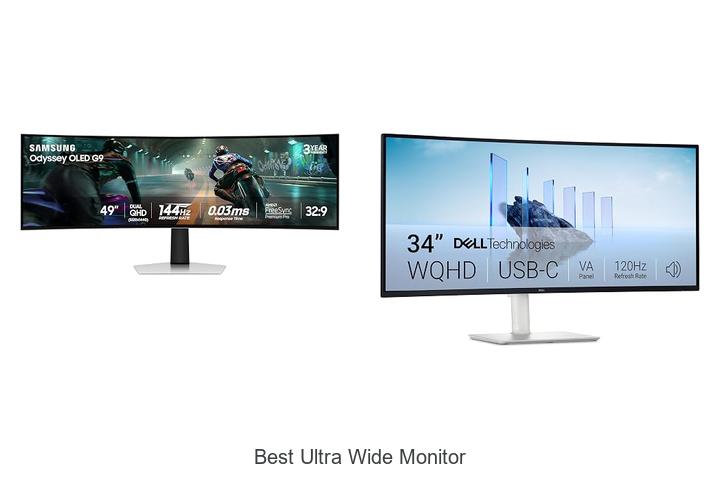
In the realm of high-resolution display technology, aspects such as aspect ratio, pixel density, and refresh rate play pivotal roles in defining the user experience. Ultra wide monitors, characterized by their extended 21:9 or wider aspect ratios, offer expansive screen real estate that enhances multitasking, immersive gaming, and professional workflows.
As technology advances, these displays are becoming increasingly sophisticated, blending technical innovation with practical functionality. Understanding the intricate specifications behind the best ultra wide monitor can transform how you interact with digital content.
Dive deeper to discover what truly sets these monitors apart in today’s competitive market.
Experience expansive views and immersive visuals like never before with these top-tier screen choices.
| Image | Product | Price |
|---|---|---|
Our Picks 1  | Samsung Odyssey OLED G9 Dual QHD Curved Monitor | Check Price On Amazon |
Our Picks 2  | Dell S3425DW 34-inch Monitor | Check Price On Amazon |
Our Picks 3  | CRUA 49 DQHD Ultrawide Curved Monitor | Check Price On Amazon |
1. Samsung Odyssey OLED G9 Dual QHD Curved Monitor
Experience the next level of immersive gaming and productivity with the Samsung Odyssey OLED G9 Dual QHD Curved Monitor. Its ultra-wide 49-inch screen and cutting-edge QD-OLED technology deliver breathtaking visuals, rich colors, and seamless performance that elevate both entertainment and work environments.
Boasting a 32:9 aspect ratio and Dual QHD resolution (5120 x 1440), the monitor offers exceptional clarity with 110 pixels per inch. Features like near-instant 03ms response time, 144Hz refresh rate, and G-Sync compatibility ensure smooth action without lag or tearing, while advanced thermal modulation safeguards screen longevity.
Pros
- Vibrant QD-OLED display producing true blacks and a wide color gamut for stunning visuals
- Ultra-wide 49” curved screen with Dual QHD resolution for extensive multitasking and immersive gaming
- Advanced gaming features including 0.03ms response time, 144Hz refresh rate, G-Sync and FreeSync Premium Pro support
Cons
- Premium price point may be high compared to standard ultra-wide monitors
Samsung’s Odyssey OLED G9 combines striking display technology and professional-grade performance, marking it a top choice among the best ultra wide monitors available. While the cost is significant, its feature set is ideal for users seeking superior visual quality and functionality in one expansive screen.
2. Dell S3425DW 34-inch Monitor
Experience immersive visuals and exceptional comfort with the Dell S3425DW 34-inch Monitor, designed to elevate productivity and entertainment. Its ultra-wide 21:9 aspect ratio combined with a curved VA panel delivers expansive, vibrant views that enhance every task and media experience.
Boasting a 120Hz refresh rate and AMD FreeSync Premium, the monitor ensures smooth, tear-free motion perfect for both work and gaming. The ComfortView Plus technology minimizes harmful blue light without compromising true-to-life colors, thanks to 99% sRGB and 95% DCI-P3 color coverage, supported by HDR readiness and a striking 3000:1 contrast ratio.
Pros
- Exceptional color accuracy and vividness with wide color gamut and HDR support
- Ultra-smooth display performance featuring 120Hz refresh rate and ultra-low 0.03ms response time
- Enhanced all-day comfort with reduced blue light emissions and eye care technologies
Cons
- Priced higher than some competing ultra-wide monitors with similar specs
The Dell S3425DW stands out as an ideal choice for those seeking a premium ultra-wide monitor that combines vibrant visuals, ergonomic comfort, and seamless connectivity, making it a compelling option for both professionals and casual users alike.
3. CRUA 49 DQHD Ultrawide Curved Monitor
Experience the next level of visual immersion with the CRUA 49 DQHD Ultrawide Curved Monitor. Its expansive 49-inch display, combined with a 1500R curvature and ultra-wide 32:9 aspect ratio, delivers a panoramic view perfect for gaming, multitasking, and cinematic enjoyment.
Boasting a stunning 5120×1440 DQHD resolution and a rapid 165Hz refresh rate enhanced by AMD FreeSync, this monitor ensures fluid motion and sharp detail. Vibrant colors with 120% sRGB coverage, an ergonomic adjustable stand, and multiple connectivity options make it a versatile centerpiece for any setup.
Pros
- Immersive 49-inch curved screen with 1500R curvature and 32:9 aspect ratio expands the field of view
- High 5120×1440 DQHD resolution paired with 120% sRGB color coverage ensures vibrant, precise visuals
- 165Hz refresh rate combined with AMD FreeSync eliminates screen tearing for smooth gameplay
- Ergonomic, height-adjustable stand with tilt and lift options for personalized comfort
- Multiple connection ports including HDMI 2.1, DisplayPort 1.4, and a 3.5mm audio jack for versatile device compatibility
- Eye-care technologies such as low blue light and flicker-free screen reduce eye strain during long sessions
Cons
- No built-in speakers, requiring external audio solutions for sound
The CRUA 49 DQHD Ultrawide Curved Monitor offers an exceptional viewing experience, combining premium visual clarity, smooth performance, and ergonomic design. Whether for competitive gaming, professional multitasking, or immersive entertainment, it stands out as a top contender among ultra-wide displays in its price range.
4. SAMSUNG ViewFinity S50GC 34 Ultra-WQHD Monitor

Experience expansive and immersive visuals with the SAMSUNG ViewFinity S50GC 34 Ultra-WQHD Monitor, designed for professionals and gamers who demand top-tier screen real estate and stunning image quality. Its ultra-wide 21:9 aspect ratio and vibrant HDR10 support elevate multitasking and entertainment to a new level of clarity and color depth.
Boasting a 34-inch matte LCD panel with a 3000:1 contrast ratio and 100Hz refresh rate, this monitor delivers smooth performance and rich visuals. Features like AMD FreeSync and Eye Saver Mode ensure reduced eye strain and fluid motion, while versatile connectivity options including dual HDMI 2 and DisplayPort 2 inputs provide flexible multitasking capabilities.
Pros
- Expansive 21:9 Ultra-WQHD display offers excellent multitasking and immersive viewing.
- HDR10 support renders over 1 billion colors with deep contrast for lifelike images.
- Advanced eye care features with ambient light sensor, Flicker Free, and Eye Saver Mode.
Cons
- Price point may be higher compared to standard ultra-wide monitors without HDR features.
Ideal for creative professionals and gamers alike, the SAMSUNG ViewFinity S50GC stands out with its exceptional color accuracy and seamless multitasking options. It’s a competitive choice among best ultra wide monitors, offering a refined experience with strong performance and advanced eye comfort technology.
5. Samsung Odyssey G9 49-inch Curved Gaming Monitor

Experience unparalleled immersion with the Samsung Odyssey G9 49-inch Curved Gaming Monitor, designed to transform your gaming setup. Its expansive 32:9 ultra-wide screen and 1000R curvature provide a truly panoramic view, keeping you ahead in fast-paced games with vivid detail and an ultra-smooth display.
Equipped with DisplayHDR 600 and a 144Hz refresh rate, the Odyssey G9 delivers excellent contrast and fluid visuals, minimizing lag through a 1ms response time. Features like AMD FreeSync Premium Pro and Auto Source Switch+ ensure seamless gameplay and effortless multitasking on a single expansive screen.
Pros
- Immersive 49-inch 32:9 aspect ratio with 1000R curvature for wide viewing angles
- DisplayHDR 600 for enhanced contrast and vibrant details in dark scenes
- High 144Hz refresh rate combined with 1ms response time for smooth, lag-free gaming
- AMD FreeSync Premium Pro support eliminates screen tearing and reduces choppiness
- Split screen and Picture-in-Picture modes enhance multitasking and collaborative gameplay
- Auto Source Switch+ automatically detects active inputs for hassle-free connectivity
Cons
- Large size may require ample desk space and may not suit smaller setups
Combining immersive visuals with advanced gaming features, the Samsung Odyssey G9 stands out as a top-tier ultra-wide monitor ideal for competitive and casual gamers alike. While its size demands space, the performance and multitasking capabilities make it a worthwhile investment compared to conventional widescreen options.
6. Samsung Odyssey G5 34-inch Ultra-Wide Monitor

Immerse yourself in your favorite games and multimedia with the Samsung Odyssey G5 34-inch Ultra-Wide Monitor, designed to deliver an expansive and captivating visual experience. Its 1000R curved screen closely matches the natural field of view, enhancing focus and reducing eye strain during prolonged sessions.
Boasting a crisp WQHD resolution and a rapid 165Hz refresh rate coupled with a 1ms response time, this monitor provides smooth, blur-free motion perfect for competitive gaming. AMD FreeSync Premium technology further ensures fluid visuals by minimizing screen tearing and stuttering, while HDR10 support enhances color accuracy for vivid and lifelike images.
Pros
- 1000R curved VA panel offers true immersion and reduces eye fatigue.
- High 165Hz refresh rate and 1ms (MPRT) response time create smooth, lag-free gameplay.
- AMD FreeSync Premium with low framerate compensation eliminates screen tearing and stutter.
- WQHD resolution on a 21:9 aspect ratio provides an ultrawide, detailed workspace or gaming view.
- HDR10 enhances color precision and highlights intricate scene details.
Cons
- Brightness level at 250 cd/m² may not be ideal for very bright environments.
The Samsung Odyssey G5 stands out as a potent option for gamers and professionals seeking immersive visuals and fluid performance at a competitive price point. Compared to other ultrawide monitors in its range, it delivers robust features tailored for multitasking and dynamic gameplay, making it a compelling choice for the best ultra wide monitor experience.
7. Samsung Odyssey Neo G9 Curved Gaming Monitor

Discover unparalleled immersion with the Samsung Odyssey Neo G9 Curved Gaming Monitor, a groundbreaking 57 display that redefines ultrawide visuals. Combining dual UHD resolution and a sweeping 32:9 aspect ratio, it delivers vivid, pin-sharp images that place gamers directly into the heart of the action.
Engineered for performance, the Odyssey Neo G9 boasts a 240Hz refresh rate and ultra-fast 1ms (GTG) response time, powered by DisplayPort Quantum Matrix Technology leverages Quantum Mini LEDs with 2,392 local dimming zones for exceptional contrast and brightness, supported by VESA DisplayHDR 1000 for vibrant, lifelike colors.
Pros
- World’s first dual UHD 57″ curved display offering an expansive field of view
- 240Hz refresh rate combined with 1ms response ensures ultra-smooth, lag-free gameplay
- Quantum Matrix Technology and 2,392 local dimming zones provide stunning contrast and brightness
Cons
- Premium price point may be a consideration for budget-conscious buyers
For gamers seeking the best ultra wide monitor, the Samsung Odyssey Neo G9 delivers unparalleled detail, speed, and immersive visuals that outclass many competitors. Its advanced display technologies and ergonomic flexibility make it an exceptional choice for elevating gaming and multitasking experiences.
8. Samsung LS49C954UANXZA 49 Curved Ultrawide Business Monitor

Elevate your workspace with the Samsung LS49C954UANXZA 49” Curved Ultrawide Business Monitor, designed to redefine multitasking and immersive viewing. Its expansive 32:9 aspect ratio combined with a 1000R curvature offers an enveloping screen experience, perfect for productivity enthusiasts and creative professionals alike.
Featuring Dual QHDA resolution and a 120Hz refresh rate, this LED display ensures smooth visuals and crisp clarity across all tasks. Connectivity is streamlined with versatile DisplayPort, dual HDMI, USB, and USB Type-C ports supporting 90W charging, turning the monitor into a central docking hub for a clutter-free desk environment.
Pros
- Immersive 49-inch 1000R curved screen with a 32:9 aspect ratio for panoramic productivity
- VESA DisplayHDR 400 support delivering enhanced contrast and vibrant colors for content creation
- Multiple connectivity options including USB-C with 90W power delivery to streamline devices
- High 120Hz refresh rate ensuring smooth scrolling and reduced input lag during gaming or work
- Integrated speakers reduce the need for additional peripherals, saving desk space
Cons
- The sizeable 49-inch display requires ample desk space and may not fit small workstations
For professionals seeking the best ultra wide monitor combining immersive visuals and efficient connectivity, the Samsung LS49C954UANXZA stands out in its category. While larger than typical ultrawide screens, its superior display quality and versatile hub capabilities offer unmatched value for demanding workflows.
9. LG Ultragear 45GX950A-B 45-inch OLED Curved Gaming Monitor

Immerse yourself in unparalleled gaming visuals with the LG Ultragear 45GX950A-B, a groundbreaking 45-inch OLED curved monitor offering the world’s first 5K2K WUHD resolution. Its ultra-wide curved screen delivers crisp, vivid imagery and a deeply engaging experience, ideal for both competitive gamers and immersive entertainment enthusiasts.
Boasting a stunning 5120 x 2160 resolution and a sharp 125 PPI subpixel layout, this monitor ensures razor-sharp text and vibrant colors across a 21:9 aspect ratio. Its OLED panel shines at up to 1300 nits with deep blacks and rich color coverage, while dual refresh modes—165Hz in 5K2K and 330Hz in WFHD—cater to diverse gaming styles for smooth, responsive play.
Pros
- World’s first 5K2K WUHD OLED curved display provides unmatched detail and immersion.
- Dual refresh rate modes (165Hz and 330Hz) optimize performance for both cinematic and competitive gaming.
- Exceptional color accuracy with 98.5% DCI-P3 coverage and DisplayHDR True Black 400 enhances visual realism.
- Ultra-fast 0.03ms response time virtually eliminates motion blur and ghosting.
- Comprehensive connectivity, including DisplayPort 2.1, dual HDMI 2.1 ports, and USB-C with 90W power delivery.
- Certified anti-glare, flicker-free, and low blue light technologies support prolonged gaming sessions comfortably.
Cons
- Premium price point may be a barrier for casual gamers or budget-conscious buyers.
Offering a significant upgrade over traditional ultra-wide monitors, the LG Ultragear 45GX950A-B combines stunning OLED clarity with high refresh rates and advanced features, making it an excellent investment for gamers seeking top-tier performance and immersive visuals in one feature-rich package.
10. Deco Gear 49 Ultrawide Curved Monitor

Discover unparalleled productivity and immersive viewing with the Deco Gear 49 Ultrawide Curved Monitor. Its expansive 49-inch 32:9 screen with a stunning 5120×1440 5K DQHD resolution delivers an exceptional workspace that seamlessly blends multiple windows and applications without interruption.
Equipped with a VA panel featuring a 3000:1 contrast ratio and wide color gamut coverage, this curved display enhances dark scenes and provides vibrant, accurate colors—ideal for professionals and creatives alike. The smooth 120Hz refresh rate and 1ms MPRT response reduce blurring, while versatile connectivity options ensure easy integration with various devices.
Pros
- Immersive 49-inch 32:9 curved screen with R1500 radius eliminates bezel distractions for multi-tasking efficiency.
- Rich color accuracy and deep contrast with 100% sRGB, 91% DCI-P3, and 3000:1 VA panel enhancing visual fidelity.
- Multiple input ports including USB-C with 65W power delivery, KVM switch, and PIP/PBP for seamless device management.
Cons
- Glossy screen finish may cause reflections in brightly lit environments.
Combining expansive workspace, vivid image quality, and flexible connectivity, the Deco Gear 49 Ultrawide Curved Monitor stands out as a leading choice among ultra wide monitors. Its feature set suits professionals seeking enhanced productivity and media enjoyment, positioning it competitively against similar displays in its price range.
Discover Your Perfect View: The Ultimate Guide to Choosing the Best Ultra Wide Monitor
Screen Size and Aspect Ratio
Understanding ultrawide display dimensions. Choosing the right screen size for your workspace. Comparing 21:9 vs 32:9 aspect ratios.Having multiple ports and options to connect various devices can significantly enhance the overall usability of an ultra-wide display. Monitors that offer a range of inputs like HDMI, DisplayPort, and USB-C allow seamless integration with laptops, desktops, gaming consoles, and other peripherals, reducing the need for extra adapters or switches. Additionally, having extra USB ports or the ability to easily add accessories helps future-proof your setup, making it adaptable as your technology needs evolve.
Additionally, having extra USB ports or the ability to easily add accessories helps future-proof your setup, making it adaptable as your technology needs evolve. This flexibility ensures that you can maximize productivity and enjoy a streamlined workspace without cumbersome limitations.
Resolution and Image Quality
Importance of high resolution (e.g., 3440×1440, 5120×1440). Panel types: IPS, VA, and OLED. Color accuracy and HDR support.High resolution is a key factor that dramatically enhances the viewing experience, with options like 3440×1440 and 5120×1440 delivering crisp details and expansive screen real estate ideal for multitasking, gaming, or creative work. The type of panel plays a significant role in image quality: IPS panels are known for their vibrant colors and wide viewing angles, VA panels offer deeper blacks and superior contrast, while OLED technology delivers exceptional color depth and perfect black levels for stunning visuals.
These factors combined ensure that the display not only looks impressive but also performs reliably across various applications.
Refresh Rate and Response Time
Ideal refresh rates for different uses (gaming, productivity). Response time considerations. Adaptive sync technologies (GSync, FreeSync).Ports and input options greatly influence how easily you can connect various devices like laptops, gaming consoles, and external drives. Having multiple USB-C, HDMI, and DisplayPort inputs ensures compatibility with your existing setup and future gadgets without needing extra adapters.
Additionally, some monitors offer built-in USB hubs or audio jacks, expanding functionality and reducing desktop clutter. Availability of extra slots or daisy-chaining capabilities can also be crucial for users who want to link additional displays or peripherals seamlessly.
Connectivity and Ports
Essential ports (HDMI, DisplayPort, USBC). USB hubs and additional connectivity options. Compatibility with multiple devices.Having multiple essential ports such as HDMI, DisplayPort, and USB-C ensures smooth integration with a variety of devices, from laptops and desktops to gaming consoles. USB hubs embedded within the monitor add convenience by allowing you to connect peripherals like keyboards, mice, and external drives directly to the screen, reducing desk clutter and cable mess.
Ensuring the monitor supports connections for multiple devices at once can streamline your workflow and prevent constant unplugging and replugging, making it easier to switch between tasks or users efficiently.
Ergonomics and Design
Adjustable stands and VESA mounting options. Curved vs flat ultrawide monitors. Build quality and cable management.Having multiple ports and the ability to connect various devices directly to your screen is crucial for maximizing productivity and maintaining a clean workspace. Many ultra-wide displays offer a variety of inputs such as HDMI, DisplayPort, USB-C, and even built-in USB hubs, allowing seamless integration with laptops, desktops, and peripherals without the need for extra adapters.
Expansion options also play a vital role in future-proofing your setup. Monitors with additional USB ports or Thunderbolt compatibility can double as docking stations, helping you connect external drives, keyboards, and mice directly. This versatility is especially beneficial if your workspace is constantly evolving or if you frequently switch between devices.
Ensuring that the screen supports these features means fewer limitations and more convenience over time.
| Feature | Benefit | Example |
|---|---|---|
| Multiple Input Ports | Connect multiple devices without swapping cables | HDMI, DisplayPort, USB-C |
| USB Hub Integration | Plug peripherals directly into the monitor | USB 3.0 ports, Thunderbolt 3 |
| Daisy-Chaining Capability | Link monitors with a single cable for multi-display setups | DisplayPort MST |
Additional Features
Builtin speakers and webcams. Blue light filters and flickerfree technology. Software and onscreen display customization options.A wide screen setup can greatly benefit from built-in speakers and webcams, which reduce the need for extra peripherals and keep your desk clutter-free. Features like blue light filters and flicker-free technology play a crucial role in reducing eye strain during extended use, helping you stay comfortable and focused throughout the day. Additionally, software tools and on-screen display customization options provide greater control over your display settings, allowing for personalized adjustments such as color calibration, split-screen layouts, and quick access to frequently used features.
These elements combine to create a more seamless and efficient user experience, ensuring the display adapts perfectly to your unique needs.
FAQ’s
What Are The Key Features To Look For In The Best Ultra Wide Monitor?The best ultra wide monitor should offer a high resolution and refresh rate for crisp, smooth visuals, along with a wide color gamut and accurate color reproduction for vibrant images. Additionally, features like ergonomic adjustability, multiple connectivity options, and curved screen design enhance comfort and productivity.
Which Brands Offer The Best Ultra Wide Monitors For Gaming?Brands like LG, Samsung, and Alienware offer some of the best ultra wide monitors for gaming, known for their high refresh rates, fast response times, and immersive curved displays. Models such as the LG UltraGear 38GN950 and Samsung Odyssey G9 are particularly popular among gamers.
How Does An Ultra Wide Monitor Improve Productivity Compared To A Standard Monitor?An ultra wide monitor improves productivity by providing a larger, continuous workspace that allows users to view multiple applications side-by-side without needing multiple screens. This reduces the time spent switching between windows and enhances multitasking efficiency.
What Is The Ideal Size And Resolution For An Ultra Wide Monitor?The ideal size for an ultrawide monitor is typically between 34 to 38 inches, providing ample screen space for productivity and immersive experiences. A resolution of 3440×1440 pixels (WQHD) is commonly preferred for sharp image quality and detailed visuals on these monitors.
Are Curved Ultra Wide Monitors Better Than Flat Ones For Immersive Experiences?Curved ultra wide monitors often provide a more immersive experience by wrapping the screen around your field of view, reducing distortion and enhancing depth perception. However, the benefit depends on screen size and viewing distance, with larger curved screens offering greater immersion compared to flat ones.
Conclusion
In summary, the best ultra wide monitor combines expansive screen real estate with stunning resolution and color accuracy, enhancing productivity and immersive experiences. Whether for gaming, creative work, or multitasking, choosing a model with features like high refresh rates, curved displays, and versatile connectivity ensures you get exceptional value and performance. Invest wisely to enjoy a seamless, panoramic view.
Invest wisely to enjoy a seamless, panoramic view.

- Best 24 Inch Computer Monitor You Can’t Miss Today! - October 9, 2026
- Best 1440p 240Hz Monitor That Will Blow Your Mind! - October 9, 2026
- Discover the Best Widescreen Monitor for Ultimate Viewing! - October 9, 2026
