
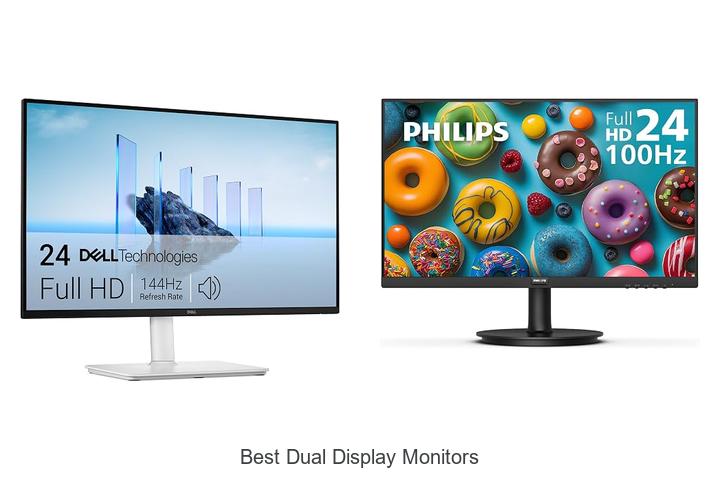
In the realm of productivity-enhancing technology, dual display setups have become indispensable for professionals seeking expanded screen real estate and seamless multitasking capabilities. Key factors such as refresh rates, color accuracy, bezel width, and ergonomic adjustability play crucial roles in optimizing the user experience.
Whether tackling complex data analysis, creative workflows, or immersive gaming, the demand for the best dual display monitors is higher than ever. As users strive to balance performance with aesthetic coherence, understanding the nuances of resolution types, connectivity options, and panel technologies becomes essential. Exploring these technical dimensions reveals why selecting the best dual display monitors requires careful consideration beyond mere convenience.
Delve deeper into this comprehensive guide to uncover which monitors truly elevate your dual-screen setup to the next level.
Discover Top Picks for Seamless Multitasking and Enhanced Productivity
| Image | Product | Price |
|---|---|---|
Our Picks 1  | Dell S2425HSM 24 Plus Monitor | Check Price On Amazon |
Our Picks 2  | Philips 241V8LB 24 Inch Computer Monitor | Check Price On Amazon |
Our Picks 3  | Sceptre E225W-FW144 22-Inch Gaming Monitor | Check Price On Amazon |
1. Dell S2425HSM 24 Plus Monitor
Discover unparalleled visual performance with the Dell S2425HSM 24 Plus Monitor, designed to elevate your dual display setup. Combining Full HD clarity, a rapid 144Hz refresh rate, and sleek aesthetics, it sets a new standard for both productivity and entertainment enthusiasts seeking seamless multitasking and immersive experiences.
Equipped with a 24-inch matte LCD panel, the Dell S2425HSM delivers vivid colors through a 99% color gamut and a sharp 1500:1 contrast ratio. Its 1ms Moving Picture Response Time and AMD FreeSync ensure smooth, tear-free visuals, while integrated dual 3W speakers enrich your audio without extra peripherals.
Eye comfort features include TÜV-certified blue light reduction and ergonomic adjustability for long-lasting ease.
Pros
- High refresh rate (144Hz) and 1ms MPRT for smooth, responsive visuals
- Integrated dual speakers offering clear, immersive sound
- Ergonomic adjustments plus TÜV-certified eye care for comfortable extended use
Cons
- Lacks higher resolution options like 2K or 4K for professional-grade editing
With its blend of high refresh rate, thoughtful ergonomics, and built-in audio, the Dell S2425HSM 24 Plus Monitor is an excellent choice for users seeking the best dual display monitors under $ Compared to similar models, it offers a balanced package that supports both productivity and entertainment without compromise.
2. Philips 241V8LB 24 Inch Computer Monitor
Discover exceptional clarity and vivid visuals with the Philips 241V8LB 24 Inch Computer Monitor, an ideal choice for users seeking performance and style. This Full HD monitor brings immersive viewing experiences, perfect for both work and entertainment setups.
Featuring a 8-inch VA panel with a 1920×1080 resolution, the Philips monitor offers stunning contrast and true-to-life colors.
Its ultra-wide 178-degree viewing angles eliminate color distortion, while the nearly bezel-free design supports seamless multi-monitor configurations to boost productivity.
Pros
- Sharp Full HD display delivering crisp and detailed images
- High 3000:1 contrast ratio with richer blacks and brighter whites for deeper visuals
- 178/178° wide viewing angles ensure consistent color from any perspective
Cons
- Glossy screen finish may reflect ambient light, causing potential glare in bright environments
Offering excellent picture quality and a streamlined design, the Philips 241V8LB stands out as a competitive option among best dual display monitors, especially considering its affordable price. It provides reliable performance for everyday computing needs with an enhanced viewing experience.
3. Sceptre E225W-FW144 22-Inch Gaming Monitor
Experience immersive gaming and seamless productivity with the Sceptre E225W-FW144 22-Inch Gaming Monitor, designed to elevate your dual display setup. Its sharp visuals, integrated speakers, and comfortable viewing features make it an exceptional choice for work and play.
Featuring a 144Hz refresh rate and a matte LED display with a 16:9 aspect ratio, this monitor ensures smooth motion and vibrant picture quality. Its minimal bezel design allows for a nearly seamless multi-monitor experience, while Blue-Light Shift technology reduces eye strain during extended use.
Pros
- Built-in speakers deliver clear, clutter-free audio without the need for external devices.
- Blue-Light Shift technology protects your eyes by minimizing harmful blue light emissions.
- Sleek, almost bezel-free design enhances dual monitor setups with an uninterrupted viewing area.
Cons
- Screen size might be compact for users preferring larger displays for multitasking or media consumption.
Combining affordability with performance, the Sceptre E225W-FW144 stands out as a top contender among best dual display monitors, especially for gamers and professionals seeking reliable specs and ergonomic features without overspending.
4. Anyuse 15.6 FHD IPS Portable Monitor

Elevate your productivity and entertainment with the Anyuse 6 FHD IPS Portable Monitor, designed for users seeking a crisp, vibrant second screen. Its slim profile and Full HD clarity make it an excellent choice for professionals and gamers who need high-quality visuals on the go.
Boasting a 1920×1080 resolution with HDR and a 178° viewing angle, this ultra-thin monitor features two full-function Type-C ports and a MINI HDMI port for seamless connectivity. Weighing just 37 lbs, it offers versatile display modes and built-in speakers, delivering impressive image quality and convenience wherever you are.
Pros
- Super clear IPS A-grade screen reduces eye strain with Low Blue Light technology
- Dual Type-C ports plus MINI HDMI support plug-and-play across multiple devices
- Portable, lightweight design at 0.04 inches thin for easy mobility
- Multiple display modes (copy, extend, second screen) enhance work and entertainment versatility
- HDR support improves color accuracy and brightness for breathtaking visuals
- Wide compatibility including laptops, gaming consoles, and more without driver installation
Cons
- Requires compatible device support for Thunderbolt 3.0/4.0 or USB 3.1 DP ALT-MODE to utilize full Type-C functionality
For those searching for the best dual display monitors to boost efficiency and gaming experiences alike, the Anyuse 6 FHD Portable Monitor offers an outstanding balance of portability, performance, and connectivity at an affordable price point. Its advanced display features set it apart from many entry-level competitors.
5. Packard Bell airFrame Dual Monitor Workstation

Elevate your workspace with the Packard Bell airFrame Dual Monitor Workstation, designed to significantly boost productivity and enhance multitasking capabilities. The dual
This setup features crisp LED displays with a 75Hz refresh rate and quick 5ms response time, ensuring smooth visuals and minimal motion blur. Flexible VESA mounting options and broad connectivity through HDMI and VGA ports make it adaptable to various environments and devices, perfect for both professional and personal use.
Pros
- Dual 21.5″ monitors improve multitasking and workflow efficiency.
- Flexible VESA-compatible mounting supports ergonomic customization.
- High-quality visuals with 75Hz refresh rate and 5ms response for smooth performance.
Cons
- Glossy screen finish may cause reflections in brightly lit rooms.
With competitive pricing and versatile features, the Packard Bell airFrame Dual Monitor Workstation offers a reliable and adaptable solution for users seeking enhanced productivity. It stands out in its category by combining ergonomic flexibility with smooth display performance, making it an excellent alternative to other dual-monitor setups on the market.
6. Philips 221V8LB 22 Inch Computer Monitor

Experience stunning visuals and smooth performance with the Philips 221V8LB 22 Inch Computer Monitor, designed to elevate your viewing experience. Perfect for work, entertainment, and gaming, this monitor delivers crisp Full HD clarity combined with a fast refresh rate to keep every frame fluid and vibrant.
Equipped with a 5-inch VA panel, the Philips 221V8LB offers remarkable color accuracy and deep contrast, producing brighter whites and richer blacks.
Its ultra-wide 178° viewing angle guarantees consistent colors from any perspective.
Pros
- Crisp Full HD 1920×1080 resolution for detailed images and sharp text
- 100Hz refresh rate combined with Adaptive-Sync for smooth and fluid visuals
- VA panel offers impressive contrast ratio (3000:1) with vibrant colors and deep blacks
Cons
- Glossy screen finish may produce glare in bright environments
The Philips 221V8LB stands out as a versatile and affordable option among the best dual display monitors, especially when paired with another unit for expanded productivity or immersive gaming setups. Its combination of high refresh rate and vivid VA panel performance ensures strong value for gamers and professionals alike.
7. Dell S2725DSM 27-inch QHD Monitor

Discover the Dell S2725DSM 27-inch QHD Monitor, a stunning display designed to enhance your computing experience with high resolution and rapid responsiveness. Perfect for professionals and gamers alike, it offers immersive visuals and smooth performance to elevate everyday tasks and entertainment.
Featuring a vibrant QHD resolution, a 1500:1 contrast ratio, and a 144Hz refresh rate, this monitor ensures crisp images and fluid motion. Integrated dual 3W speakers provide rich sound, while eye comfort technologies reduce blue light emission, maintaining visual clarity and color accuracy throughout prolonged use.
Pros
- Sharp and vivid QHD display with wide 178-degree viewing angles powered by IPS technology
- High refresh rate (144Hz) combined with 1ms MPRT ensures smooth, tear-free visuals
- Built-in dual 3W speakers enhance multimedia experience without extra peripherals
- Comfort-focused design with TÜV-certified eye care to reduce blue light and eye strain
- Adjustable stand allowing personalized angles and positions for ergonomic use
- Dell Display and Peripheral Manager software optimizes overall workspace efficiency
Cons
- Brightness peak of 350 nits may be less suitable for very bright environments compared to premium HDR monitors
Balancing exceptional picture quality, ergonomic comfort, and smart features, the Dell S2725DSM stands out as an excellent choice within the best dual display monitors category. For those seeking a reliable, well-rounded QHD monitor under $200, it represents a compelling blend of performance and value compared to similarly priced IPS options.
8. 15.6 Laptop Screen Extender Portable Monitor

Upgrade your mobile workspace effortlessly with the 6 Laptop Screen Extender Portable Monitor, designed to streamline multitasking and boost productivity.
This sleek, ultra-slim dual-screen solution enhances your laptop into a triple-display setup, delivering crisp visuals and a clutter-free experience wherever you work.
Featuring advanced USB-C connectivity with minimal cables, the extender offers quick, hassle-free installation compatible with most 13 to 3 laptops.
Pros
- Seamless triple-screen expansion improving workflow efficiency by up to 300%
- Ultra-slim, lightweight aluminum design with included leather carrying bag for easy portability
- Wide compatibility across Mac, Windows, Chrome OS, and Nintendo Switch, with multiple connection options
Cons
- Additional cables and drivers required for some laptops lacking full-featured USB-C ports or M1/M2/M3 MacBooks
Ideal for professionals and creatives needing extra screen real estate without sacrificing portability, this dual display monitor extender delivers exceptional value for enhancing workflow. Compared to bulky traditional extenders, it offers a cleaner, more elegant setup perfect for efficient multitasking on the move.
9. LG 27U411A-B 27-inch Full HD IPS Monitor

Discover stunning visuals and superior performance with the LG 27U411A-B 27-inch Full HD IPS Monitor. Designed for productivity, creativity, and immersive gaming, this monitor combines vibrant color accuracy and smooth motion technology to elevate your dual display setup experience.
Featuring a crisp 1920 x 1080 Full HD resolution and an IPS panel, the display ensures vivid colors and wide viewing angles up to 178°. Its virtually borderless design enhances multi-monitor setups, while the 120Hz refresh rate and 1ms Motion Blur Reduction deliver fluid, blur-free visuals during fast-paced action.
Pros
- Ultra-slim bezels for a modern look and seamless multi-display integration
- Supports HDR10 and covers up to 99% sRGB for vibrant, true-to-life colors
- Dynamic Action Sync and Black Stabilizer optimize gaming responsiveness and visibility in dark scenes
Cons
- Limited to Full HD resolution, which may not match the sharpness of higher resolution monitors in this size category
Whether upgrading from a single screen or configuring a dual display station, the LG 27U411A-B offers a balanced mix of clarity, speed, and color precision. Its feature set is ideal for users prioritizing smooth visuals and versatile use at a competitive price point.
10. CIDETTY 14 FHD Portable Laptop Monitor

Enhance your productivity with the CIDETTY 14 FHD Portable Laptop Monitor, a sleek and versatile second screen designed for professionals and gamers alike. Its 14-inch Full HD IPS display ensures crisp visuals while its ultra-slim profile makes multitasking seamless whether at home, office, or on the move.
Boasting a 1080P resolution with blue light filtering and anti-glare technology, this monitor delivers vivid colors and comfortable viewing over long sessions. Compatible across Windows, macOS, Linux, and popular gaming consoles, its plug-and-play design supports multiple display modes and dual-screen setups effortlessly.
Pros
- Bright 14-inch FHD IPS screen with wide 178° viewing angle and eye-friendly features.
- Multiple input ports including two USB Type-C and one HDMI, supporting mirror and extended displays.
- Ultra-thin design (0.24 inches) with built-in speakers and protective case for portability.
Cons
- Incompatibility with certain MacBooks (M1, M2, M3 chips) and Surface devices with only one Type-C port.
Offering a balance of portability, performance, and compatibility, the CIDETTY 14 FHD Portable Laptop Monitor stands out as a top choice among dual display monitors for users seeking to maximize efficiency on the go. Its rich feature set ensures it competes well with other portable displays in the $170-$200 price range.
Unlock Productivity: Your Ultimate Guide to the Best Dual Display Monitors
Display Size and Resolution
Ideal screen size for dual monitors. Common resolution options and their benefits. Impact of resolution on productivity and clarity.Having the right ports and slots available on your monitors ensures seamless connection to various devices and simplifies the setup process. Multiple input options such as HDMI, DisplayPort, and USB-C offer flexibility to link laptops, desktops, and even gaming consoles without constantly swapping cables.
Additionally, the ability to connect accessories like external drives, webcams, or speakers directly through monitor hubs reduces desktop clutter and enhances workflow efficiency.
Equally important is the option to add more devices or upgrade hardware down the road. Monitors that provide extra USB ports or daisy-chaining capabilities allow for smoother integration of peripherals and expansion of your workstation without needing additional adapters.
This adaptability supports future-proofing your setup, accommodating any new technology or increasing computing demands with ease.
Panel Type and Color Accuracy
Differences between IPS, TN, and VA panels. Importance of color accuracy for specific tasks. Viewing angles and their relevance in dual setups.Panel type affects both the visual performance and overall usability of dual monitors. IPS panels are known for their superior color accuracy and wide viewing angles, making them ideal for tasks requiring precise color representation, such as photo editing or graphic design. TN panels typically offer faster response times but sacrifice color depth and viewing angles, which can lead to color shifting when viewed from the side—an important consideration in a multi-monitor setup where screens are angled.
VA panels strike a balance by providing deeper contrast ratios and better blacks, enhancing media consumption, though their color accuracy and off-angle visibility usually fall between IPS and TN panels.
Color accuracy plays a critical role depending on the nature of your work. Creative professionals benefit greatly from displays that deliver true-to-life colors to ensure their projects look consistent across different platforms.
Meanwhile, casual users might prioritize other attributes like speed or contrast. Since dual displays often involve multiple screens positioned side by side, wide and consistent viewing angles prevent color and brightness distortions, ensuring a seamless visual experience without frequent readjustments.
Connectivity and Compatibility
Available input ports (HDMI, DisplayPort, USBC). Support for daisychaining and multimonitor setups. Compatibility with your computer/device.Multiple input ports such as HDMI, DisplayPort, and USB-C play a crucial role in ensuring seamless integration with various devices. These options allow for greater flexibility in connecting laptops, desktops, or other peripherals without needing extra adapters. Additionally, support for daisy-chaining and multimonitor setups can significantly streamline workspace management by enabling multiple screens to be linked together through a single cable, reducing clutter and simplifying configuration.
It’s equally important to verify that the monitors are compatible with your computer’s graphics card and operating system to avoid performance issues or limited functionality. Checking for compatibility beforehand helps ensure smooth operation and the ability to fully utilize features like higher refresh rates and advanced color settings. Evaluating these factors can enhance both productivity and the overall user experience.
Evaluating these factors can enhance both productivity and the overall user experience.
Ergonomics and Adjustability
Stand height, tilt, swivel, and pivot options. VESA mount compatibility. Benefits of ergonomic adjustments in dual displays.Ensuring that a dual monitor setup supports multiple connection types and offers room for additional devices can greatly enhance its versatility and long-term usability. Monitors equipped with various input ports like HDMI, DisplayPort, and USB-C allow seamless integration with different computers and peripherals without the need for constant cable swapping. Additionally, having extra USB ports or daisy-chaining capabilities enables the addition of accessories such as webcams, external drives, or charging stations, reducing desk clutter and improving workflow efficiency.
Additionally, having extra USB ports or daisy-chaining capabilities enables the addition of accessories such as webcams, external drives, or charging stations, reducing desk clutter and improving workflow efficiency. Evaluating these features upfront helps create a more adaptable workstation that can evolve with changing technology and work demands.
Refresh Rate and Response Time
Refresh rate considerations for general use vs. gaming. Response time impact on display performance. Synchronization technologies (GSync, FreeSync).Opting for a setup that offers multiple ports and support for various connection types ensures compatibility with a wide range of devices and eases the process of adding peripherals or upgrading hardware down the line. Having enough slots for USB hubs, audio jacks, and display inputs means less clutter and more flexibility in arranging your workspace. This versatility becomes especially important if you plan to connect additional accessories like external hard drives, webcams, or even a docking station, allowing your workstation to evolve with your needs without requiring immediate replacement.
Moreover, the ability to extend your display real estate through seamless multi-monitor configurations can significantly boost productivity. Monitors that provide daisy-chaining capabilities or offer built-in hubs for easier cable management enhance usability while minimizing tangled wires. It’s also wise to verify the support for different port standards, such as HDMI, DisplayPort, and USB-C, since this influences the quality of the signal and the maximum achievable resolutions and refresh rates.
By ensuring ample options for future upgrades or expansions, you avoid being locked into a rigid setup that could quickly become outdated.
Additional Features and Budget Considerations
Builtin speakers, USB hubs, and blue light filters. Energy efficiency and power consumption. Balancing feature set with price point.Modern dual-screen setups often come equipped with built-in speakers, USB hubs, and blue light filters that enhance usability and comfort, reducing the need for extra peripherals and minimizing eye strain during extended use. Energy efficiency plays a significant role in ongoing costs, as monitors with lower power consumption not only help reduce electricity bills but also contribute to a more environmentally friendly workspace. Striking the right balance between the available features and the overall price ensures that the investment aligns with both functional needs and budget constraints without compromising quality or performance.
Striking the right balance between the available features and the overall price ensures that the investment aligns with both functional needs and budget constraints without compromising quality or performance.
FAQ’s
What Are The Key Features To Look For In The Best Dual Display Monitors?The best dual display monitors should offer seamless connectivity options, consistent color accuracy, and adjustable stands for ergonomic comfort. Additionally, they should have thin bezels for a nearly borderless viewing experience and support high resolutions for crisp, clear visuals.
Which Dual Display Monitors Offer The Best Value For Money In 202In 2024, the Dell UltraSharp U2723QE and LG 27QN600-B are among the best value dual display monitors, offering excellent color accuracy and reliable performance at a reasonable price. Both models provide versatile connectivity and crisp 27-inch 4K or QHD screens, ideal for productivity and creative work.
How Do Dual Display Setups Improve Productivity?Dual display setups improve productivity by allowing users to multitask more efficiently, as they can view and manage multiple applications or documents simultaneously without constantly switching windows. This reduces time spent toggling between tasks and enhances workflow organization.
What Are The Top Recommended Brands For Dual Display Monitors?Top recommended brands for dual display monitors include Dell, LG, and ASUS, known for their reliable performance and high-quality screens. These brands offer a range of models suitable for both professional and gaming setups.
How Can I Set Up A Seamless Dual Monitor Display At Home Or In The Office?To set up a seamless dual monitor display, connect both monitors to your computer using compatible cables (HDMI, DisplayPort, or VGA), then configure the display settings in your operating system to extend the desktop across both screens. Ensure the monitors are positioned and calibrated for consistent resolution and color to create a smooth, unified viewing experience.
Conclusion
In summary, the best dual display monitors enhance productivity by offering ample screen space, vivid visuals, and ergonomic features. Whether for professional work, gaming, or multitasking, choosing monitors with matching sizes, resolutions, and connectivity options ensures a seamless experience. Investing in quality dual monitors can significantly improve workflow efficiency and overall user comfort.

- Best Dual Display Monitors That Boost Your Productivity Fast - October 6, 2026
- Top 10 Best Desktop Computer Monitors You Can’t Miss! - October 6, 2026
- Best Console Monitor for Ultimate Gaming Experience! - October 6, 2026
