
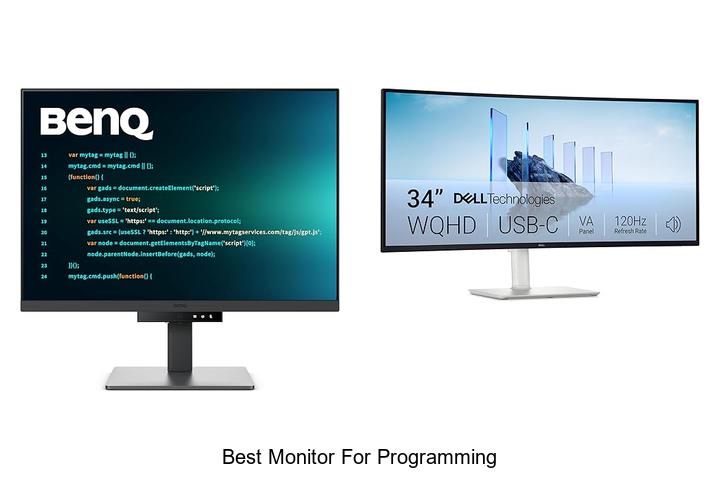
High-resolution displays, adjustable refresh rates, and ergonomic designs play a pivotal role in optimizing the coding environment for developers. When tackling complex algorithms or debugging extensive lines of code, the clarity and precision of a monitor can significantly impact productivity and reduce eye strain. Moreover, factors such as color accuracy, screen real estate, and connectivity options are essential considerations for programmers who demand seamless multitasking and an immersive visual experience.
Selecting the best monitor for programming involves balancing these technical elements to create an efficient and comfortable workspace. As the landscape of programming evolves and developer needs become increasingly specific, understanding the nuances behind monitor specifications can guide you toward a setup that truly enhances your workflow.
Discover what makes a monitor ideal for programming in the sections ahead.
Top Displays That Boost Coding Efficiency and Comfort
| Image | Product | Price |
|---|---|---|
Our Picks 1  | BenQ RD280U 28.2 Programming Monitor | Check Price On Amazon |
Our Picks 2  | Dell S3425DW 34 Inch Monitor | Check Price On Amazon |
Our Picks 3  | BenQ RD280UG Programming Monitor | Check Price On Amazon |
1. BenQ RD280U 28.2 Programming Monitor
Discover unparalleled clarity and comfort with the BenQ RD280U 2 Programming Monitor, engineered specifically for developers who demand precision and eye care. Its unique Nano Matte Panel and tailored coding modes elevate your programming environment.
Ideal for long hours of coding, this monitor combines technology and ergonomics for peak productivity.
Featuring a 3:2 aspect ratio and a matte finish, the BenQ RD280U reduces glare while offering sharp text rendering with a 1200:1 contrast ratio. The integrated Brightness Intelligence Gen2 and Eye-Care technology minimize eye fatigue, and the exclusive MoonHalo backlight adds soothing illumination to support extended work sessions without strain.
Pros
- Anti-glare Nano Matte Panel ideal for minimizing reflections and improving code visibility
- Specialized programming modes to distinctly differentiate syntax for enhanced coding focus
- Eye-care features including Brightness Intelligence Gen2 and Night Hours Protection for reduced eye fatigue
- Comfort-optimized design encouraging better posture during extended programming hours
- Large 28.2-inch display with 3:2 aspect ratio offers more vertical screen space for reading code
Cons
- 60 Hz refresh rate might be limiting for users seeking smoother video or gaming experiences
For programmers seeking a dedicated monitor that balances eye comfort with advanced coding features, the BenQ RD280U stands out as a top contender. While it may not suit high-refresh-rate needs, it surpasses many rivals in screen ergonomics and visual clarity, offering great value at its price point.
2. Dell S3425DW 34 Inch Monitor
Experience immersive productivity and vibrant visuals with the Dell S3425DW 34 Inch Monitor, designed to elevate programming and multimedia tasks. Its ultra-wide 21:9 aspect ratio offers expansive screen real estate, enabling seamless multitasking and enhanced workflow efficiency.
Equipped with a 120Hz refresh rate and AMD FreeSync Premium, the curved VA panel delivers smooth, tear-free visuals with exceptional color accuracy, covering 99% sRGB and 95% DCI-P3. The monitor’s ComfortView Plus reduces harmful blue light for prolonged viewing without eye strain, while integrated high-fidelity speakers provide rich, detailed sound.
Pros
- Ultra-wide 34-inch curved screen with 21:9 aspect ratio for enhanced multitasking.
- Low blue light emissions (≤35%) with ComfortView Plus, reducing eye fatigue during long coding sessions.
- Supports 120Hz refresh rate and AMD FreeSync Premium for smooth and immersive visuals.
- High contrast ratio of 3000:1 and HDR-ready display ensure vivid and detailed imagery.
- Single USB-C cable connectivity with up to 65W power delivery maintains clean workspace setup.
- Built-in advanced speakers provide superior audio quality compared to previous models.
Cons
- Matte screen finish may reduce vibrancy in very bright environments compared to glossy panels.
The Dell S3425DW strikes an excellent balance between visual performance, ergonomic comfort, and connectivity, making it one of the best monitors suited for programming and creative work alike. Its combination of broad screen space and eye-friendly features places it ahead of many conventional flat monitors.
3. BenQ RD280UG Programming Monitor
Experience unparalleled coding comfort and efficiency with the BenQ RD280UG Programming Monitor, designed specifically to meet the needs of developers. Its unique blend of advanced display technology and ergonomic features enhances readability and minimizes eye strain during extended programming sessions.
Equipped with a Nano Matte Panel and MoonHalo Backlight, this monitor delivers crystal-clear visuals with reduced glare and balanced illumination. The 3:2 aspect ratio provides extra vertical workspace, while a 120Hz refresh rate ensures smooth scrolling, making code navigation seamless and efficient.
Pros
- Exclusive Coding Modes optimized for enhanced code readability and eye comfort
- High 120Hz refresh rate enabling fluid cursor movement and faster code browsing
- 3:2 aspect ratio offers increased vertical screen real estate, reducing the need to scroll frequently
Cons
- Price point at $699 may be high compared to standard monitors, though justified by specialized features
For programmers seeking a dedicated monitor tailored to long coding hours, the BenQ RD280UG delivers a compelling balance of visual comfort and functionality. Its specialized features make it a strong contender among premium monitors designed for professional development environments.
4. BenQ RD280UA 28.2 4K Programming Monitor

Enhance your coding environment with the BenQ RD280UA 2 4K Programming Monitor, engineered specifically for programmers seeking pristine visuals and ergonomic comfort. Its Nano Matte Panel and advanced coding modes deliver crisp, glare-free clarity, ensuring every line of code stands out for improved productivity and focus.
Its Nano Matte Panel and advanced coding modes deliver crisp, glare-free clarity, ensuring every line of code stands out for improved productivity and focus.
Equipped with a 4K LCD display and a 3:2 aspect ratio, this monitor offers a spacious workspace with vibrant color accuracy and a wide 178-degree viewing angle. The Night Hours Protection and Brightness Intelligence Gen2 features minimize eye strain during extended sessions, while the versatile BenQ Ergo Arm Stand allows infinite positioning for optimal comfort.
Pros
- Anti-glare Nano Matte Panel reduces reflections for comfortable long-term viewing.
- Advanced coding modes enhance code differentiation and readability.
- Ergo Arm Stand offers customizable ergonomics, improving posture and reducing fatigue.
Cons
- Refresh rate limited to 60Hz, which may be less ideal for fast-paced graphics or gaming.
For programmers prioritizing visual clarity and ergonomic flexibility, the BenQ RD280UA presents a well-rounded choice at a competitive price. When compared to other 4K monitors, its programmer-focused features provide a distinct advantage for lengthy coding sessions, making it one of the best monitors for programming.
5. SAMSUNG ViewFinity S50GC 34 Ultra-WQHD Monitor

Discover the SAMSUNG ViewFinity S50GC 34 Ultra-WQHD Monitor, designed to elevate your productivity and viewing experience with its expansive 21:9 aspect ratio and stunning Ultra WQHD resolution. Ideal for multitasking and immersive visuals, it’s a perfect choice for professionals and creatives seeking detailed clarity in one seamless display.
Boasting HDR10 technology, this monitor renders over 1 billion colors for rich depth and vibrant contrast. Its 100Hz refresh rate paired with AMD FreeSync ensures smooth motion without tearing, making it versatile for both work and entertainment.
Eye care features like ambient light detection and flicker-free technology help reduce strain during extended use.
Pros
- Ultra-wide 21:9 aspect ratio maximizes screen real estate for seamless multitasking.
- HDR10 and over 1 billion colors enhance image depth and accuracy.
- Eye Saver Mode with ambient light sensor reduces eye fatigue for comfortable long hours.
Cons
- Higher price point compared to standard monitors may not suit all budgets.
With exceptional color accuracy, smooth visuals, and thoughtful eye care technologies, the SAMSUNG ViewFinity S50GC stands out among ultra-wide monitors for programming and creative tasks. While priced on the premium side, its performance justifies the investment for users demanding professional-grade quality.
6. Acer KB220Q H2bi 21.5in FHD Office Monitor

Elevate your workspace with the Acer KB220Q H2bi 5-inch FHD Office Monitor, designed to deliver vibrant visuals and smooth performance.
Experience stunning clarity with a 1920×1080 resolution on a 16:9 matte display, enhanced by a rapid 100Hz refresh rate and 1ms response time. The near bezel-less ZeroFrame design maximizes screen real estate, offering seamless multi-monitor setups that enhance productivity and immersive viewing.
Pros
- Crisp, true-to-life colors with Full HD 1080p resolution for detailed visuals
- Adaptive-Sync support ensures smooth, tear-free graphics performance
- Ultra-smooth 100Hz refresh rate paired with a fast 1ms response time reduces input lag
- ZeroFrame design enables an expansive and nearly seamless multi-monitor experience
- Matte screen finish reduces glare for comfortable long hours of use
Cons
- Limited to a 21.5-inch screen size, which may be small for users seeking larger displays
Offering excellent color accuracy and fast refresh capabilities at an affordable price, the Acer KB220Q H2bi is a versatile monitor ideal for programming and multimedia use. While smaller than some alternatives, its design and performance make it a reliable choice among budget-friendly options on the market.
7. Acer Nitro KG271U 27in QHD Gaming Monitor

Experience crystal-clear visuals and ultra-smooth performance with the Acer Nitro KG271U 27-inch QHD Gaming Monitor. Designed to deliver outstanding image quality and responsiveness, this monitor is ideal for gamers, programmers, and creatives seeking precision and speed without compromise.
Featuring a stunning 2560 x 1440 resolution on a vibrant IPS panel, the KG271U offers sharp detail and wide 178-degree viewing angles. AMD FreeSync technology eliminates screen tearing, while the blazing 180Hz refresh rate and 5ms response time ensure fluid motion and minimal input lag for an immersive experience.
Pros
- High-resolution QHD display with accurate DCI-P3 95% color coverage for vivid, true-to-life visuals
- AMD FreeSync technology delivers smooth gameplay free from stuttering and tearing
- Ultra-fast 180Hz refresh rate combined with a 0.5ms GTG response time for seamless motion clarity
Cons
- Brightness level of 250 cd/m² may be lower than some competing models, limiting usage in very bright environments
Boasting a sleek zero-frame design and wide viewing angles, the Acer Nitro KG271U stands out as a versatile monitor balancing gaming performance and color accuracy. For users seeking a higher brightness or HDR performance, alternatives exist, but this model remains a top choice for programming, gaming, and creative work under standard lighting conditions.
8. ASUS ProArt PA278QV Monitor

Discover unparalleled color accuracy and versatile functionality with the ASUS ProArt PA278QV Monitor, tailored for creative professionals and programmers who demand precision. Its 27-inch WQHD display delivers stunning visuals alongside ergonomic comfort to enhance long hours of focused work.
Equipped with Calman Verified Delta E < 2 accuracy and full 100% sRGB and Rec. 709 color gamut, this monitor guarantees true-to-life color reproduction right out of the box. The IPS panel offers wide viewing angles combined with a sharp 2560 x 1440 resolution, ideal for detailed programming and multimedia editing.
The IPS panel offers wide viewing angles combined with a sharp 2560 x 1440 resolution, ideal for detailed programming and multimedia editing. Connectivity is comprehensive with DisplayPort, HDMI, DVI-D, and a USB hub, while the ergonomic stand supports extensive adjustments to reduce strain during extended sessions.
Pros
- Exceptional color accuracy with Calman Verified certification and Delta E < 2 for professional-grade visuals.
- Wide connectivity options including multiple video inputs and a USB hub for seamless device integration.
- Ergonomically designed adjustable stand offering tilt, swivel, pivot, and height adjustments for optimal comfort.
Cons
- Refresh rate capped at 75Hz, which might not suit fast-paced gaming but is sufficient for most programming and creative tasks.
For professionals prioritizing color fidelity and ergonomic design, the ASUS ProArt PA278QV stands out as a premium choice among similar WQHD displays. It balances performance and comfort seamlessly, supporting high-precision workflows while ensuring reduced eye strain.
9. Samsung Odyssey G5 27 Gaming Monitor

Experience unparalleled clarity and seamless performance with the Samsung Odyssey G5 27 Gaming Monitor. Designed for enthusiasts who demand precision and immersive visuals, this monitor combines cutting-edge technology and ergonomic design to elevate both gaming and programming workflows.
Featuring a sharp QHD resolution of 2560 x 1440 pixels, the Odyssey G5 delivers vivid, detailed images with enhanced depth through HDR10 support. Its rapid 180Hz refresh rate and 1ms response time ensure smooth and responsive visuals, while AMD FreeSync technology eliminates screen tearing for flawless action.
Pros
- High-resolution QHD display offers 1.7 times the pixel density of Full HD for crystal-clear visuals.
- 180Hz refresh rate paired with 1ms response time minimizes lag, ensuring ultra-smooth gameplay and precise reactions.
- Ergonomic stand supports tilt, pivot, and height adjustment for comfortable extended use.
Cons
- Lacks integrated speakers, requiring external audio solutions.
The Samsung Odyssey G5 27 stands out as a versatile choice that bridges the needs of gamers and professionals seeking exceptional image quality and performance. Compared to standard monitors, its combination of high refresh rate and ergonomic features makes it an excellent investment for long-term use.
10. ASUS ProArt PA248QV Monitor

Discover unparalleled color accuracy and professional-grade visuals with the ASUS ProArt PA248QV Monitor, designed to elevate your programming and creative projects. Its vivid 1920 x 1200 WUXGA display combined with Calman Verified technology ensures sharp, true-to-life images that keep your work precise and engaging.
Equipped with 100% sRGB and Rec.709 color space coverage, this monitor guarantees consistent, expressive hues with DeltaE < 2 accuracy. An ergonomic stand with tilt, swivel, pivot, and height adjustments enhances comfort during long coding sessions, while multiple connectivity options ensure seamless integration with your devices.
An ergonomic stand with tilt, swivel, pivot, and height adjustments enhances comfort during long coding sessions, while multiple connectivity options ensure seamless integration with your devices.
Pros
- Exceptional color fidelity with Calman Verified 100% sRGB and Rec.709 coverage
- Ergonomic versatility featuring tilt, swivel, pivot, and height adjustments for user comfort
- Multiple input ports including DisplayPort, HDMI, and D-Sub for flexible device connectivity
Cons
- Refresh rate capped at 75Hz, which may not suit high-frame-rate gaming needs
The ASUS ProArt PA248QV stands out as an excellent choice for programming professionals and creatives seeking superior color accuracy and ergonomic design. Its balanced feature set makes it a competitive alternative to higher-priced monitors, providing remarkable value and comfort for extended use.
Ultimate Guide to Choosing the Best Monitor for Programming Excellence
Screen Size and Resolution
Optimal screen size for coding comfort. Importance of high resolution for text clarity. Considerations for ultrawide and multiple monitor setups.Having multiple ports and the ability to connect various devices directly to your display greatly enhances workflow efficiency. It allows seamless integration of peripherals such as external hard drives, keyboards, and additional displays without constantly swapping cables.
Furthermore, ample options for adding extra screens or upgrading components ensure that the setup can evolve alongside your programming needs, preventing early obsolescence and costly replacements.
Panel Type and Color Accuracy
Differences between IPS, TN, and VA panels. Impact of color accuracy on visual comfort. Role of color gamut and calibration.IPS, TN, and VA panels each offer distinct advantages and drawbacks that can significantly affect your coding experience. IPS panels are known for their wide viewing angles and superior color reproduction, making them ideal for tasks requiring visual clarity and consistency. TN panels, while offering faster response times, tend to have narrower viewing angles and less accurate colors, which might cause eye strain over long coding sessions.
VA panels strike a balance with better contrast ratios but often fall short in color precision compared to IPS.
Color accuracy plays a crucial role in reducing visual fatigue and ensuring clear, comfortable viewing during extended periods in front of the screen. A display that can reproduce colors faithfully minimizes subtle visual distractions, helping developers focus for longer spans without discomfort.
| Panel Type | Pros | Cons |
|---|---|---|
| IPS | Wide viewing angles, excellent color accuracy | Generally higher cost, slightly slower response time than TN |
| TN | Fast response times, usually more affordable | Limited viewing angles, poor color reproduction |
| VA | High contrast ratios, deeper blacks | Slower response times, less accurate colors than IPS |
Paying attention to the color gamut and the ability to calibrate the display ensures the screen covers a broad spectrum of colors and maintains accuracy over time. This capability is especially important for ensuring consistent visuals and reducing eye strain caused by color shifts, which can interfere with the precision often necessary in programming environments.
Refresh Rate and Response Time
Relevance of refresh rate for programming tasks. Response time considerations. When higher specs matter for developers.The number of ports and types of connections a monitor offers can significantly impact workflow efficiency for developers. Having a variety of input options like HDMI, DisplayPort, and USB-C ensures compatibility with different devices and peripherals without the need for extra adapters. Additionally, extra USB ports and hub functionality allow for seamless integration of keyboards, mice, and external drives directly through the screen, reducing desk clutter and cable mess.
For those who work with multiple machines or require future-proof setups, a monitor that supports upgrading or adding accessories enhances versatility and longevity, making it a smart choice for evolving tech needs.
Ergonomics and Adjustability
Height, tilt, swivel, and pivot adjustments. Importance of eyelevel alignment. Antiglare coatings and blue light filters.Having multiple ports and the ability to connect various devices easily can greatly enhance your workflow, especially when handling multiple input sources like laptops, external drives, or peripherals. This flexibility allows for seamless integration with docking stations, keyboards, or even multiple monitors, reducing cable clutter and setup time. Additionally, monitors that offer options for upgrading or adding accessories, such as USB hubs or additional display inputs, provide long-term value by adapting to evolving tech needs without needing a complete replacement.
Connectivity Options
Essential ports for programming setups (HDMI, DisplayPort, USBC). Multiple device connectivity and switching. Integrated USB hubs and peripherals support.Having a monitor equipped with essential ports such as HDMI, DisplayPort, and USB-C can significantly enhance a programming workspace by allowing seamless connection to various devices like laptops, desktops, and external drives. This versatility ensures that developers can quickly switch between machines or multitask without constantly unplugging and reconnecting cables. Additionally, monitors featuring integrated USB hubs provide convenient access to peripherals such as keyboards, mice, and external storage, reducing desk clutter and streamlining workflow.
Choosing a display with ample connection options not only supports efficient device management but also future-proofs the setup as technology evolves.
Additional Features and Budget Considerations
Builtin speakers and other extras. Warranty and customer support. Balancing features with budget constraints.Having multiple ports such as USB-C, HDMI, and DisplayPort on a monitor ensures seamless connection to various devices, enhancing workflow efficiency. Integrated speakers and other extras like adjustable stands or blue light filters add convenience and comfort during long coding sessions. It’s also important to factor in warranty coverage and the quality of customer support, as these can save time and money if any issues arise.
It’s also important to factor in warranty coverage and the quality of customer support, as these can save time and money if any issues arise. Striking a balance between desired features and budget constraints helps achieve the best value without overspending, ensuring a setup that meets both performance needs and financial limits.
FAQ’s
What Are The Key Features To Look For In The Best Monitor For Programming?The best monitor for programming should have a high resolution for clear text, an adjustable stand for ergonomic comfort, and ample screen size to view multiple windows simultaneously. Additionally, features like flicker-free technology and blue light filters help reduce eye strain during long coding sessions.
How Does Screen Size Impact Productivity For Programmers?Larger screen sizes enhance productivity for programmers by providing more space to view code, debug tools, and documentation simultaneously, reducing the need to switch between windows. Conversely, smaller screens can lead to more distractions and slower workflow due to limited visibility and frequent window toggling.
Is A Curved Or Flat Monitor Better For Programming Tasks?A curved monitor can enhance immersion and reduce eye strain by matching the natural curvature of your vision, which may be beneficial for long programming sessions. However, a flat monitor is often preferred for coding due to its consistent viewing angles and easier screen alignment when using multiple monitors.
What Resolution And Aspect Ratio Are Ideal For Coding And Multitasking?An ideal resolution for coding and multitasking is 2560×1440 (QHD) or higher, as it provides sharp text and ample screen real estate. A 16:9 or ultrawide 21:9 aspect ratio is preferred for comfortably viewing multiple windows side by side.
Which Monitor Brands Offer The Best Displays Tailored For Programming?Brands like Dell (especially the UltraSharp series), LG (such as the UltraFine line), and ASUS ProArt are known for offering high-quality monitors with sharp text clarity, accurate colors, and ergonomic designs ideal for programming. These monitors provide features like high resolution, adjustable stands, and minimal eye strain, enhancing coding comfort and productivity.
Conclusion
In summary, the best monitor for programming combines a high-resolution display, ample screen size, and ergonomic features to enhance productivity and reduce eye strain. Look for monitors with crisp text clarity, adjustable stands, and multiple connectivity options. Investing in a quality monitor tailored to your coding needs can significantly improve comfort and efficiency during long programming sessions.

- Best Monitor for Programming: Boost Your Coding Now! - October 3, 2026
- Best Monitor for Productivity That Will Boost Your Workflow! - October 3, 2026
- Discover the Best Monitor for Mac That Boosts Your Workflow! - October 3, 2026
