
High resolution panels, ultra-wide color gamuts, and HDR support have become critical factors in selecting the best 4K computer monitor for professional and everyday use. With 3840 x 2160 pixels offering exceptional pixel density, 4K monitors deliver unparalleled clarity and detail that transform digital workflows and entertainment experiences.
High refresh rates combined with low input lag further elevate performance, especially for gaming and creative applications where precision is paramount. Beyond raw specifications, considerations such as color accuracy, connectivity options, and ergonomic design influence the overall value of a 4K display. Navigating this complex landscape to identify the best 4K computer monitor tailored to specific needs can be challenging, but understanding key features is the first step toward making an informed choice.
Keep reading to uncover what sets top-tier 4K monitors apart in today’s competitive market.
Discover the ultimate viewing experience with these top-tier high-resolution displays
| Image | Product | Price |
|---|---|---|
Our Picks 1  | Dell S2725QS 27-Inch 4K UHD Monitor | Check Price On Amazon |
Our Picks 2  | Samsung ViewFinity S7 27-Inch Monitor | Check Price On Amazon |
Our Picks 3  | LG 32UR500K-B 32-inch 4K UHD Monitor | Check Price On Amazon |
1. Dell S2725QS 27-Inch 4K UHD Monitor
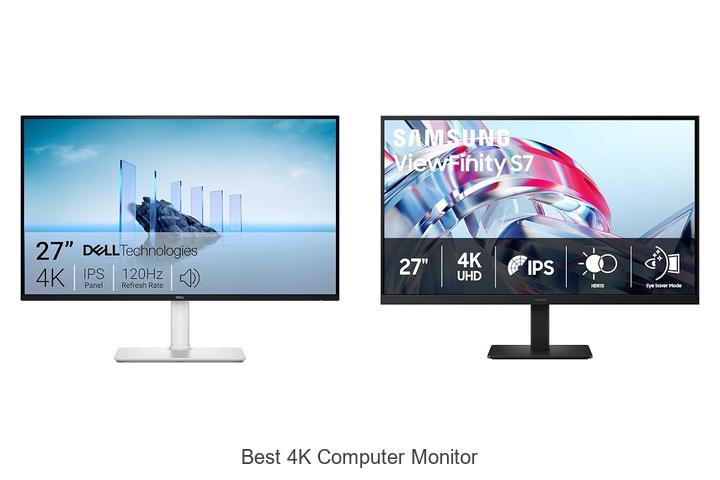
Experience stunning visuals and exceptional comfort with the Dell S2725QS 27-Inch 4K UHD Monitor, designed to elevate your work and entertainment setups. Combining ultra-high-definition clarity with advanced eye-care technology, this monitor delivers an immersive and fatigue-free viewing experience ideal for professionals and gamers alike.
Featuring a vibrant 27-inch 4K UHD display with 99% sRGB coverage and in-plane switching technology, it offers crisp colors and wide viewing angles. Enhanced by AMD FreeSync Premium, a 120Hz refresh rate, and a rapid 03ms response time, smooth visuals come standard.
Additionally, the integrated ComfortView Plus reduces harmful blue light emissions without compromising color accuracy, making extended use easier on the eyes.
Pros
- Ultra-sharp 4K resolution with vivid colors and HDR readiness for outstanding image quality
- ComfortView Plus technology reduces blue light emissions for prolonged eye comfort
- Sleek design with ultra-thin bezels and re-engineered audio delivering richer, immersive sound
Cons
- May be priced higher compared to some competitors with similar specifications
The Dell S2725QS strikes a fine balance between cutting-edge display technology and user-centered features, making it a compelling choice among the best 4K computer monitors. For those seeking both performance and comfort, it stands out as a reliable investment.
2. Samsung ViewFinity S7 27-Inch Monitor
Experience unmatched clarity and productivity with the Samsung ViewFinity S7 27-Inch Monitor, designed to elevate your workspace. Its 4K UHD resolution and HDR10 support deliver stunning visuals, making it ideal for professionals and creatives seeking exceptional detail and vibrant colors in every task.
Featuring a 27-inch IPS panel with a 178° wide viewing angle and matte finish, the ViewFinity S7 ensures consistent brightness and reduced glare from multiple positions. Equipped with HDMI and DisplayPort connectivity, TÜV-certified Eye Comfort technology, and Samsung’s Display Manager for easy multitasking, this monitor enhances both comfort and efficiency.
Pros
- Stunning 4K UHD (3840×2160) resolution with high pixel density for crisp, detailed visuals.
- HDR10 technology optimizes contrast and color accuracy, producing deeper blacks and brighter highlights.
- Eye Comfort technology reduces blue light exposure and screen flickering, minimizing eye strain during long work sessions.
- Multiple connectivity options including HDMI and DisplayPort for versatile device compatibility.
- Wide 178° viewing angles allow clear images from various perspectives without color or brightness loss.
Cons
- 60Hz refresh rate may not suit high-frame-rate gaming needs compared to specialized gaming monitors.
The Samsung ViewFinity S7 stands out as an exceptional choice among best 4K computer monitors, balancing superior image quality, eye-friendly features, and connectivity for professional and everyday use. It is a practical investment for those prioritizing accurate color reproduction and visual comfort.
3. LG 32UR500K-B 32-inch 4K UHD Monitor
Elevate your visual experience with the LG 32UR500K-B 32-inch 4K UHD Monitor, designed to deliver stunning clarity and vivid colors. Perfect for gamers, creative professionals, and entertainment enthusiasts, this display enhances every detail in a spacious 32-inch screen with ultra-high definition sharpness.
Boasting a 3840 x 2160 resolution and up to 90% DCI-P3 color gamut, the LG 32UR500K-B renders vibrant HDR10 content with exceptional depth and realism. Its ergonomic stand, Dynamic Action Sync, and Black Stabilizer features combine to improve comfort, responsiveness, and visibility during intense gaming sessions.
Pros
- Crystal-clear 4K UHD resolution with broad 90% DCI-P3 color spectrum for lifelike visuals
- Enhanced gaming features like Dynamic Action Sync and Black Stabilizer for reduced input lag and improved dark scene visibility
- Built-in stereo speakers with Waves MaxxAudio provide rich, immersive sound without extra peripherals
Cons
- 60Hz refresh rate may not satisfy competitive gamers seeking higher frame rates
The LG 32UR500K-B stands out as a reliable and feature-rich 4K monitor ideal for a broad range of users. It balances superb image quality and gaming enhancements effectively, making it a compelling choice compared to similarly priced monitors lacking HDR support or color accuracy.
4. Dell S3225QS 32-inch 4K UHD Monitor

Experience unparalleled clarity and immersive visuals with the Dell S3225QS 32-inch 4K UHD Monitor. Designed for professionals and gamers alike, this display combines stunning 4K resolution with comfortable viewing, making it a top contender among the best 4K computer monitors available today.
Equipped with a VA panel delivering true-to-life colors via 99% sRGB and 95% DCI-P3 coverage, the Dell S3225QS ensures vibrant and accurate imagery. Its ultra-low 03ms response time complemented by a 120Hz refresh rate and AMD FreeSync Premium technology offers smooth, tear-free visuals, perfect for both work and play.
Pros
- ComfortView Plus reduces harmful blue light emissions without compromising color accuracy for extended viewing comfort.
- Rich color reproduction with HDR readiness and a 1500:1 contrast ratio enhances depth and detail on screen.
- Enhanced audio system provides more powerful, clearer sound with a wider frequency response than previous models.
Cons
- Premium features come at a higher price point compared to some competing 32-inch 4K monitors.
Offering an exceptional blend of visual performance and ergonomic comfort, the Dell S3225QS stands out for users seeking a reliable and vibrant 4K monitor. When compared to similar models, its superior color accuracy and enhanced audio make it a compelling choice for creative professionals and enthusiasts.
5. Dell S2725QC 27-Inch 4K UHD Monitor

Experience stunning visuals and exceptional comfort with the Dell S2725QC 27-Inch 4K UHD Monitor. Designed to deliver crisp, vibrant images and smooth performance, it’s an ideal choice for professionals and gamers seeking clarity and precision in a sleek, modern design.
Equipped with ComfortView Plus to reduce harmful blue light emissions, this monitor ensures eye comfort during extended use. Its 27-inch 4K UHD display features IPS technology for vivid colors and wide viewing angles, with a rapid 120Hz refresh rate and ultra-low response time for seamless motion and minimal blur.
Pros
- Enhanced ComfortView Plus technology reduces blue light emissions for eye-friendly viewing without color loss.
- AMD FreeSync Premium with a 120Hz refresh rate and 0.03ms response time offers smooth, tear-free gameplay and work sessions.
- 99% sRGB color gamut and 1500:1 contrast ratio combine with HDR readiness to produce rich, detailed visuals.
Cons
- Speakers provide improved sound but may not replace dedicated audio setups for audiophiles.
Combining eye care, breathtaking 4K visuals, and responsive performance, the Dell S2725QC stands out among best 4K computer monitors. Its connectivity options, including USB-C with power delivery, make it a versatile and clutter-free addition to any setup.
6. LG 27US500-W 27-Inch 4K UHD Monitor

Discover stunning visual clarity with the LG 27US500-W 27-Inch 4K UHD Monitor, designed for professionals seeking exceptional image quality and vibrant colors. Its 4K UHD resolution combined with HDR10 support transforms any workspace into a high-definition creative environment.
Boasting a 1000:1 contrast ratio and up to 90% DCI-P3 color gamut, this IPS display offers crisp, deep blacks and vivid hues ideal for digital imaging tasks. The ergonomic stand and OnScreen Control feature ensure comfortable, customizable use, making it a versatile addition to any tech setup.
Pros
- Outstanding 4K UHD resolution with HDR10 and wide color gamut for remarkable image accuracy
- Ergonomic stand allows flexible tilt adjustments to enhance user comfort during extended use
- OnScreen Control simplifies workspace customization with easy display splitting and monitor settings
Cons
- Standard 60Hz refresh rate may limit suitability for fast-paced gaming compared to high-refresh alternatives
Combining advanced color technology and ergonomic design, the LG 27US500-W stands out as an excellent choice for creatives and professionals seeking the best 4K computer monitor experience under an accessible price point.
7. Samsung 32 Flat Computer Monitor

Experience stunning visuals and smooth performance with the Samsung 32 Flat Computer Monitor, designed to elevate your workspace and gaming setup. Its sleek, borderless design complements any environment while delivering crystal-clear 4K clarity, perfect for professionals and gamers seeking immersive image quality.
Equipped with a three-sided borderless LED screen, AMD FreeSync support, and a 75Hz refresh rate, this monitor provides seamless motion and reduces image tearing. Enhanced with Eye Saver Mode and flicker-free technology, it protects your eyes during extended use, making it ideal for work and play.
Pros
- Expansive three-sided borderless display offers a modern look and immersive viewing.
- AMD FreeSync technology synchronizes refresh rates for tear-free, smooth visuals.
- Advanced eye care features minimize strain during long computing sessions.
Cons
- Brightness level of 250 cd/m² may be less optimal for very bright environments.
Combining high contrast and vivid colors with an elegant design, the Samsung 32 Flat Computer Monitor is a compelling choice for those looking to balance productivity and entertainment. While brightness is moderate, its eye-friendly features and smooth performance make it a strong contender among mid-range 4K monitors.
8. LG 27UP850K-W 27-inch 4K UHD IPS Monitor

Discover unparalleled visual clarity with the LG 27UP850K-W 27-inch 4K UHD IPS Monitor, designed to bring your content to life through vibrant colors and sharp details. Ideal for professionals and entertainment lovers alike, this monitor transforms your workspace and gaming setup with stunning 4K resolution and versatile features.
Boasting a 3840 x 2160 UHD resolution and 95% DCI-P3 color gamut, the display delivers brilliant, true-to-life colors enhanced by DisplayHDR 400 support. Its ergonomic stand ensures comfortable viewing, while multiple connectivity options including USB-C with 90W power delivery, HDMI, and DisplayPort simplify your device setup without extra adapters.
Pros
- Exceptional 4K UHD resolution with wide color gamut for vivid image quality
- Comprehensive connectivity options including USB-C for seamless data and power transfer
- Adjustable ergonomic stand allowing height, tilt, and pivot customization
Cons
- 60Hz refresh rate may not satisfy high-frame-rate competitive gamers
Offering a balanced blend of superior image fidelity, ergonomic comfort, and connectivity versatility, the LG 27UP850K-W stands out as a top choice among 4K monitors in its price range. Its feature set appeals to creatives and general users seeking performance without compromise.
9. Sceptre U325W-UPT 32-Inch 4K UHD Monitor

Experience stunning visuals with the Sceptre U325W-UPT 32-Inch 4K UHD Monitor, a premium display designed for professionals and gamers alike. Delivering crystal-clear 4K resolution and vibrant color accuracy, it transforms your workspace into an expansive digital canvas for enhanced productivity and immersive entertainment.
Boasting a 32-inch IPS panel with 3840 x 2160 resolution, this monitor offers four times the detail of Full HD. Its 70Hz refresh rate with overclocking reduces screen tearing, while built-in stereo speakers eliminate the need for extra peripherals.
Pros
- Ultra-clear 4K UHD display providing exceptional detail and color accuracy
- Integrated high-quality speakers for streamlined audio without additional clutter
- Multiple connectivity options including DisplayPort and HDMI for versatile device compatibility
Cons
- Refresh rate capped at 70Hz, which may not satisfy ultra-fast gaming enthusiasts
With its expansive screen size, vivid picture quality, and practical features, the Sceptre U325W-UPT offers excellent value for users seeking a reliable and immersive 4K monitor at an affordable price. It stands out as a cost-effective alternative to higher-priced competitors without sacrificing essential performance.
10. 32 Inch 4K UHD Monitor

Experience stunning visuals and expansive workspace with the 32 Inch 4K UHD Monitor, designed to elevate productivity and entertainment. Its ultra-high-definition display and vibrant color accuracy make it an excellent choice for professionals and gamers seeking exceptional clarity and smooth performance in one sleek package.
Featuring a 32-inch 3840×2160 4K resolution screen with an IPS panel and 8-bit color depth, this monitor delivers vivid colors and sharp details ideal for complex tasks and immersive media. AMD FreeSync compatibility ensures fluid gameplay, while multiple connectivity options and a slim, space-saving design support versatile setups for work and play.
Pros
- Ultra-clear 4K UHD resolution with 16.7 million color support for true-to-life images and detailed visuals.
- Fast IPS panel and MPRT technology reduce motion blur, enhancing smooth video playback and gaming experiences.
- Multiple inputs (HDMI 2.0 and dual DisplayPort 1.4) enable easy connection to various devices, boosting multitasking and productivity.
- Sleek three-sided ultra-narrow bezels and slim profile save desk space and allow for an immersive viewing experience.
- Energy-efficient LED backlight with low flicker reduces eye strain during extended use.
- AMD FreeSync compatibility minimizes screen tearing and stuttering for seamless graphics performance.
Cons
- Lacks built-in speakers, requiring external audio solutions for sound output.
Overall, the 32 Inch 4K UHD Monitor provides a compelling blend of high-resolution clarity, fast response times, and flexible connectivity at a competitive price point. Its design and performance outperform many standard 4K monitors in this category, making it a smart choice for users seeking both professional-grade visuals and gaming capabilities.
Ultimate Guide to Choosing the Best 4K Computer Monitor for Stunning Clarity
Display Quality and Resolution
True 4K (3840 x 2160) resolution verification. Panel types: IPS vs. VA vs. TN. Color accuracy and gamut coverage (sRGB, AdobeRGB, DCIP3).Modern high-resolution screens often include multiple ports such as HDMI, DisplayPort, and USB-C, which determine how easily devices can connect and work together. Ensuring the monitor supports the necessary input options allows seamless compatibility with different graphics cards, laptops, or peripherals. Additionally, having extra USB ports or hubs built into the display can simplify cable management and enable easier attachment of accessories like keyboards, mice, or external drives.
Additionally, having extra USB ports or hubs built into the display can simplify cable management and enable easier attachment of accessories like keyboards, mice, or external drives. Some models even offer daisy-chaining capabilities, allowing multiple monitors to be linked using a single connection, which enhances workspace organization.
Another important aspect is the ability to expand functionality by connecting additional devices without the need for separate adapters or hubs. Monitors equipped with multiple input sources and built-in USB hubs provide flexibility for multitasking and upgrading setups in the future. This versatility saves both time and money by reducing clutter and minimizing compatibility issues across various hardware configurations.
Screen Size and Design
Ideal screen size for workspace and usage. Ultrawide vs. standard 16:9 aspect ratio. Ergonomics: height adjustment, tilt, swivel, and pivot.Modern monitors often come equipped with a variety of ports such as HDMI, DisplayPort, and USB-C, which play a crucial role in seamlessly connecting multiple devices like laptops, gaming consoles, and external drives. Having a diverse range of input options ensures compatibility with different hardware and allows for hassle-free switching between sources. Additionally, the ability to plug in peripherals directly through built-in USB hubs or docking features can significantly reduce desk clutter and improve workflow efficiency.
It’s also important to check if the monitor supports daisy-chaining or multiple displays, facilitating an expanded workspace that enhances multitasking capabilities. Failing to ensure adequate connection options and expansion capabilities might limit future upgrades or restrict the full use of your devices’ potential.
Refresh Rate and Response Time
Refresh rate options for gaming and professional use. Response time impact on motion clarity. Variable refresh rate technologies (GSync, FreeSync).A high refresh rate significantly enhances both gaming experiences and professional workflows by delivering smoother visuals and reducing motion blur. For gamers, refresh rates of 120Hz or higher provide fluid motion that can improve reaction times and overall gameplay quality, while professionals working with video editing or animation benefit from consistent frame updates that make detailed work easier. Response time plays a crucial role in maintaining motion clarity; lower response times minimize ghosting and blurring during fast-paced scenes, ensuring images remain sharp and clear.
Response time plays a crucial role in maintaining motion clarity; lower response times minimize ghosting and blurring during fast-paced scenes, ensuring images remain sharp and clear.
Variable refresh rate technologies like G-Sync and FreeSync are designed to synchronize the monitor’s refresh rate with the graphics card’s output. This synchronization eliminates screen tearing and stuttering, resulting in a much smoother visual experience, especially during gaming or video playback.
Connectivity and Compatibility
Available ports: HDMI, DisplayPort, USBC, and Thunderbolt. Multidevice support and daisychaining. Compatibility with graphics cards and operating systems.Modern high-resolution displays often come equipped with a variety of ports such as HDMI, DisplayPort, USB-C, and Thunderbolt, each serving different purposes and offering distinct advantages. Having multiple input options ensures seamless connection with various devices, including laptops, desktops, and external peripherals, enhancing versatility.
Additionally, ensuring the screen is fully compatible with your graphics card and operating system is crucial for optimal performance, smooth video playback, and accurate color rendering—factors that significantly impact the overall user experience and productivity.
Additional Features
HDR support and standards (HDR10, Dolby Vision). Blue light filter and flickerfree technology. Builtin speakers, USB hubs, and other extras.Additional features can significantly enhance your overall experience and efficiency. Supports for advanced high dynamic range formats such as HDR10 and Dolby Vision deliver richer colors and better contrast, making images and videos look more lifelike and vibrant.
Many models also come equipped with built-in speakers, allowing for convenient audio playback without extra peripherals. Integrated USB hubs and extra ports expand your options for connecting peripherals like keyboards, mice, and external drives directly through the display, helping to streamline your workspace and reduce cable clutter.
Considering these elements ensures the device not only meets visual quality standards but also complements your day-to-day workflow and comfort.
Budget and Warranty Considerations
Price ranges and value for money. Brand reputation and customer reviews. Warranty terms and customer support options.Modern 4K displays often come equipped with multiple ports such as HDMI, DisplayPort, and USB-C, allowing seamless connection to various devices without the need for extra adapters. This flexibility ensures compatibility with laptops, desktops, gaming consoles, and other peripherals, enabling a more streamlined workspace.
Ensuring that the monitor supports the latest standards and provides room for future upgrades means the device remains relevant longer, potentially saving money over time. For users who rely on multi-monitor setups or require specialized connections, the availability and type of these ports become crucial factors that impact overall convenience and performance.
FAQ’s
What Are The Key Features To Look For In The Best Computer Monitor?The best computer monitor should have a high resolution for clear, sharp images and a fast refresh rate for smooth visuals. Additionally, features like accurate color reproduction, adjustable ergonomics, and multiple connectivity options enhance overall usability.
Which Brands Offer The Most Reliable And High-Quality Monitors?Brands like Dell, ASUS, and LG are known for offering the most reliable and high-quality monitors, praised for their excellent display performance and durability. Additionally, Eizo and BenQ are favored by professionals for their color accuracy and build quality.
How Does A Monitor Improve Productivity Compared To A Standard Hd Monitor?A monitor with higher resolution and larger screen size improves productivity by allowing more content to be displayed simultaneously with clearer details, reducing the need for scrolling and window switching. Additionally, features like better color accuracy and faster refresh rates enhance visual comfort and efficiency during work.
What Is The Ideal Screen Size And Refresh Rate For A Monitor For Gaming And Professional Use?An ideal monitor for both gaming and professional use typically has a screen size of 27 inches, balancing immersive visuals and desk space. A refresh rate of 144Hz or higher is recommended to ensure smooth gameplay and fluid motion for professional tasks like video editing.
Are There Any Budget-Friendly Monitors That Provide Excellent Performance?Yes, there are budget-friendly monitors like the ASUS ProArt Display and Dell UltraSharp series that offer excellent performance with great color accuracy and sharp visuals. These monitors provide a good balance of quality and affordability, making them ideal for both work and casual use.
Conclusion
In summary, the best 4K computer monitor offers stunning visuals, sharp detail, and vibrant colors, enhancing both productivity and entertainment. When choosing, consider factors like screen size, refresh rate, color accuracy, and connectivity options to find a model that fits your specific needs. Investing in a quality 4K monitor ensures an immersive and efficient computing experience.

- Discover the Best Monitor Size for Ultimate Productivity! - October 3, 2026
- Unlock Stunning Clarity: Discover the Best Monitor Resolution! - October 3, 2026
- Best Monitor for Working From Home: Top Picks You Need Now! - October 3, 2026
