
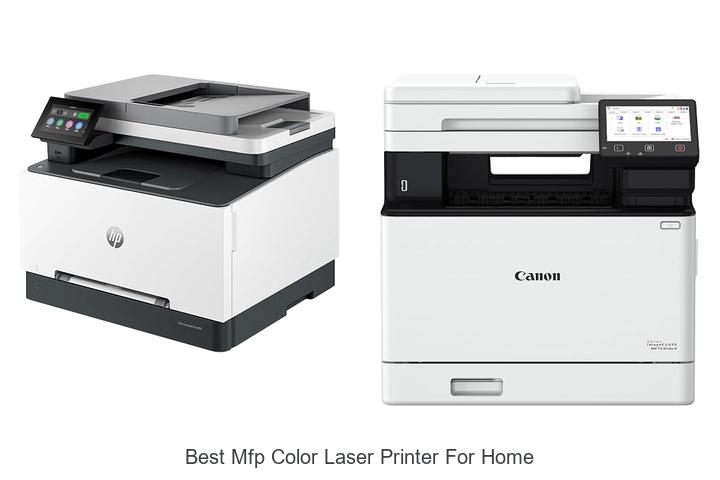
In the realm of digital imaging and document management, multifunction printers (MFPs) equipped with color laser technology offer an exceptional blend of speed, precision, and versatility. Engineered to handle high-resolution color output while integrating printing, scanning, copying, and sometimes faxing capabilities, these devices are transforming home office environments.
Balancing factors such as toner efficiency, print speed measured in pages per minute (PPM), and connectivity options like Wi-Fi and Ethernet becomes essential for discerning users. Delving into the nuances that define the ideal home color laser MFP reveals what sets the top contenders apart and what features really matter in everyday applications.
Top Picks to Elevate Your Home Office Printing Experience
| Image | Product | Price |
|---|---|---|
Our Picks 1  | HP Color LaserJet Pro MFP 3301sdw All-in-One Printer | Check Price On Amazon |
Our Picks 2  | Canon imageCLASS MF753Cdw II Color Duplex Laser Printer | Check Price On Amazon |
Our Picks 3  | HP Color LaserJet Pro MFP 3301fdw Wireless Laser Printer | Check Price On Amazon |
1. HP Color LaserJet Pro MFP 3301sdw All-in-One Printer
Experience professional-quality color printing at home or in small office settings with the HP Color LaserJet Pro MFP 3301sdw All-in-One Printer. Combining speed, vivid outputs, and versatile functions, this device is designed to boost productivity while delivering crisp, vibrant documents every time.
Equipped with next-generation TerraJet toner, the printer delivers up to 26 ppm in black and color prints. Its auto duplex printing and a 250-sheet input tray ensure efficient handling of various tasks.
Pros
- Fast and reliable print speeds of up to 26 pages per minute in both black and color
- Original HP 218A and 218X toner cartridges provide consistently vivid colors and sharp text
- Auto 2-sided printing and 250-sheet input tray enhance productivity and reduce paper waste
Cons
- Only compatible with HP toner cartridges featuring chips, limiting third-party cartridge use
Offering a blend of speed, quality, and advanced features, the HP Color LaserJet Pro MFP 3301sdw stands out as one of the best color laser printers for home and small office use. Its all-in-one capabilities and award-winning reliability make it a worthwhile investment compared to other devices in this category.
2. Canon imageCLASS MF753Cdw II Color Duplex Laser Printer
Discover exceptional performance and vibrant color output with the Canon imageCLASS MF753Cdw II Color Duplex Laser Printer. Designed for home and small office use, this all-in-one device effortlessly combines printing, scanning, copying, and faxing with wireless convenience and duplex functionality, making it an ideal choice for productivity and efficiency.
Equipped with a fast 35 ppm black-and-white print speed and a sharp 1200 x 1200 dpi resolution, the MF753Cdw II delivers crisp documents and stunning color prints. Its user-friendly touchscreen and support for multiple devices, including laptops, PCs, and smartphones, ensure seamless control and connectivity. Energy Star certification highlights its eco-friendly design.
Pros
- Four-in-one functionality: print, scan, copy, and fax in a single machine
- Duplex printing saves paper and enhances efficiency
- High-quality color output with genuine Canon 069 toner cartridges
Cons
- Relatively heavier at 50 pounds, which may limit portability
Combining speed, quality, and versatile features, the Canon imageCLASS MF753Cdw II stands out as a reliable solution for those seeking the best MFP color laser printer for home use. Its robust capabilities and user-friendly design deliver excellent value for both personal and professional environments.
3. HP Color LaserJet Pro MFP 3301fdw Wireless Laser Printer
Discover exceptional printing performance with the HP Color LaserJet Pro MFP 3301fdw, designed to meet the demands of home offices and small teams. Delivering vibrant color documents with professional quality, this wireless all-in-one printer excels in speed and reliability to keep your workflow smooth and efficient.
Equipped with next-generation TerraJet toner, the printer ensures sharp, vivid prints at speeds up to 26 pages per minute for both black and color. Its versatile functions include fast color printing, scan, copy, fax, and automatic double-sided printing and scanning, supported by a 250-sheet input tray and auto document feeder for added convenience.
Pros
- Wireless dual-band Wi-Fi with self-reset functionality enhances connectivity and reduces downtime.
- Supports two-sided single-pass scanning and auto duplex printing to save time and paper.
- Robust 250-sheet input capacity and auto document feeder simplify handling multi-page tasks.
Cons
- Only compatible with HP original cartridges, limiting third-party ink options.
Combining reliable performance with professional-grade color output, the HP Color LaserJet Pro MFP 3301fdw is an excellent choice for home environments needing multifunction efficiency. Compared to other home printers, it stands out for speed and connectivity, making it a worthwhile investment for productivity and quality.
4. Xerox C235dni Wireless Color Laser Printer

Discover the Xerox C235dni Wireless Color Laser Printer, an ideal choice for home users seeking vibrant color printing combined with multifunction capabilities. Designed for efficiency and reliability, it delivers professional-quality documents with minimal running costs, making it a standout option among the best MFP color laser printers for home use.
Equipped with wireless connectivity, this all-in-one printer offers seamless printing, scanning, and copying at speeds up to 24 pages per minute. The vivid 1200 x 1200 dpi resolution ensures sharp text and brilliant graphics, while easy setup via the Xerox Easy Assist App makes installation effortless. Supporting high-yield cartridges, it helps reduce operational expenses for households with moderate printing needs.
Supporting high-yield cartridges, it helps reduce operational expenses for households with moderate printing needs.
Pros
- Low running costs supported by starter and high-yield toner cartridges, ideal for printing up to 1,500 pages monthly
- Wireless and mobile printing capabilities including Apple AirPrint and Mopria for versatile device compatibility
- All-in-one functionality with fast printing, scanning, and copying, backed by trusted Xerox performance
Cons
- Weighs 35 pounds, which may limit portability compared to smaller desktop printers
Combining economical operation with high-quality output and seamless connectivity, the Xerox C235dni is a strong contender for home offices seeking dependable color laser printing. Compared to other models in its class, it balances cost-efficiency with performance, ensuring professional results without sacrificing convenience.
5. HP Color LaserJet Pro MFP 3301cdw Wireless Printer

Experience the perfect blend of efficiency and vibrant color output with the HP Color LaserJet Pro MFP 3301cdw Wireless Printer, an ideal choice for home and small office environments. Delivering professional-quality prints, scans, copies, and faxes, it ensures seamless productivity with advanced features and reliable performance.
Part of HP’s official refurbished program, this printer features genuine parts and toner, supported by a one-year warranty for peace of mind. Boasting fast print speeds up to 26 ppm in both black and color, automatic duplex printing, a 250-sheet input tray, and dual-band Wi-Fi connectivity, it combines convenience with superior print quality. Enhanced security with HP Wolf Pro Security and mobile printing capabilities via the HP app add to its appeal.
Pros
- High-speed printing up to 26 pages per minute in color and black for quick task completion
- Comprehensive all-in-one functionality including scanning, copying, faxing, and two-sided single-pass scanning
- Robust wireless connectivity options with dual-band Wi-Fi and mobile app compatibility for easy remote access
- Built-in HP Wolf Pro Security safeguards against cyber threats, ensuring data protection
- Eco-conscious design with Energy Star and EPEAT certification, plus recyclable toner cartridges
Cons
- Requires use of original HP toner cartridges with built-in chips; does not support third-party cartridges
Combining dependable performance, rich color quality, and advanced security, the HP Color LaserJet Pro MFP 3301cdw stands out as one of the best MFP color laser printers for home use. It offers a balanced mix of features and eco-friendly design that surpasses many in its class, making it a smart investment for users seeking reliable multifunction printing.
6. Canon imageCLASS MF662Cdw Wireless Laser Printer

Discover exceptional printing quality and versatility with the Canon imageCLASS MF662Cdw Wireless Laser Printer, an ideal all-in-one solution for home use. Combining vibrant color prints, wireless convenience, and fast performance, it caters perfectly to users seeking efficiency and high-quality output in a compact design.
This 3-in-1 device handles printing, scanning, and copying with ease while delivering up to 26 pages per minute in both color and black-and-white. Its 5-inch color touchscreen ensures intuitive navigation, supported by mobile device compatibility through Canon PRINT, Apple AirPrint, and Mopria Print Service for seamless wireless operation.
Pros
- Automatic duplex printing reduces paper waste and keeps operating costs low
- High-capacity Canon Genuine Toner cartridges offer long-lasting high-quality prints
- User-friendly interface with a customizable 5-inch color touchscreen and easy wireless setup
Cons
- Relatively heavy at 55.1 pounds, which may limit portability within the home
Overall, the Canon imageCLASS MF662Cdw stands out as one of the best MFP color laser printers for home use, offering speed, quality, and convenience. Its feature set outpaces many competitors, making it a reliable choice for households needing robust printing solutions.
7. HP Color LaserJet Pro MFP 3301cdw Wireless Printer

Experience outstanding color printing quality and versatile functionality with the HP Color LaserJet Pro MFP 3301cdw Wireless Printer. Designed for home offices and small business environments, it combines high performance with energy-efficient technology, making it an ideal choice for those seeking the best MFP color laser printer for home use.
Equipped with dual-band Wi-Fi and Auto-Reconnect capabilities, this all-in-one device supports fast, automatic two-sided printing, copying, scanning, and faxing. Its compact design integrates seamlessly into any workspace while advanced security features ensure your documents and data stay protected throughout busy workdays.
Pros
- Energy-saving Auto-On/Auto-Off technology reduces power consumption during inactivity.
- Reliable dual-band Wi-Fi with Auto-Reconnect for stable wireless printing without interruptions.
- High-speed, automatic duplex printing delivers crisp, professional color documents at up to 26 pages per minute.
Cons
- Relatively heavier and larger compared to some compact home printers, weighing 37.7 pounds.
The HP LaserJet Pro MFP 3301cdw strikes a perfect balance between performance and convenience. Its robust features, combined with eco-friendly technology and security measures, deliver excellent value for home users needing a reliable, all-in-one color laser printer.
8. Canon imageCLASS LBP646Cdw Wireless Laser Printer

Discover vibrant and efficient printing tailored for your home office with the Canon imageCLASS LBP646Cdw Wireless Laser Printer. Combining fast color output and wireless convenience, it’s an ideal choice for those seeking sharp, professional-quality prints without unnecessary extras.
Designed solely for printing, this color laser printer boasts speeds up to 26 pages per minute with a rapid first page out time. Its 5-inch LCD screen simplifies navigation, and wireless setup is straightforward, enabling seamless printing from laptops, smartphones, and tablets through Canon’s app and popular mobile services.
Pros
- Impressive print speed of up to 26 ppm for both color and monochrome documents
- Automatic duplex printing conserves paper and reduces replacement frequency
- High-capacity Canon Genuine Toner 075 cartridges deliver consistent, sharp prints with fewer interruptions
Cons
- No scanning, copying, or faxing functions, limiting multifunction capabilities
Offering a streamlined printing experience with fast output and wireless flexibility, the Canon imageCLASS LBP646Cdw stands out as a dependable color laser printer tailored for home users prioritizing print quality and efficiency. For a multifunction alternative, consider other Canon models that include scanning and copying features, but if printing speed and simplicity matter most, this model delivers substantial value.
9. HP Color LaserJet Pro MFP 4301fdw All-in-One Printer

Discover efficiency and vibrant quality for your home office with the HP Color LaserJet Pro MFP 4301fdw All-in-One Printer. Designed to handle printing, scanning, copying, and faxing with professional-grade color output, it suits small teams and personal users seeking reliable, speedy performance.
Delivering up to 35 color pages per minute, this all-in-one laser printer features an auto document feeder and two-sided printing, boosting productivity. Enhanced connectivity options include intelligent Wi-Fi, Ethernet, Bluetooth, and compatibility with multiple operating systems, ensuring seamless wireless printing from any device.
Pros
- Fast color printing speed of up to 35 pages per minute for high-volume tasks
- Comprehensive multifunctional capabilities: print, scan, copy, and fax
- Robust security with HP Wolf Pro Security to safeguard data and device settings
Cons
- Heavier and larger footprint compared to basic home printers, requiring ample desk space
Balanced between speed, security, and quality, the HP Color LaserJet Pro MFP 4301fdw is an excellent choice for home users who need dependable performance beyond basic printing. Its advanced features and versatile connectivity make it a top contender in the best MFP color laser printers for home environments.
10. Canon imageCLASS MF665Cdw Laser Printer

Discover the Canon imageCLASS MF665Cdw Laser Printer, an exceptional all-in-one solution designed for home offices that demand high-quality color printing combined with versatile functionality. Its speed, wireless convenience, and user-friendly touchscreen elevate everyday printing tasks effortlessly.
Equipped with 4-in-1 capabilities—print, scan, copy, and fax—the MF665Cdw delivers vibrant color and monochrome prints at up to 26 pages per minute. The 5-inch color touchscreen with an Application Library allows quick access to frequently used features, while wireless setup and mobile device compatibility streamline your workflow. High-capacity Canon Genuine Toner ensures impressive page yields and outstanding print quality.
High-capacity Canon Genuine Toner ensures impressive page yields and outstanding print quality.
Pros
- Fast print speeds of up to 26 ppm for both color and black & white documents.
- Efficient automatic duplex printing and a 50-sheet duplex ADF save time and paper.
- Intuitive 5-inch color touchscreen with customizable Application Library enhances productivity.
Cons
- Relatively heavy at 50 pounds, which might limit portability within the home.
Offering robust performance and multifunction convenience, the Canon imageCLASS MF665Cdw stands out as one of the best MFP color laser printers for home use, blending speed, quality, and ease of use in an ENERGY STAR certified design backed by a 3-year warranty.
Top Picks and Expert Tips for Choosing the Best MFP Color Laser Printer for Home Use
Print Quality and Resolution
Understanding color accuracy and vibrancy. DPI and image sharpness considerations. Impact of toner vs. ink technology on color output.Printers equipped with versatile options for connecting to various devices and the ability to add extra components provide greater convenience and adaptability in everyday use. Features such as Wi-Fi, Ethernet, and USB ports allow seamless interaction with smartphones, tablets, and computers, enabling printing tasks to be completed effortlessly from multiple sources.
Additionally, the capacity to upgrade with additional trays, memory, or finishing accessories ensures the machine can handle increasing demands, such as printing larger volumes or accommodating different paper types, without needing a complete replacement. This flexibility not only enhances user experience but also ensures the device remains functional and relevant as needs evolve over time.
Functionality and Features
Scanning, copying, and fax capabilities. Duplex (doublesided) printing options. Connectivity features: WiFi, Ethernet, USB, and mobile printing.Modern printers often come equipped with multiple functions such as scanning, copying, and faxing, turning them into versatile tools that streamline everyday tasks. Devices that support double-sided printing not only reduce paper waste but also save time by handling both sides automatically. Equally important are the ways the printer connects to your devices—options like wireless networks, Ethernet cables, USB ports, and mobile printing capabilities ensure seamless integration with smartphones, tablets, and computers.
Equally important are the ways the printer connects to your devices—options like wireless networks, Ethernet cables, USB ports, and mobile printing capabilities ensure seamless integration with smartphones, tablets, and computers. A device offering several connection methods provides flexibility to fit different setups and enhances overall convenience, allowing for quick and easy document management in a home environment.
Print Speed and Volume
Pages per minute (PPM) for color and blackandwhite. Monthly duty cycle and recommended daily usage. Warmup time and first page out speed.A printer’s speed significantly impacts productivity, especially when handling both color and black-and-white documents. Pages per minute (PPM) ratings indicate how quickly a printer can produce color and monochrome prints, with many models offering faster speeds for black-and-white pages due to simpler processing.
Alongside this, recommended daily usage provides a guideline to maintain optimal performance without overworking the device, helping extend its lifespan.
Warmup time and first-page-out speed are critical for reducing delays, especially when printing small batches or urgent documents. A shorter warmup time means the printer will be ready to start printing almost immediately after being powered on or awakened from sleep mode. Similarly, a fast first-page-out speed ensures the initial document emerges quickly, minimizing wait times and allowing for efficient workflow.
| Feature | Importance | Typical Range |
|---|---|---|
| Pages per minute (Color) | Determines speed for color prints | 10-25 PPM |
| Pages per minute (Black-and-white) | Generally faster than color | 20-40 PPM |
| Monthly duty cycle | Ensures durability under workload | Up to 20,000 pages |
| Recommended daily usage | Maintains printer health | Up to 500 pages |
| Warmup time | Affects readiness speed | 10-30 seconds |
| First page out speed | Reduces wait for initial print | 5-15 seconds |
Cost of Ownership
Initial purchase price vs. longterm expenses. Cost and yield of replacement toner cartridges. Energy efficiency and power consumption.Understanding how a printer connects to your devices and its ability to accommodate additional features can greatly affect user experience and future-proofing. Modern printers that support wireless options such as Wi-Fi and Bluetooth allow seamless printing from laptops, smartphones, and tablets without the hassle of cables. Equally important is the availability of multiple ports, including USB and Ethernet, which ensure compatibility with various devices and can boost reliability in busy home offices.
Equally important is the availability of multiple ports, including USB and Ethernet, which ensure compatibility with various devices and can boost reliability in busy home offices.
Devices with versatile options for adding extra trays, memory, or finishing accessories offer flexibility as your printing needs evolve. This adaptability can save money in the long run by reducing the need to upgrade the entire machine.
For instance, being able to add a second paper tray or a duplexing unit enhances productivity, especially when managing different paper sizes or double-sided printing tasks.
| Feature | Benefit | Impact on Home Use |
|---|---|---|
| Wireless Connectivity (Wi-Fi/Bluetooth) | Easy device pairing and mobility | Convenient for home setups with multiple users |
| Multiple Port Types (USB/Ethernet) | Greater compatibility and stable connections | Ensures printer can connect to various hardware |
| Expandable Features (Additional Trays, Memory) | Scalable performance as demands increase | Supports higher volume or specialized printing needs |
Size and Design for Home Use
Printer dimensions and footprint for limited spaces. Noise levels during operation. Ease of setup and user interface simplicity.Having multiple options to connect your device, whether through wireless, USB, or Ethernet, plays a crucial role in ensuring seamless printing from various gadgets around the house. Additionally, the ability to add extra features like additional paper trays or memory upgrades can extend the printer’s functionality as your needs grow, making the device more adaptable over time.
These aspects help maintain convenience and efficiency without requiring an immediate replacement for evolving demands.
Compatibility and Software Support
Operating system compatibility (Windows, macOS, Linux). Support for mobile and cloud printing services. Availability of driver updates and software utilities.Ensuring that a color laser printer supports a wide range of operating systems such as Windows, macOS, and Linux can save a lot of frustration and compatibility issues later on. This flexibility allows seamless integration with various devices around the home, no matter which platform you use.
Additionally, printers that offer support for mobile and cloud printing services enable users to print documents directly from smartphones, tablets, or cloud storage without needing physical connectivity, greatly enhancing convenience and workflow efficiency.
Regular updates to drivers and software utilities also play a crucial role in maintaining optimal performance and security. Devices backed by consistent manufacturer support tend to run more smoothly, with fewer glitches and improved feature sets over time.
These updates often fix bugs and add compatibility for new operating system versions, ensuring the printer remains versatile and reliable for years to come.
FAQ’s
What Features Should I Look For In The Best Mfp Color Laser Printer For Home Use?When choosing the best MFP color laser printer for home use, look for features like high print quality, fast printing speed, and affordable toner replacement. Additionally, consider multifunction capabilities such as scanning, copying, and wireless connectivity for convenience.
Which Color Laser Mfps Offer The Best Balance Of Quality And Affordability For Home Offices?For home offices, color laser MFPs from brands like Brother and HP offer the best balance of quality and affordability, providing sharp print output and reliable performance at a reasonable price. Models such as the Brother MFC-L3750CDW and HP Color LaserJet Pro MFP M283fdw are popular choices for their cost-effectiveness and multifunction features.
How Do Color Laser Mfp Printers Compare To Inkjet Printers For Home Printing Needs?Color laser MFP printers generally offer faster printing speeds and sharper text output, making them ideal for high-volume or office-style home use. However, inkjet printers typically provide better color photo quality and are more cost-effective for occasional, photo-heavy printing.
What Are The Top-Rated Color Laser Mfp Printers For Small Home Office Setups?The top-rated color laser MFP printers for small home offices include the Brother MFC-L3710CW and the HP Color LaserJet Pro M283fdw, both praised for their compact design, efficient performance, and high-quality color printing. These models offer reliable multifunction features like scanning, copying, and wireless connectivity, making them ideal for home office productivity.
How Important Is Print Speed And Cartridge Cost When Choosing A Home Color Laser Mfp Printer?Print speed and cartridge cost are both crucial factors when choosing a home color laser MFP printer, as faster print speeds ensure efficient productivity, while affordable cartridge costs help keep ongoing expenses manageable. Balancing these aspects can lead to better overall value and convenience for everyday printing needs.
Conclusion
In summary, the best MFP color laser printer for home balances high-quality color output, reliable multifunction features, and compact design. Look for models offering efficient printing, scanning, copying, and wireless connectivity to suit everyday home needs.

- Best MFP Color Laser Printer for Home – Top Picks Revealed! - September 25, 2026
- Best Mailing Label Printer: Top Picks You Can’t Miss! - September 25, 2026
- Best Low Budget Printer That Shockingly Delivers Quality! - September 25, 2026
