
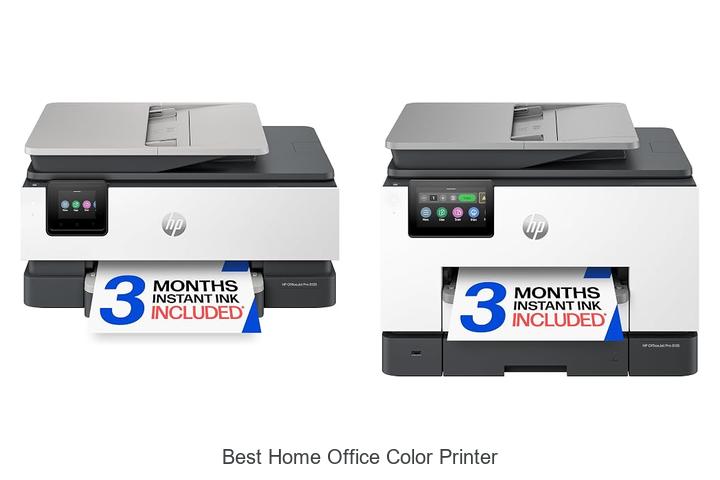
In today’s digital workspace, the demand for reliable output devices equipped with high-resolution printing technology and efficient color management systems is paramount. A home office environment requires a balance of speed, precision, and cost-effectiveness when selecting peripheral equipment, particularly color printers capable of producing vibrant, accurate prints for both documents and graphics.
Factors such as print speed measured in pages per minute (ppm), print resolution in dots per inch (DPI), and connectivity options including wireless and USB interfaces significantly influence the overall user experience. Identifying the best home office color printer means navigating a variety of specifications to find a model that delivers consistent quality without compromising on operational efficiency. Exploring these critical parameters will reveal key insights that help distinguish top-performing printers tailored for home office needs—read on to uncover what makes one model stand out above the rest.
Discover the Top Choices to Brighten Up Your Workspace with Vivid Prints
| Image | Product | Price |
|---|---|---|
Our Picks 1  | HP OfficeJet Pro 8125 Wireless All-in-One Printer | Check Price On Amazon |
Our Picks 2  | HP OfficeJet Pro 9135 Wireless All-in-One Printer | Check Price On Amazon |
Our Picks 3  | Canon Color imageCLASS MF753Cdw II Laser Printer | Check Price On Amazon |
1. HP OfficeJet Pro 8125 Wireless All-in-One Printer
Discover the HP OfficeJet Pro 8125 Wireless All-in-One Printer, designed to deliver professional-quality color printing effortlessly from the comfort of your home office. Perfect for creating crisp business documents, reports, and vibrant presentations with ease and speed, it combines functionality with modern technology for superior productivity.
Equipped with fast color printing up to 10 ppm and black printing up to 20 ppm, this printer features a 7-inch color touchscreen, auto 2-sided printing, and a 225-sheet input tray. Wireless connectivity ensures seamless printing from multiple devices, complemented by HP’s AI to optimize print formatting and enhance security with HP Wolf Essential Security.
Pros
- Efficient wireless printing with dual-band Wi-Fi for a reliable connection.
- Advanced HP AI technology optimizes print layouts, reducing waste and ensuring professional output.
- Includes a 3-month trial of HP Instant Ink for convenient, cost-saving ink delivery.
Cons
- Strict cartridge compatibility requiring original HP cartridges, which may limit third-party options.
Offering a perfect balance of speed, quality, and smart features, the HP OfficeJet Pro 8125 stands out as an excellent choice for small home offices seeking reliable all-in-one functionality. Compared to similar printers, it excels with AI-driven print optimization and robust security, making it a worthy investment in productivity and peace of mind.
2. HP OfficeJet Pro 9135 Wireless All-in-One Printer
Discover the HP OfficeJet Pro 9135, a versatile wireless all-in-one printer designed to elevate your home office productivity with professional-quality color printing. Ideal for busy environments, it combines speed, precision, and smart technology to handle presentations, brochures, and everyday documents effortlessly.
Featuring print speeds up to 25 ppm in black and 20 ppm in color, plus automatic two-sided printing and scanning, the OfficeJet Pro 9135 streamlines your workflow. The intuitive 3-inch touchscreen and HP AI optimize print formatting, while dual-band Wi-Fi and HP app support guarantee seamless wireless connectivity.
Pros
- Fast, high-quality color and black-and-white prints suitable for professional documents
- Automatic two-sided printing and single-pass two-sided scanning save time and resources
- Convenient wireless printing with dual-band Wi-Fi and smartphone app integration
Cons
- Relies exclusively on original HP cartridges, which may increase long-term ink costs
The HP OfficeJet Pro 9135 stands out as an excellent choice for the best home office color printer, blending speed, quality, and smart features in a reliable package. For those seeking efficiency and professional results, it outperforms many competitors in its class.
3. Canon Color imageCLASS MF753Cdw II Laser Printer
Discover unparalleled efficiency and vibrant color output with the Canon Color imageCLASS MF753Cdw II Laser Printer, designed to elevate your home office workflow. Combining advanced laser technology with wireless connectivity, this all-in-one solution delivers professional-quality prints, scanning, copying, and faxing with remarkable ease.
Equipped with duplex printing and a 50-pound robust build, the MF753Cdw II supports high-speed color and black-and-white prints at 35 ppm. Its automatic document feeder (ADF) streamlines scanning tasks, while the intuitive touchscreen control panel simplifies operation.
Pros
- Fast print speeds up to 35 pages per minute for efficient document handling.
- Wireless and duplex printing functions support seamless and eco-friendly operations.
- All-in-one functionality with print, copy, scan, and fax capabilities enhances productivity.
Cons
- Weighing 50 pounds, it may require ample space and careful placement in compact offices.
With its combination of speed, versatility, and sharp color quality, the Canon Color imageCLASS MF753Cdw II stands out as a top choice for anyone seeking the best home office color printer. Its robust features and reliable performance make it a smart investment compared to similar models in the market.
4. Brother MFC-L8930CDW Color Laser All-in-One Printer

Experience top-tier performance with the Brother MFC-L8930CDW Color Laser All-in-One Printer, designed to meet the demanding needs of a busy home office. Combining compact design with professional-quality output, it delivers sharp color and black prints rapidly, enhancing productivity and efficiency.
Equipped with fast print and copy speeds up to 33 pages per minute, an 80-page auto document feeder, and duplex scanning up to 104 images per minute, this versatile printer enables seamless multitasking. Its robust toner capacity and advanced connectivity options, including dual-band wireless and Gigabit Ethernet, maximize convenience while reducing printing costs.
Pros
- High-quality color and black printing with resolution up to 2400 x 600 dpi ensures crisp documents
- Cost-effective with included high-yield toner cartridges and options for super high-yield replacements
- Advanced scanning features including double-sided, fast duplex scanning and integration with cloud services
Cons
- Heavier and larger footprint compared to some compact home office printers, weighing 71.2 pounds
Offering a strong combination of speed, versatility, and cost efficiency, the Brother MFC-L8930CDW stands out as a reliable solution for improving home office productivity. Its advanced features and durable design make it a smart choice among color laser all-in-one printers.
5. Canon PIXMA TR7120 Wireless Inkjet Printer

Discover the Canon PIXMA TR7120 Wireless Inkjet Printer, a perfect blend of affordability and versatility designed to meet the demands of both home users and hybrid workers. Its compact design and advanced features make it an ideal choice for anyone seeking the best home office color printer solution.
This all-in-one printer excels with a 2-cartridge hybrid ink system delivering crisp text and vibrant photo colors. Equipped with dual-band Wi-Fi, an Auto Document Feeder, and automatic two-sided printing, it ensures efficient workflow and reliable wireless performance, all controlled easily via an intuitive OLED display and mobile apps.
Pros
- High-quality prints with sharp text and vivid color graphics
- Seamless wireless printing with dual-band Wi-Fi and mobile device compatibility
- Efficient handling of multi-page documents using the Auto Document Feeder and auto duplex function
Cons
- Print speed (up to 11 pages per minute) is moderate compared to some laser printers
The Canon PIXMA TR7120 stands out as a versatile and cost-effective choice, combining excellent print quality, wireless convenience, and compact design. For home office environments demanding quality and efficiency on a budget, it offers a compelling alternative to bulkier or more expensive models.
6. Canon PIXMA TS6520 Wireless Inkjet Printer

Discover the Canon PIXMA TS6520 Wireless Inkjet Printer, an ideal solution for anyone seeking high-quality, versatile printing straight from a compact, stylish device. Perfectly suited for home offices and hybrid work environments, it blends crisp document output and vibrant photo prints with seamless connectivity and user-friendly features.
Equipped with a 2-cartridge hybrid ink system, the PIXMA TS6520 produces sharp text and vivid color, while its dual-band Wi-Fi ensures stable wireless connections for effortless printing from smartphones or computers. Additional highlights include auto duplex printing, borderless photo capabilities, and a neat OLED display for easy control and monitoring.
Pros
- Affordable all-in-one functionality combining print, scan, and copy in a compact design.
- Dual-band Wi-Fi allows reliable wireless printing from various devices, including smartphones and tablets.
- Automatic two-sided printing reduces paper use, saving time and promoting eco-friendly habits.
Cons
- Maximum black and white copy speed of 11 pages per minute may be slower compared to some competitors.
Balancing affordability and performance, the Canon PIXMA TS6520 stands out as a top contender among home office color printers. It delivers vivid output and versatile connectivity, making it a smart choice for users who want efficiency without compromising quality on a budget.
7. HP OfficeJet Pro 9125 Wireless All-in-One Printer

Discover seamless efficiency and professional-quality color printing with the HP OfficeJet Pro 9125 Wireless All-in-One Printer. Designed to elevate your home office experience, it combines speed, versatility, and intelligent features to deliver exceptional documents, making it a top choice for anyone seeking the best home office color printer.
Offering fast print speeds of up to 22 ppm for black and 18 ppm for color, this all-in-one device supports wireless connectivity, auto two-sided printing and scanning, and a user-friendly 7-inch touchscreen. Integrated HP AI optimizes print formatting, while HP Wolf Pro Security ensures data protection, all wrapped in a sustainable design with 40% recycled plastic.
Pros
- High-speed printing with professional-quality color output ideal for presentations and brochures
- Convenient wireless printing and mobile app support for on-the-go document management
- Advanced AI-powered print optimization and strong security features to protect your data
Cons
- Compatible only with original HP cartridges featuring HP chips, limiting aftermarket options
Balancing speed, smart features, and security, the HP OfficeJet Pro 9125 is an excellent investment for home offices prioritizing professional-quality color printing and efficient workflow. Compared to other printers in its range, it offers a robust feature set and reliable connectivity, ensuring your documents always look their best.
8. HP OfficeJet Pro 8139 Wireless All-in-One Inkjet Printer

Discover the HP OfficeJet Pro 8139, an ideal choice for home offices demanding professional-quality color printing. Offering crisp business documents, vibrant presentations, and sharp flyers, this versatile all-in-one inkjet printer combines speed, precision, and advanced features in a compact design.
Equipped with fast print speeds up to 20 ppm for black and 10 ppm for color, the OfficeJet Pro 8139 supports wireless connectivity and features a 7-inch touchscreen for intuitive navigation. Its automatic 2-sided printing, auto document feeder, and large 225-sheet input tray enhance productivity, while HP’s AI-driven formatting ensures efficient and flawless prints.
Pros
- Convenient 1-year trial of HP Instant Ink delivers ink directly and saves up to 50% on costs.
- Robust wireless connectivity with dual-band Wi-Fi and smartphone app support for easy printing on the go.
- Enhanced security via HP Wolf Essential Security protects sensitive data against cyber threats.
Cons
- Compatible only with original HP cartridges featuring proprietary chips, which may limit third-party ink options.
Combining efficiency, quality, and intelligent features, the HP OfficeJet Pro 8139 stands out in the realm of best home office color printers. For users prioritizing reliability and rich functionality, it presents a compelling option at an accessible price point of $
9. HP Color LaserJet Pro MFP 3301sdw All-in-One Printer

Upgrade your workspace with the HP Color LaserJet Pro MFP 3301sdw, the perfect all-in-one printer designed for small teams and home offices seeking vibrant, professional-quality color prints at remarkable speeds. Its sleek design and powerful features streamline your printing, scanning, and copying needs with ease.
Delivering up to 26 pages per minute in both black and color, this device boasts next-generation TerraJet toner for vivid, crisp results. Equipped with a flatbed scanner, auto duplex printing, and a 250-sheet input tray, it supports efficient workflows and reliable performance using original HP 218A and 218X toner cartridges.
Pros
- Fast print speeds of up to 26 ppm for quick turnaround on documents and reports
- Auto 2-sided printing and a 250-sheet input tray enhance productivity and reduce paper use
- Original HP toner ensures consistent, high-quality color output with longevity
Cons
- Printer weight of 37.7 pounds may limit portability in smaller spaces
Ideal for users prioritizing quality and speed, the HP LaserJet Pro MFP 3301sdw offers reliable all-in-one functionality that outperforms many competitors in the best home office color printer category, making it a smart investment for professional and efficient document management.
10. Canon MegaTank G3270 Wireless Color Printer

Discover the Canon MegaTank G3270 Wireless Color Printer, an ideal solution for your home office printing needs. Combining wireless convenience with high-capacity ink tanks, it delivers exceptional color quality and impressive page yields to keep productivity flowing without frequent interruptions.
Equipped with wireless print, copy, and scan functions, the MegaTank G3270 includes up to two years’ worth of ink, enabling up to 6,000 black-and-white or 7,700 color pages from a single ink set. Its compact design features a 35” LCD display and supports borderless printing, giving you vibrant, professional results.
Pros
- Exceptional ink efficiency saves up to $1,000 on replacements with high page yield per refill
- All-in-one wireless capability for printing, copying, and scanning with convenient app control
- Supports a variety of media types including card stock, envelopes, and glossy photo paper
Cons
- Single-sided printing might slow down tasks requiring duplex output
Balancing cost efficiency with reliable performance, the Canon MegaTank G3270 is a top choice for anyone seeking the best home office color printer. Its high ink capacity and wireless features outperform many competitors, making it a smart investment for consistent, high-quality printing.
Top Tips for Choosing the Best Home Office Color Printer That Suits Your Needs
Print Quality and Speed
Resolution and color accuracy. Pages per minute (PPM). Photo printing capabilities.Seamless interaction with various devices and the ability to add new features over time can significantly enhance the overall efficiency of a home office printer. Ensuring that the device supports multiple wireless and wired connection options, such as Wi-Fi, Bluetooth, USB, and Ethernet, allows for flexible use across different setups and gadgets. Additionally, expandable features like extra paper trays, memory upgrades, or compatibility with external accessories help the printer adapt to growing demands without the need for immediate replacement.
- Improved workflow through easy sharing and collaboration.
- Future-proofing by accommodating additional needs or devices.
- Enhanced convenience with multiple ways to connect and print.
| Connection Type | Advantages | Ideal For |
|---|---|---|
| Wi-Fi | Wireless and convenient; supports multiple devices | Users with mobile devices or laptops in different rooms |
| Ethernet | Stable and fast; good for networked offices | Workplaces with wired network infrastructure |
| USB | Simple direct connection; compatible with most computers | Single user or direct printing needs |
Connectivity Options
USB and Ethernet connections. Wireless and WiFi compatibility. Mobile printing support (AirPrint, Google Cloud Print).Having multiple connection options ensures your printer seamlessly integrates into your home office setup. USB and Ethernet ports offer stable and fast links, ideal for wired environments where consistent performance is key. Meanwhile, wireless and WiFi compatibility provide the convenience of placing the printer anywhere without the clutter of cables, supporting flexible arrangements and easy access from different rooms. For added versatility, support for mobile printing technologies such as AirPrint and Google Cloud Print allows direct printing from smartphones, tablets, or laptops without the need for a computer, streamlining workflow and boosting productivity.
Ink and Toner Considerations
Cartridge types (inkjet vs. laser). Cost and availability of replacement cartridges. Ink efficiency and page yield.Modern printers offer a range of options for connecting to devices, from traditional USB ports to wireless Wi-Fi and Bluetooth capabilities. This variety ensures seamless integration with multiple gadgets like laptops, smartphones, and tablets, making printing more convenient and efficient. Additionally, having multiple ports and slots available allows for future upgrades, such as adding extra paper trays, memory cards, or network interfaces, which can enhance productivity and adapt to evolving work needs.
Devices with versatile connection options also support faster data transfer and less downtime, which is crucial in a busy home office setting. The ability to link several peripherals simultaneously helps streamline workflow without constantly unplugging and switching cables.
Furthermore, expandable features provide flexibility to accommodate different tasks, whether printing high-quality photos or producing large document batches, ensuring the device remains useful over time without needing frequent replacement.
Printer Features and Functions
Duplex (doublesided) printing. Scanning, copying, and faxing capabilities. Display screen and control panel usability.Having the ability to print on both sides of the paper can significantly reduce paper waste and save on printing costs, making double-sided printing an essential feature to check. Multi-function devices that include scanning, copying, and faxing offer greater versatility, eliminating the need for separate machines and optimizing workspace efficiency. The quality and usability of the display screen and control panel also play a crucial role in simplifying operations, allowing users to easily navigate settings, preview documents, and execute tasks without frustration.
The quality and usability of the display screen and control panel also play a crucial role in simplifying operations, allowing users to easily navigate settings, preview documents, and execute tasks without frustration.
Size and Space Requirements
Printer dimensions and weight. Suitable placement for home office setups. Noise levels during operation.Efficient device interaction plays a crucial role in a smooth workflow, especially as modern home office setups often involve multiple gadgets. Ensuring the printer supports a variety of connection options such as wireless, USB, and Ethernet can simplify integrating it with laptops, desktops, tablets, and smartphones. This versatility allows for quick printing directly from different devices, reducing downtime and boosting productivity.
This versatility allows for quick printing directly from different devices, reducing downtime and boosting productivity.
Room to grow is another important factor. A machine that provides options for adding extra paper trays, memory, or even duplex units accommodates increasing demands without needing immediate replacement.
This flexibility means the printer can adapt to more extensive printing tasks or handle higher volumes as your home office needs evolve, making it a cost-effective and long-lasting choice.
Cost and Budget Factors
Initial purchase price. Longterm maintenance and ink costs. Warranty and customer support options.Ensuring seamless integration with various devices and the ability to accommodate future needs can greatly enhance the overall functionality of a color printer in a home office setting. A printer that supports multiple connection options such as USB, Wi-Fi, and Ethernet enables easy printing from computers, smartphones, and tablets, providing flexibility and convenience. Additionally, machines designed with extra slots or ports allow for the addition of accessories like memory cards or extra paper trays, which can improve efficiency as work demands grow.
Additionally, machines designed with extra slots or ports allow for the addition of accessories like memory cards or extra paper trays, which can improve efficiency as work demands grow. Considering these aspects upfront can prevent potential limitations, reduce the need for frequent replacements, and ensure smooth workflow continuity over time.
FAQ’s
What Are The Key Features To Look For In The Best Home Office Color Printer?The best home office color printer should offer high-quality color output, fast printing speeds, and cost-effective ink or toner usage. Additionally, features like wireless connectivity, compact design, and multifunction capabilities (print, scan, copy) enhance convenience and efficiency.
Which Color Printers Offer The Best Print Quality For Home Office Use?For home office use, inkjet printers generally offer the best color print quality, especially models from brands like Canon and Epson. These printers produce sharp, vibrant images and are ideal for printing photos and detailed graphics.
How Do Inkjet And Laser Color Printers Compare For Home Office Needs?Inkjet printers offer better color accuracy and photo printing quality, making them ideal for tasks requiring vibrant images. Laser color printers provide faster printing speeds and lower cost per page, making them more efficient for high-volume document printing in a home office.
What Is The Most Cost-Effective Color Printer For A Small Home Office?The most cost-effective color printer for a small home office is often the Epson EcoTank series, as it uses refillable ink tanks that significantly reduce printing costs. Additionally, models like the Canon PIXMA G series also offer affordable ink replacement and good print quality for home use.
Are There Any Reliable Wireless Color Printers Suitable For Home Office Environments?Yes, there are several reliable wireless color printers suitable for home office environments, such as the HP OfficeJet Pro 9015e and the Canon PIXMA TR8620. These models offer excellent print quality, wireless connectivity, and features tailored for efficient home office use.
Conclusion
In summary, choosing the best home office color printer depends on factors like print quality, speed, connectivity, and budget. Popular models offer vibrant colors, efficient ink usage, and features like wireless printing to enhance productivity. Investing in a reliable color printer ensures professional-looking documents and seamless workflow for any home office setup.

- Best Printer for Labels: Top Picks You Can’t Miss! - September 23, 2026
- Best and Cheapest Wireless Printer Deals You Can’t Miss! - September 23, 2026
- Best All in One Printer with USB Port You’ll Love! - September 23, 2026
