
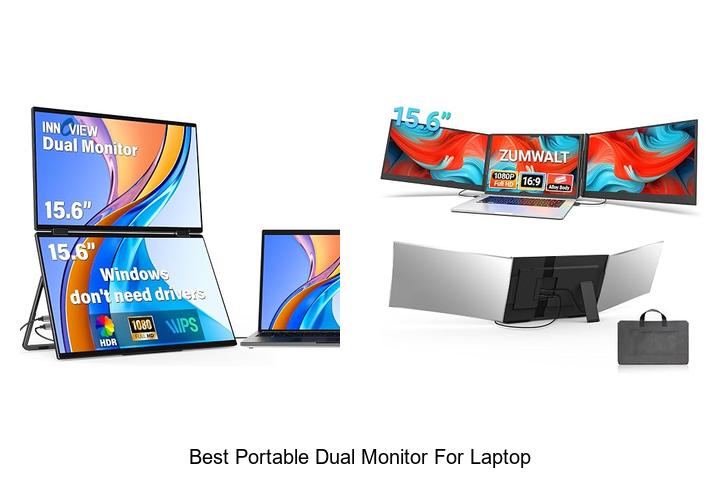
Enhancing workspace efficiency through extended display setups has become essential in today’s multitasking environments, particularly for laptop users who require mobility without sacrificing screen real estate. Portable dual monitors leverage lightweight, plug-and-play technology combined with high-resolution IPS panels to deliver seamless multi-window workflows, enabling improved productivity for professionals on the move. With advancements in USB-C connectivity and HDR support, selecting the best portable dual monitor for laptop use demands careful evaluation of factors such as refresh rates, color accuracy, and power consumption.
As the market offers a diverse range of options tailored to various specifications and user needs, understanding the nuances behind these devices can be crucial. Dive deeper to explore the key features and top contenders setting new standards in portable dual-monitor solutions.
Enhance Your Mobile Workspace with These Top Screen Solutions
| Image | Product | Price |
|---|---|---|
Our Picks 1  | InnoView Portable Dual 15.6 Foldable Monitor | Check Price On Amazon |
Our Picks 2  | 15.6 Laptop Screen Extender Portable Monitor | Check Price On Amazon |
Our Picks 3  | KYY 15.6 Portable IPS Laptop Screen Extender | Check Price On Amazon |
1. InnoView Portable Dual 15.6 Foldable Monitor
Discover enhanced productivity on the go with the InnoView Portable Dual 6 Foldable Monitor.
Featuring two crisp 6-inch 1080P IPS panels with adjustable stands and gravity sensors, the foldable design supports multiple display modes including extended, split-screen, and duplicate.
Pros
- Effortless plug-and-play functionality with USB Type-C support and no driver needed for Windows systems
- Flexible viewing with foldable dual 15.6-inch IPS screens, 0-315° rotation, and auto screen orientation
- Multiple display modes enhance multitasking: extended, split-screen, and duplicate
Cons
- Extended mode requires manual driver installation for Mac devices and is unsupported via HDMI on all systems
Combining portability with powerful multitasking capabilities, the InnoView portable dual monitor stands out as an excellent investment for users seeking enhanced screen real estate on laptops. Its competitive price and user-friendly features make it a compelling alternative to other portable dual-monitor solutions.
2. 15.6 Laptop Screen Extender Portable Monitor
Elevate your productivity on the go with the 6 Laptop Screen Extender Portable Monitor, designed to effortlessly transform any compatible laptop into a powerful triple-screen workstation. Its sleek, ultra-slim design combines portability and style, making it an ideal companion for professionals seeking expanded screen real estate without added bulk.
Its sleek, ultra-slim design combines portability and style, making it an ideal companion for professionals seeking expanded screen real estate without added bulk.
This portable dual monitor setup features two vibrant 6 Full HD IPS displays with wide 178° viewing angles and 280 nits brightness, ensuring clear and vivid visuals wherever you work. Effortlessly connect with minimal cables using USB-C, enabling a clean workspace and quick triple-screen productivity boost—up to 300% more efficient multitasking experience compared to standard setups.
Pros
- Ultra-slim aluminum shell with lightweight durability and a stylish look ensures easy portability and protection.
- Supports seamless triple-screen configuration via just two USB-C cables for compatible laptops, simplifying setup and reducing clutter.
- Wide compatibility including Mac, Windows, Chrome, and Switch systems, with additional cable options for non-USB-C or M1/M2 MacBooks.
Cons
- Requires additional cables and driver installation when used with devices lacking a full-featured USB-C port, which can complicate setup.
Offering an excellent balance of portability, visual clarity, and workspace expansion, the 6 Laptop Screen Extender Portable Monitor stands out as a top choice for professionals who demand more from their on-the-go setup.
3. KYY 15.6 Portable IPS Laptop Screen Extender
Expand your workspace effortlessly with the KYY 6 Portable IPS Laptop Screen Extender, an ideal solution for professionals seeking enhanced productivity on the go. Its dual
Its dual 6-inch FHD IPS displays provide vibrant visuals and wide viewing angles, transforming any laptop into a powerful multi-screen setup.
Designed for seamless compatibility across multiple operating systems, this screen extender features a single USB-C cable connection for quick and clutter-free setups. Its sleek, durable aluminum alloy frame and adjustable stands enable versatile positioning and easy sharing, making it perfect for traders, analysts, and creative professionals.
Pros
- Wide compatibility with Windows, macOS, Chrome OS, Android, and Linux systems via plug-and-play USB-C/Type-A connection
- High-quality 15.6″ FHD 1080P IPS screens offering accurate colors and 178° viewing angles for clear visuals
- Portable, ultra-thin aluminum design with adjustable built-in stands and 360° screen rotation for flexible multi-directional viewing
Cons
- Not compatible with gaming consoles such as PS5 and Xbox Series X
Overall, the KYY 6 Portable IPS Laptop Screen Extender offers a convenient and high-quality dual-screen experience that boosts productivity without the bulk of traditional setups.
4. InnoView Dual Portable 15.6 Foldable Monitor

Enhance your productivity effortlessly with the InnoView Dual Portable 6 Foldable Monitor, designed to expand your laptop’s workspace without hassle. Ideal for multitaskers and professionals on the move, it delivers crisp Full HD visuals through dual IPS panels in a compact, foldable design that travels as easily as your laptop.
Featuring plug-and-play compatibility with Windows systems and versatile display modes—including extension, splicing, and mirroring—this portable monitor supports efficient multitasking across various setups. Its 1080p resolution, 178-degree viewing angle, and automatic rotation ensure clear, flexible viewing, while the built-in 180° adjustable stand and matte finish reduce glare for uninterrupted focus.
Pros
- Dual 15.6-inch IPS screens offering expansive workspace with 1080p clarity
- Easy setup with no drivers required on Windows and versatile multi-mode display options
- Compact foldable design and lightweight construction for ultimate portability
Cons
- Mac users need to install drivers and use the original adapter for full functionality
Combining convenience, quality, and portability, the InnoView Dual Portable Monitor serves as an excellent choice for anyone seeking the best portable dual monitor for laptop use. Its flexible design and multiple display modes provide a competitive edge over similar devices, making it a smart investment for work, study, or travel.
5. Laptop Screen Extender 15.6 FHD Ultra-Slim Portable Monitor

Enhance your productivity on the go with the Laptop Screen Extender 6 FHD Ultra-Slim Portable Monitor. Perfectly designed for multitaskers, remote workers, and creatives, this sleek monitor adds an extra screen space with crisp Full HD visuals, all while remaining lightweight and travel-friendly.
Perfectly designed for multitaskers, remote workers, and creatives, this sleek monitor adds an extra screen space with crisp Full HD visuals, all while remaining lightweight and travel-friendly.
Featuring a 6-inch 1080P IPS display, the extender delivers vibrant colors and wide viewing angles in a slim 18-inch profile weighing only 9 lbs.
Pros
- Lightweight and ultra-slim design with a durable aluminum body, ideal for travel.
- Supports triple-screen setups with intuitive InnovRay software for enhanced multitasking.
- Wide device compatibility including macOS, Windows, gaming consoles, and USB-C smartphones.
Cons
- Requires an additional H5 cable for certain Mac models to enable dual video output.
For professionals and gamers alike looking for the best portable dual monitor for laptop use, this extender delivers exceptional clarity and versatile connectivity. Its robust feature set and portable design make it a standout choice compared to bulkier alternatives.
6. KEFEYA 14 FHD IPS Portable Laptop Screen Extender
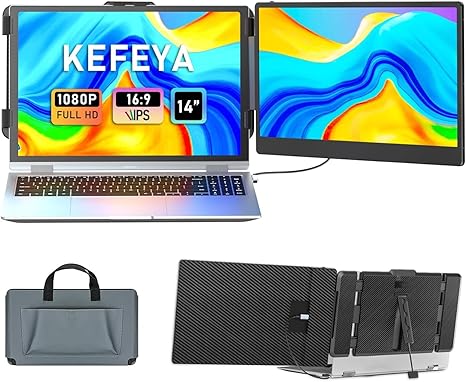
Enhance productivity and multitask effortlessly with the KEFEYA 14 FHD IPS Portable Laptop Screen Extender. Designed for professionals and gamers alike, this sleek dual monitor expands your workspace on the go, offering stunning visuals and seamless connectivity without the hassle of extra drivers.
Equipped with a vibrant 1080p IPS display, the 14-inch monitor delivers crisp images with 72% NTSC color gamut and 300 nits brightness. Its plug-and-play setup with versatile connectivity options including USB-C and HDMI supports multiple display modes and a 180° rotation, making collaboration and viewing more flexible than ever.
Pros
- Boosts efficiency by up to 200% by enabling multiple windows simultaneously for work or entertainment.
- High-quality 1080p IPS panel with wide viewing angles and eye-friendly settings for vivid color reproduction.
- Supports wide device compatibility including Windows, Mac, Linux, Android, and gaming consoles with easy plug-and-play connectivity.
Cons
- Requires an additional USB-A to USB-C cable for power supply when using HDMI connection.
With its portability, excellent display technology, and user-friendly design, the KEFEYA 14 Portable Monitor is a standout choice among portable dual monitors for laptops, offering superior convenience and versatility at an attractive price point.
7. KYY Portable 15.6 Monitor

Experience stunning visuals on the go with the KYY Portable 6 Monitor, designed to bring high-definition clarity and versatile connectivity to your laptop setup.
Perfect for professionals, gamers, and multitaskers seeking the best portable dual monitor for laptop use, it transforms any workspace into a productivity powerhouse.
Equipped with a 6-inch Full HD IPS display featuring a 178° wide viewing angle and HDR technology, this ultra-slim monitor delivers crisp and vibrant images. Its multiple connectivity options—including two Full Function Type-C ports and a Mini-HDMI—make it compatible with a wide range of devices, while the lightweight design and durable smart cover ensure easy portability and protection.
Its multiple connectivity options—including two Full Function Type-C ports and a Mini-HDMI—make it compatible with a wide range of devices, while the lightweight design and durable smart cover ensure easy portability and protection.
Pros
- High-resolution 1920×1080 IPS display with HDR and wide 178° viewing angle for vibrant visuals
- Dual Full Function Type-C ports and Mini-HDMI provide broad device compatibility and single-cable connectivity
- Ultra-slim, lightweight design (0.3 inch thickness, 1.7 lb) with scratch-proof smart cover for portability and protection
Cons
- Refresh rate limited to 60 Hz may not satisfy competitive gamers needing higher frame rates
The KYY Portable 6 Monitor offers an exceptional balance of portability, clarity, and connectivity, making it an ideal secondary display for work or entertainment.
When compared to similar portable monitors, it stands out due to its robust device compatibility and durable smart cover — a reliable choice for anyone seeking to enhance their laptop’s screen real estate on the move.
8. 15.6 Laptop Screen Extender Portable Monitor

Enhance your laptop’s functionality with the 6 Laptop Screen Extender Portable Monitor, designed to boost productivity and provide flexible viewing options wherever you go. Perfect for professionals and creatives, it transforms your workspace with vivid visuals and a lightweight, detachable design.
Perfect for professionals and creatives, it transforms your workspace with vivid visuals and a lightweight, detachable design.
Offering over 11 configurations, this dual monitor for laptops supports triple-screen, dual-screen, or standalone use. Featuring a
6 Full HD IPS display with 120% sRGB and HDR, it delivers clear, vibrant images. Its plug-and-play setup and broad compatibility make it ideal for diverse devices and work environments.
Pros
- Detachable screens allow for triple, dual, or single monitor setups tailored to your needs.
- Lightweight at 1.5 lbs per screen with a slim profile, perfect for travel and remote work.
- High-quality 15.6″ FHD IPS display with HDR support and wide color gamut for sharp visuals.
Cons
- Requires multiple ports and cables (USB-C and HDMI) for full functionality on some laptops.
Combining portability, vivid imagery, and flexible configurations, the 6 Laptop Screen Extender Portable Monitor stands out as an excellent choice among the best portable dual monitors for laptops, offering an efficient, customizable multi-screen experience for work and play.
9. VisionOwl 15.6 Inch Portable Dual Monitor

Upgrade your mobile workstation with the VisionOwl 6 Inch Portable Dual Monitor, engineered to elevate productivity and streamline multitasking. Its sleek, stackable design and vivid displays make it an essential companion for professionals seeking the best portable dual monitor for laptop setups on the go.
Its sleek, stackable design and vivid displays make it an essential companion for professionals seeking the best portable dual monitor for laptop setups on the go.
Featuring two crisp 6 1080P IPS matte screens with 107% sRGB color gamut, this dual monitor ensures vibrant visuals and wide viewing angles. Quick plug-and-play compatibility with Windows and macOS, along with a comprehensive accessory kit, enables effortless setup for laptops, desktops, and mini PCs alike.
Pros
- Effortless dual-screen installation with Microsoft-certified DisplayLink drivers for seamless Windows and macOS integration
- Wide connectivity options including USB-C DisplayPort, Mini-HDMI inputs, plus all essential cables and power adapters included
- Robust full-metal construction with a lightweight 3.5 lb frame; folds 360° with adjustable kickstand and VESA mount support for flexible viewing
Cons
- The vertically stacked screen layout may require adjustment for users preferring a side-by-side dual display
The VisionOwl portable dual monitor balances premium build quality, vivid display performance, and user-friendly setup, making it an outstanding choice for professionals who demand versatility and portability without compromise. Compared to typical portable monitors, it offers superior color accuracy and multiple connectivity options, ensuring an efficient multi-display experience anywhere.
10. MNN 15.6 FHD Portable Monitor USB-C HDMI

Enhance productivity and entertainment with the MNN 6 FHD Portable Monitor. Combining vibrant Full HD visuals and ultra-slim portability, this monitor is an ideal companion for professionals, gamers, and travelers seeking an expanded screen experience on the go.
Combining vibrant Full HD visuals and ultra-slim portability, this monitor is an ideal companion for professionals, gamers, and travelers seeking an expanded screen experience on the go.
Featuring a 6-inch IPS screen with 1920×1080 resolution and a wide 178° viewing angle, the MNN monitor delivers accurate, bright colors with eye-care technology to reduce blue light and flicker.
Dual Type-C ports offer seamless plug-and-play connectivity, supporting multiple devices including laptops, gaming consoles, and smartphones.
Pros
- Sharp Full HD display with HDR support for vibrant visuals and enhanced image quality.
- Lightweight, ultra-slim design perfect for travel and portability.
- Dual USB-C ports enable easy connection and power delivery with a single cable.
Cons
- Requires device compatibility with Thunderbolt 3.0 or USB 3.1 Type-C DP ALT-MODE for optimal use.
Offering versatile connectivity, eye-friendly display features, and a durable smart cover stand, the MNN 6 FHD Portable Monitor stands out as a top choice among portable dual monitors for laptops, providing a balanced blend of performance and convenience for enhanced productivity and immersive gameplay.
Ultimate Guide to Choosing the Best Portable Dual Monitor for Your Laptop
Display Quality and Size
Screen resolution and clarity. Panel type (IPS, OLED, etc.). Screen size and aspect ratio.Ensuring your device offers a variety of input options and the ability to connect multiple peripherals can greatly enhance its versatility. Different laptops and gadgets may require specific ports such as USB-C, HDMI, or DisplayPort, and having multiple options allows seamless integration without the need for additional adapters.
Portability and Design
Weight and thickness. Build materials and durability. Ease of setup and foldability.Devices that offer multiple screen options often vary significantly in how easily they connect to your laptop and how many additional ports they provide for accessories. Having multiple input methods such as USB-C, HDMI, or DisplayPort ensures compatibility with different laptops and external devices without needing extra adapters. Additionally, the availability of extra USB ports or SD card slots can transform a simple monitor into a versatile hub, reducing the need for a separate docking station and enhancing productivity on the go.
Assessing these factors can prevent frustration caused by incompatible cables or insufficient ports, allowing you to make the most out of the device’s functionality. A setup that supports plug-and-play with minimal cables not only saves time but also maintains a clean and organized workspace, which is essential for mobility and efficiency. Furthermore, devices that extend your laptop’s connectivity options provide a seamless experience when connecting peripherals such as keyboards, mice, or external storage, adding convenience whether you’re working remotely or traveling.
Furthermore, devices that extend your laptop’s connectivity options provide a seamless experience when connecting peripherals such as keyboards, mice, or external storage, adding convenience whether you’re working remotely or traveling.
Compatibility and Connectivity
Supported laptop operating systems. Available ports (USBC, HDMI, DisplayPort). Plugandplay vs driver requirements.Ensuring that a dual-screen setup works seamlessly with your laptop begins with verifying the laptop’s supported operating systems, as compatibility can vary significantly between Windows, macOS, and Linux. It’s also crucial to identify the types of ports available on both the laptop and the monitor, such as USB-C, HDMI, or DisplayPort, since these dictate how easily devices can be connected without extra adapters.
Understanding these factors helps guarantee a hassle-free setup and reliable operation right out of the box.
Power Requirements and Battery Life
Power source options (USBpowered vs external adapter). Battery capacity and longevity. Charging while in use.Having versatile power source options can greatly influence how convenient and flexible a portable dual monitor is during daily use. Many models are USB-powered, which means they draw energy directly from your laptop or device, reducing the need for extra cables and adapters.
Battery capacity and longevity play crucial roles in ensuring uninterrupted productivity, especially when working remotely or on the go. Monitors with larger battery reserves can last several hours without needing a recharge, providing more freedom away from power sources. On the other hand, smaller batteries may mean shorter usage times and more frequent charging breaks.
On the other hand, smaller batteries may mean shorter usage times and more frequent charging breaks.
Another important aspect is the ability to charge while in use. Monitors that support pass-through charging or can operate while plugged in prevent downtime and allow continuous use during extended work sessions. This feature can be a game-changer for users who rely on their setup throughout the day without access to multiple power outlets.
Performance Features
Refresh rate and response time. Blue light filter and eye care technologies. Adjustable brightness and color calibration.Ensuring smooth visuals and minimal lag is key, so paying attention to the refresh rate and response time can greatly impact the overall experience. A higher refresh rate delivers fluid motion, which is especially important for tasks involving fast-moving content or gaming, while a low response time reduces ghosting and blurring.
Adjustable brightness settings allow for comfortable viewing in different lighting conditions, and precise color calibration ensures that colors appear accurate and consistent, which is crucial for creative professionals and anyone relying on true-to-life visuals.
Price and Warranty
Price range and value for money. Warranty period and customer support. Return policy and trial period options.Understanding the range of available connection options and the ability to add extra devices is crucial for maximizing productivity and ensuring compatibility with your existing setup. Monitors that offer versatile ports such as USB-C, HDMI, or DisplayPort provide greater flexibility in linking to different laptops or peripherals without needing additional adapters. Additionally, having multiple input options allows for seamless switching between devices, which can be a major time-saver during multitasking sessions.
Equally important is the potential to expand your workspace with extra features like USB hubs or additional power delivery ports. This not only reduces cable clutter but also enables charging other devices, making the monitor a more integral part of your mobile workstation.
Monitors that support daisy-chaining or offer multiple connection points can effortlessly integrate with other screens or accessories, catering to evolving work demands.
FAQ’s
What Are The Top Features To Look For In The Best Portable Dual Monitor For A Laptop?The best portable dual monitor for a laptop should offer lightweight and slim design for easy portability, high resolution with vibrant display quality, and multiple connectivity options like USB-C or HDMI for seamless compatibility. Additionally, features such as adjustable stands, eye-care technology, and reliable power efficiency are essential for comfortable and efficient use on the go.
Which Brands Offer The Most Reliable Portable Dual Monitors For Laptops?Brands like ASUS, Lenovo, and Dell are known for offering some of the most reliable portable dual monitors for laptops, combining good display quality with portability. Additionally, portable monitors from brands like HP and Asus ZenScreen series are also highly regarded for their reliability and performance.
How Does A Portable Dual Monitor Improve Productivity For Laptop Users?A portable dual monitor enhances productivity for laptop users by providing additional screen space, allowing for better multitasking and easier comparison of documents. This setup reduces the need to constantly switch between tabs or windows, streamlining workflow and saving time.
What Is The Average Price Range For High-Quality Portable Dual Monitors Compatible With Laptops?The average price range for high-quality portable dual monitors compatible with laptops typically falls between $250 and $500. Prices vary based on features like screen size, resolution, and connectivity options.
Are There Any Compatibility Issues To Consider When Choosing A Portable Dual Monitor For A Specific Laptop Model?Yes, compatibility issues can arise when choosing a portable dual monitor, such as ensuring the laptop supports the required video output ports (e.g., USB-C, HDMI) and that the graphics card can handle multiple displays. Additionally, it’s important to check the monitor’s driver requirements and any operating system limitations.
Conclusion
When choosing the best portable dual monitor for your laptop, prioritize lightweight design, easy connectivity, and vibrant display quality. Look for models with USB-C compatibility, adjustable stands, and full HD resolution to enhance productivity on the go.
Top picks combine portability with performance, making them ideal for professionals who need efficient multitasking anywhere.

- Top Best Computer Speakers Under 100 You Can’t Miss! - November 10, 2026
- Best Inexpensive Computer Speakers You Can’t Miss! - November 10, 2026
- Top 7 Best Desktop Computer Speakers for Epic Sound! - November 10, 2026
